


Hey, Paweł here.
Our guest today is Rohan Varma, the first Product Manager at Cursor (acquired by SpaceX this year for $60 billion). Until recently, Product Lead, Codex at OpenAI.
Rohan and I both teach in Product Faculty’s AI Builder Fellowship (see our Black Friday offer).
Cursor went from $100M ARR to over $1 billion in under a year with just one product manager.
I joined Cursor as an engineer and then shifted into being their first product manager. And the funny part? It was my first-ever product management role.
Then I joined OpenAI to work on Codex. As adoption took off, we had just two product managers.
Again, I was one of them.
So I’ve been a product manager at two pretty interesting companies building in AI and I’ve seen firsthand how different this job has become.
The bad news: you can’t follow the exact career path of an AI PM who joined OpenAI years ago. The industry has changed.
The good news: that doesn’t matter. Today I’m breaking down the exact strategy you can use to land an AI PM role in 2027, even with no prior AI PM experience.
AI product management is one of the most in-demand and highest-paying roles in tech.
Businesses are moving from experimenting with AI to scaling production agentic systems, and this is just getting started.
In this post:
The 8-Skill AI Product Manager Stack
Three AI PM Portfolio Projects That Prove You’re Ready
How to Land AI PM Interviews: Roles, Resume, and Outreach
How to Ace AI PM Interviews: Three Practice Questions
Your 90-Day Plan to Become an AI PM
Let’s dive in.
1. The 8-Skill AI Product Manager Stack
There’s a lot of confusion about this role, and a lack of relevant resources. It shows up in aspiring AI PMs who are:
Confusing AI PMs with PMs who use AI.
Learning AI product management through random courses that teach outdated PM practices.
Trying to reverse-engineer the career trajectories of AI PMs at frontier labs. This is the worst of the three.
The in-demand AI PM role is different from traditional product management. Making any of these mistakes will only put you further behind.
And the opening is real: very few of the senior product managers I talk to have hands-on experience shipping a working AI agent or model-based product.
It gets better. You don’t need:
An engineering background.
To train a foundation model.
All you need is to understand how AI products work, where they fail, and how to make decisions about quality, cost, and reliability.
But it’s easier said than done, especially when nearly all the AI PMs I know came from traditional PM backgrounds.
Let’s address one of the top misconceptions among AI PM aspirants:
Yes, your job as an AI PM requires you to build, ship, and evaluate AI products. But all of this only matters when:
You build an AI product that should be built.
You don’t build an AI product to solve a problem that could easily be solved manually.
Problems come first. AI solutions later.
This is product decision-making in a nutshell, and this is what AI PMs get hired for.
You’re not paid to use AI. You’re paid to solve a problem that can be effectively and efficiently solved with an AI product that offers a strategic business advantage.
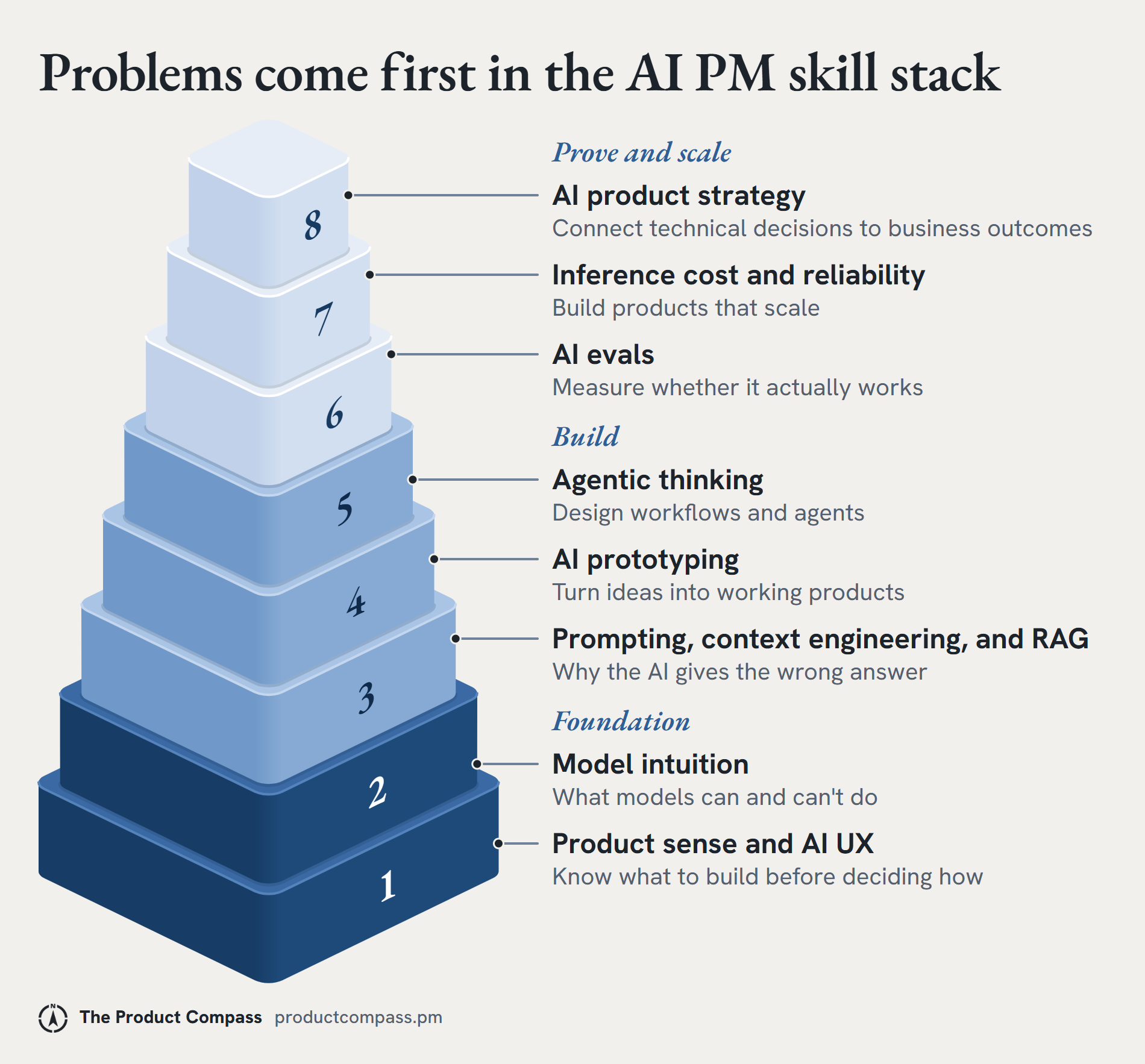
To understand all 8 skills in depth, we first need a problem that we’ll solve using each skill. This will also show you why each skill is a non-negotiable part of an AI PM’s toolkit.
The problem: A customer support team spends hours answering questions using company documentation.
The goal: An AI product that helps the team respond faster.
1.1 Product sense and AI UX
One morning at OpenAI I showed up to work, and one of the engineers on the Codex team said, “Look, I built the browser in this. What do you think?” He’d built it because frontend iteration was really annoying.
I said, “That’s awesome. We should definitely figure out how to ship this.”
His build became our starting point: an actual branch in the product that we could develop off of. We could build things almost instantly, so a lot of our time went into looking at solutions and deciding whether we actually wanted to ship them.
It’s literally not a question of what is possible. Everything is possible. It’s just: what should we do? Having something working just lets that conversation happen with evidence on the screen.
One of the biggest mistakes aspiring AI product managers make is skipping that question and jumping straight into solutions.
They hear about a customer problem and immediately start thinking about which AI model, agent, or framework to use.
But great AI PMs start with a different question:
What problem are we actually trying to solve, and what would success look like?
This requires two critical skills:
Product Sense: Understanding your users, identifying their real problems, and deciding what is worth building.
AI UX (User Experience): Designing how people interact with AI, verify its outputs, handle mistakes, and stay in control.
Let’s look at an example.
The problem: Your customer support agents spend four hours every day answering questions about refunds, shipping, and product policies.
An inexperienced AI PM might immediately propose an AI chatbot to automate customer responses.
A strong AI PM would first talk to support agents and discover that their biggest bottleneck isn’t writing responses. It’s finding the correct policies scattered across internal documents.
That insight changes the solution.
Instead of a fully autonomous chatbot, you build an AI support copilot that:
Finds the relevant policy in company documentation.
Drafts a response with citations.
Lets agents verify, edit, and approve the answer before sending it.
But building the product isn’t enough. You also need to define what success looks like.
Here are four measurable targets you might set:
Time spent answering policy questions: 4 hours/day → 2 hours/day
Average resolution time: 8 minutes → 4 minutes
Responses with material policy errors: 5% → Below 1%
Responses sent without substantial edits: To be measured → 80%
Illustrative targets; actual baselines and targets should be validated with the support team.
Your goal: Reduce the time agents spend answering policy questions by 50% without compromising accuracy.
📌 Don’t start with what AI can build. Start with the customer problem, design the right experience, and define measurable success. Only then should you decide which AI model can deliver it.
1.2 Model intuition
Model intuition is your understanding of where a model works well and where it tends to fail.
One habit that helps me build it: I keep my own Codex setup pretty light on custom skills (the reusable instruction files Codex can load). We built a ton of interesting plugins internally at OpenAI, but I find it really useful to see where Codex falls over when it doesn’t have anything specific.
Test your models and watch how they behave on five things:
Tokens: The units the model processes: words, parts of words, and punctuation. Token usage drives cost and how much information the model can handle.
Context window: How much information the model can process in one request: the user’s query, instructions, retrieved documents, and sometimes the conversation history. A large context window helps with information-heavy tasks, but it doesn’t mean the model will use all of that information correctly.
Tool calling: The model’s ability to call external actions or sources, such as searching a knowledge base or looking up an order. The application runs the tool and returns the result to the model.
Latency: How long the system takes to respond. A more accurate model can take longer to answer.
Inference cost: What it costs to run the model. It varies with the model, the number of tokens processed, and how many times the model is called.
More terms: the AI Product Manager Glossary.
For our support copilot, say you have three models to test with 50 customer questions:
Model 1 is quick and cheap to run, but it frequently misses key information.
Model 2 is more accurate, but slower and more expensive.
Model 3 is good at simple questions, but struggles when it has to combine information across multiple documents.
Now you have to decide:
Do you use the most accurate model for every question?
Do you use the cheaper model for simple questions?
Is the extra quality worth the cost and response time?
This is a product trade-off!
For your three-model comparison, keep the actual failures alongside the scores. Was a policy exception missed? Did the model combine two documents incorrectly? Did it use a tool when it should have asked a clarifying question? Those examples will tell you more about which model fits the task than a single overall accuracy number.
You can’t make that decision well without understanding prompting, context, and retrieval.
1.3 Prompting, context engineering, and RAG
A great AI product manager understands where an AI answer comes from, why it might be wrong, and how to fix it.
Three skills matter here:
Prompting: Giving the model clear instructions about what to do, how to respond, and what constraints to follow.
Context engineering: Ensuring the model has the right information, instructions, and tools available when completing a task.
Retrieval-Augmented Generation (RAG): Retrieving relevant information from external sources, such as company documents, and providing it to the model as context.
Let’s return to our support copilot.
A customer asks: “Can I return a product after 30 days?”
Your copilot searches the company’s documentation, retrieves the return policy, and generates an answer.
But there’s a problem.
The company allows returns within 30 days, yet the copilot confidently tells the customer they have 60 days.
An inexperienced AI PM might simply tell the engineering team to improve the prompt.
A strong AI PM investigates where the system failed.
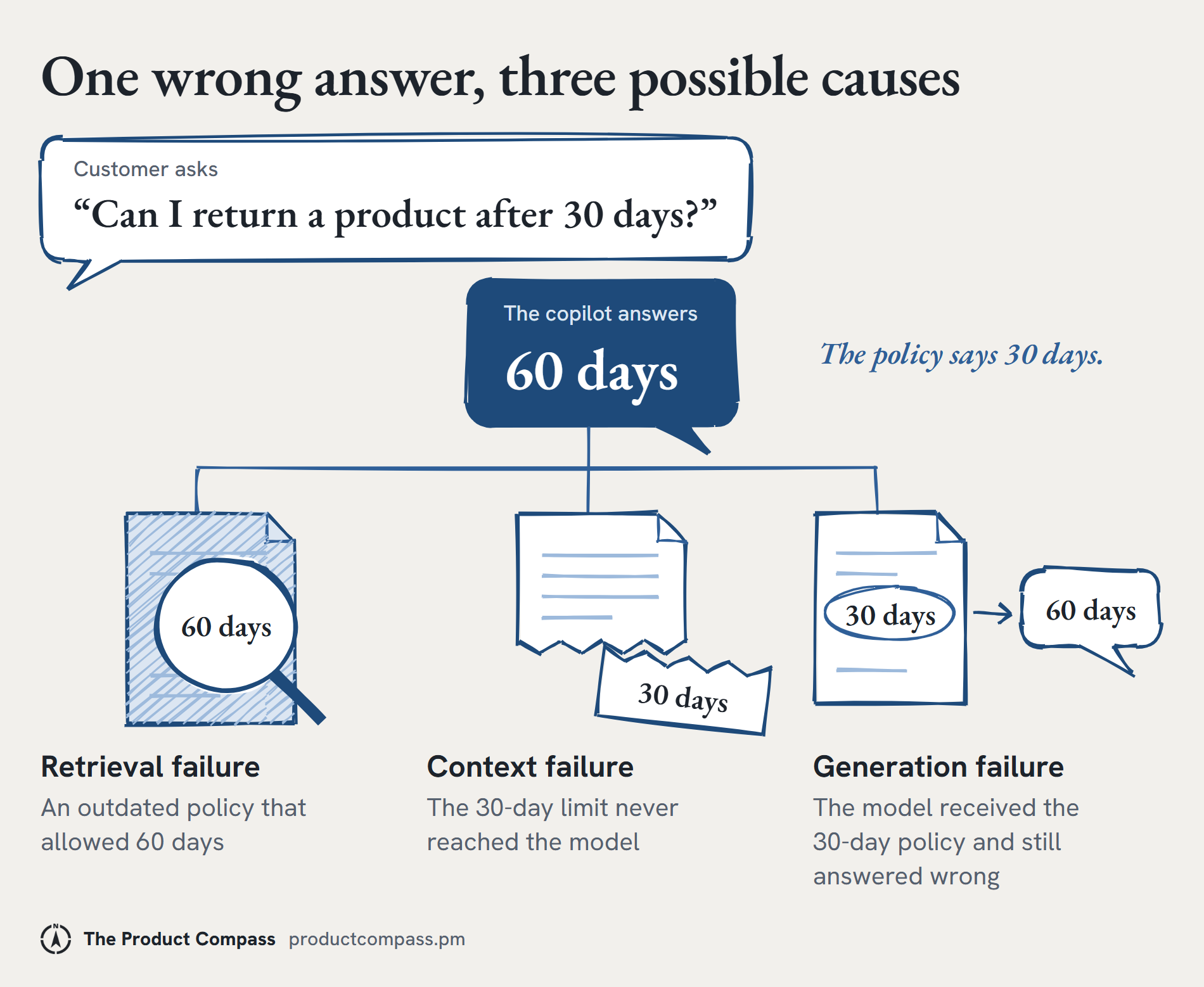
There are three possibilities:
Retrieval failure: Did the system find the wrong information? Perhaps it retrieved an outdated policy that allowed returns within 60 days. The fix might involve improving document indexing, retrieval ranking, or filtering outdated policies.
Context failure: Did the correct information reach the model? Perhaps the system retrieved the right document but excluded the paragraph specifying the 30-day limit. The fix might involve changing how documents are divided into chunks or how retrieved information is assembled into the model’s context.
Generation failure: Did the model misinterpret the correct information? Perhaps the model received the correct 30-day policy but still generated an incorrect answer. Now you might investigate the prompt, conflicting instructions, or the model’s ability to follow the policy.
The same incorrect answer can have three completely different root causes. And each requires a different solution.
That’s why learning RAG means understanding the entire information flow well enough to diagnose failures systematically.
When Codex doesn’t do something correctly, it’s easy to just say, “Great, I’ll do it myself.” I try to ask what was missing instead. Probably I had some context or information that Codex didn’t have.
Sometimes the missing piece is a document. Sometimes it’s access to a tool. Sometimes it’s a constraint I never explained because it felt obvious to me.
Then the job is figuring out how to give it that context, so it has it moving forward.
At OpenAI, I’d get added last minute to an entirely new project, and in 20 minutes I’d have all the context of what happened before I joined, because Codex could go into our tools: Slack, docs, Linear, email, and Drive.
The useful result links back to the evidence, preserves disagreements, and leaves unanswered questions visible. A confident summary that smooths over a conflict can create another problem.
For your copilot, keep a trace of the question, retrieved passages, context sent to the model, tool results, and final answer. Then you can follow the failure back to the point where information was lost or misused.
1.4 AI prototyping
In 2027, you don’t need to be an expert programmer to build AI product prototypes.
With AI coding tools like OpenAI Codex, Claude Code, Replit, and Cursor, you can turn an idea into a working prototype without writing every line of code yourself.
But you should understand what you’re building, how it works, and why you made certain product decisions.
Image generation really changed the way I work. Prototyping design ideas with AI often meant writing code, but I think image generation is much faster.
I took a screenshot of the Codex composer, where you select the project, and asked for four or five ideas to improve project selection. From just the screenshot, it did a pretty good job of staying within the design language.
That was kind of an AGI moment for me. We always think of image generation as something for, I don’t know, turning your hair blue. But the mocks are good enough that iterating is much quicker than generating five dummy React sites. Then I’d say, “Cool, now take the first one and make a prototype of it.”
The artifact should fit the question. An image can help you compare layouts. To learn whether someone can verify an AI-generated answer, you need a flow they can actually use.
Using an AI coding agent, you could build a simple prototype with three features:
A support agent enters a customer’s question.
The AI searches company documentation and drafts a response.
The agent reviews the answer and its sources before sending it.
That’s enough to put your idea in front of real users and learn whether it solves their problem.
You don’t need a polished interface or dozens of features. Start with the smallest version that demonstrates value.
But being able to build a prototype isn’t the same as understanding it.
You should be able to explain:
Which AI model you’re using and why.
How the system retrieves information.
What happens when the AI gives an incorrect answer.
What you would improve based on user feedback.
These are exactly the kinds of decisions you’ll need to defend in an AI PM interview.
The prototype also doesn’t have to become permanent software. Often it’s a disposable one-off. I’ll ask Codex, “Look at all my Slack messages, figure out the most important ones to respond to, and show them to me in a local website.” If it’s something I’d use repeatedly, I set up an automation to update it every hour or so.
That’s a useful way to approach your first project too: build enough to learn whether the workflow deserves more investment.
1.5 Agentic thinking: design agentic workflows and know when to build an AI agent
The general optimization function for me is: every time I do anything, I basically think, could Codex have done this?
In 2027, great AI PMs will know how to delegate work to agents, design workflows around them, and build systems that get things done with minimal human intervention.
Think of it as becoming an agent maximalist: constantly looking for opportunities to automate work, while knowing when human judgment is necessary.
At OpenAI we used Slack very heavily, with a ton of channels where customers and our own team sent feedback. One thing I used Codex for was synthesizing that feedback, highlighting the important things, and uploading it into a Linear board I could review later.
I did it once in a Codex thread first, and spent a lot of time asking it how to put things into Linear correctly. Then I just asked Codex to set up an automation to run it every day and send me a Slack message every time it finished. I had five or six automations like that, each one a manual process I’d done once first.
The sequence matters. I get to inspect the workflow before making it recurring.
Back to the support copilot: instead of just answering questions, imagine it can now:
Read an incoming support ticket.
Identify and classify the customer’s issue.
Retrieve the customer’s order details.
Find the relevant company policy.
Draft a response and update the ticket.
You could design an agentic workflow that handles all five steps.
Should the agent also issue a $500 refund automatically?
Not necessarily.
You need to think about permissions, spending limits, human approvals, and what happens when the agent makes a mistake.
Here’s how a human handoff could work:
A customer requests a $500 refund. Your agent checks the order, retrieves the refund policy, and determines that the request needs manager approval.
Instead of processing the refund, it:
Pauses the refund action.
Creates an approval request showing the order details, relevant policy, and reason for the recommendation.
Notifies a support manager to approve or reject it.
Processes the refund only after approval, then records the decision and updates the ticket.
If the manager rejects the request, the agent doesn’t issue the refund.
The agent does the research and preparation. The human makes the consequential decision.
And there’s another important question: Do you even need an autonomous agent?
If the steps are predictable, a simple workflow with a few AI model calls might be faster, cheaper, and more reliable.
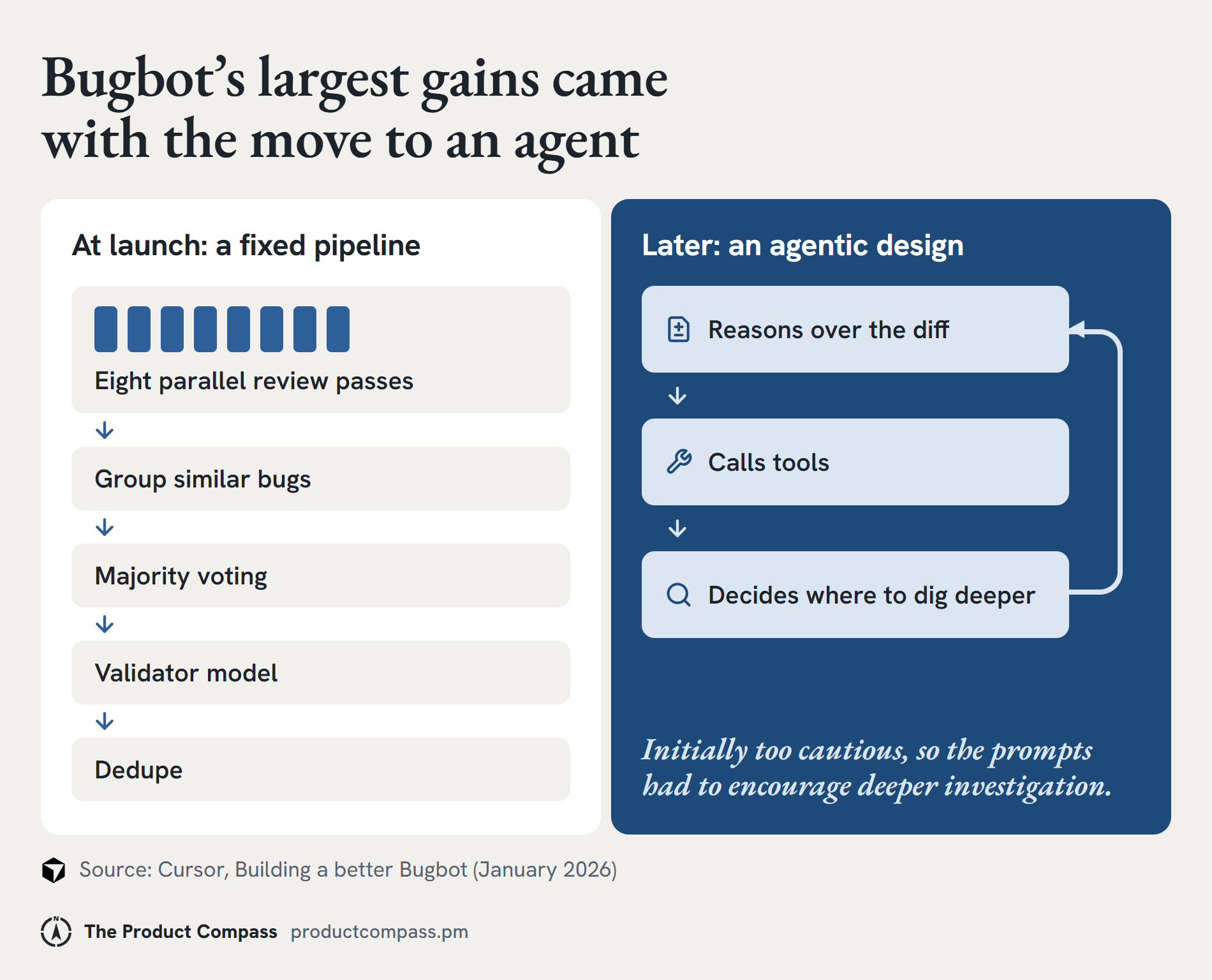
Bugbot, Cursor’s AI code reviewer, is a real example of how that choice changes over time. At launch, it ran eight parallel review passes, then voting, validation, and deduplication.
Later, the team moved to an agentic design that let the model use tools and decide where to investigate. That’s where it saw its largest gains. The new agent was initially too cautious, so the prompts had to encourage deeper investigation.
The architecture should follow what the task and the model can reliably support. Revisit that decision as the evidence changes.
The goal is to identify where autonomy creates genuine value and where it introduces unnecessary complexity.
📌 Become someone who instinctively thinks about what AI agents can do for you. But develop the judgment to decide what they should do, what they shouldn’t, and when humans must remain in control.
1.6 AI evals
A big difference between building an AI demo and shipping a reliable AI product is knowing how to evaluate its performance.
A demo might work perfectly five times in a row. But what happens when 1,000 real customers start using it?
That’s where AI evaluations (evals) come in.
Evals help you systematically measure how well your AI product performs specific tasks, identify where it fails, and determine whether your changes actually improve performance.
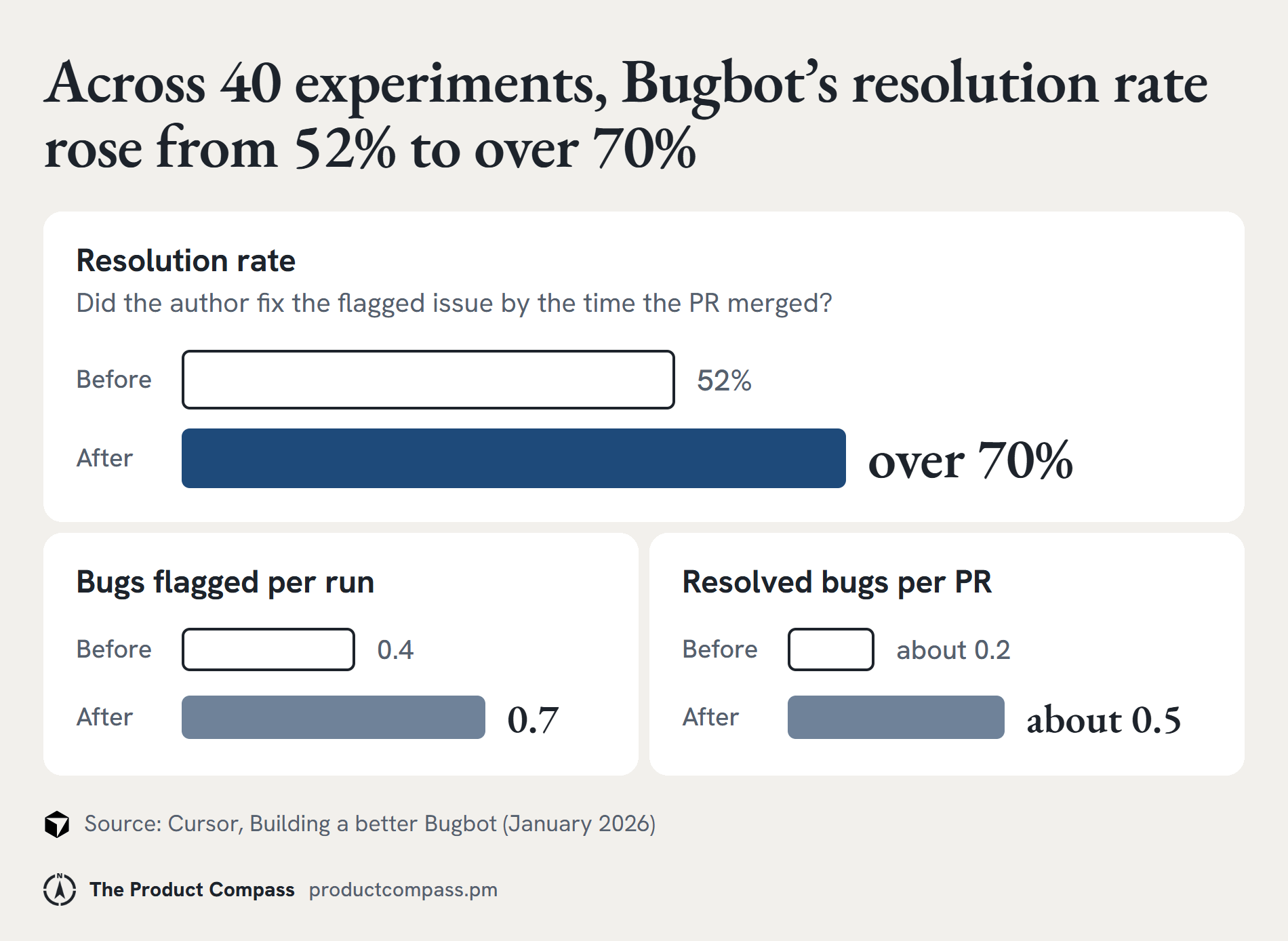
For Bugbot, the team tracked resolution rate: whether the author had fixed a flagged issue by the time the PR merged. An AI made that call, spot-checked with the PR authors. Across 40 major experiments, the rate rose from 52% to over 70%, while bugs flagged per run increased from 0.4 to 0.7. Many of the attempted changes made the metrics worse.
That connects the evaluation to useful work: did the reported issue lead to a fix? For the support copilot, you need to establish the equivalent connection between answer quality and a correctly resolved customer problem.
You create an evaluation dataset containing 40 test cases:
Questions the company documentation can answer correctly.
Questions where the correct answer isn’t available.
Questions involving outdated or conflicting policies.
High-risk requests that should be escalated to a human.
For each case, you define what successful behavior looks like.
You run your first evaluation and get these results:
32 out of 40 tests passed: an 80% pass rate.
That’s your baseline.
You investigate the eight failures, identify problems with how the model follows the refund policy, and improve your prompt.
Then you run the same 40 tests again.
36 out of 40 tests passed: a 90% pass rate.
You’ve improved performance by 10 percentage points on your evaluation set.
What if the four remaining failures all involve incorrectly approving refunds? Or what if the new prompt fixed six cases but broke two that previously worked?
A higher overall score doesn’t automatically mean your product is ready to ship.
You need to examine performance across different scenarios, investigate regressions, and test on fresh examples the model hasn’t been optimized against.
Start by reading actual outputs and grouping the failures you find. That gives you grounded categories to evaluate, rather than choosing metrics before you understand the errors.
Codex skills and plugins add a lot to the prompt, so I do think about how to eval the output when I change mine, especially as agents run more autonomously. Right now, I just test it: cool, looks good, keep going. That standard needs to rise when other people depend on the output.
For the copilot, an automated check can verify that approval existed before a refund. Applying a complicated policy exception may need expert review. If you use a model as a grader, check its judgments against the people who understand the task.
📌 Forty cases are a useful starting point, not proof that every production risk is covered.
1.7 Inference cost and reliability
An AI product that works for 10 users might become too expensive, too slow, or too unreliable for 10,000.
That’s why great AI PMs ask whether their product can work reliably and economically at scale.
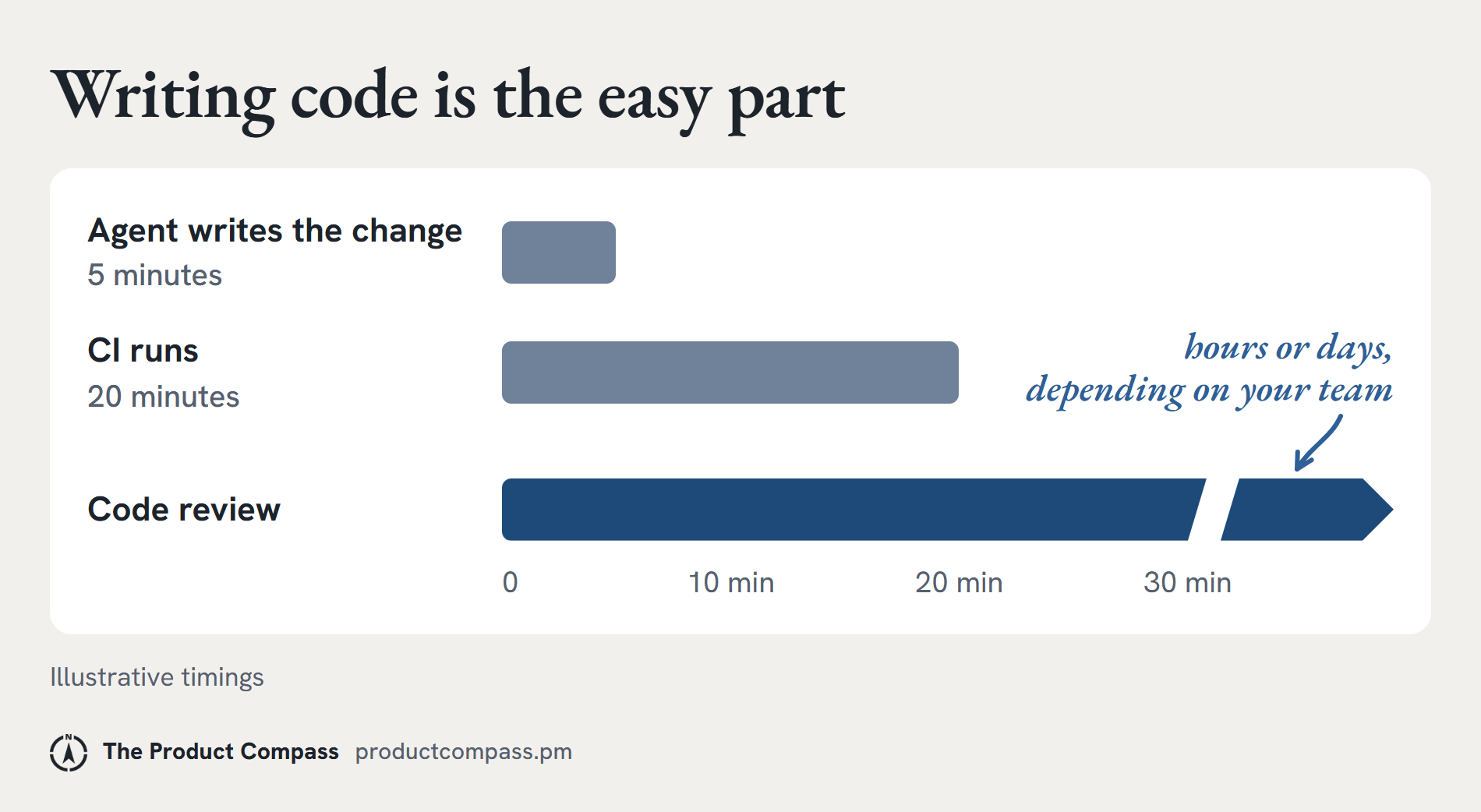
Writing code is the easy part. Say Codex writes something in five minutes. What happens next? CI (the automated build and test run) might take 20 minutes, and code review might take hours or days, depending on your team. Everything around the code is now the bottleneck.
On Codex, we also built a way to ask it to nurse a PR: wait for CI, fix it, respond to human feedback, and ping me on Slack once I can merge. That used to be ten different interaction points. Now it’s just the very end: “Okay, cool, it’s good to go.”
With your copilot, measure the whole task too. A fast answer can still leave the support agent spending minutes checking sources or repairing a draft.
Your prototype performs well in testing. But when the company rolls it out to 80 support agents, three problems emerge:
Costs are rising: Every customer question triggers multiple model calls, even when the answer is simple.
Responses are slow: Agents sometimes wait 15 seconds for an answer, disrupting their workflow.
Tools occasionally fail: When document retrieval breaks, the copilot can’t complete the task.
As an AI PM, your job is to investigate the trade-offs and make decisions. Four questions:
Cost: are we spending more than the value we’re creating?
Suppose each response costs $0.10 to generate, and your team processes 50,000 questions per month. That’s $5,000 in monthly inference costs.
Could you reduce that to an average of $0.03 per response by using a smaller model for straightforward questions while keeping a more capable model for complex cases?
That would reduce monthly inference spending from $5,000 to $1,500, assuming the same volume.
Latency: how fast does the product need to be?
If agents wait 15 seconds for every response, the copilot might actually slow them down.
You could reduce unnecessary model calls, improve retrieval speed, or use faster models for simpler tasks.
But remember: a faster answer isn’t better if it sacrifices accuracy.
Reliability: what happens when something breaks?
Suppose the document search tool fails. Should the copilot invent an answer? Absolutely not.
Instead, it should notify the agent that the source couldn’t be retrieved and offer a retry or manual lookup.
A reliable product needs to handle failures safely, not just perform well when everything works.
Put a limit on retries, and protect actions that change state from running twice. Measure cost per successful resolution, including failed attempts and human review, alongside the cost per model response. Otherwise, apparent inference savings can disappear elsewhere in the workflow.
Scalability: can the system handle growing demand?
A system that performs well with 10 concurrent users may struggle with 500.
You need to understand usage patterns, capacity limits, and how performance changes as demand increases.
1.8 AI product strategy
A great AI PM knows how to explain why the business should invest in an AI product.
You might have built an accurate, reliable, and cost-effective AI system. But that doesn’t automatically make it a good business investment.
The real question: does the value your product creates justify the money, time, and resources required to build and maintain it?
Imagine your team handles 50,000 customer questions every month.
Before introducing the copilot, agents spend an average of eight minutes answering each question. With the copilot, that drops to four minutes.
Here’s what the business case could look like:
Time saved: 50,000 questions × 4 minutes = approximately 3,333 agent-hours saved per month.
AI operating costs: At an average of $0.03 per response, monthly inference costs are $1,500.
Quality: Your evaluation results show that the copilot handles routine questions accurately, but complex refund cases still require human review.
Additional costs: Engineering, infrastructure, monitoring, and ongoing maintenance.
These figures are illustrative, and time saved represents potential additional capacity, not automatically realized financial savings.
Now you have enough information to start making strategic product decisions.
For example, should you invest in making the copilot handle every possible support request?
Probably not.
Your evidence might show that the copilot performs exceptionally well on routine questions but struggles with complicated refund disputes.
Rather than investing months trying to automate everything, you could focus on routine questions, where the product delivers the greatest measurable value, and keep complex cases with human agents.
That decision could improve your return on investment while reducing operational risk.
You should be able to explain your strategy to three different audiences:
Engineers: Why you’re prioritizing certain capabilities, models, and technical trade-offs.
Customers: How the product makes their work faster, easier, or more reliable.
Business leaders: How the investment improves efficiency, customer satisfaction, or revenue, and what evidence supports that conclusion.
You should also think ahead: as AI models become more capable and less expensive, how might your product strategy change?
The team structure itself has to change when you’re building with these tools. It’s not just that the same team moves faster. It’s that the optimal team looks different.
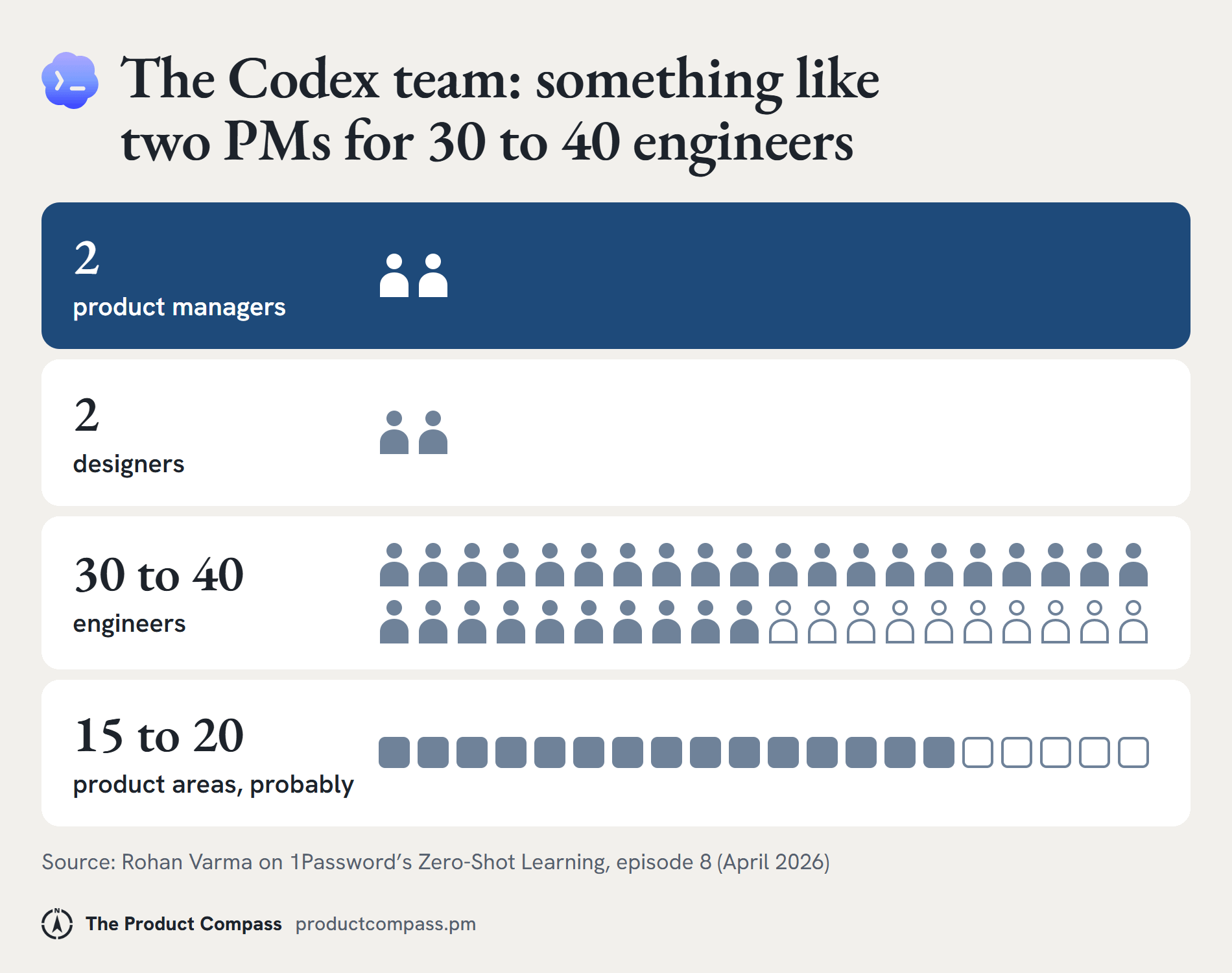
The Codex team was pretty small: something like two PMs, two designers, and somewhere between 30 and 40 engineers across probably 15 to 20 product areas.
We wrote very few traditional specs. Sometimes a spec was roughly ten bullets. When we started a project, I’d think through the most important decisions it needed to feel cohesive with our strategy, almost like guardrails. Beyond that, our engineers and designers moved pretty autonomously and made a ton of micro-decisions themselves.
With tools like Codex, human-to-human collaboration becomes a big bottleneck. Each of our projects really had just one or two engineers working on it.
A short brief should make the customer problem, intended outcome, constraints, and scope clear. It should also explain what the builder can decide independently and what evidence would make us change direction.
We weren’t planning six months out. I’ve been thinking we need a new word for roadmap, because it implies a 12-month thing. It was more: what’s the four-to-eight-week plan? Four weeks later, we’d see what the new priorities were.
Adoption is another part of the strategy. I think the top 1% of Codex users are probably 100x more leveraged than the median user, with the same tool. They treat it like a team member, not like a smarter autocomplete.
For your support copilot, watch whether the team changes its workflow and reaches the intended outcome. An available feature or a growing usage count doesn’t establish that on its own.
And you don’t need to work at OpenAI, Anthropic, or Google to develop these skills.
You can start building them today.
But reading about these skills isn’t enough. You need evidence that you can apply them. That’s where your portfolio comes in.
Side note from Paweł: if you want to learn these skills live, Rohan teaches AI Product Management in Product Faculty’s AI Builder Fellowship, starting Jan 25. I teach there too (AI-Native PM with Claude starting Nov 30), alongside Shubham Saboo (Google) and Henry Shi (Anthropic) on Agentic Engineering, Reah Miyara (Google) on AI Evals, Jennifer Liu (ex-Google) on AI PM Interviews, and Amit Fulay (Uber) on AI Product Leadership.
New in 2027: Forward-Deployed AI Engineering (Rohan Varma), Agent Design Engineering (John Maeda, GitHub) and Claude Architect Mastery (Carmelo Iaria). One membership covers them all, and you can start free with Rohan’s AI Product Manager Foundations.

2. Three AI PM Portfolio Projects That Prove You’re Ready
Hiring managers care about what your AI projects reveal about your ability to think, build, and make product decisions.
You can build 10 impressive-looking AI demos and still struggle to demonstrate that you’re ready for the job.
Why? Because there’s a big difference between building something with AI and demonstrating that you know how to build a successful AI product.
2.1 What makes a great AI PM portfolio project
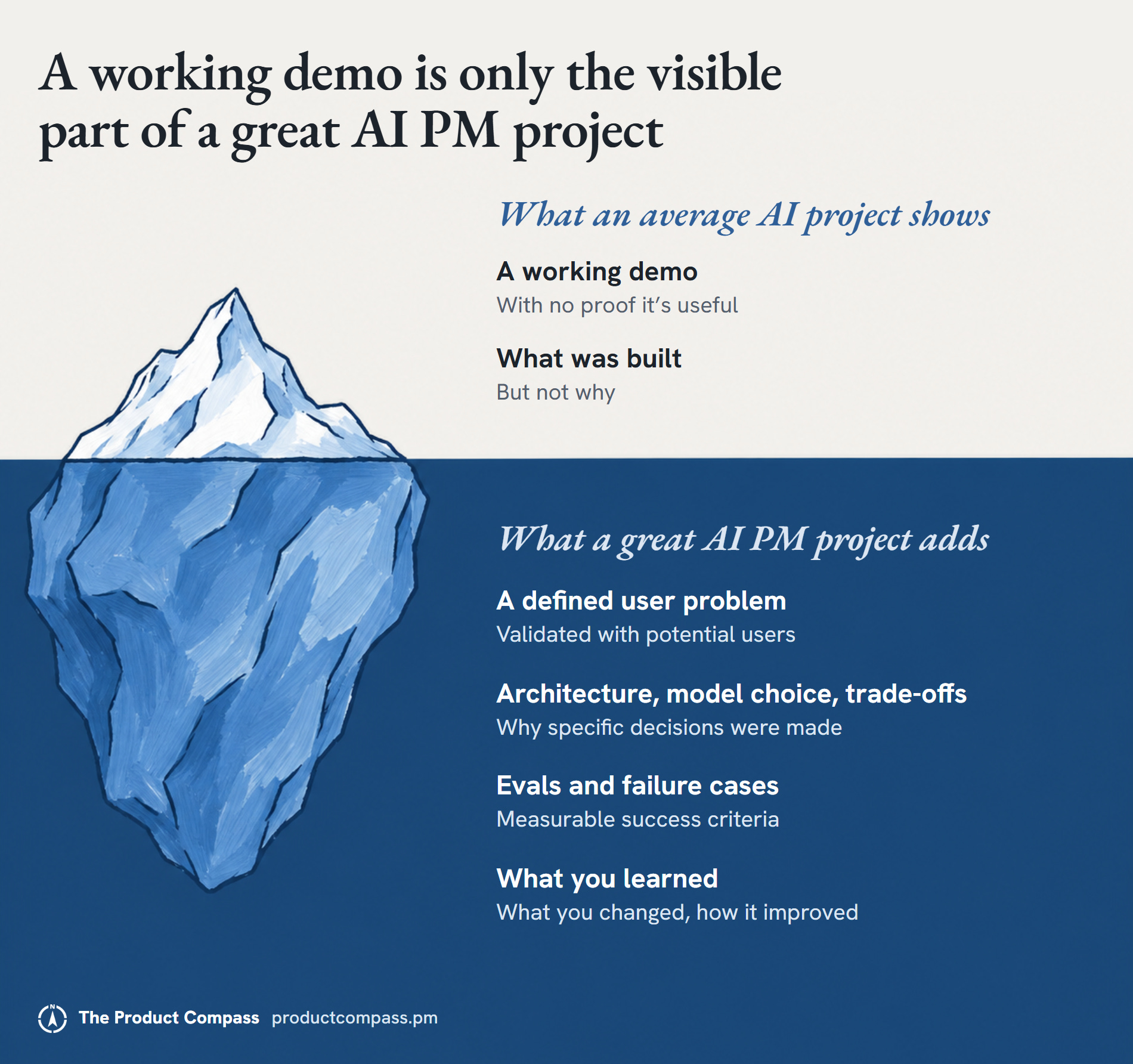
An average AI project:
Starts with a technology instead of a real user problem.
Replicates something that already exists, like a generic ChatGPT clone.
Shows a working demo but provides no evidence of its usefulness.
Claims the AI works well without testing difficult scenarios.
Explains what was built but not why specific decisions were made.
A great AI PM project:
Starts with a clearly defined user problem, ideally validated by talking to potential users.
Demonstrates a working product that addresses that problem.
Explains the architecture, model selection, and important trade-offs.
Includes evals, failure cases, and measurable success criteria.
Shows what you learned, what you changed, and how the product improved.
One demonstrates your ability to use AI tools. The other demonstrates your ability to make AI product decisions.
And you don’t need 10 projects to prove that.
I’ve been a founder most of my career, and I’ve worked in AI coding for a while. I wouldn’t pretend someone coming from another field has the same starting point.
What your portfolio can do is make your technical judgment inspectable. Show how information moves through the system, where an action can fail, and how you tested the result. Building and explaining a small product is a practical way to develop that technical judgment without first trying to reproduce someone else’s career path.
Here are three projects I’d recommend building.
2.2 Project 1: a RAG support copilot
What to build: Choose a software product with publicly available documentation and build an AI copilot that helps users find accurate answers.
For example, a user asks: “How do I reset my account?”
Your copilot should:
Search the relevant product documentation.
Retrieve the information needed to answer the question.
Draft a helpful response with citations so users can verify it.
But don’t stop when the prototype works.
Create an evaluation set that includes questions the documentation can answer, questions it cannot answer, and questions involving conflicting information.
What to showcase in your portfolio:
The user problem and why you chose to solve it.
A working demo and a simple explanation of your RAG architecture.
Your evaluation results, including incorrect answers.
One important failure you discovered and how you fixed it.
What this proves to hiring managers: You understand product discovery, prompting, RAG, AI UX, and how to evaluate an AI product beyond a successful demo.
Paweł: How to Build a RAG Chatbot Without Coding
2.3 Project 2: an AI agent for a real workflow
What to build: Create an AI agent that can complete a bounded, multi-step task.
For example, build a support agent that:
Reads an incoming support request.
Classifies the customer’s issue.
Retrieves relevant information from company documentation.
Drafts an update to the support ticket.
Requests human approval before taking any consequential action.
Now introduce a failure.
What happens if the documentation tool stops working? Does your agent retry, ask for help, or confidently continue with incomplete information?
Design the workflow so the agent handles these situations appropriately.
What to showcase in your portfolio:
Your agent’s workflow and tools.
What the agent can and cannot do without permission.
How human approvals and handoffs work.
What happens when a tool fails.
What this proves to hiring managers: You can design agentic systems, manage tool permissions, make autonomy decisions, and balance automation with reliability and safety.
2.4 Project 3: improve an AI product with evidence
This is where you can really differentiate yourself.
What to build: Take one of your previous projects and make a measurable improvement.
For example, imagine your support copilot costs $0.10 per response.
You discover that routing straightforward questions to a smaller model could bring the average down to $0.03 per response, but the smaller model struggles with complex refund policies.
Instead of switching everything to the cheaper model, you design a routing system:
Simple questions go to the cheaper model.
Complex questions go to the more capable model.
High-risk or uncertain cases go to human review.
Now run your evaluations again.
Did you reduce costs without sacrificing answer quality? Did routing introduce additional latency? Did any previously correct answers become incorrect?
What to showcase in your portfolio:
Your original performance and cost baseline.
The improvement you wanted to achieve.
The changes you implemented.
Before-and-after evaluation results.
The trade-offs you made and why.
The costs in this example are illustrative. Use measurements from your own project.
What this proves to hiring managers: You can use evidence to improve AI products, reason about model economics, and make technical decisions that support business outcomes.
2.5 How to present your projects
For every project, make five things immediately accessible:
The problem: Who is the user, and what problem are you solving?
The product: A working prototype or a short demonstration.
The architecture: How your AI system works and why you designed it that way.
The evidence: Your evals, success metrics, and failure cases.
Your decisions: What you changed, what trade-offs you made, and what you learned.
If you haven’t tested your product with real users, be transparent about that. Don’t invent adoption or business impact.
📌 Three thoughtfully built, evaluated, and documented projects will give you far more to discuss in an interview than 10 disconnected demos.
And once you have that evidence, the next challenge is getting the right hiring managers to see it.
Hey, Paweł here. To learn more about building with AI, see our Product Engineering series: Part 1, Part 2, Part 3 and the free Product Engineering skills collection. No coding.
Here, you can also learn how I built my own harness step by step:
