

Everyone is discussing what a harness is. Nobody shows you how to build one. And everyone can.
So, I built my own Claude Code.
It's called Mini Harness: about 1,200 lines of Python, with a loop, tools, sessions, compaction, permissions with an AI judge, subagents, /goal mode, skills and MCP servers.
Built to teach, as an experiment. Surprisingly, it became the top harness on Claude Haiku.
I tested it against seven other harnesses. Same 10 tasks, five runs each, on two models:
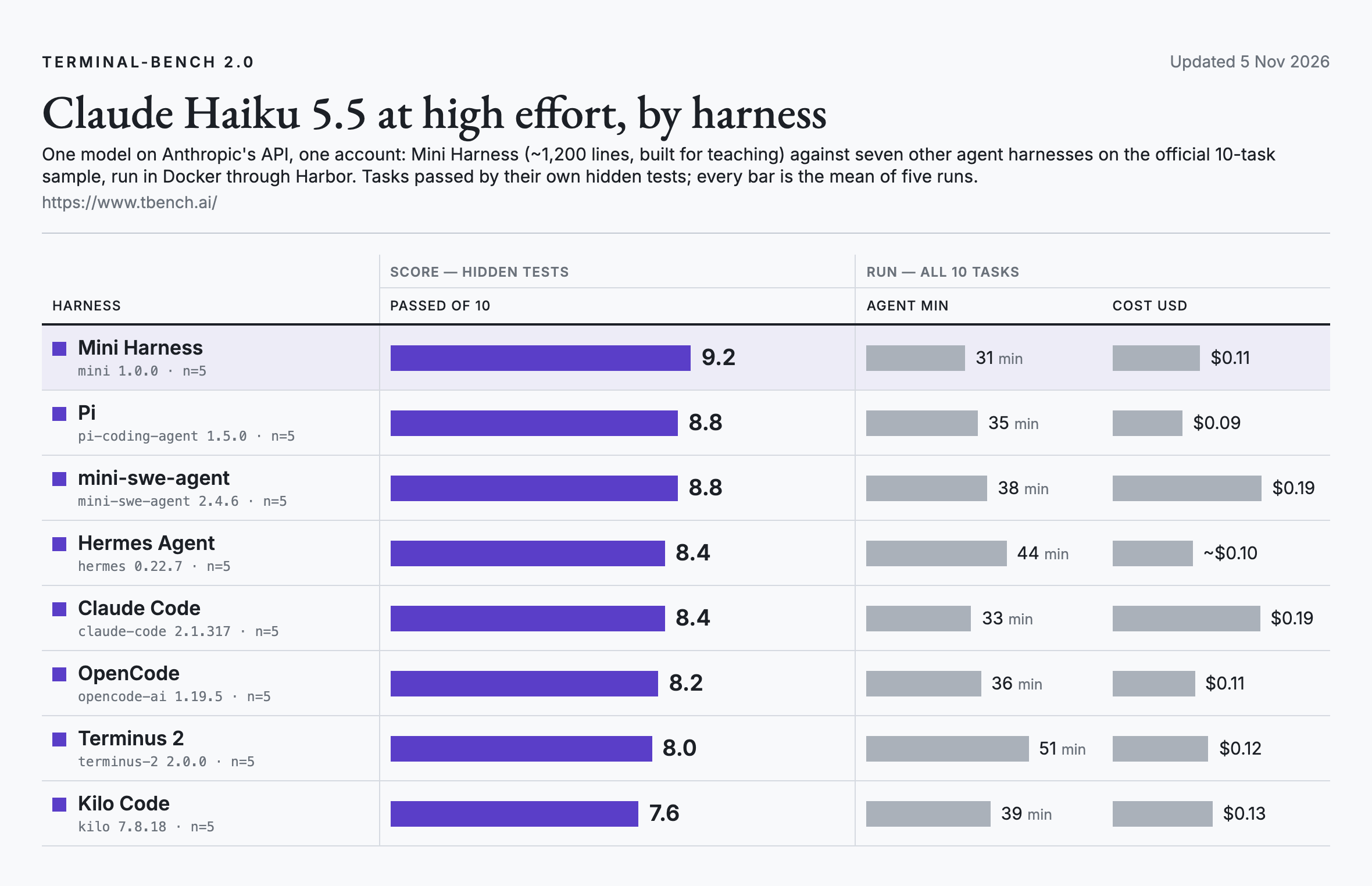
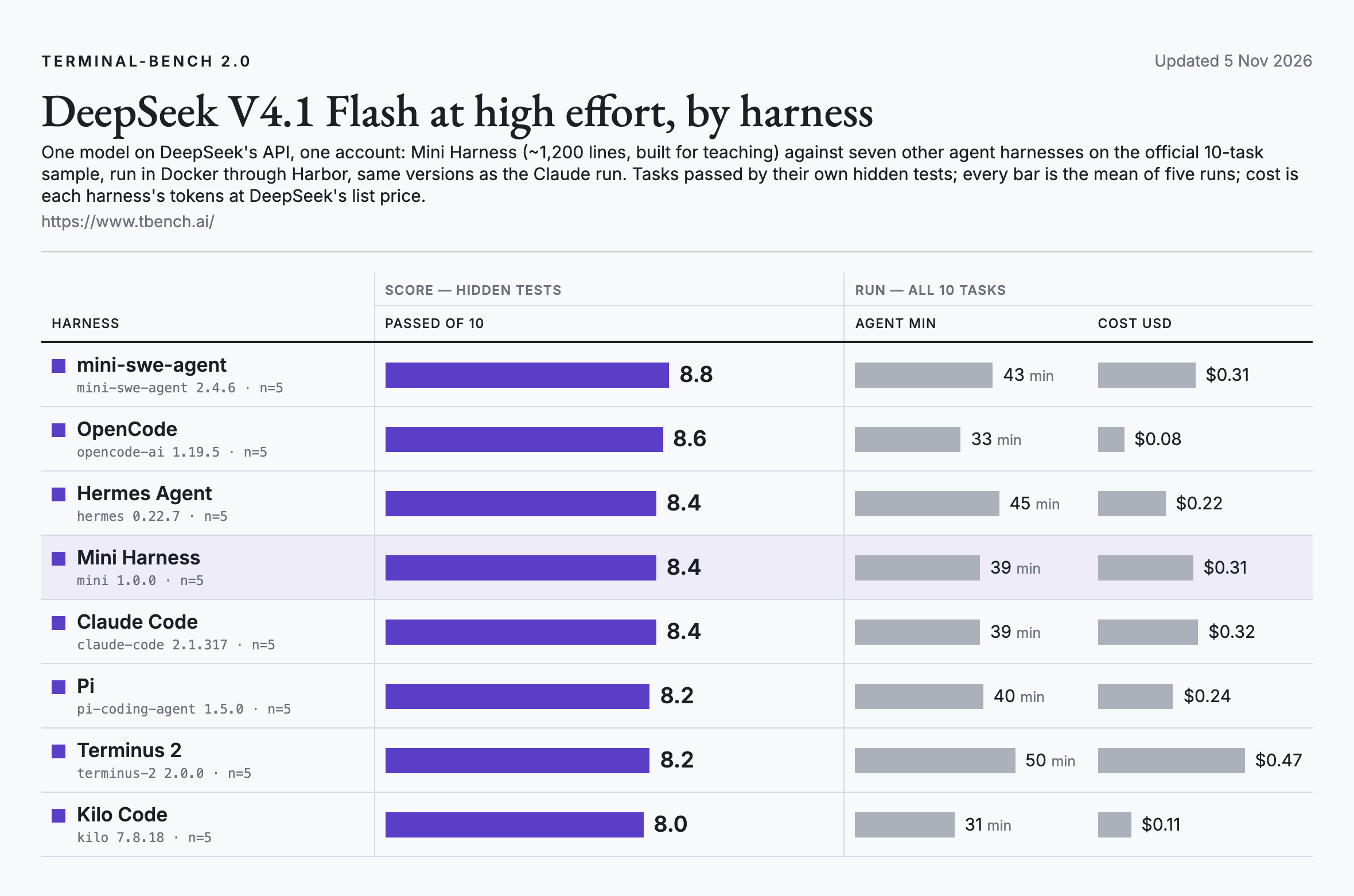
The gaps are small, so I read it as "in the top group on both models", not "the best".
The value isn't my harness. It's building yours on the same design, one that beat many popular harnesses, while you learn the key building blocks.
Next, I share 15 steps, each with a suggested prompt. In 1-2 hours (incl. pasting prompts), you'll have a custom, ready-to-use harness to learn from or show in your portfolio.
In this post:
What an Agent Harness Is
The Core: Loop, Tools, Context
How Mini Harness Compares
Build Your Own Agent Harness
Remembering: Sessions, Compaction, Memory
Safety: Permissions, Judge, Search
Working With You: Questions, Subagents, Goal Mode
Reach: Skills, MCP, Models, Running It
How It All Fits
If you're new to Claude, see:
Easiest: Claude Desktop v2.0: You Don’t Need VS Code Anymore
With VS Code: Claude Code for PMs: The Beginner's Guide
1. What an Agent Harness Is
Think of the model as a very capable colleague who can only talk. They can say "open this file" or "run the tests", but they have no hands.
The harness is the hands, the notebook and the safety rules around them. Claude Code, Codex and Cursor's agent are all harnesses around a model.
The model decides. The harness does.
You can see it in the charts: on Haiku 5.5, the average went from 7.6 to 9.2 depending on the harness.
2. The Core: Loop, Tools, Context
Three parts make a working agent. Each step ends with a prompt: paste it into Claude Code or Codex in an empty folder, in order, and you build your own as you read.
Your harness calls the model directly, so it needs an API key from Anthropic (console.anthropic.com) or DeepSeek (platform.deepseek.com). With Haiku 5.5 or DeepSeek V4.1 Flash, the costs of your tests will be way below $0.10. As an alternative, you can adjust the prompts and experiment with a free OpenRouter model, such as Google: Gemma 4 31B (free).
Each prompt below says what to build and why, and names the Claude Code conventions to follow. Claude picks the rest, writes it down and tests the result.
Step 1: Reasoning loop
Why we need it: a model call is one question and one answer. Fixing a bug takes many: look at files, change one, run the tests, read the error, try again.
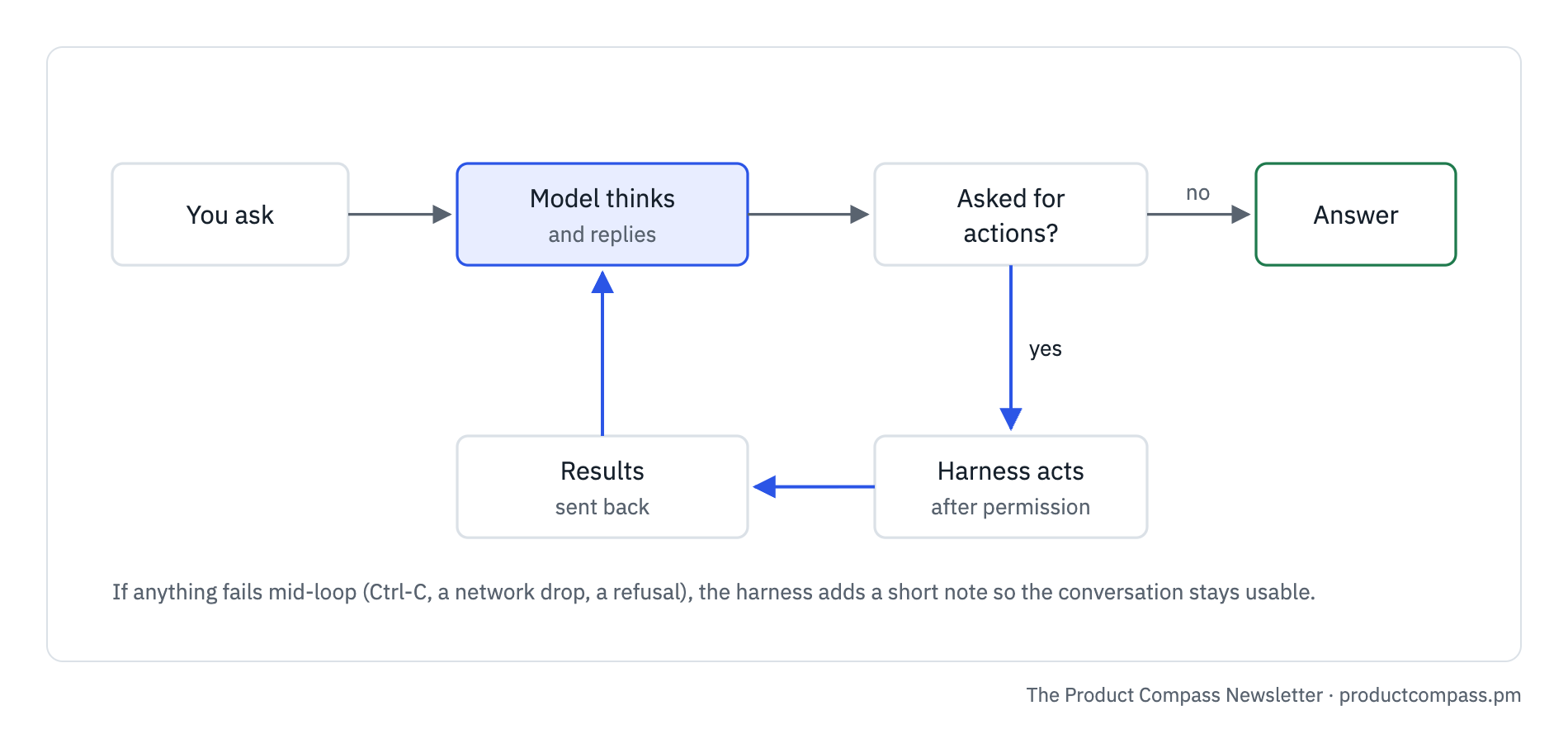
How it works: the harness sends the conversation to the model and runs the actions it asks for. On each trip, the model reasons about what it has seen and picks the next step, until a reply asks for nothing.
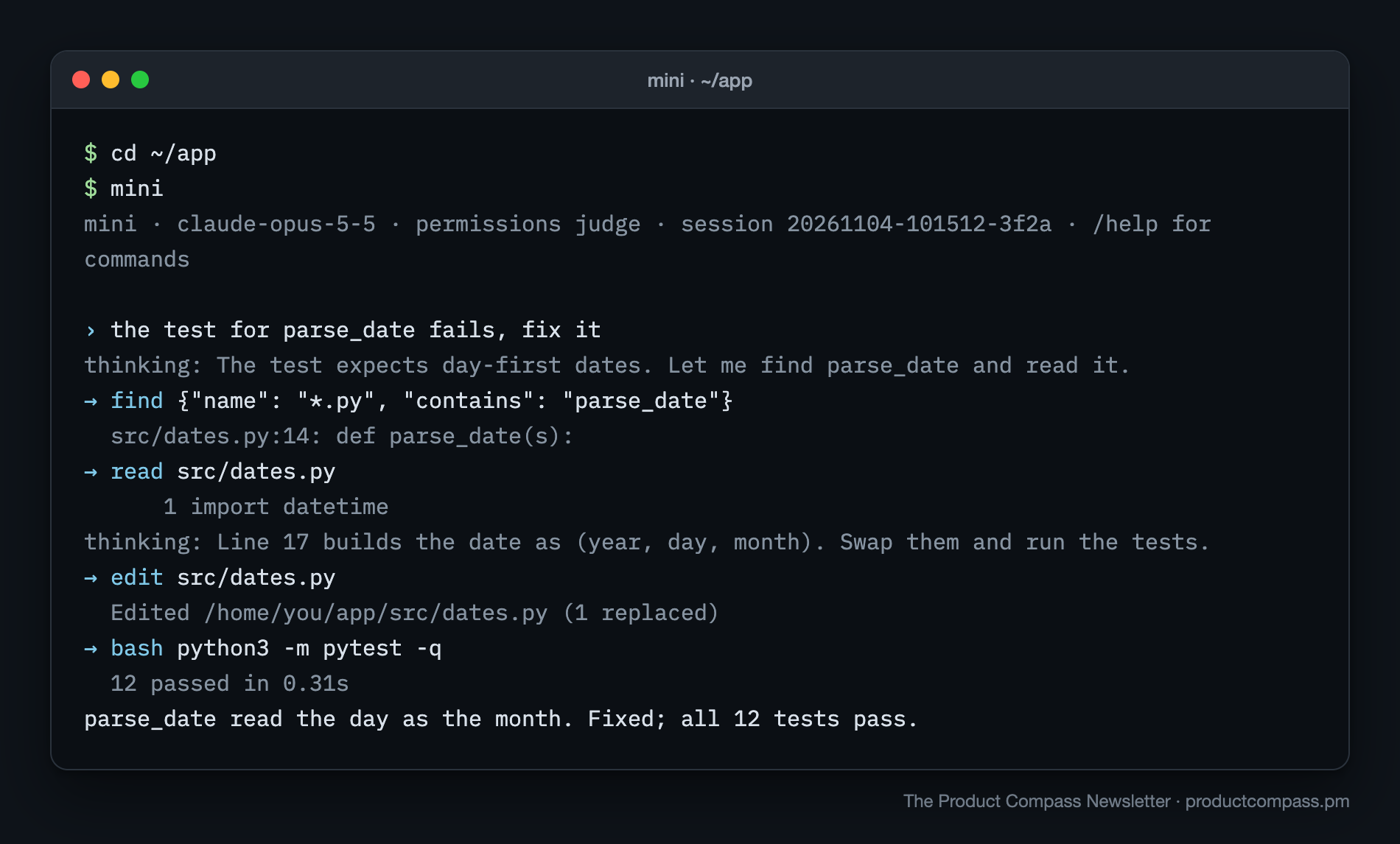
One turn in mini's terminal. Each arrow is an action the model asked for:
The loop itself is about 50 lines. Almost everything else in a harness keeps this loop working when something breaks.
For PMs: We previously discussed how exactly tools are called in A Guide to Context Engineering for PMs. I recommend you study that one, too, for more insights about what happens inside the agents.
Build it:
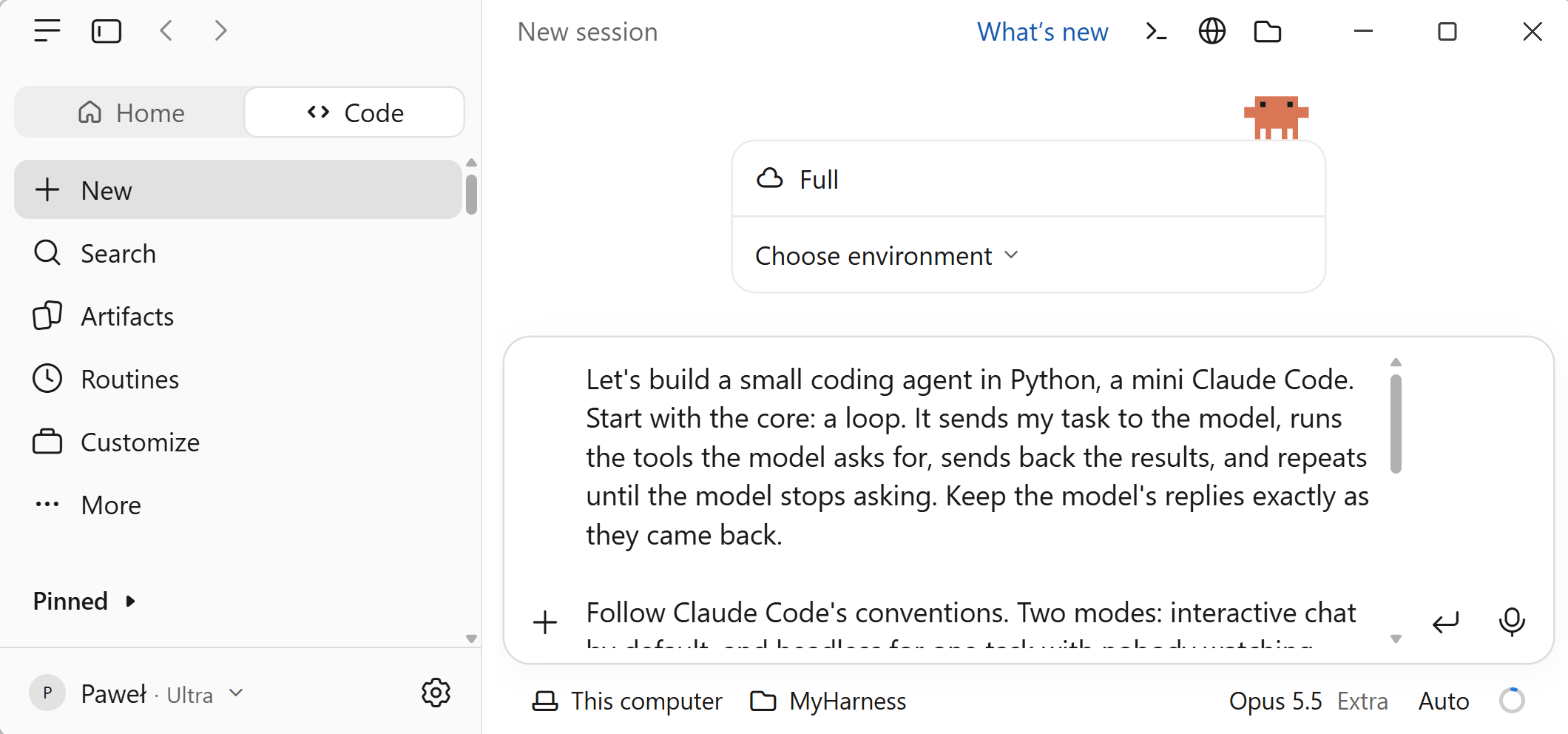
Let's build a small coding agent in Python, a mini Claude Code. Start with the core: a loop. It sends my task to the model, runs the tools the model asks for, sends back the results, and repeats until the model stops asking. Keep the model's replies exactly as they came back.

Follow Claude Code's conventions. Two modes: interactive chat by default, and headless for one task with nobody watching, started with -p "task". Use my Anthropic API key, or DeepSeek's through its Anthropic-compatible endpoint; walk me through setting it up, and never print the key or save it in the project. Pick the model with --model, or /model in chat. Ctrl-C stops the current turn, not the program. Keep a design doc in the project with how to run it and every decision we make.

Test it: headless, ask it to say hi in three words. Then try it without a key, and with a model that doesn't exist: each should give a clear message, not a crash.
Tip: You can run all my prompts in VS Code or in Claude Desktop / Code tab:
Step 2: Tools
Why we need it: the loop runs actions, so the model needs a fixed menu of actions it can ask for.
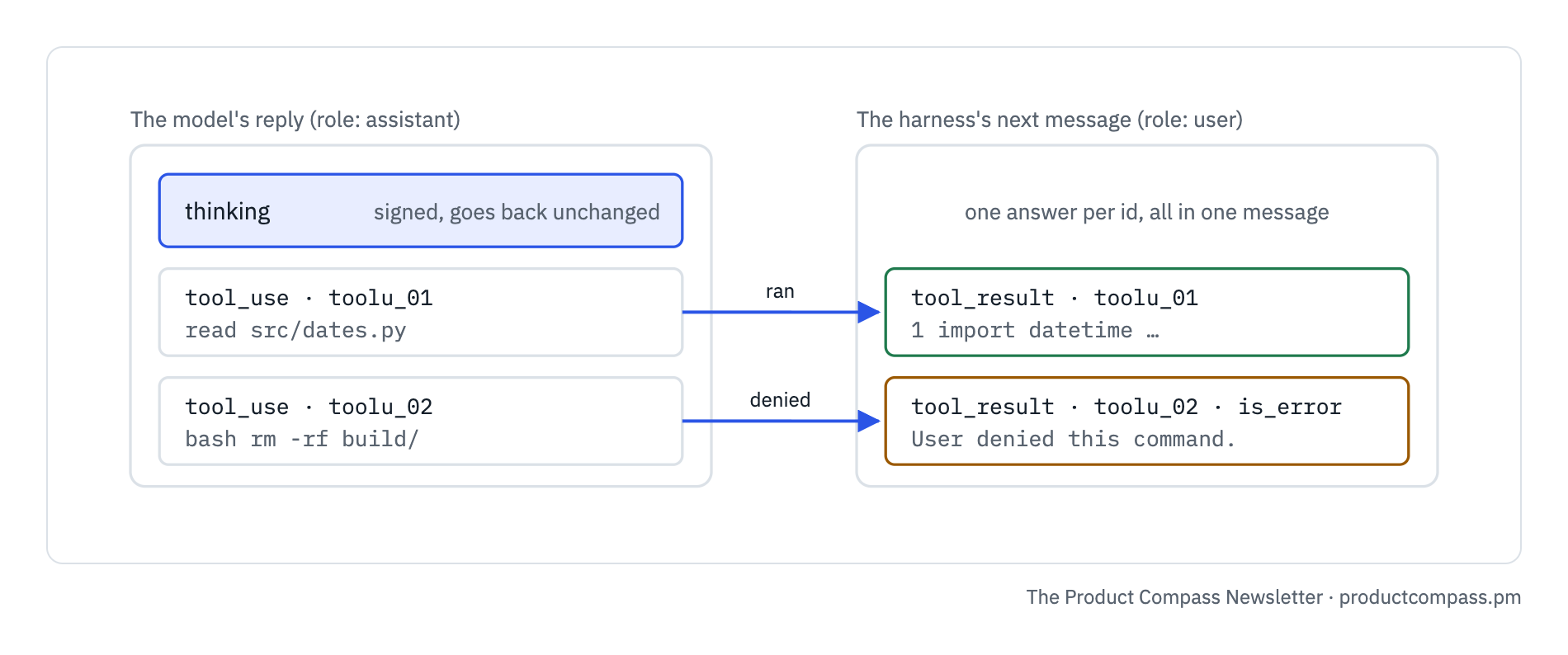
How it works: five local tools (read, write, edit, bash, find), each a short manual the model reads and a function the harness runs. Plus web search, which runs on the provider's servers: Anthropic and DeepSeek both offer it. Later steps add three the harness handles itself: asking you, subagents and goal mode. Every action request carries an id, and every id gets an answer, even "denied":
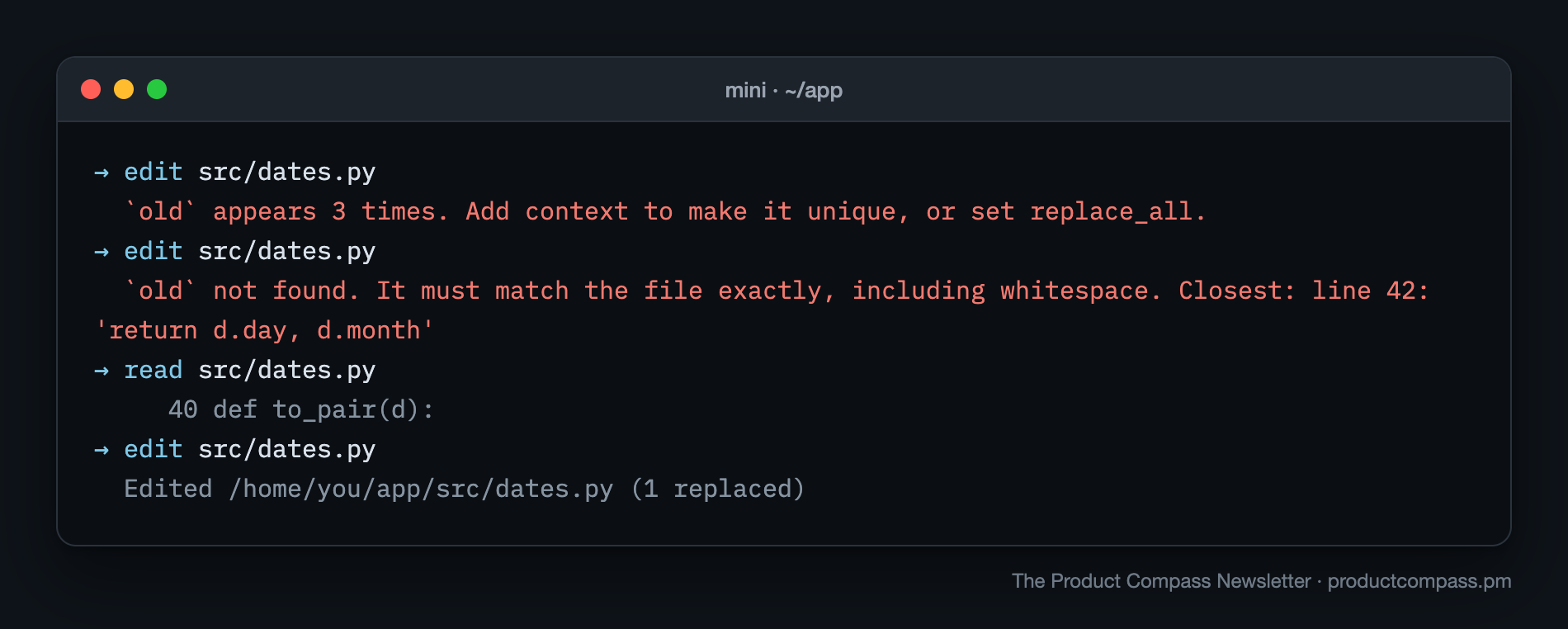
Error messages are instructions. A bare "failed" gets retried blindly. "That text appears 3 times, add more context" gets fixed on the next step:
For PMs: the words the agent reads are part of the product. Think of it as a user experience for the agents.
Build it:
Now give it hands: tools to read, write and edit files, run commands, and search the project. Also turn on the provider's built-in web search; Anthropic and DeepSeek both run it on their servers. Each tool gets a short manual the model reads and strict rules for its inputs.

Edits replace exact text, and only in a file it has read. Every tool call gets an answer, even when it fails or is refused, and every error says what to try next. Propose the manuals and add the patterns to the design doc.

Test it: ask it to create a script that prints hi, run it, and tell me the output. Then ask it to replace a line that isn't in the script: the error should say what to do next.
Step 3: Context window
Why we need it: models remember nothing between calls, so on every step the harness resends everything.
How it works: a fixed top, written once per session (instructions, your project's AGENTS.md, tool manuals), and below it a conversation that grows with every step.
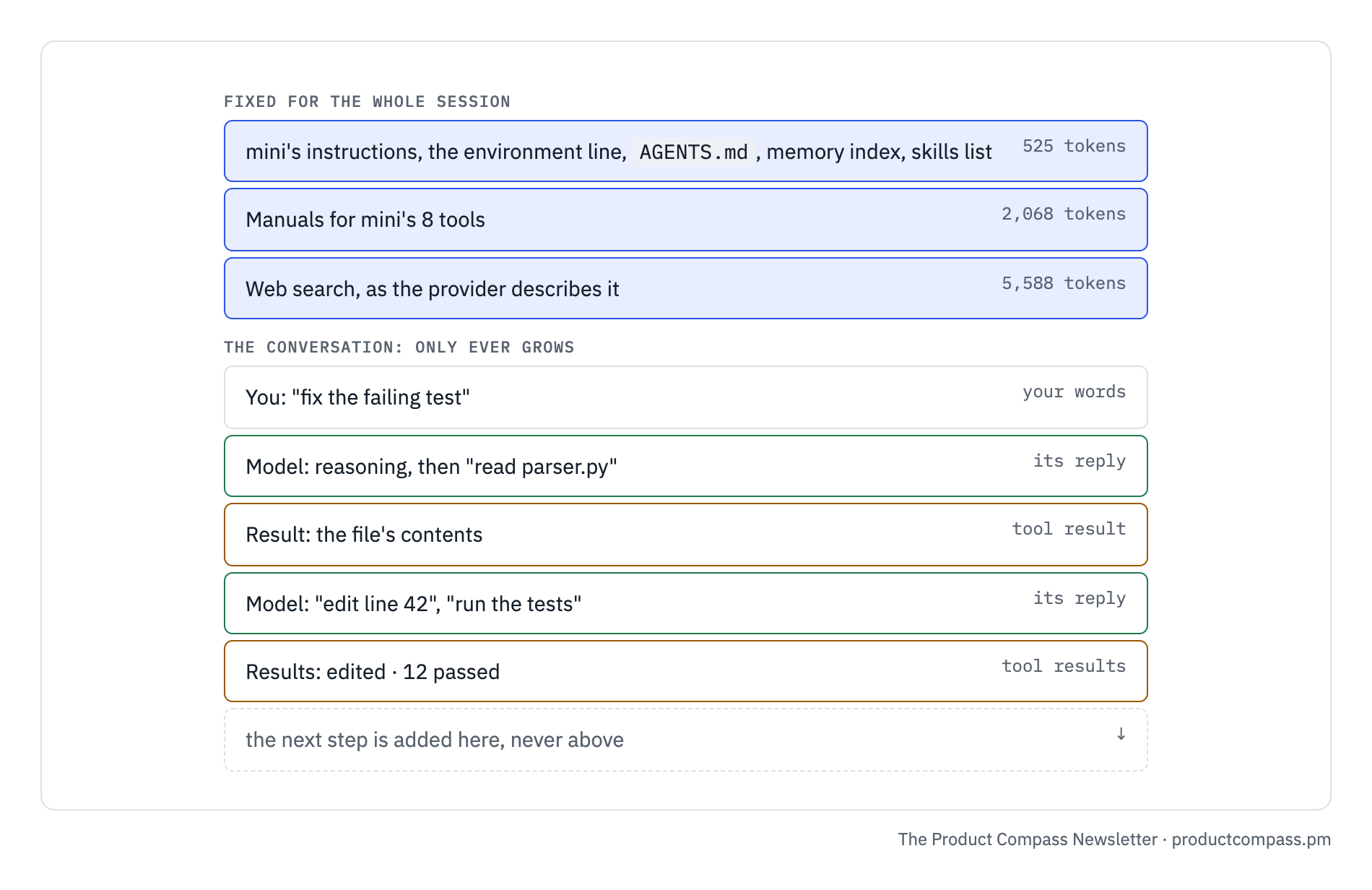
I measured mini's starting point with /context. About 8,200 tokens before you type anything, and two thirds of it is the web search tool:

One rule holds this window together: never edit what was already sent. Claude seals its reasoning to everything above it, and the provider caches the beginning it has already read. Edit the top, and both break:
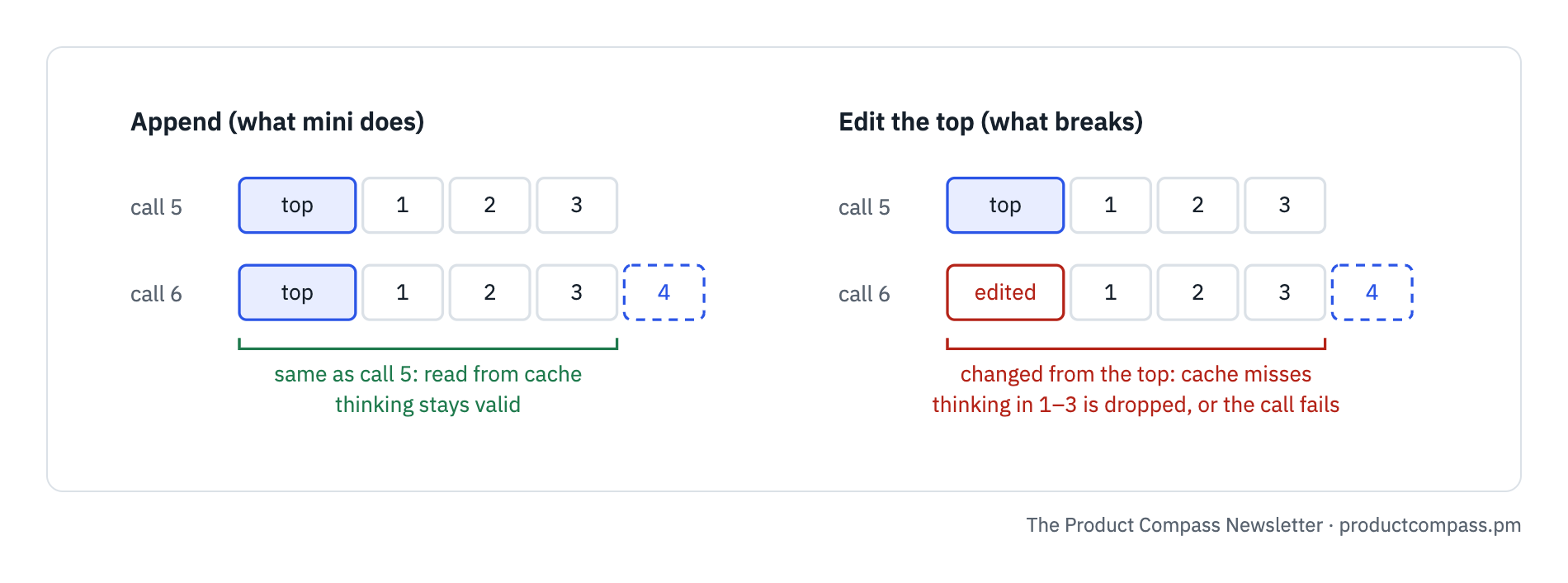
The reward is money: on Opus 5.5, cached tokens cost $0.20 per million instead of $4.
For PMs: this is why long sessions get expensive, and why an agent that rewrites its own context gets worse over time. More in Claude Code's Limits Are Generous. The Problem Is Your Setup.
Build it:
Next, what the model sees on every call. Write its instructions once per session: a few short rules, a line about where it runs (system, folder, date, model), and the project's AGENTS.md if there is one. Never change what was already sent; new information goes at the end. That keeps the cache working and the model's reasoning valid.

Show me the tokens each call uses, and add /context to show what fills the context window. Add this rule to the design doc.

Test it: put "Always answer in French" in AGENTS.md and ask it to say hello. Delete the file and ask again in a new session: now in English.
3. How Mini Harness Compares
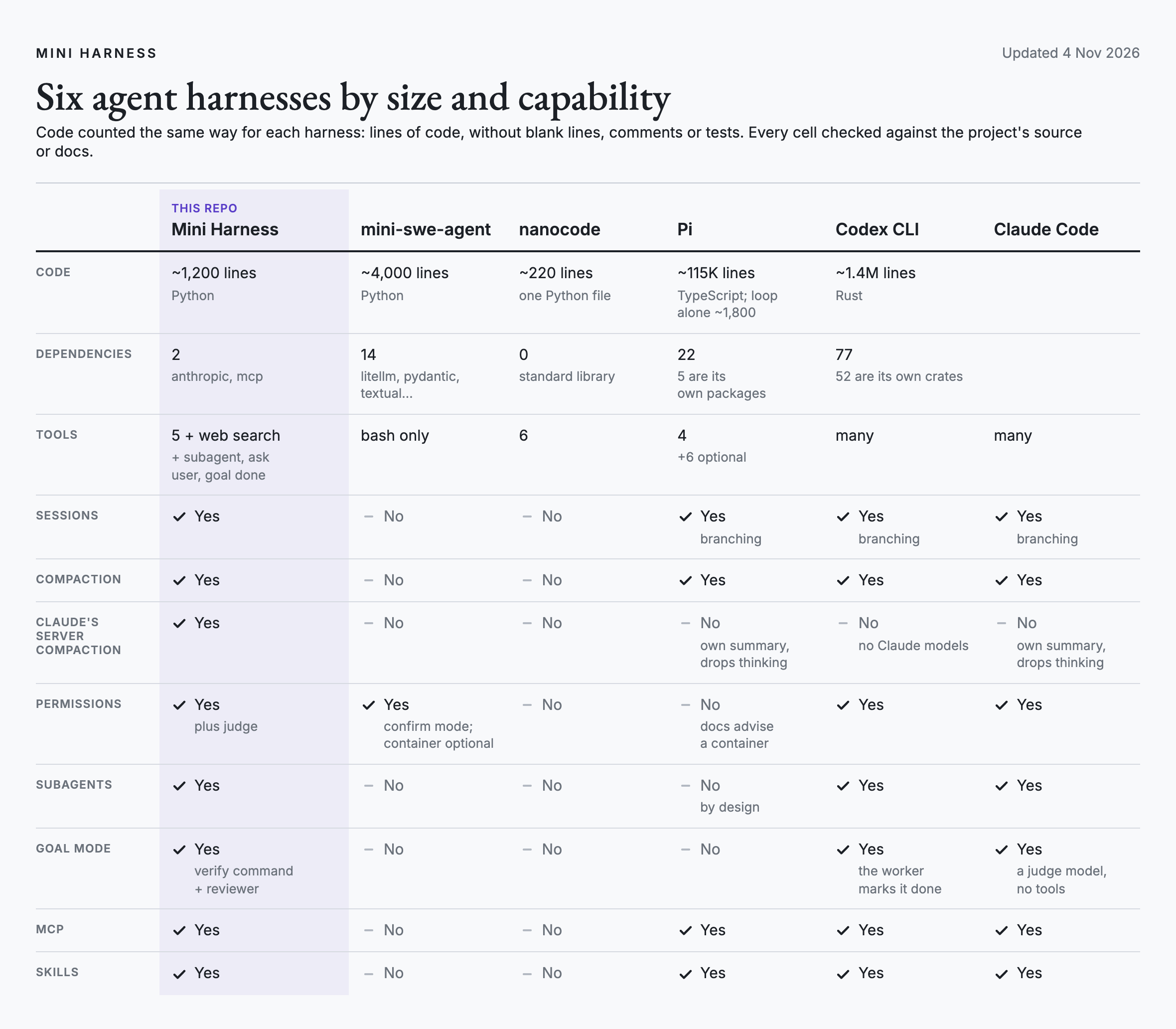
I checked each harness against its own source code and docs, counting code the same way for each. Of the small harnesses I checked, only mine covers all the common features:
4. Build Your Own Agent Harness
How many PMs have their own harness in their portfolio?
With the prompts above, you already have a working agent. Next, we build the full harness together, one step at a time. You'll understand why each part exists, instead of theorizing and skimming infographics.
The code is free on GitHub, but a finished harness won't teach you much. The value is in building your own.
Keep reading for:
Sessions, compaction and memory: an agent that survives a crash and a long task
A permission gate and an AI judge: nothing risky runs without a yes
Subagents and goal mode: work checked by something other than the worker
Skills, MCP servers and cost: what plugs in, and what it costs
12 more build prompts, each with a test