

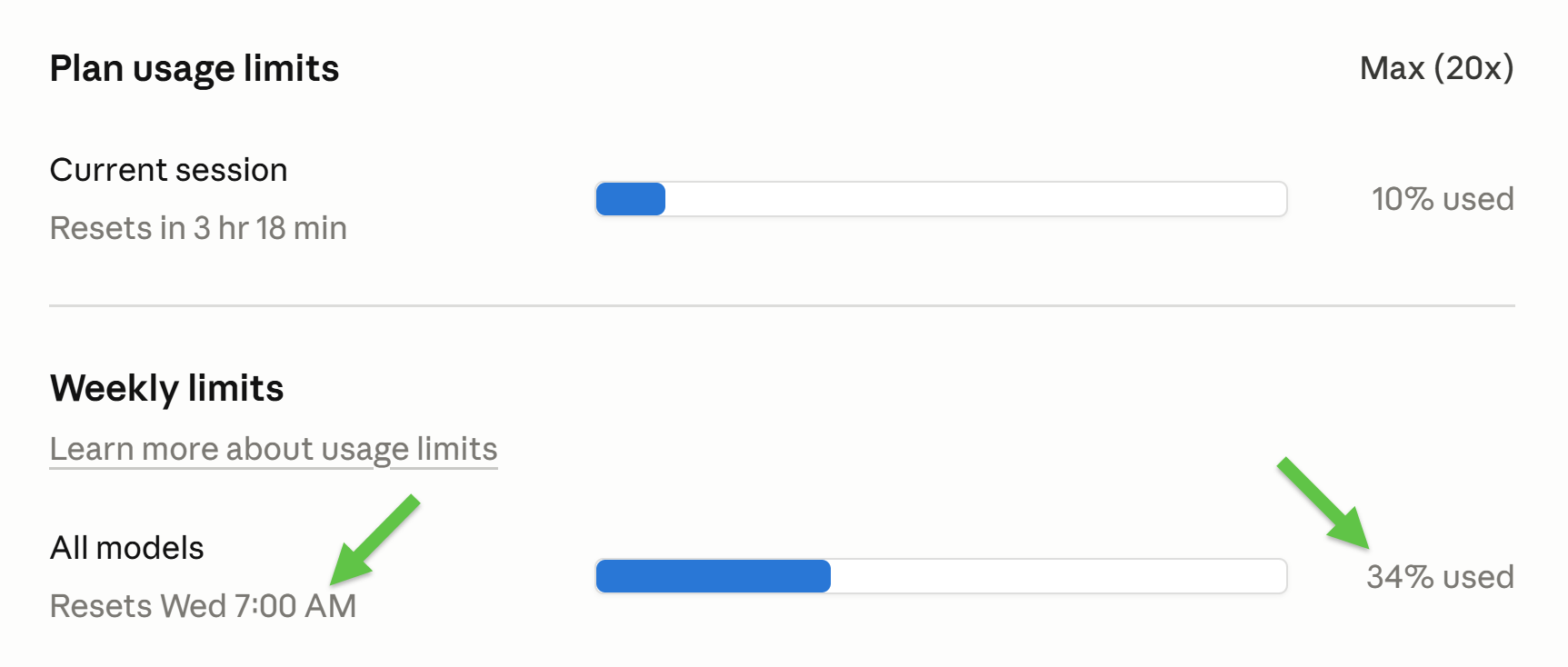
I’m on Claude Code Max 20x (€180/mo). 5 days in. Only 34% used working with Claude for 8 hours/day and running 10+ scheduled workflows:
The same workflow cost me €1,184.95 (~$1,389) a month ago:
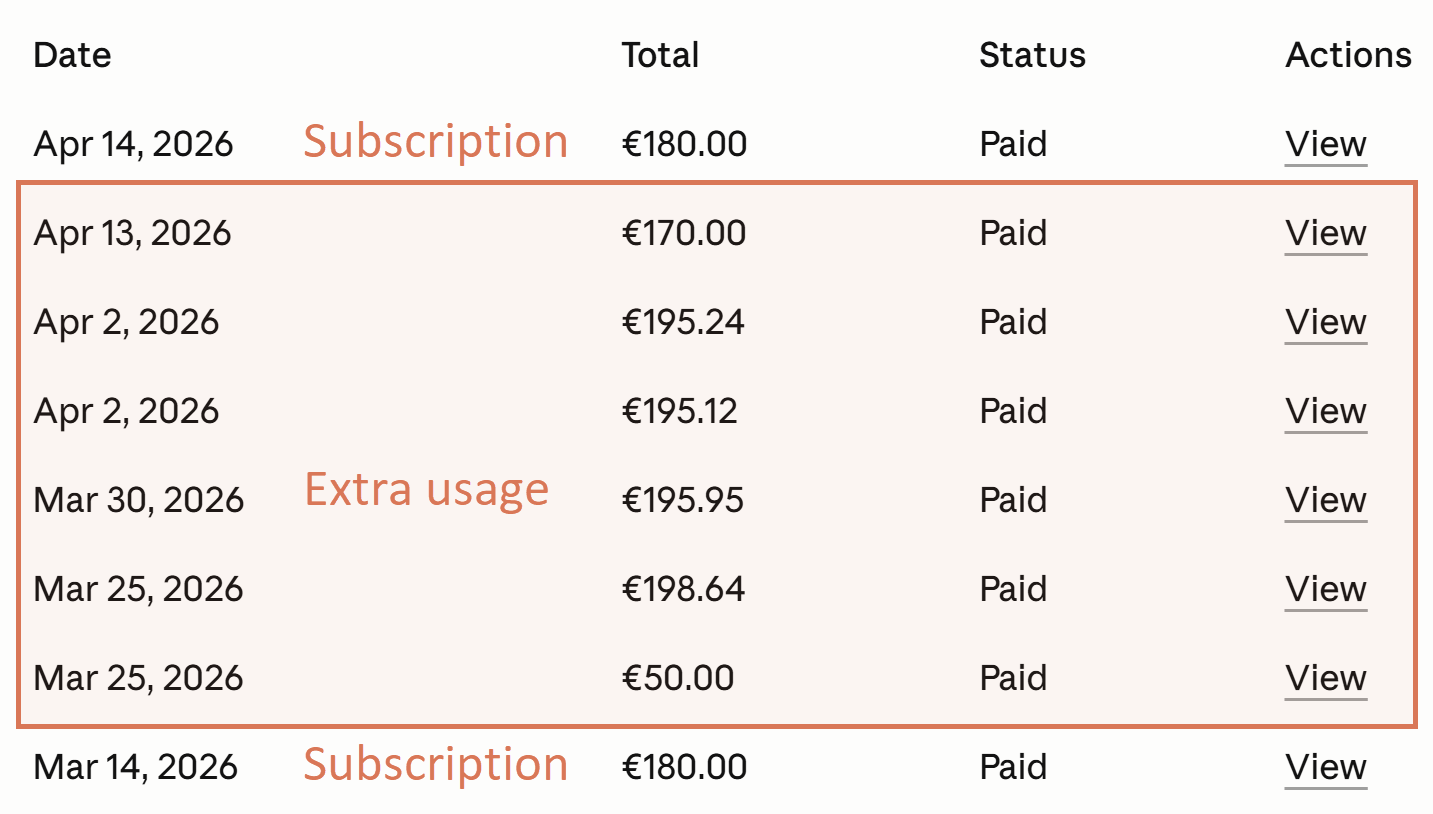
No model swap, no skipped sessions.
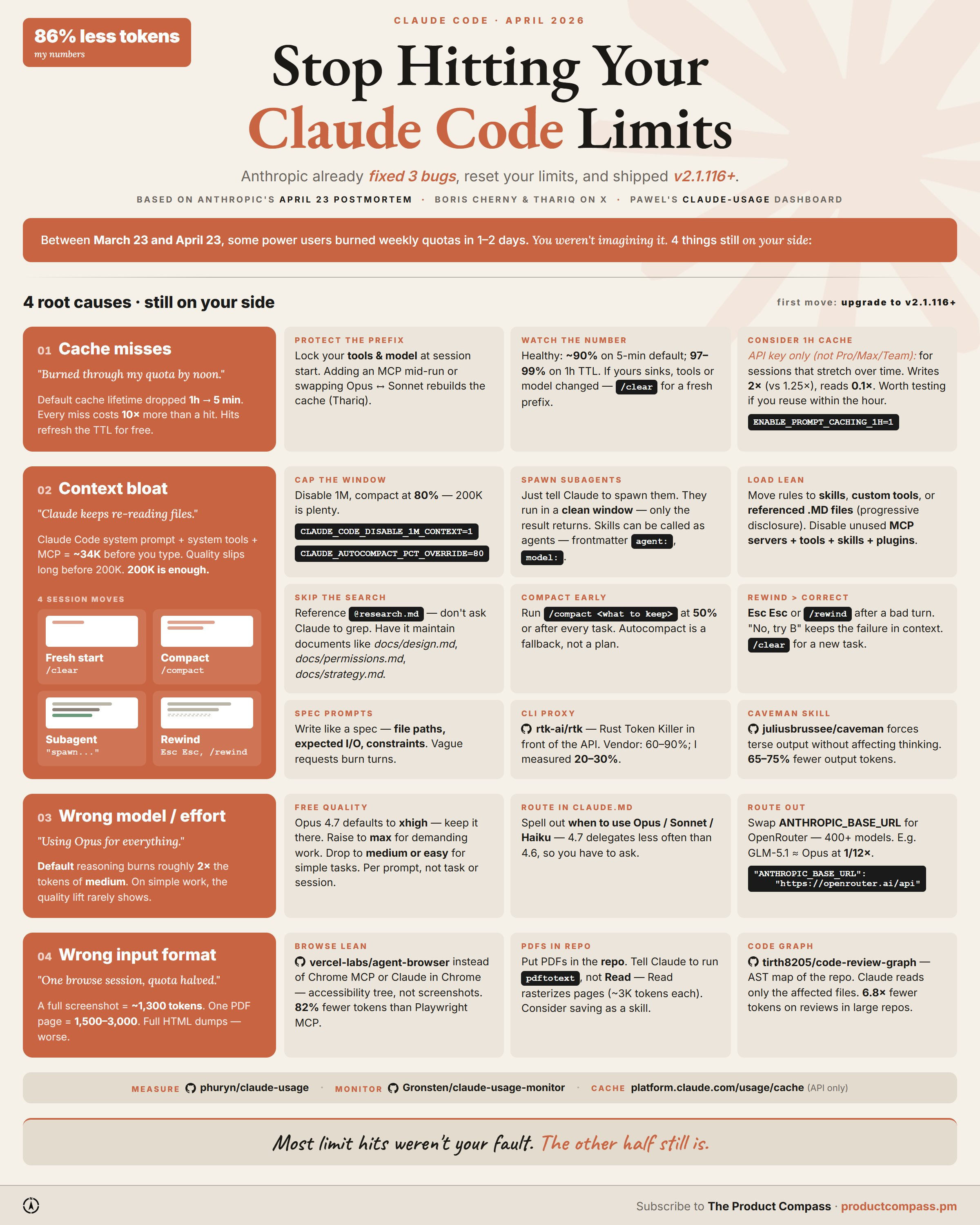
Between March 23 and April 23, some users on Max burned weekly quotas in 1-2 days. Anthropic shipped 3 bug fixes (v2.1.116+) and reset all subscriber limits. Full writeup in their April 23 postmortem.
Four root causes are still on your side (I’ve been researching and testing that for the last 2 weeks):
Cache misses
Context bloat
Wrong model or effort
Wrong input format
Our Sponsor: Nimbalyst
This is a paid placement, but I only run sponsors I've actually tested. I’ve been working with Nimbalyst for 10+ hours.
It’s a visual workspace for Claude Code and Codex. If the VS Code interface has intimidated you, you should try it.
I loved the markdown files that actually render without plugins, and navigating between linked documents. VS Code is missing this.
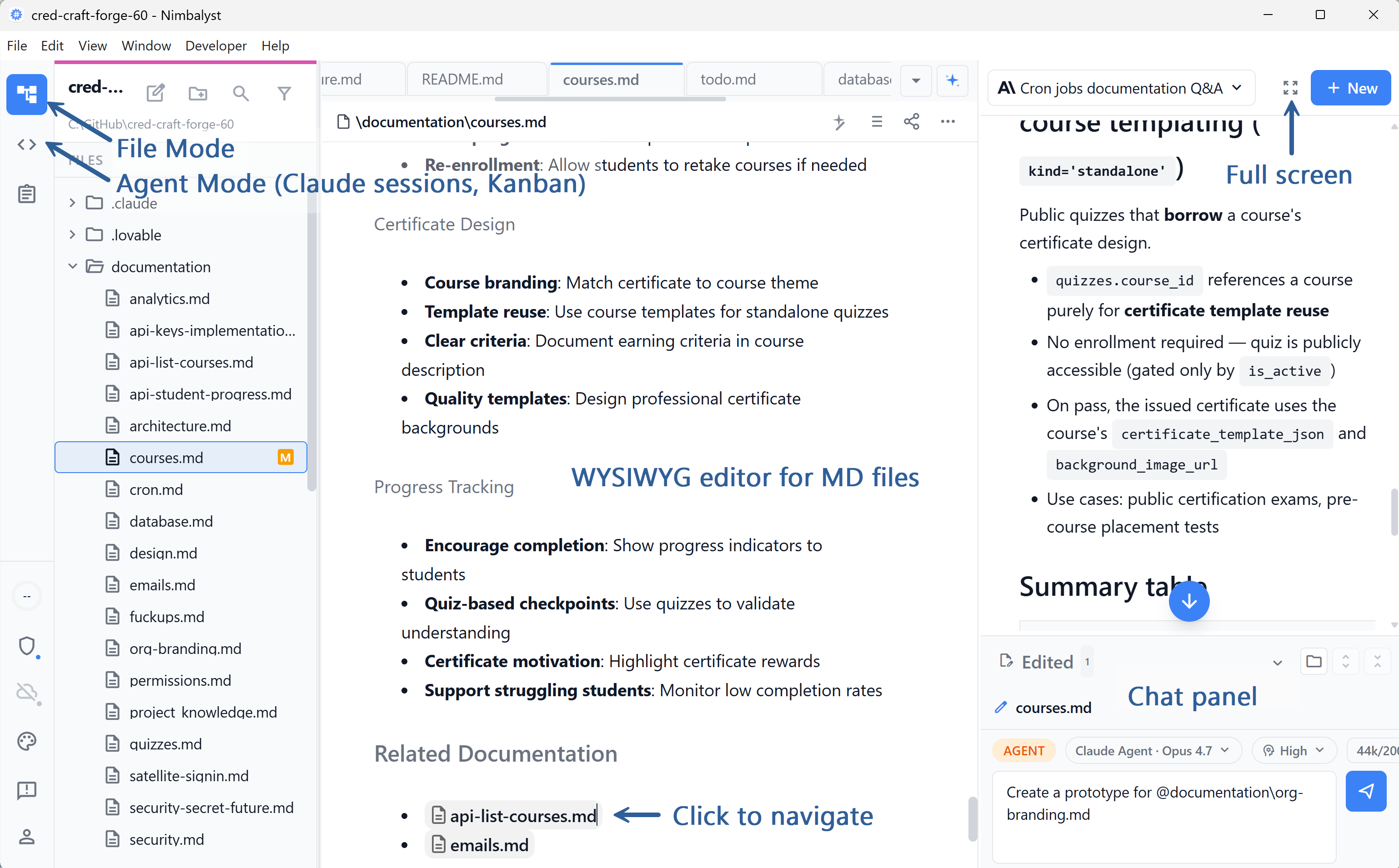
Big surprise: sessions as cards on a Kanban board. Backlog, planning, implementing, done. Claude doesn’t have this.
Plus session tracking, all the context window techniques we’ve been discussing, and a native iOS app (their custom remote control). Works with your Claude Pro/Max/Team subscription, not just API keys.
Free for individual use. Worth twenty minutes if you’ve been Claude-Code-curious:
1. Cache Misses
The prompt cache is the single biggest lever in Claude Code. Most people never look at it.
The math:
Cache read: 0.1× the input price
Cache write (5-min TTL): 1.25×
Cache write (1-hour TTL): 2×
Cache refresh on hit: free (charged at the read price)
Every hit on a cached prefix resets its TTL at no extra cost. So a long session with steady tool use stays warm indefinitely as long as the prefix doesn’t change.
Thariq spelled out the rules in “Lessons from Building Claude Code.” The two that move the needle:
Lock your tools at session start. Adding or removing a tool mid-session invalidates the cached prefix and forces a full re-read. Never add or remove tools mid-session.
Lock your model at session start. Switching models mid-session blows the cache for the same reason.
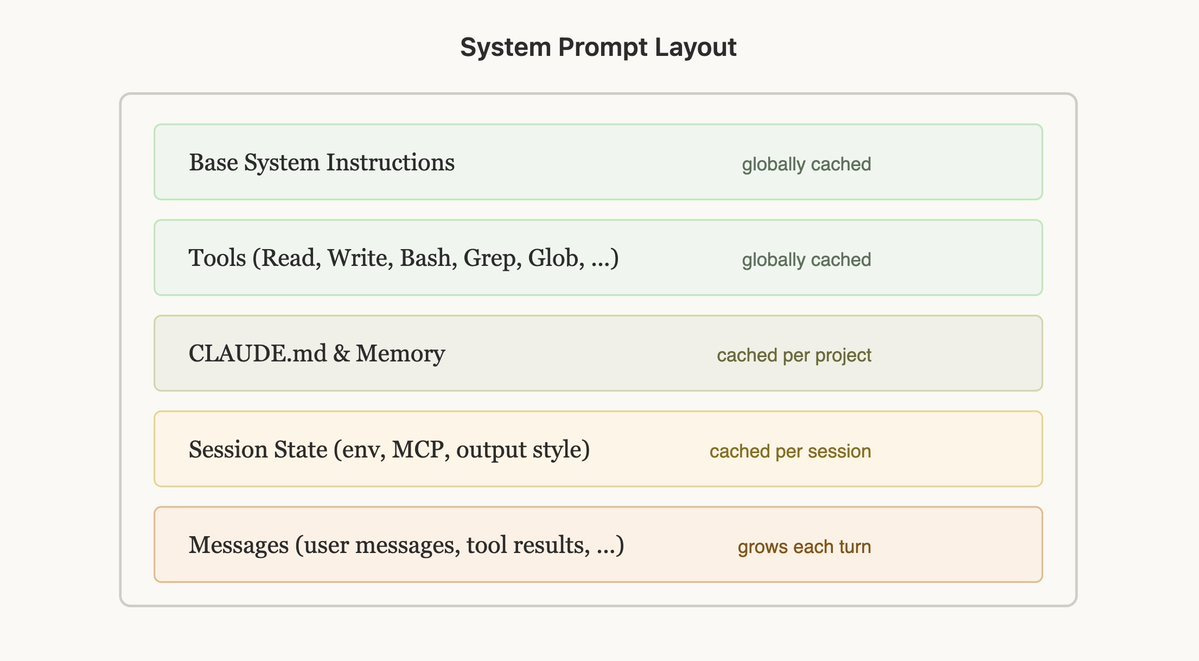
~90% is healthy on the 5-min default. On the 1-hour TTL it climbs to ~97-99%, but that one is API-only and isn’t priced into Pro / Max / Team subscriptions.
What to Do:
Protect the prefix. Don’t add MCP servers mid-session, don’t /model mid-session.
Watch the hit rate. See § Watch the Number below.
Consider the 1h cache for long sessions on the API. Write costs more (2× vs 1.25×), but the higher hit rate pays it back.
2. Context Bloat
For Opus 4.7, 1M context is the default. That’s expensive. Long sessions sprawl, and auto-compact fires later than it should. Disable it and fall back to 200K. 200K is enough for almost any task.
On 200K, auto-compact fires at ~155K (~80%), the behavior Boris Cherny described for the previous Opus. The trick is to compact before you hit the auto-trigger. Once it fires, it pushes you over and warms a fresh prefix. Compact early instead.
The settings I run:
{
  "env": {
    "CLAUDE_CODE_DISABLE_1M_CONTEXT": "1",
    "CLAUDE_AUTOCOMPACT_PCT_OVERRIDE": "80"
  }
}
That disables 1M context and pins the auto-compact threshold at 80%.
2.1 Five Session Moves
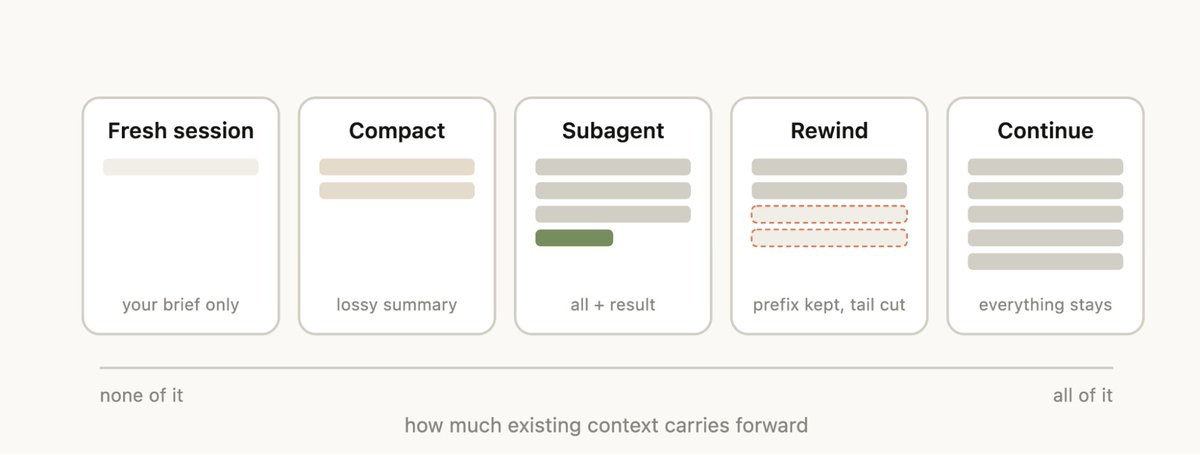
/compact at 50% or after every task. Don’t wait for auto.
/clear between unrelated work. New session = fresh prefix.
/rewind when a turn went sideways. Cheaper than re-prompting around the bad context.
Subagents for anything that doesn’t need the parent’s reasoning.
2.2 Subagents Are the Underused Move
Anything that’s bulk-mechanical, scoped research, or parallelizable should run in a subagent. The parent context stays clean and you parallelize across cheaper models.
A CLAUDE.md task-delegation block I keep in every project:
## Subagents v1.0

Spawn subagents to isolate context, parallelize independent work, or offload bulk mechanical tasks. Don't spawn when the parent needs the reasoning, when synthesis requires holding things together, or when spawn overhead dominates.

Pick the cheapest model that can do the subtask well:
- Haiku: bulk mechanical work, no judgment
- Sonnet: scoped research, code exploration, in-scope synthesis
- Opus: subtasks needing real planning or tradeoffs

If a subagent realizes it needs a higher tier than itself, return to the parent.

Parent owns final output and cross-spawn synthesis. User instructions override.
2.3 Skills Can Also Be Invoked as Agents
Add agent: true and model: to the frontmatter and the skill runs in its own subagent context with its own model. For example:
---
name: tldr-pdf
description: Extract a 200-word TL;DR from a PDF without loading the full text into the parent context
agent: true
model: sonnet
---

You receive a path to a PDF.

1. Run `pdftotext "$1" -` to extract the text.
2. Read the output.
3. Return only:
   - 5-bullet TL;DR
   - 3 quotes worth keeping
   - Any URLs cited

Never return the full text. Never expand beyond the structure above.
The parent gets back 200 words. The full PDF never touches its context.
2.4 A Few More Techniques that Pay for Themselves on Long Sessions
Load lean. Disable unused MCP servers, tools, skills, and plugins. Move rules out of CLAUDE.md and into skills, custom tools, or referenced .MD files (progressive disclosure).
Spec prompts. Write requests like a spec: file paths, components, expected I/O, constraints. Vague requests burn turns and tokens.
Skip the search. When you know the file, tag it @ docs/design.md or @ research.md. Claude doesn’t need to grep for what you can hand it directly.
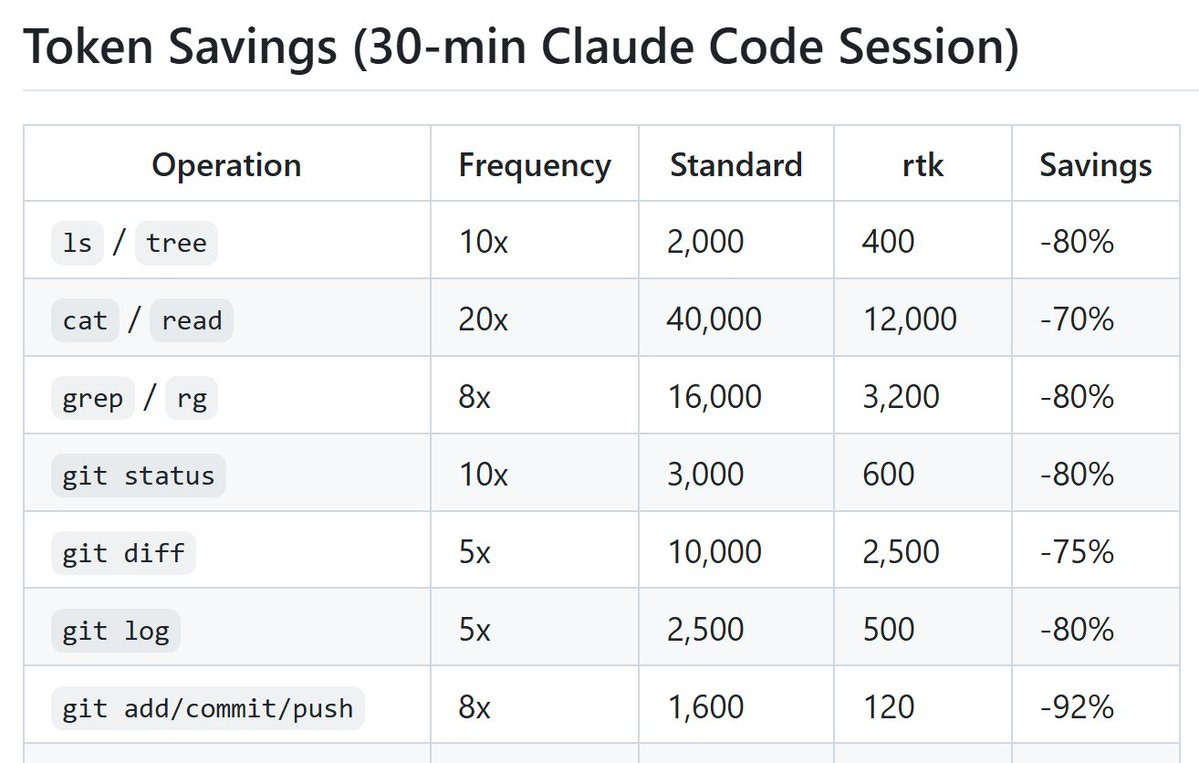
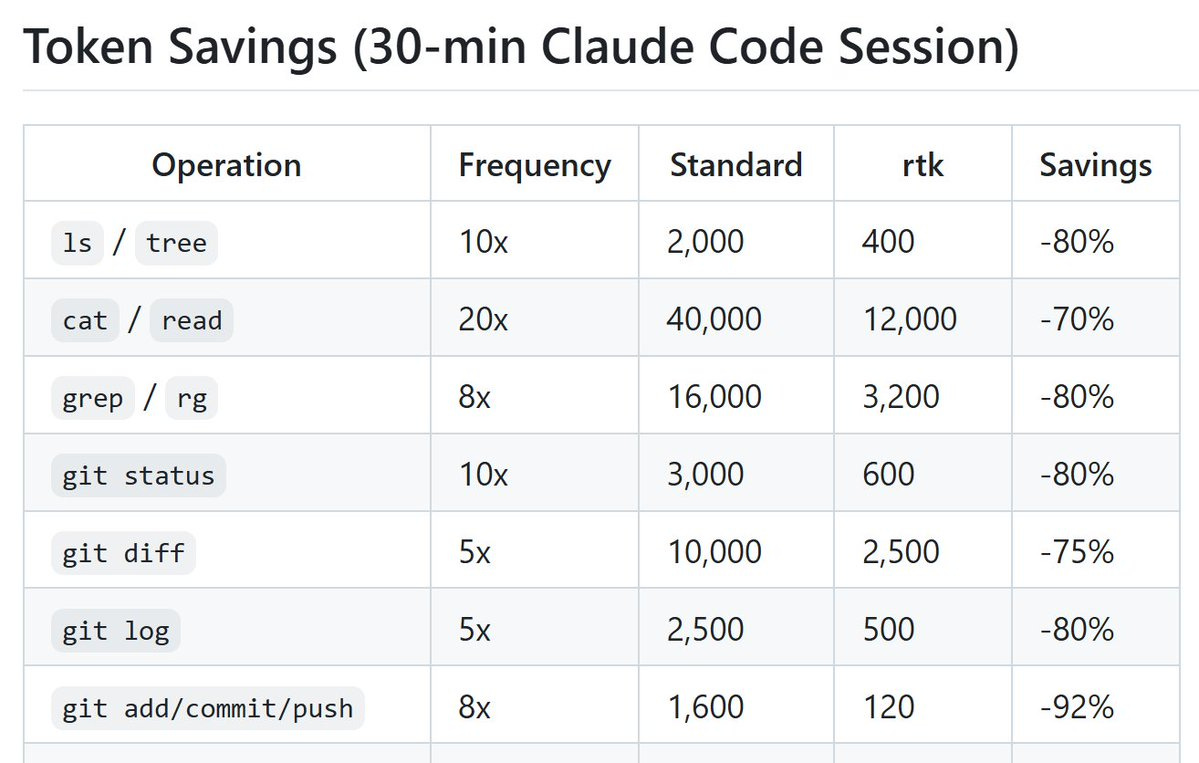
rtk-ai/rtk. CLI proxy that strips redundant whitespace and compresses tool output. 60-90% according to the authors. ~20-30% token reduction in my workflow.
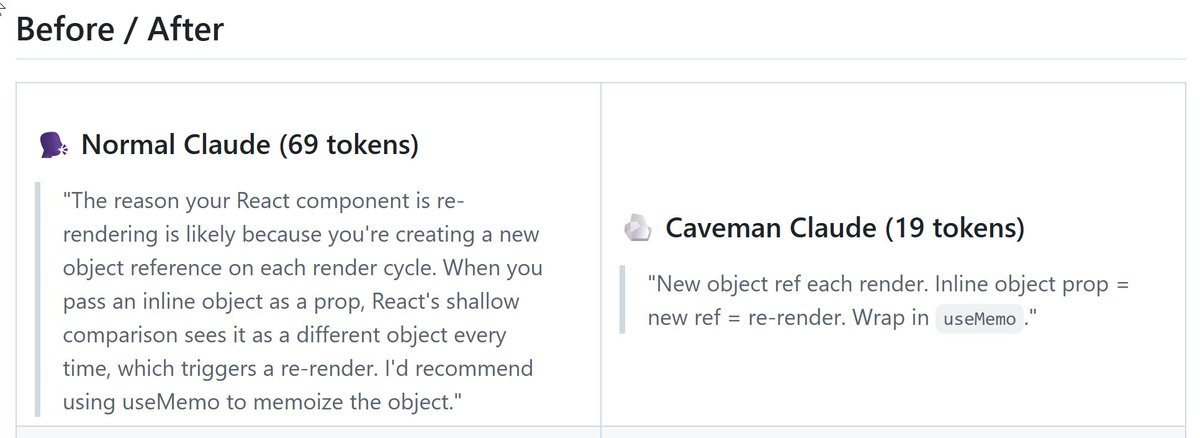
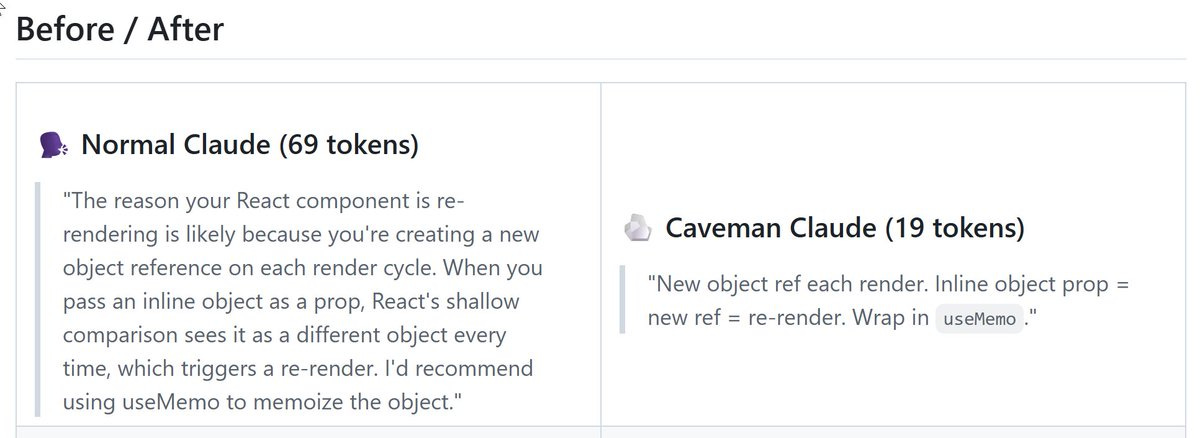
juliusbrussee/caveman. Drops conversational filler from responses without affecting the model’s actual reasoning. Highest savings on chats.
3. Wrong Model or Effort
Three separate dials. All burn tokens fast if you leave them on the wrong setting.
3.1 Effort
Default reasoning burns ~2× the tokens of medium for most tasks. Set it on the prompt that needs the headroom, not the whole session.
markdown
/effort low       # quick fixes, mechanical tasks
/effort medium    # most prompts (huge savings vs default)
/effort high      # demanding reasoning
/effort xhigh     # default for agentic coding (4.7)
/effort max       # diminishing returns; rarely worth the ~2× xhigh cost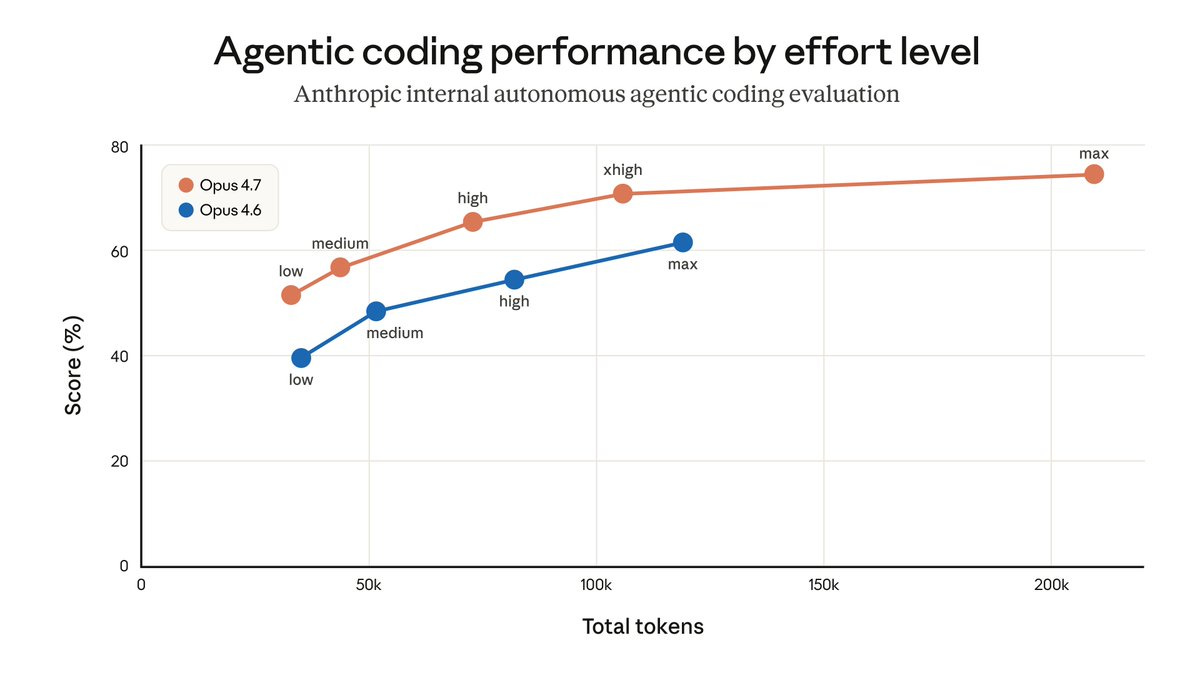
Per prompt, not per task or session. Since then, the effort dial got re-measured under Fable 5.
3.2 Route in (CLAUDE.md)
Pick the session model at start. You can’t switch mid-session without nuking the cache (§1). Two options:
Sonnet session. Cheaper, but no Opus available. Good when you know the work is in-scope for Sonnet.
Opus session + delegate. Pay for Opus on the parent (planning, tradeoffs), delegate the rest. My default for mixed work.
Then spell out delegation in CLAUDE.md: Haiku for mechanical work, Sonnet for scoped research, Opus for tradeoffs. Opus 4.7 delegates less than 4.6, so you have to ask. See § 2 (Task Delegation) for the full block.
3.3 Route Out
If you’re hitting Pro / Max / Team limits but want to keep the Claude Code interface, route to OpenRouter or another provider. GLM-5.1 ≈ Opus at ~1/12× the cost.
{
  "env": {
    "ANTHROPIC_BASE_URL": "https://openrouter.ai/api",
    "ANTHROPIC_AUTH_TOKEN": "{YOUR-API-KEY}",
    "ANTHROPIC_API_KEY": ""
    },
  "model": "z-ai/glm-5.1"
}4. Wrong Input Format
Some inputs are token-expensive by default. Three swaps cover most of it.
4.1 Screenshots and Chrome Scraping → agent-browser
vercel-labs/agent-browser browses pages via the accessibility tree instead of rendering and screenshotting. ~90% fewer tokens than “Claude in Chrome” when you’re scraping or doing research from web pages.
npm install -g agent-browser
agent-browser install  # Download Chrome from Chrome for Testing (first time only)
4.2 PDFs → pdftotext, Not Claude’s PDF Reader
The Read tool loads PDFs as images, which is expensive. Tell Claude to use ‘pdftotext’ instead of ‘Read’ (works for PDFs on local drive, but not attached to the chat - the latter works in Claude Desktop only).
The CLAUDE.md fragment that codifies defaults from 4.1 and 4.2:
## Preferred Tools

### Data Fetching

1. **WebFetch**: free, text-only, works on public pages that don't block bots.
2. **agent-browser CLI**: free, local Rust CLI + Chrome via CDP. For dynamic pages or auth walls that WebFetch can't handle. Returns the accessibility tree with element refs (@e1, @e2). ~82% fewer tokens than screenshot-based tools. Install: `npm i -g agent-browser && agent-browser install`. Use `snapshot` for AI-friendly DOM state, element refs for interaction.
3. **Notice recurring fetch patterns and propose wrapping them as dedicated tools.** When the same fetch/parse logic comes up more than once, suggest wrapping it as a named tool (e.g. a skill file or a .py script that calls `agent-browser` with the snapshot and extraction steps baked in for that source). Add the entry to `## Dedicated Tools` below and reference it by name on future calls.

### PDF Files

Use 'pdftotext', not the 'Read' tool. Use 'Read' only when the user directly asks to analyze images or charts inside the document. Read loads PDFs as images.

## Dedicated Tools

<!-- List project-specific tools here. For each, link to its skill or script file (e.g. `tools/reddit_fetch.py`). The orchestration logic lives in those files, not here. -->
4.3 Large Repos → Code Graph, Not Raw File Reads
tirth8205/code-review-graph builds a persistent map of your codebase (a knowledge graph). Claude reads only what matters. Claimed 6.8× fewer tokens on reviews, up to 49× on daily coding tasks. I implemented it in accredia.io. Worth noting: it does reduce tokens on specific tasks, not all tokens.
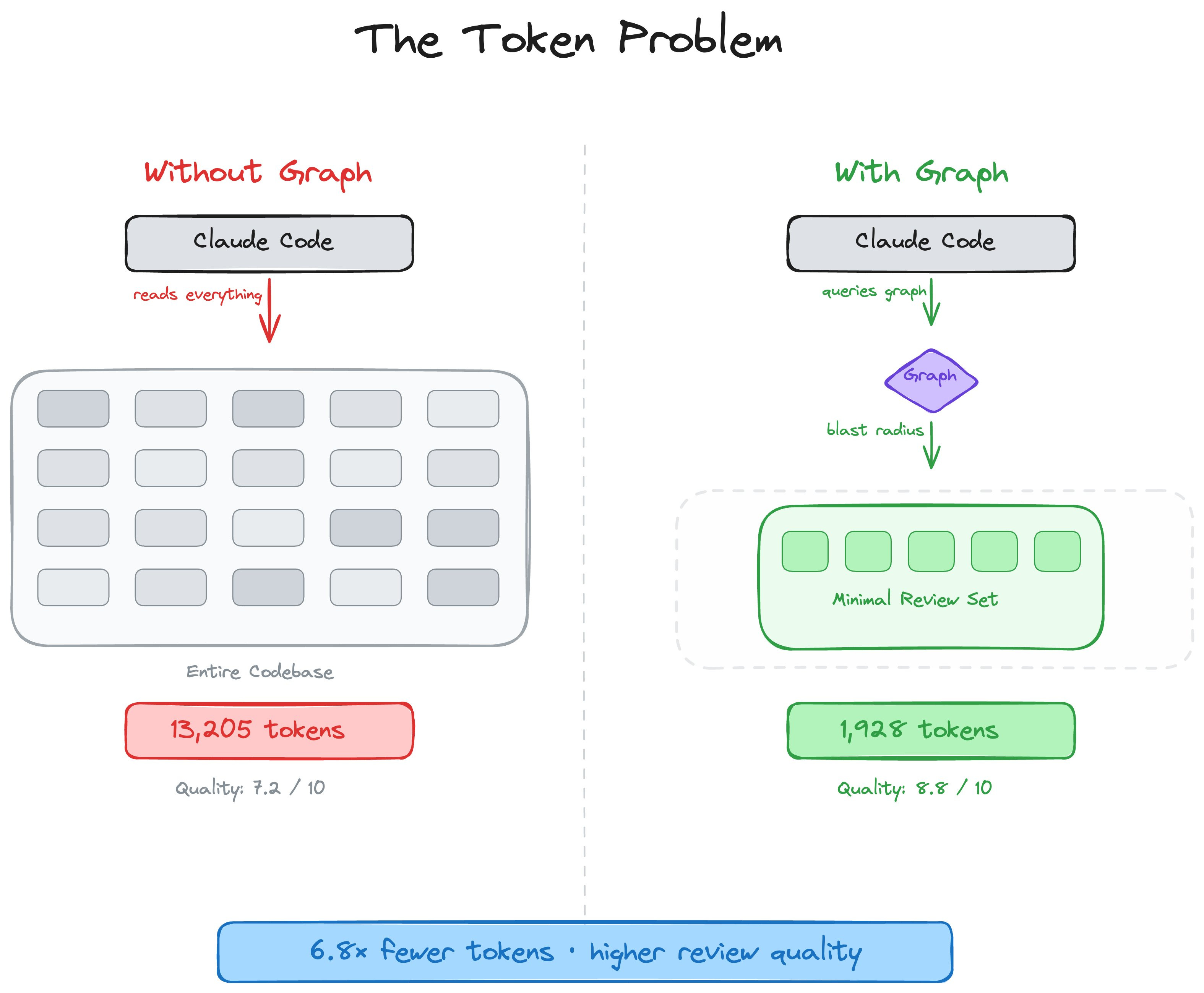
AI coding tools re-read your entire codebase on every task. code-review-graph fixes that. It builds a structural map of your code, tracks changes incrementally, and gives your AI assistant precise context via MCP so it reads only what matters.
5. Watch the Number
Three dashboards, depending on your tier:
5.1 Historical (Pro / Max / Team)
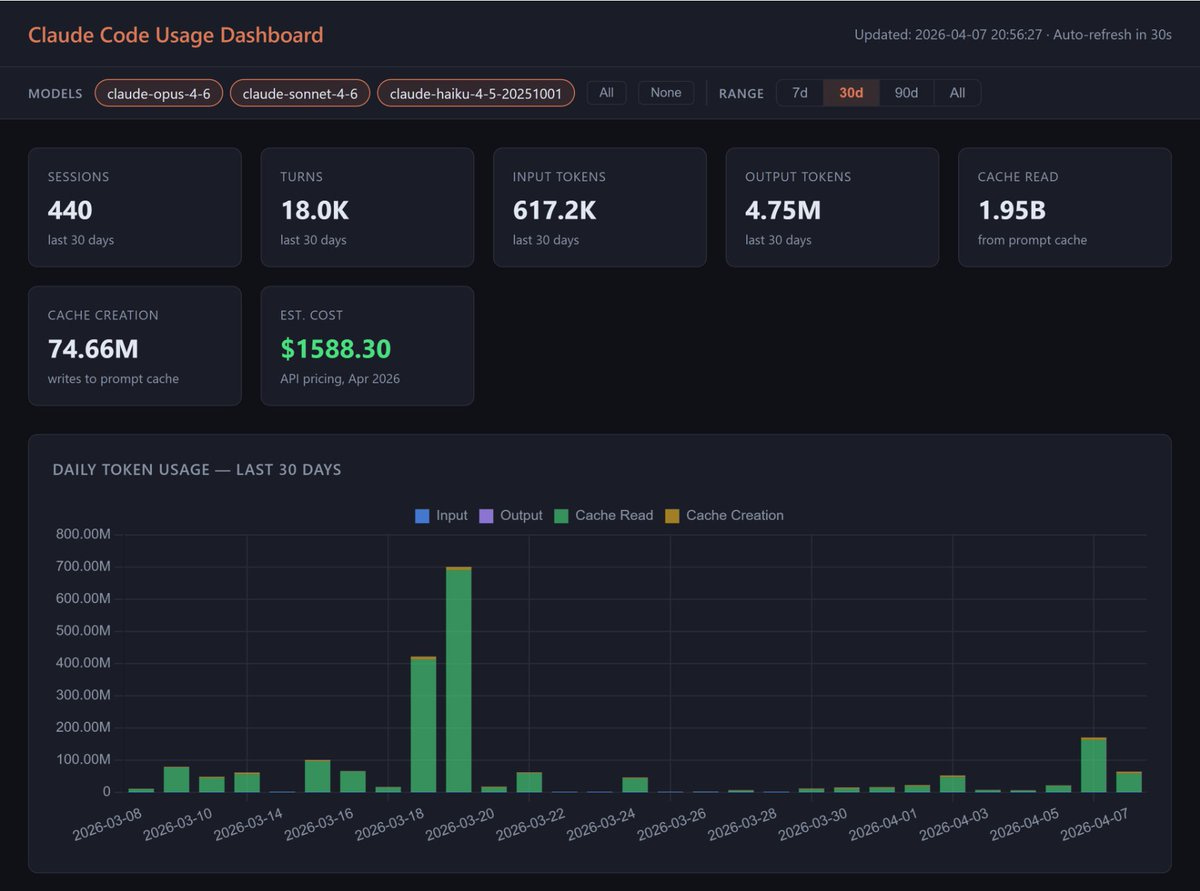
phuryn/claude-usage: Long-term breakdown by session, day, week, and all-time. Use it to find where the spend went.
5.2 Real-Time
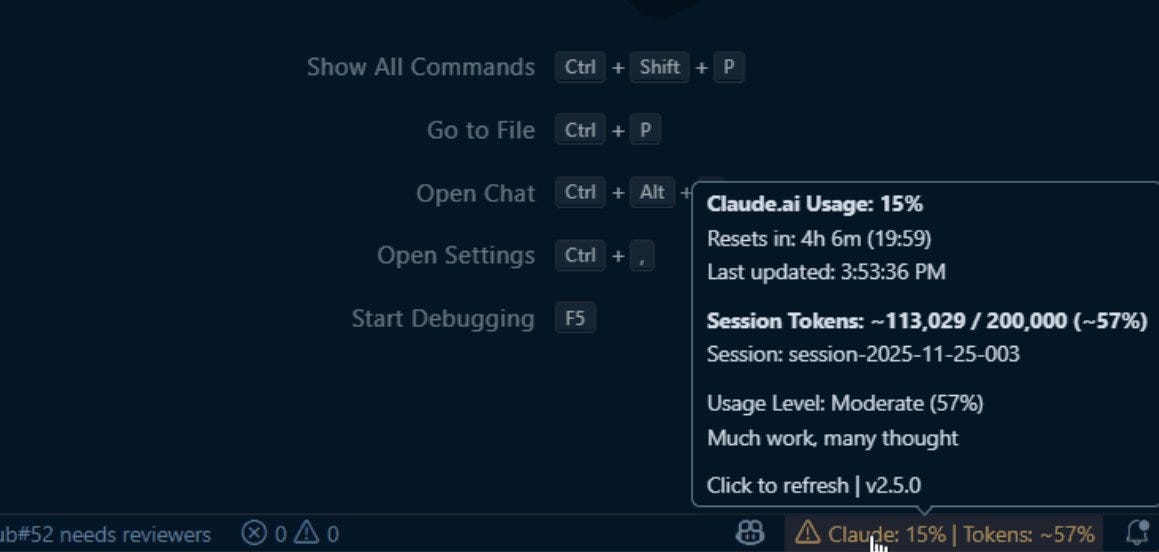
Gronsten/claude-usage-monitor: Current 5-hour window + active session tokens, with color thresholds. Use it to know how close you are to your cap right now.
5.3 API: Anthropic’s Own Cache Dashboard (API users)
At platform.claude.com/usage/cache, API only, separate from Pro / Max / Team subscriptions monitoring.
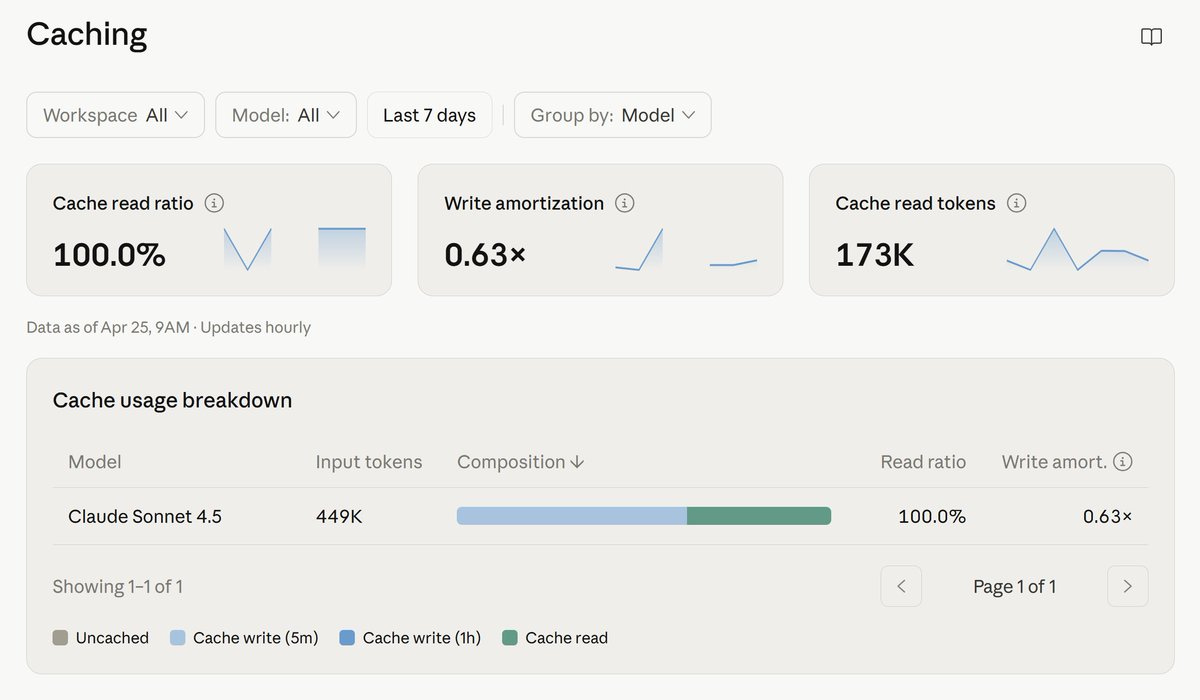
If you can’t see the cache hit rate, you can’t fix it.
🔒 6. An Upgraded Sub-Agents Instructions for Cowork and Claude Code
In §2.2, I shared a Subagents v1.0 block that significantly reduced my tokens in Claude Code, especially with Opus 4.7.
After running it across dozens of sessions, two failure modes kept showing up:
Subagents with no strategic context returned compliant-but-useless data, forcing the parent to re-spawn with a better brief and pay for the work twice.
Unverified data silently propagated into the parent agent.
Those two issues were common in Claude, unrelated to tokens.
The block below fixes them by adding the strategic-context layer. Works across Cowork and Claude Code 👇