
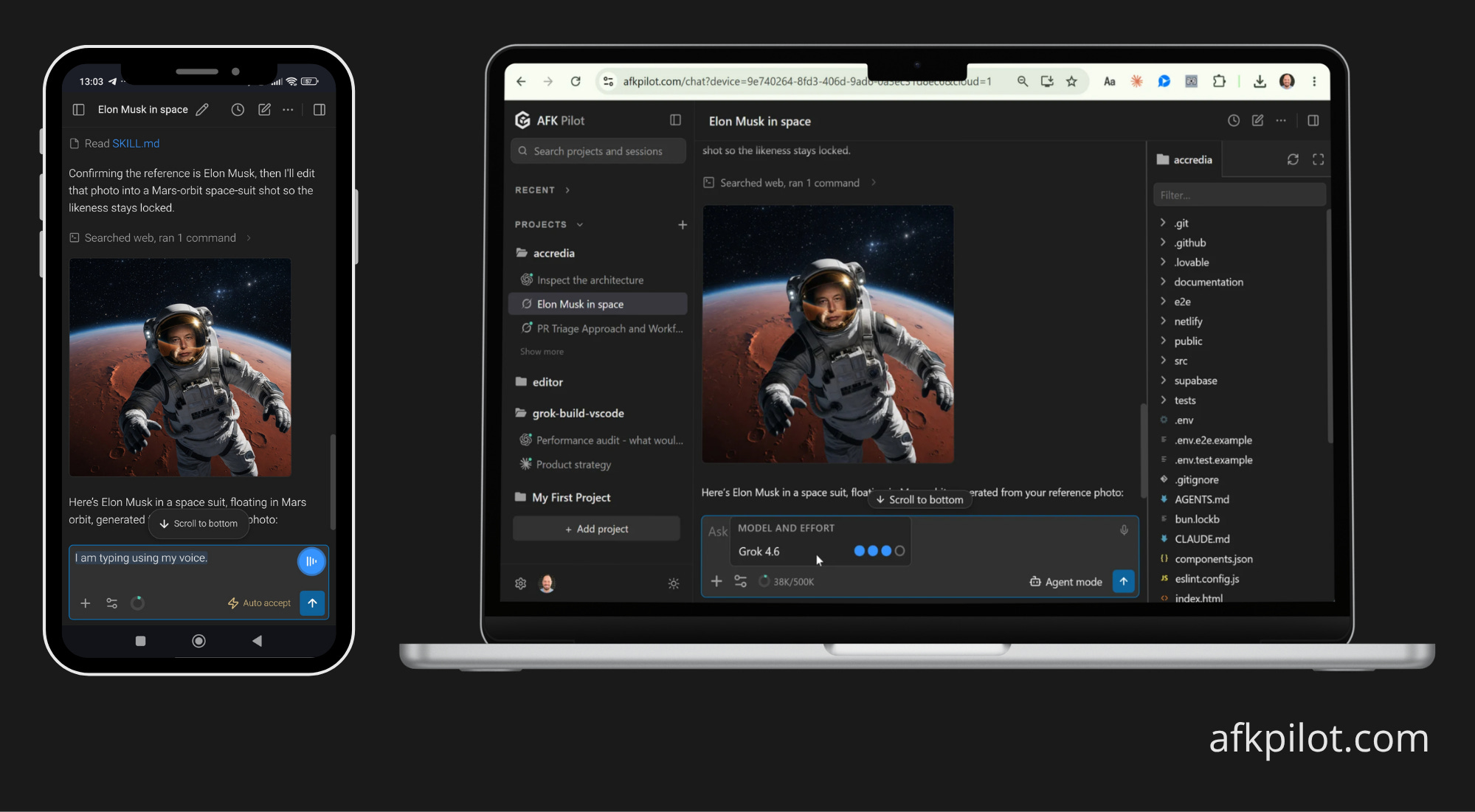
Yes, you can control the Grok Build coding agent from your phone. Grok Build ships as a terminal agent with no remote interface, so the answer is a third-party layer. The agent can run in the AFK Pilot extension (previously Grok Build for VS Code) or in Grok Build Desktop (Community), and AFK Pilot's remote control links either one to a browser on any device. You pair once with a one-time code, then chat, review, and steer the same session from a phone, tablet, or another laptop. Since September 2026 the machine does not have to be yours either: AFK Pilot Cloud gives you a dedicated machine of its own, reached the same way.
I build all of it. AFK Pilot and Grok Build Desktop (Community) are unofficial community projects, not affiliated with or endorsed by SpaceXAI (formerly xAI), Meta, OpenAI, Anthropic or Google.
Last updated: October 16, 2026.
At a Glance
What it is. Remote control for the Grok Build coding agent.
Runs on. Any modern browser. Installable as a phone app (PWA).
Setup. One-time pairing code. No tunnel, no VPN, no port forwarding.
Hosts. The AFK Pilot extension (v2.0.0 or newer), Grok Build Desktop (Community) on Windows, macOS and Linux, or an AFK Pilot Cloud machine that needs nothing installed. The agent is free to try with usage limits; sustained use needs SuperGrok, X Premium+, or an xAI API key.
Editors. VS Code 1.106+ and Cursor 3.x; other VS Code-based editors such as Google's Antigravity editor install it from Open VSX, and may hold you on the last version compatible with their VS Code base.
Model. Whatever the agent is on, switchable from the phone. A fresh Grok Build install starts on Grok 4.7.
Agents. Grok Build, and also Meta's Muse Code, OpenAI Codex and Claude Code, each signed in through its own CLI. All four connect from the phone. Google's Antigravity also runs, experimentally: off by default (Settings → Advanced), on your own computer only, and connected at the computer, not from the phone.
Cloud. AFK Pilot Cloud: a dedicated Linux machine, 8 CPU cores, 8 GB of RAM and about 100 GB of disk, that keeps its files between sessions and sleeps when idle. In preview, included with Remote Max.
Free tier. 1 linked device, 100 remote messages a week, the full chat UI. Messages inside the host itself are never limited.
Paid. $5 a month for unlimited linked devices and unlimited remote messages. The Cloud machine preview is included.
The Problem This Solves
Grok Build is a CLI agent. It runs where you started it, and it holds its state there. Start a long task, walk away, and the session is stranded on a machine you are not sitting at. The agent may be waiting on a permission prompt for twenty minutes while you are in another room.
The usual answers all put a network problem in front of the coding problem. SSH in from a phone terminal, expose a port, run a tunnel, or stand up a VPN mesh. Each works. Each also means the thing you set up first has nothing to do with the code you wanted to look at.
Four Ways to Reach a Grok Build Session Remotely
SSH and a phone terminal app. You set up SSH keys, a terminal emulator, and a reachable host. Traffic goes direct to your machine. Best for people who already live in a terminal.
A self-hosted Tailscale web UI. The two established projects, daniel-farina/grok-remote and ChrisP-Builds/grok-remote-hub, both run over a Tailscale tailnet on your own mesh, plus the project itself. Traffic never touches a third party. Newer community remotes appear monthly and vary in approach. Best if you want zero external relay and do not mind the setup.
AFK Pilot. You link the machine once from the extension and approve it in your browser, or type its one-time code at afkpilot.com/link. The extension dials out, so there is no inbound port to open. Messages are relayed in memory through the AFK Pilot server. Best if you want it working in a few minutes.
AFK Pilot Cloud. No machine of yours at all. A dedicated Linux machine, kept ready and linked to your account from the start, with Grok Build, Muse Code, Codex and Claude Code preinstalled. You open it from the device list and connect the agent from the browser. Best if you do not want a computer running at home.
The honest trade is where the traffic goes. The Tailscale projects keep every byte on hardware you control, which is genuinely the stronger privacy posture, and if that matters most to you they are the right pick. AFK Pilot relays through a server and buys you a setup with no network configuration at all. Pick the one whose cost you would rather pay. The Cloud machine is a third position: the hardware is ours, the disk and the sign-ins are yours, and there is nothing of yours to keep awake.
The Cloud Machine, Plainly
AFK Pilot Cloud is a dedicated Linux virtual machine that AFK Pilot runs for you: 8 CPU cores, 8 GB of RAM, about 100 GB of disk, with the Grok Build, Muse Code, Codex and Claude Code command-line agents already installed and the same browser interface already attached. It shows up at the top of your device list as Cloud, linked from the start, so there is no pairing code and nothing to install.
It is a persistent machine, not a per-session container. Cloned repositories, installed packages, dotfiles and agent sign-ins are still there next time. Between sessions it sleeps, and opening it wakes it: machines are kept ready, so that usually takes seconds, and when one has to be built from scratch it can take up to 25 minutes and the page says so while it works.
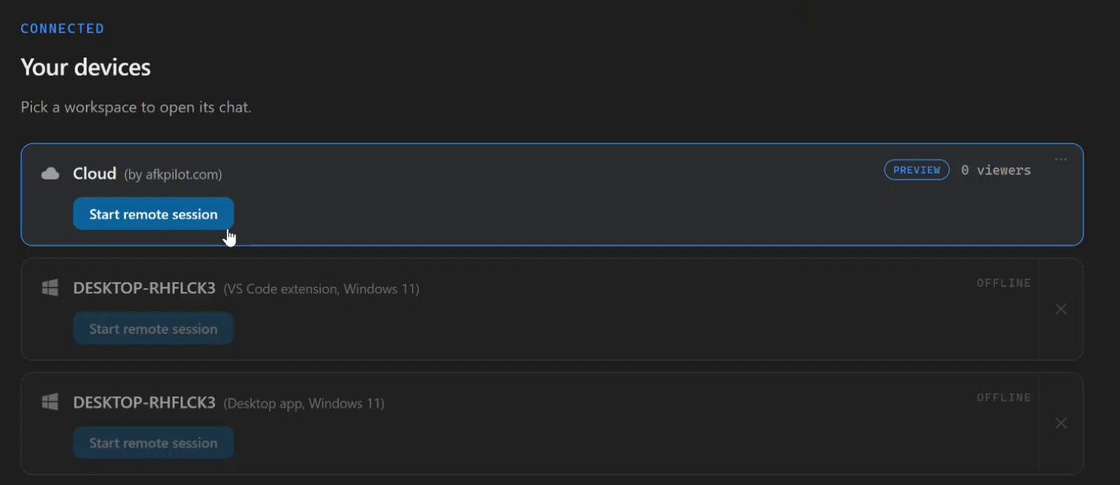
Signing agents in happens in the browser, on that machine. Grok Build signs in by device code, Codex by device code where its CLI and your account allow it, Claude Code by pasting the code Anthropic shows you, and Muse Code through Meta's link and short code. The credential lands on the machine, not in your browser and not on the relay; Anthropic's terms require exactly that, and the design treats all four the same way.
Connectors (MCP apps) work there, signed in from the browser, and Muse Code runs without its own shell sandbox, because the machine is already an isolated VM; its approval rules still apply. One limit during the preview, stated plainly: there are no automatic backups. A machine can be rebuilt or reclaimed when a preview ends, a subscription lapses, or maintenance needs it, so anything you care about goes to a Git remote. The host runs on hardware AFK Pilot operates, which makes the privacy separation a policy it keeps rather than a wall you own. Pricing is in the section below.
Set It Up in Three Steps
Install a host. Either one works. The AFK Pilot extension from the VS Code Marketplace or Open VSX (search "AFK Pilot" or the ID
grok-vscode-phuryn) if you already work in an editor, or Grok Build Desktop (Community) if you would rather not install one. Both install the grok CLI for you if it is missing.Link this device. In your host, click the phone button in the chat's top bar and choose Sign in and link this machine. On versions before 4.14 it is the gear menu, Remote Control, Sign in (link this device). The approval page opens in your browser. If the code is showing on a different machine, open /link and type it in by hand. Remote control ships in extension v2.0.0 and later, so update if you are on 1.x.
Open it on your phone. Visit afkpilot.com on the phone, sign in, and tap Install app to keep it one tap away. Once a machine is linked, the same phone button shows a QR code that opens the conversation on screen on your phone.
That is the whole setup. There is no tunnel to keep alive, no port to forward, and no VPN to join.
On a Cloud machine the steps collapse to one. The machine already exists and is linked from the start: open it from the device list, connect the agent from the browser, and start.
What You Can Actually Do from the Phone
It is the same session, not a separate agent and not a chatbot discussing your code from a distance. The workspace, the repository, and the conversation history are the ones on your desk.
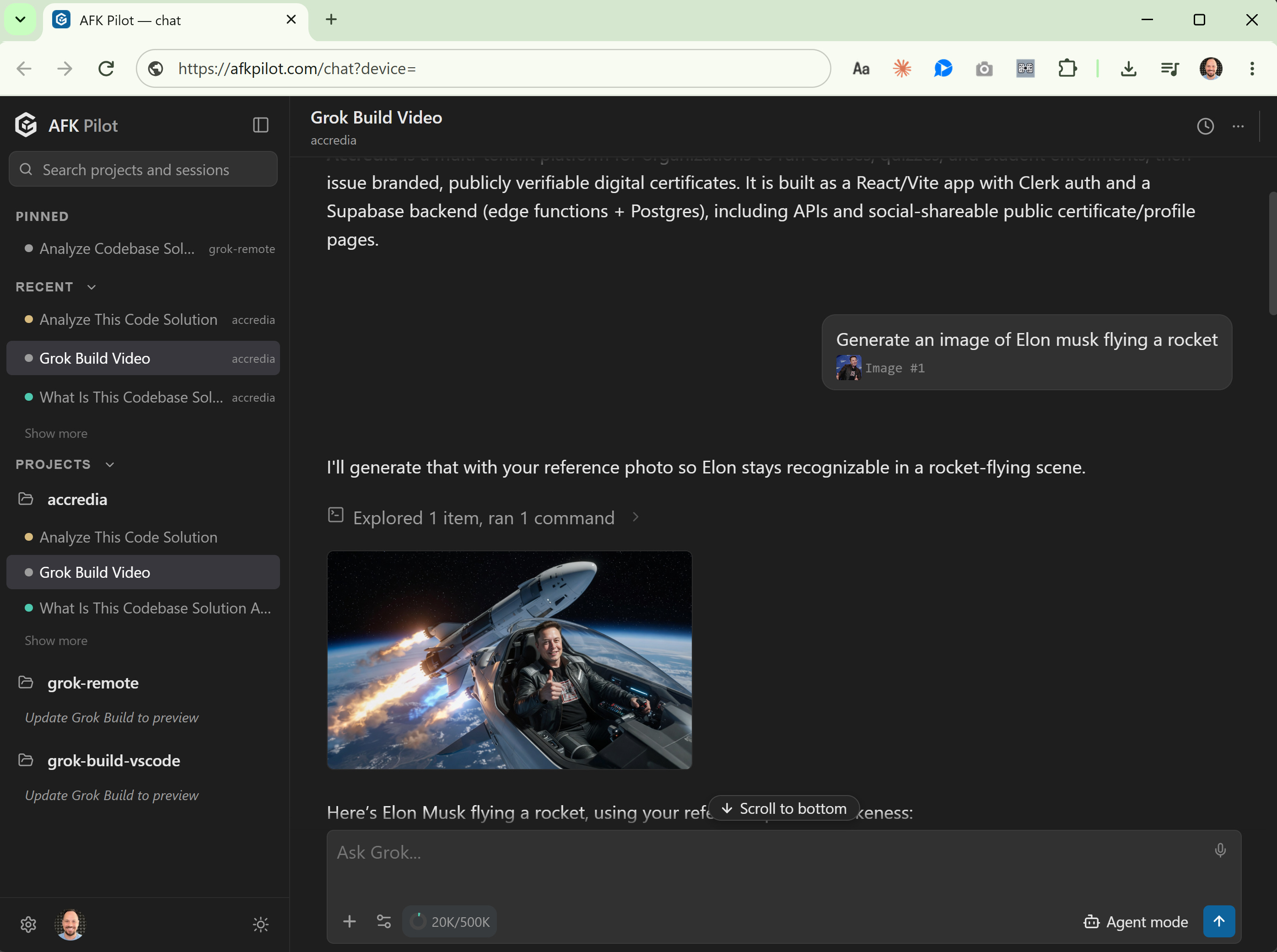
Send new work, not just read output
Hand a conversation from the desk to the phone: scan the QR code behind the phone button, or choose Continue on phone from a session's menu
Watch tool calls and file exploration stream live
Approve permission prompts and answer the agent's questions
Switch the model and the reasoning effort
Fork a conversation to try a different direction without losing the original
Pick which workspace to open when you have several linked
See every project and its recent conversations side by side, and start one in any of them
Browse the project’s files, several open at once. On a wide screen the panel sits beside the chat
Open, edit and save a text file. If the agent changed it underneath you, the save asks before overwriting
Connect an agent. Grok Build signs in by device code; Codex does too, where its CLI and your account allow device-code login; Claude Code shows you a URL and takes the code you paste back; Muse Code shows Meta's link and a short code. The credential lands on the machine running the agent, never in the browser and never on the relay
Sign in to GitHub and clone a repository: pick one from your account or paste a URL. Private repositories need the GitHub connection, by the GitHub CLI's device code or, as the advanced path, a fine-grained token the app hands to gh once and never stores
Rewind to an earlier turn, or edit one and send it again
Schedule a routine: a prompt that runs against a project on a timetable
Images work in both directions. Videos never leave your machine. A few things still need the desk: importing a folder from disk, which needs your operating system's folder picker; signing an agent out, except on a Cloud machine, where the browser is the only surface; and turning on and connecting Antigravity, which is experimental and runs on your own computer only.
Codex from your phone
OpenAI has an official route for Codex: you set up remote access in the ChatGPT desktop app on the host, on macOS or Windows, and control it from the ChatGPT app on iOS or Android. OpenAI's remote connections guide says it can't be set up from the Codex CLI or the IDE extension. That desktop app can also work in a project on an SSH host, such as a Linux server; your phone still connects through the Mac or Windows machine running it. If you already work in that desktop app, it is the natural pick.
The AFK Pilot route reaches the Codex conversations you start in the AFK Pilot extension or in Grok Build Desktop (Community), on a Windows, macOS or Linux host, or on a Cloud machine, where Codex is preinstalled. From the phone you can steer a running Codex turn, approve its commands and file changes, and switch its model, such as GPT-6 Astra. Codex signs in with your ChatGPT account or an API key, and you can connect it from the phone by device code where your OpenAI account allows device-code login.
Privacy and What Leaves Your Machine
Messages are relayed in memory and are never stored. Every linked device binds to your account and stays revocable from the server at any time, so a lost phone is a revocation rather than an incident.
This is a relay, so your prompts and the agent's replies do pass through it in transit. Your files stay on your machine, where the agent reads them locally. If a third-party relay is outside your threat model, use one of the Tailscale projects above instead. I would rather tell you that here than have you discover the architecture later.
Pricing
The free tier is one linked device and 100 remote messages a week, with the full chat interface. Remote Max is $5 a month and removes both limits. A fair-use burst cap of 20 messages a minute applies on every plan, and messages inside the host itself are never limited. The Cloud machine is in preview and included with Remote Max for now; it will get a plan of its own later. Current terms are on afkpilot.com.
The extension itself stays free to install. As of v2.0.0 it is licensed FSL-1.1-MIT (Fair Source): free to use, modify, and redistribute for any purpose except building a competing commercial product or service, and each release converts to plain MIT two years after it ships. Everything up to and including v1.8.1 was published under MIT and stays MIT. The relay and the Cloud machines are the hosted pieces.
What This Is Not
Not a mobile IDE. You can open, edit and save a text file when you need to, but the job is steering an agent, not writing code by hand on a 6-inch screen.
Not a way around Grok’s own limits. The agent underneath runs on your account: free to try with usage limits, and SuperGrok, X Premium+, or an xAI API key for sustained use.
Not a SpaceXAI product. No official remote interface for Grok Build exists. This is a community layer over the official CLI.
Not a way around your own machine sleeping, unless you take the Cloud machine. On your own hardware the agent runs where you installed it. Since v2.0.1 the extension holds off idle sleep while a device is linked, so a turn you started from the phone is not cut short by the screensaver, and it releases that hold the moment you sign out. A closed lid still suspends on every operating system. The Cloud machine removes that requirement: it sleeps on its own between sessions and wakes when you open it, so your laptop can stay shut.
FAQ
Can I control Grok Build from my phone?
Yes. Install a host, either the AFK Pilot extension or the Grok Build Desktop (Community) app, link the device with a one-time code, and open afkpilot.com on your phone. You get the same session your editor is running.
What is AFK Pilot?
AFK Pilot is a free extension for VS Code, Cursor and other VS Code-based editors that runs Grok Build, Muse Code, Codex and Claude Code, and, experimentally, Google's Antigravity (off by default, on your own computer only), in one chat interface. Remote control from any browser at afkpilot.com is one of its features: pair once with a one-time code and the same session opens on your phone. AFK Pilot Cloud is its hosted machine, with four agents preinstalled. The standalone Grok Build Desktop (Community) app links to afkpilot.com the same way. I build all of them. The remote has a free tier; Remote Max is $5 a month and includes the Cloud preview.
Is there an official remote control for the Grok coding agent?
No. SpaceXAI (formerly xAI) ships Grok Build as a CLI with a terminal UI and no remote interface. Every remote option today is third-party.
Do I need Tailscale or a VPN?
Not for AFK Pilot. Pairing is a one-time code. The self-hosted alternatives (grok-remote, grok-remote-hub) do require a Tailscale tailnet, which is the trade-off for keeping traffic entirely on your own network.
Do I have to expose a port or run a tunnel?
No. The extension dials out to the service, so there is nothing to forward and nothing to keep running.
Is my code sent to a server?
Your prompts and the agent's replies are relayed in memory and never stored. Your files stay on your machine, where the agent reads them locally. Videos never leave your machine.
Does it work on iPhone and Android?
Yes. It runs in any modern mobile browser and installs as an app on both.
Is it free?
There is a free tier: one linked device and 100 remote messages a week, and Remote Max is $5 a month for unlimited devices and messages. The extension and the desktop app are free to install either way, and the source is public under FSL-1.1-MIT (Fair Source), which converts each release to plain MIT two years after it ships.
Does it work with Cursor?
Yes. The AFK Pilot extension runs in VS Code 1.106+ and Cursor 3.x, and its remote control works the same in each. Other VS Code-based editors such as Google's Antigravity editor install it from Open VSX, and may hold you on the last version compatible with their VS Code base. Cursor also ships remote features of its own: cloud agents that work on a copy of your repo in its infrastructure, and an iOS Remote Control for local sessions on paid plans. How the three routes differ, and where each wins: Cursor Remote Control.
Does it work in Antigravity?
Yes, in two ways. Google's Antigravity editor installs the extension from Open VSX, though it may hold you on the last version compatible with its VS Code base, and remote control works the same there. And Google's Antigravity agent runs inside AFK Pilot as an experimental fifth agent: off by default (Settings → Advanced), on your own computer only, connected at the computer, then reachable from the phone like the others. Those are AFK Pilot's own Antigravity conversations; for sessions you start in Google's Antigravity app, Google's own Remote Control (since August 2026) is the route. How the routes differ: Antigravity Remote Control.
Can I start new work from my phone, or only review?
Both. You can send new instructions, approve permissions, and open, edit and save project text files, not just watch.
Looking for Grok Projects on your phone?
Grok Projects, the workspace feature in the grok.com chat apps, is a different thing; open grok.com or the X app for that. This page is about the Grok Build coding agent. Its projects rail shows every coding project and its conversations side by side in the same phone browser.
What happens if I lose my phone?
Revoke that device from the server. Every linked device is bound to your account and individually revocable, and signing out unlinks it on both ends.
Which model does it use?
Whichever the agent is on, and you can switch it from the phone. A fresh Grok Build install starts on Grok 4.7. The other agents show the models their own CLI offers your account, such as GPT-6 Astra in Codex, Opus 5.5 as Claude Code's default, Muse Wonder in Muse Code, and Gemini 4 Argon in Antigravity when it is connected with a Gemini API key. Grok setup detail: How to Use Grok 4.7 in VS Code.
How is this different from the extension itself?
The extension and the desktop app are the hosts: the agent runs there, on your own machine or on a Cloud machine. The remote is the browser surface at afkpilot.com that drives whichever one you are running; it is part of AFK Pilot, not a separate product. Full feature list: the AFK Pilot extension, or the standalone route: Grok Build Desktop (Community). Deciding between GUI options first: Does Grok Build have a GUI?.
Can I reach Codex, Claude Code and Muse Code this way too?
Yes. The remote layer sits on the extension, not on any one agent, so whichever agents you have connected, Grok Build, OpenAI Codex, Claude Code or Meta's Muse Code, are reachable from the same phone, and the browser shows which of them are connected. You can also connect them from the phone: Grok Build and Codex by device code (Codex only where its CLI and your account allow it), Claude Code by pasting the code Anthropic shows you, Muse Code through Meta's link and short code. Signing an agent out still happens at the desk, except on a Cloud machine. Google's Antigravity, the experimental fifth agent, is reachable too once you turn it on and connect it at the computer; it cannot be connected from the phone and does not run on Cloud machines.
Do I have to leave my computer on?
For an agent on your own machine, yes: awake and online. The extension holds a wake lock while a device is linked so the machine does not idle-sleep, but a closed lid still suspends. With a Cloud machine, no. It runs in AFK Pilot's cloud, sleeps on its own between sessions and wakes when you open it, so your laptop can stay shut.
Can I run Grok Build on a server or a VPS and reach it from my phone?
The extension needs a window of VS Code, Cursor or Google's Antigravity editor on that machine to live in, so a plain headless server is not a host by itself. The Cloud machine is the answer to that: a Linux machine with a host and the four agents already on it, reachable the same way as any other device in your list. If the agent you want on a server is Claude Code, the do-it-yourself route is written up here: Claude Code on a VPS.
Can I clone a private GitHub repo from my phone?
Yes. Connect GitHub once under Settings, Providers, either with the GitHub CLI's device code, a short code you confirm on github.com, or, as the advanced path, a fine-grained token the app passes to gh once and never stores. Then pick the repository from your account or paste its URL. Public repositories clone without signing in, and the clone lands in ~/AFK Pilot on the machine running the agent.
Is the Cloud machine shared?
No. It is one Linux virtual machine per account, with 8 CPU cores, 8 GB of RAM and about 100 GB of disk, and your files stay on it between sessions. It is not backed up automatically, and it can be rebuilt or reclaimed when a preview ends or a subscription lapses, so anything you want to keep goes to a Git remote.
Can I control Muse Code from my phone?
Yes. Meta ships Muse Code as a terminal agent with no remote interface, and the extension and the desktop app run it like the other agents, so AFK Pilot reaches it the same way: link the machine once and the Muse conversation opens on the phone, approvals and workflow cards included. Muse's approval mode switches from the phone; its sandbox and workspace-trust settings stay at the desk, and installing Muse has to happen on the machine itself. Cloud machines come with Muse preinstalled. More: Muse Code GUI.
AFK Pilot exists because a user asked for it, which is most of what I have to say about product work. I write that up here: what building in the open teaches me, not the tool tour.