
Antigravity has had a first-party Remote Control since August 21, 2026. Turn it on in Settings, App, and any browser can open your Antigravity 2.0 desktop sessions: the conversations, the plans, the artifacts, with a push notification on your phone when an agent needs you. That covers most of what people mean by “Antigravity from my phone”. This page is about what it covers, what it needs, and the other route: running Grok Build, OpenAI Codex or Claude Code inside Antigravity and steering those from a phone, or running them on a cloud machine with no computer of yours at all.
I built AFK Pilot, and I also build the extension it connects to. Google's Remote Control is Google's, and where it fits you should use it. Neither of mine is affiliated with or endorsed by Google or SpaceXAI (formerly xAI).
Last updated: September 4, 2026.
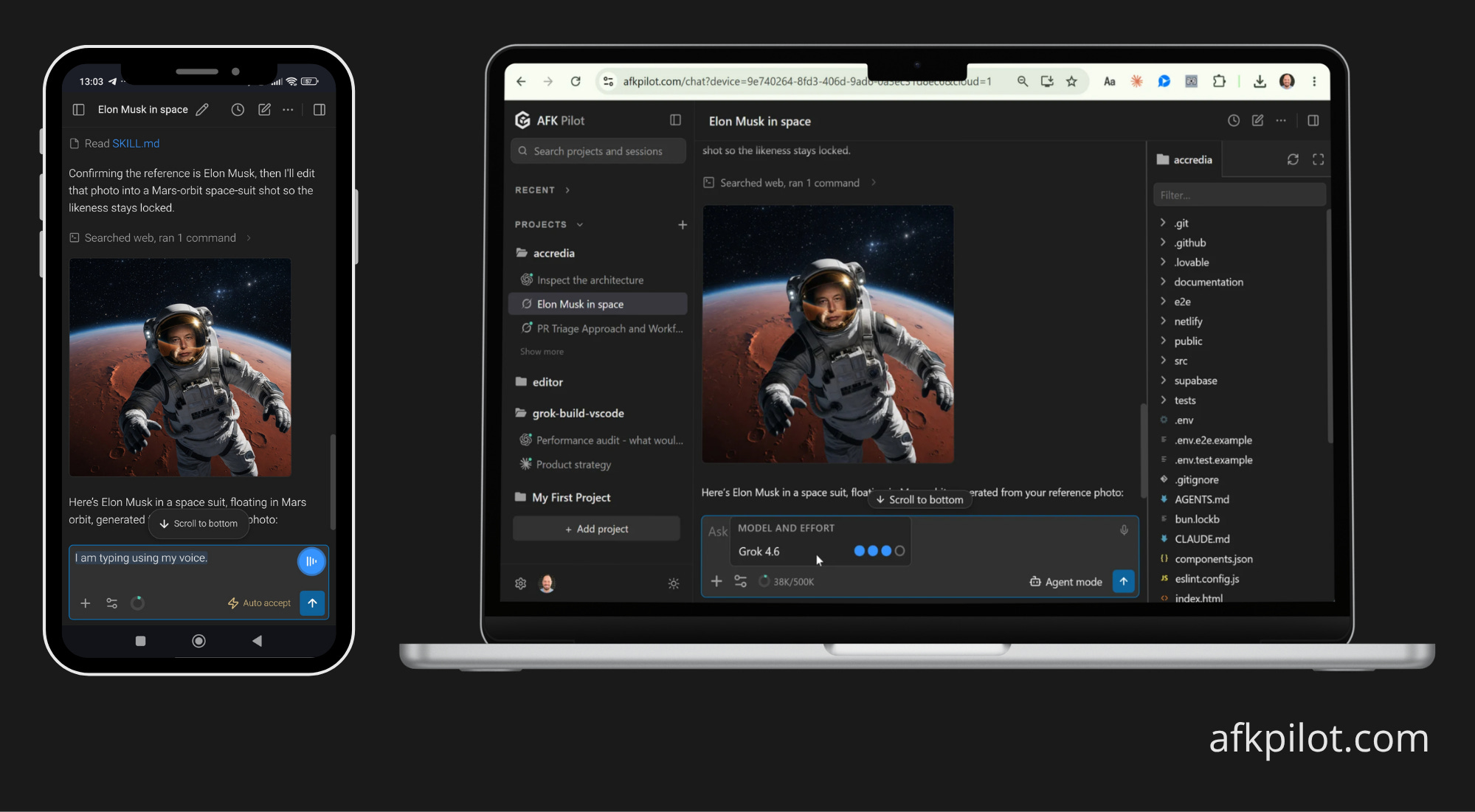
At a Glance
Google's Remote Control. Ships with Antigravity 2.0 since August 2026. Any browser, the same Google account, an instance switcher across your machines, push notifications on the phone. It drives Antigravity's own agent.
What it needs. Antigravity 2.0 desktop with Remote Control enabled, awake and online. For a server with no editor, Google provides a headless daemon for Linux, macOS and Windows.
The other route. Grok Build for VS Code (Community) from Open VSX inside Antigravity 2.1.1 or newer, paired once with AFK Pilot. It drives Grok Build, Codex or Claude Code, not Antigravity's agent. Any browser, a free tier, and it edits real files.
No computer at all. AFK Pilot Cloud: a dedicated Linux machine with the three agents preinstalled, reached from the same browser.
Free tier. 1 linked device, 100 remote messages a week, the full chat UI.
Paid. Remote Max, $5 a month, for unlimited linked devices and unlimited remote messages. The Cloud machine preview is included.
What Google's Remote Control Does
Enable it in Antigravity 2.0 under Settings, App: toggle Enable Remote Control on, and optionally give the machine a nickname. Then open the Remote Control dashboard in any browser, sign in with the same Google account, and pick the machine. You see the active conversations, start new agent tasks, review implementation plans and inspect artifacts. On a phone the dashboard installs to the home screen and pushes a notification when an agent finishes or needs your input.
For machines nobody sits at, Google ships a headless daemon: an installer script for Linux and macOS, and a Windows one that needs an Administrator Command Prompt. It signs in once by device code and then keeps itself signed in across reboots. On macOS the daemon stops when you sign out of the user account; on Linux and Windows it keeps running.
Two things decide whether it is enough for you. It steers Antigravity's own agent and only that one. And the host has to be awake and online: Google's own troubleshooting list starts with making sure the machine is not asleep or suspended.
The Other Route: A Different Agent Inside Antigravity
If the agent you want from your phone is Grok Build, Codex or Claude Code rather than Antigravity's, Google's Remote Control does not reach it. The route that does: install the Grok Build for VS Code (Community) extension from Open VSX, which is Antigravity's own extension gallery, pair it once with AFK Pilot, and steer that agent from any browser. It is the same session, in the same workspace, and the phone edits real files. It works on Antigravity 2.1.1 and newer.
One thing up front, because it decides whether this half of the page is useful to you: this does not remote-control Antigravity's own agent. It runs a second agent inside the same editor, and that one is what you steer.
Set It Up in Three Steps
Install the extension from Open VSX. Open the Extensions view in Antigravity and search for Grok Build, or open the listing directly. You need Antigravity 2.1.1 or newer. On 2.0.x the install fails with a compatibility error, which the FAQ below explains and fixes. The extension walks you through installing the
grokCLI and signing in, one click per step.Link this device. In the extension, open the gear menu, choose Remote Control, then Sign in (link this device). The approval page opens in your browser. If the code is showing on a machine you are not sitting at, open /link and type it in by hand.
Open it on your phone. Visit afkpilot.com on the phone, sign in, and tap Install app to keep it one tap away.
That is the whole setup. There is no tunnel to keep alive, no port to forward, and no VPN to join.
What You Can Do From the Phone
It is the same session, not a separate agent and not a chatbot discussing your code from a distance. The workspace, the repository, and the conversation history are the ones open in Antigravity on your desk.
Send new work, not just read output
Watch tool calls and file exploration stream live
Approve permission prompts and answer the agent's questions
Browse the project's files and open, edit and save a text file
See every project and its recent conversations side by side, and start one in any of them without switching first
Switch the model and the reasoning effort
Fork a conversation to try a different direction without losing the original
Connect the agent from the phone: Grok Build and Codex by device code (Codex where its CLI and your account allow it), Claude Code by pasting the code Anthropic shows you
Sign in to GitHub and clone a repository, by the GitHub CLI's device code or a fine-grained token the app never stores
The file panel is a real editor, not a viewer. Several files open as tabs, and on a wide screen they sit beside the chat. Text files up to 2 MiB open, images preview only, and there is no create, delete, or rename. If the agent changed a file underneath you while you were typing, you get a choice between reloading and overwriting rather than a silent clobber.
Images work in both directions. Videos never leave your machine.
What This Is Not
Not remote control of Antigravity's own agent. That is Google's Remote Control, above, and you should use it when Antigravity's agent is the one you want from the phone.
Not a mobile IDE. You are steering an agent and making small edits, not doing a refactor by hand on a 6-inch screen.
Not a Google product. Antigravity and its Remote Control are Google's. The extension and AFK Pilot are mine, and neither is affiliated with or endorsed by Google or SpaceXAI.
Not a way around your machine sleeping, unless you take the Cloud machine. On your own hardware the extension holds off idle sleep while a device is linked, so a turn you started from the phone is not cut short by the screensaver, but a closed lid still suspends on every operating system, and Google's Remote Control has the same requirement. AFK Pilot Cloud removes it: the machine sleeps on its own between sessions and wakes when you open it.
Privacy and What Leaves Your Machine
Messages are relayed in memory and never stored on our servers. Every linked device binds to your account and stays revocable at any time, so a lost phone is a revocation rather than an incident.
This is a relay, so your prompts and the agent's replies do pass through it in transit. Your files stay on your machine, where the agent reads them locally. If a third-party relay is outside your threat model, the self-hosted Tailscale projects listed on the general remote control page keep every byte on hardware you control, at the cost of a network setup you have to maintain. I would rather tell you that here than have you discover the architecture later.
Pricing
The free tier is one linked device and 100 remote messages a week, with the full chat interface. Remote Max is $5 a month and removes both limits. A fair-use burst cap of 20 messages a minute applies on every plan, and messages inside the editor itself are never limited.
The extension is free to install. The agent underneath is free to try with usage limits on any X or Grok account, and sustained use runs on SuperGrok, X Premium+, or an xAI API key. Antigravity itself is free to use on a personal Google account, with paid Google AI plans changing which models its own agent gets. None of that is affected by this setup. AFK Pilot Cloud is in preview and included with Remote Max for now. Google's Remote Control is part of Antigravity, on your Google account.
FAQ
Can I use Antigravity from my phone?
Yes, two ways. Google's Remote Control, since August 2026, opens your Antigravity 2.0 sessions in any browser and steers Antigravity's own agent. The extension route runs Grok Build, Codex or Claude Code inside Antigravity and steers those from any browser through AFK Pilot.
Does Antigravity have a mobile app?
Not a store app. Google's Remote Control is a web app you can install to the phone's home screen, with push notifications when an agent needs you. AFK Pilot is the same kind of thing for the other agents.
Does Antigravity Remote Control work when my laptop is closed?
No. The host has to be awake and online; Google's troubleshooting page says so first. The headless daemon is Google's answer for a server. AFK Pilot Cloud is mine: a dedicated Linux machine that sleeps on its own and wakes when you open it, so nothing of yours has to stay on.
Does this control Gemini in Antigravity?
Google's Remote Control does. The extension route does not: it controls the Grok Build, Codex or Claude Code agent running inside Antigravity, not Antigravity's own built-in agent.
I get "Extension is not compatible with Code 2.0.6. Extension requires: ^1.90.0". How do I fix it?
Update Antigravity to 2.1.1 or newer, then install the extension normally. Antigravity 2.0.x reported its own product version, 2.0.x, to the extension host instead of the VS Code base version it is built on, so every extension declaring a ^1.x engine range was rejected. That was not specific to this extension. Google fixed it in 2.1.1, which reports base 1.107.0 again, comfortably above the extension's 1.106 floor.
Can I edit files remotely?
Yes. You can browse the project tree and open, edit and save a text file from the phone, with several files open as tabs at once. Images are preview only, text files cap at 2 MiB, and creating, deleting, and renaming are not available from the remote surface.
Is it free?
There is a free tier: one linked device and 100 remote messages a week, and Remote Max is $5 a month for unlimited devices and messages. The extension itself is free to install, and the Grok Build agent is free to try with usage limits on any X or Grok account.
Does it work on iPhone and Android?
Yes. It runs in any modern mobile browser and installs as an app on both.
Do I need a tunnel or a VPN?
No. You pair once with a one-time code, and the extension dials out to the service, so there is nothing to forward and nothing to keep running. No tunnels, no config.
Is my code sent to a server?
Your prompts and the agent's replies are relayed in memory and never stored on our servers. Your files stay on your machine, where the agent reads them locally. Videos never leave your machine.
Does the same setup work in VS Code or Cursor?
Yes. The extension supports VS Code 1.106+, Cursor 3.x, and Antigravity 2.1.1+, and the remote layer connects through the extension, so whatever the extension runs in, this runs in. Cursor has its own wrinkle worth reading first: Cursor Remote Control. The plain VS Code version: Grok Remote Control.
---
AFK Pilot exists because a user asked for it, which is most of what I have to say about product work. I write that up here: what building in the open teaches me, not the tool tour.