
DeepSeek ships no VS Code or Cursor extension for DeepSeek Harness. The free AFK Pilot extension runs DeepSeek's official harness (dsh) in a VS Code or Cursor sidebar, next to Grok Build, Claude Code and Codex. The same interface runs it in a desktop app that also ships for Linux, and from your phone without a server of your own.
DeepSeek does ship its own GUI: dsh comes with a CLI, a local Web UI and a desktop app for Apple silicon Macs and Windows. If you want DeepSeek Harness by itself on an Apple silicon Mac or a Windows PC, use DeepSeek's app from deepseek.com/en/harness. This page covers what it doesn't: the editor, a Linux desktop app, and your phone without a server of your own.
I build AFK Pilot: the extension, the desktop app and the afkpilot.com phone client. None of them is affiliated with or endorsed by DeepSeek.
Last updated: November 5, 2026 (AFK Pilot v4.15.8, which pins dsh 0.2.1-rc.5).
In VS Code or Cursor: the AFK Pilot extension. On Linux or an Intel Mac, without an editor: Grok Build Desktop (Community). From your phone: afkpilot.com. DeepSeek Harness alone on an Apple silicon Mac or a Windows PC: DeepSeek's own app.
At a Glance
What it is. A graphical interface for DeepSeek's own harness, not a re-implementation of it. The app installs the official
@deepseek-ai/dshpackage from npm at a pinned version and talks to it over the Agent Client Protocol.Where it runs. VS Code 1.106+ and Cursor as an extension; Grok Build Desktop (Community) as a standalone app on Windows, macOS and Linux; any browser through afkpilot.com once the computer is linked.
What you need. A DeepSeek API key. The app brings its own Node for dsh and leaves your global Node alone.
Two harnesses. Default (dsh's standard agent and full tool set, with goal and skill shortcuts) or Minimal (a lean tool set, full access, no prompts), chosen per conversation.
Other agents. Grok Build, Muse Code, Codex, Claude Code and Antigravity run in the same window. Each conversation keeps the agent it started with. Antigravity, like DeepSeek, is off by default.
Price. The extension and the desktop app are free. DeepSeek bills your API key per token. The phone client has a free tier; Remote Max is $5 a month.
Set It Up
Install a host. In VS Code, Cursor or another VS Code-based editor, open Extensions (Ctrl/Cmd+Shift+X), search “AFK Pilot” or the ID
grok-vscode-phuryn, and install, or use the direct links for the VS Code Marketplace and Open VSX. No editor? Download Grok Build Desktop (Community) from afkpilot.com/desktop.Turn DeepSeek on and connect it. Turn on DeepSeek in Settings → Advanced (it's off by default), then connect it in Settings → Providers with your DeepSeek API key. The app downloads a pinned copy of dsh and its own Node, checks the Node download against the checksums nodejs.org publishes, and keeps the key in its secure storage. If
DEEPSEEK_API_KEYis set in your environment, it uses that. The install took about five and a half minutes on my Windows machine.Pick a model and a harness. Choose a DeepSeek model in the model picker. Then click the context ring next to the token count and pick Default or Minimal under Harness, before your first message. After that the conversation keeps its harness; start a new one to switch.
Default or Minimal
dsh comes in several profiles. AFK Pilot runs two of them, and you choose per conversation:
Default. dsh's standard agent with its full tool set and subagents, plus the goal and skill shortcuts below. dsh is built to ask before actions it flags, but in my tests on Windows it asked about neither shell commands nor file writes, and its Windows shell runs without dsh's sandbox: treat it as close to full access on Windows. The Agent mode / Auto accept switch applies to DeepSeek too.
Minimal. A lean tool set (on Windows: a PowerShell terminal, an image reader and a working-directory tool), full access, and no approval prompts. A notice in the chat says so for as long as it runs. On my Windows machine it starts in about 2 seconds, against about 7 for Default.
Goals and skills in Default
Type / in a Default conversation and the menu offers AFK Pilot's goal shortcuts (/goal, /goal-status, /goal-pause, /goal-resume, /goal-done) and the skills dsh itself would load: the project's .dsh/skills and .agents/skills, then ~/.agents/skills. The goal shortcuts ask the model to use dsh's goal tools; in DeepSeek's own Web UI, /goal is a direct command instead. Skills reach the model the way dsh loads them. Minimal has neither.
Each harness keeps its own dsh home inside the app's storage, separate from any ~/.dsh configuration you already have.
What You Get in the Editor
Six agents in one panel. DeepSeek sits next to Grok Build, Muse Code, Codex, Claude Code and Antigravity. Models from every connected agent share one picker, and each conversation keeps its agent, so you can put the same task to DeepSeek Harness and Claude Code and switch between the two conversations in one panel.
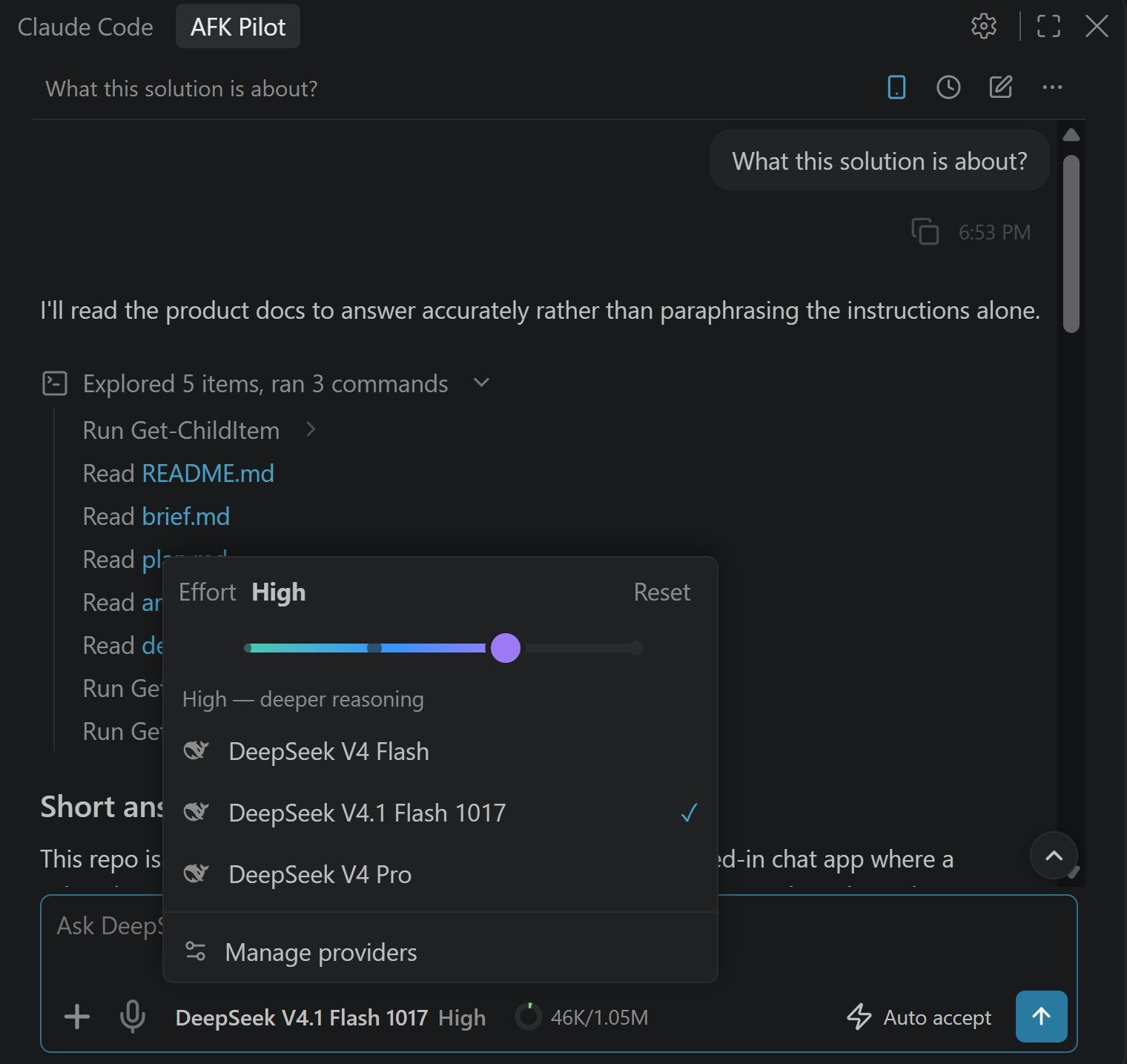
Model, effort and context. The picker lists the models dsh offers your key. The effort strip has Off, Low, High and Max (High by default), and the context meter tracks DeepSeek's 1M-token window.
Its work, readable. Commands dsh runs show as rows with their output, and a subagent it launches shows as a card; the parent's next reply carries the result.
Voice. Dictate instead of typing, say “grok send” (or a phrase you choose) to send hands-free, and have replies read aloud. At the computer, dictation needs ffmpeg and a Grok sign-in or an OpenAI API key.
Does the harness matter? On my Bug Hunt Bench, the same DeepSeek V4.1 Flash 1017 model scored 42.7 of 105 in DeepSeek Harness and 39.1 in Claude Code at max effort, 7 runs each. The gap is not significant on its own, and the harness cost $1.84 a run against $1.01. The full comparison: DeepSeek Harness vs Claude Code.
Everything else the extension does: the AFK Pilot extension for VS Code.
DeepSeek Harness From Your Phone
DeepSeek ships no phone app for its harness; the DeepSeek app for iPhone and Android is its chat assistant and doesn't run dsh. dsh's Web UI improved its phone and tablet support in 0.2.2-rc.1 (November 4, 2026), and DeepSeek documents serving it through a reverse proxy or tunnel, with trusted hosts and TLS. That works if you run and secure that yourself, for an agent that can run commands on your machine.
AFK Pilot's remote control needs no server of your own. Link the computer once, then open afkpilot.com on the phone; it installs as a web app, and there is no native iOS or Android app. Your computer dials out to the relay, so there is no inbound port and no port forwarding. Messages are relayed in memory and never stored, over TLS on both hops; they are not end-to-end encrypted.
Turning DeepSeek on, installing it and entering the key happen at the computer. After that, the phone can chat with a DeepSeek conversation and choose its harness. The computer has to stay on: DeepSeek is not on AFK Pilot Cloud machines, which run Grok Build, Muse Code, Codex and Claude Code. Remote Free covers 100 remote messages a week on one device; Remote Max is $5 a month. Setup and privacy in full: Grok Remote Control.
Codeg's iOS and Android apps are another route: they connect to Codeg's desktop app, which runs dsh.
DeepSeek Harness on Linux and Intel Macs
DeepSeek's desktop app ships for macOS on Apple silicon and for 64-bit Windows. Its download page says Intel Macs are not supported, and there is no Linux build. On Linux, DeepSeek's own route is the Web UI in a browser: npx @deepseek-ai/dsh web, which needs Node 24.9 or newer as of 0.2.2-rc.1.
Grok Build Desktop (Community) ships for Linux as an AppImage and a .deb (x86-64), and for Intel and Apple silicon Macs. The extension runs in VS Code or Cursor on Linux too, and its DeepSeek installer supports Windows, macOS and Linux on x64 and arm64. DeepSeek connects the same way everywhere, and the app brings its own Node, so the system's Node version doesn't matter. On Ubuntu 24.04 and later, use the .deb: it sets up the sandbox helper Ubuntu requires. More on the app: Grok Build Desktop.
What It Does Not Do Yet
No Plan mode. DeepSeek built dsh's Agent Client Protocol route for automation, and plans are among the things it leaves out, so the app doesn't offer one.
No manual compaction. dsh condenses the context on its own. There is no Compact button, and the context popup says why.
No image attachments. The app refuses them before sending.
No steering, connectors or MCP servers from the app. Those stay with the agents that support them.
Earlier messages after a restart. After the editor or app restarts, a reopened DeepSeek conversation keeps its context, but the app can't show its earlier messages: dsh doesn't replay them.
No deleting or forking history from here. dsh keeps its own history.
One pinned dsh. The app runs the dsh version it pins (0.2.1-rc.5 in AFK Pilot 4.15.8), so a new dsh release reaches you when AFK Pilot moves its pin. DeepSeek Harness itself is a developer preview, and DeepSeek warns of compatibility-breaking changes.
Not DeepSeek's full Web UI. DeepSeek's own app shows things dsh keeps off this route, such as its plan and todo cards. For those, use DeepSeek's app.
Not on Cloud. DeepSeek runs on your own computer only.
DeepSeek in VS Code and Cursor Without the Harness
Most guides to DeepSeek in VS Code do something else: they point an existing assistant at a DeepSeek model.
GitHub Copilot Chat. Bring-your-own-key extensions add DeepSeek models to Copilot Chat. The largest, “DeepSeek V4 for Copilot Chat”, has over 440,000 installs.
Cline and other open agents. Cline has a DeepSeek provider, and most open coding agents for VS Code accept DeepSeek's OpenAI-compatible API.
Cursor. Cursor lists DeepSeek V4.1 Flash 1017 among its own models (hidden by default).
Claude Code, Codex and OpenCode. DeepSeek's own docs show how to point each one at its API: Claude Code, Codex and OpenCode. The Codex guide covers Codex's VS Code extension too.
All of these put a DeepSeek model inside someone else's agent; the harness route runs DeepSeek's own agent around it. The bench line above measures what that changes.
How It Compares
DeepSeek's own app. The desktop app (Apple silicon Macs, Windows) and the Web UI (anywhere Node 24.9+ runs, Linux included) are the complete dsh experience, with its native
/goalcommand, skills and voice input. Use them if DeepSeek Harness is all you run and you don't need it inside an editor, or on your phone without running your own proxy.Community DeepSeek Harness extensions. I count 48 dedicated DeepSeek Harness clients on the VS Code Marketplace and about a dozen on Open VSX. About half embed or launch DeepSeek's own Web UI; the rest draw their own interface. A few multi-agent extensions run dsh too, and so has Codeg's desktop app since mid-August.
AFK Pilot. What it adds: five other agents next to it, the VS Code and Cursor sidebar, a Linux desktop app, phone access without a server of your own, and hands-free sending by voice. What it gives up: the limits above.
FAQ
Does DeepSeek Harness have a VS Code extension?
Not from DeepSeek. As of November 2026, DeepSeek ships dsh as a CLI, a local Web UI and a desktop app for Apple silicon Macs and Windows, and users are still asking for an official extension in the project's GitHub Discussions. Community extensions fill the gap. AFK Pilot is one of them: it runs DeepSeek's official harness in a VS Code sidebar next to five other coding agents.
Can I use DeepSeek Harness in Cursor?
Yes. AFK Pilot installs in Cursor from Open VSX (search “AFK Pilot” or grok-vscode-phuryn), and DeepSeek connects the same way as in VS Code: turn on DeepSeek in Settings → Advanced (it's off by default), then connect it in Settings → Providers with a DeepSeek API key.
Is there a DeepSeek Harness GUI?
Yes, DeepSeek's own. npx @deepseek-ai/dsh web opens a local Web UI in your browser, and the DeepSeek Harness desktop app wraps it for Apple silicon Macs and Windows. For a GUI inside VS Code or Cursor, as a Linux desktop app, or on your phone without a server of your own, AFK Pilot runs the same harness.
Can I use DeepSeek Harness from my phone?
DeepSeek Harness has no iPhone or Android app (DeepSeek's mobile app is its chat assistant). You can serve its Web UI through a reverse proxy or tunnel you run yourself (0.2.2-rc.1 improved its phone and tablet support), or link your computer to AFK Pilot once and open afkpilot.com on the phone. Setup and the key stay at the computer; the phone can then chat with DeepSeek and choose its harness. The computer has to stay on, because DeepSeek is not on AFK Pilot Cloud machines.
Does DeepSeek Harness run on Linux?
The harness does: dsh is an npm package, and npx @deepseek-ai/dsh web runs its Web UI on Linux with Node 24.9 or newer (dsh 0.2.2-rc.1). DeepSeek's desktop app does not: it ships for Apple silicon Macs and Windows only. Grok Build Desktop (Community) ships for Linux as an AppImage and a .deb, and the AFK Pilot extension runs in VS Code or Cursor on Linux, both with DeepSeek.
Is it free?
The AFK Pilot extension and desktop app are free and open source (FSL-1.1-MIT; each release becomes MIT after two years). DeepSeek Harness is free and open source too (MIT). What costs money is DeepSeek's API: your key is billed per token. For scale, one Bug Hunt Bench run at max effort (two repositories, about an hour) cost me $1.84 on DeepSeek V4.1 Flash 1017 at DeepSeek's off-peak prices. The phone client is free for 100 remote messages a week on one device; Remote Max is $5 a month.
Which DeepSeek models can I use?
The ones dsh offers your API key. On my install the picker lists DeepSeek V4 Flash, DeepSeek V4.1 Flash 1017 and DeepSeek V4 Pro, with effort at Off, Low, High or Max (High by default) and a 1M-token context window.
What is the difference between Default and Minimal?
Default is dsh's standard agent: its full tool set, subagents, and goal and skill shortcuts. It is built to ask before the actions dsh flags, though in my tests on Windows it never asked. Minimal is a lean tool set with full access and no approval prompts, and it starts faster. You choose in the context popup before the first message, and the conversation keeps that choice.
Can I run DeepSeek Harness and Claude Code side by side?
Yes. Connect both, and each conversation keeps its agent, so the same task can go to each and you switch between the two conversations in one panel. How the two harnesses compare on the same DeepSeek model: DeepSeek Harness vs Claude Code.
Is AFK Pilot an official DeepSeek product?
No. It is a community project. It runs DeepSeek's official dsh package, unmodified, launched with two small configuration overlays: Minimal's ACP startup and, on Windows, dsh's own PowerShell shell without its sandbox for Default. DeepSeek doesn't make or endorse it. For DeepSeek's own app, go to deepseek.com/en/harness.
I run DeepSeek Harness next to Claude Code, Codex and Grok Build on the same tasks and publish what I measure. That is the newsletter: not the tool tour, but what changes for PMs and builders once agents do the building.
AFK Pilot and Grok Build Desktop (Community) are unofficial community projects by Pawel Huryn, not affiliated with or endorsed by SpaceXAI (formerly xAI), Meta, DeepSeek, OpenAI, Anthropic or Google. DeepSeek is a trademark of DeepSeek; Grok and Grok Build of xAI; Muse Code of Meta; Codex of OpenAI; Claude and Claude Code of Anthropic; Antigravity of Google.