
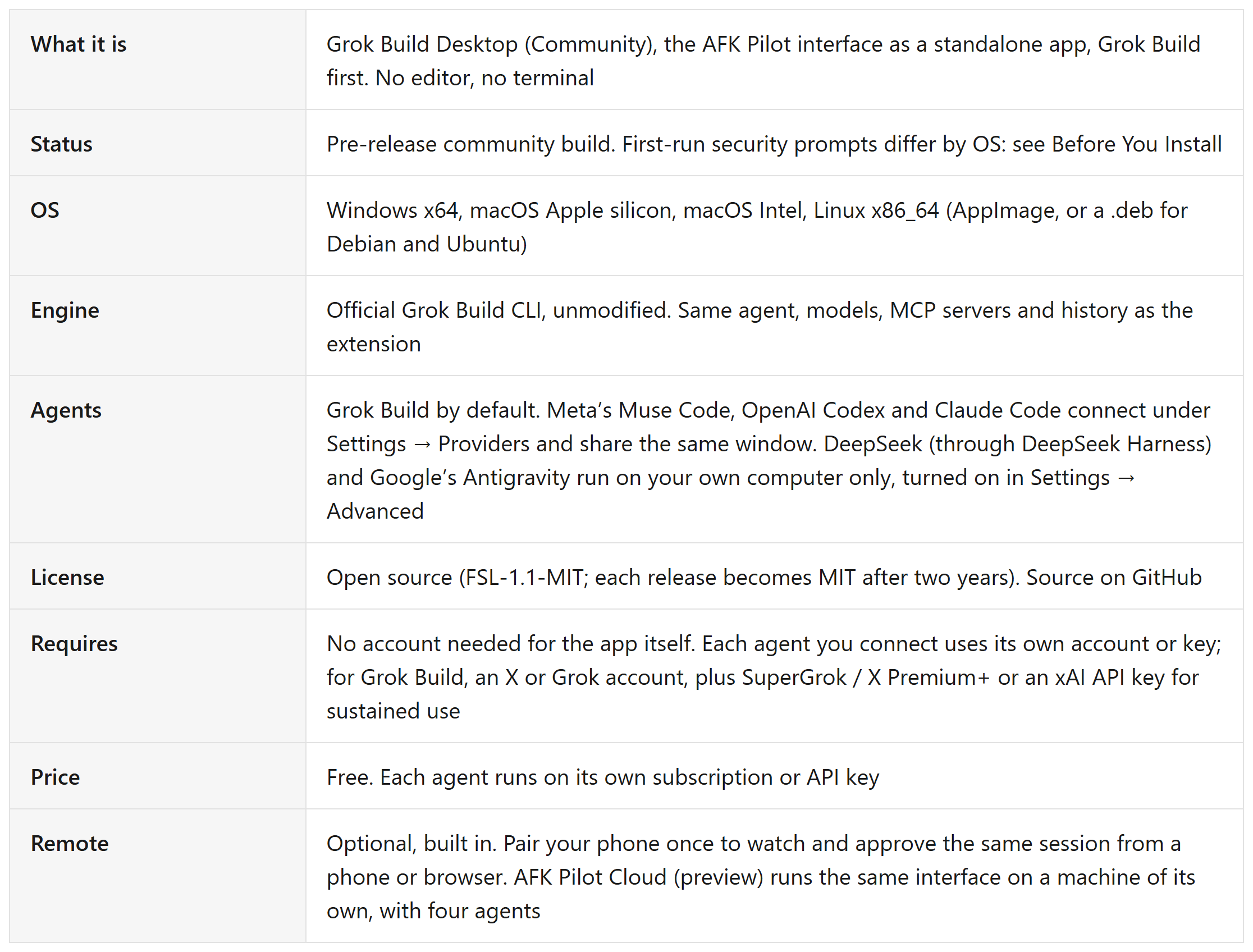
Grok Build Desktop (Community) is a free standalone app that runs the Grok Build coding agent from SpaceXAI (formerly xAI) on Windows, macOS and Linux. No editor, no terminal. You install it, open a project folder, and start working. It also runs Meta's Muse Code, DeepSeek (through DeepSeek Harness), OpenAI Codex, Claude Code and Google's Antigravity agent in the same window.
I built it, and I also build the AFK Pilot extension (previously Grok Build for VS Code), which puts the same interface in VS Code and Cursor. Neither is affiliated with or endorsed by SpaceXAI, Meta, DeepSeek, OpenAI, Anthropic or Google.
Last verified: November 5, 2026 (v4.15.8). The macOS build is signed and notarized by Apple. The Windows build is not signed yet. Linux ships as an AppImage and, for Debian and Ubuntu, a .deb package. See Before You Install.
At a Glance
Why This Exists
Most people who bounce off coding agents do not bounce off the agent.
They bounce off what sits in front of it. Install an editor. Configure the editor. Find the extension. Work out which panel does what. By the time the agent is ready, the thing you wanted to try has gone cold.
The setup is the part that stops people, not the agent.
I watched that happen in workshops, and on my own fresh machines. So the same agent UI now ships as an app you open on its own.
What You Get
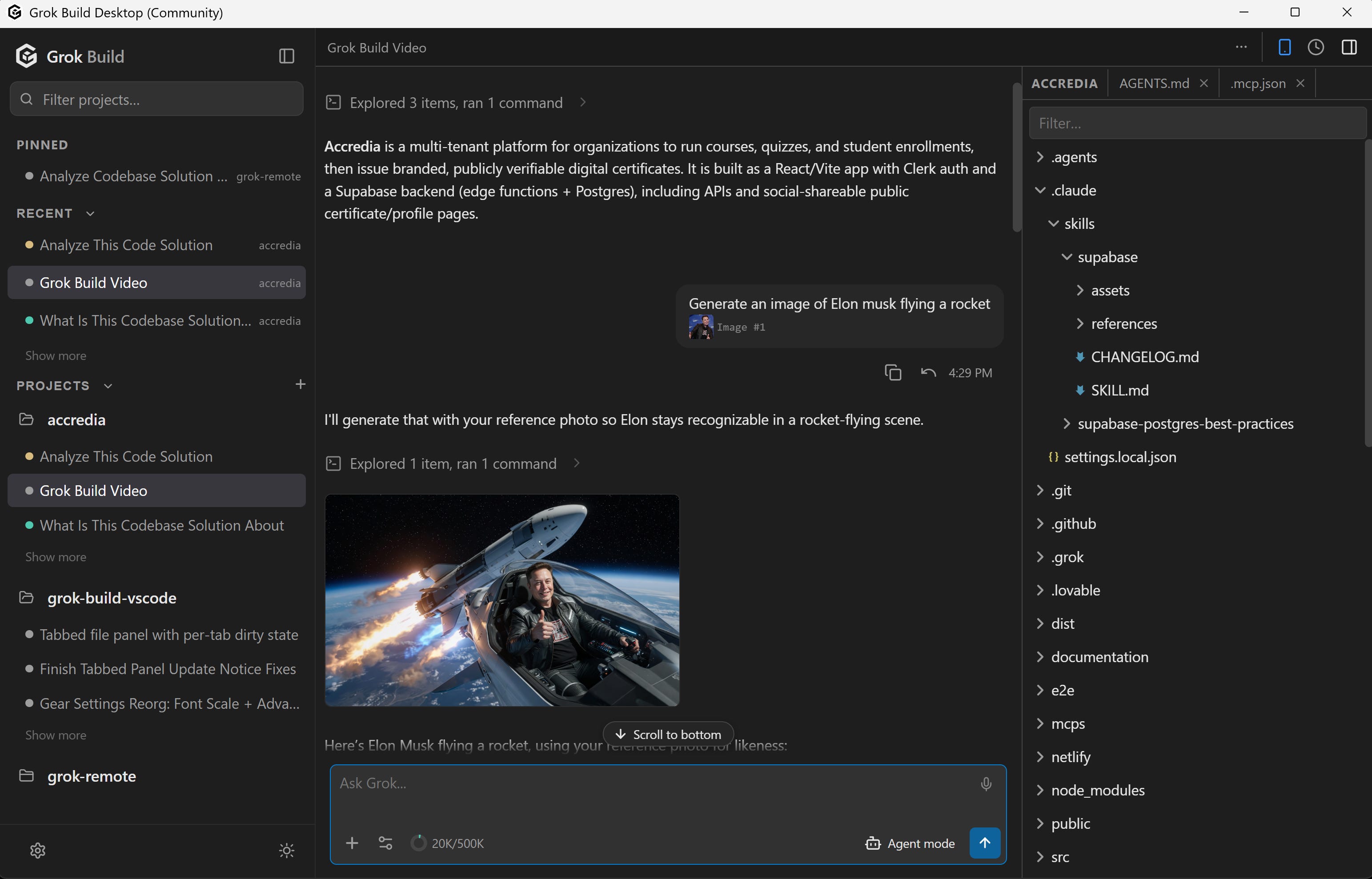
Three panes, and nothing to configure first.
Projects on the left. Add as many folders as you want. Each keeps its own conversations, and you switch between them from the projects rail without reopening anything. Pinned and Recent sit above the list, and a project idle for a month files itself away until you touch it again.
The conversation in the middle. Streaming responses, reasoning traces, slash commands, images and diagrams inline, and voice dictation.
Your files on the right. Browse the tree, open text files in tabs, and edit them in place. Markdown opens as a preview with a source toggle, and Ctrl/Cmd+S saves. Since v3.5.0 the phone client gets the same file panel, so a file you opened at your desk is still there from your phone.
A permission card before anything happens, if you want one. In Agent mode, file writes and shell commands are shown to you first, with the exact command, and wait. A new install starts Grok Build in Auto accept, which approves them for you; switch to Agent from the mode button to see each one first.
Your history, shared. Each agent's conversations live where the agent itself keeps them (Grok Build's under ~/.grok), the same place the extension reads them from, so the same work is there whichever host you open.
Add project, three ways. Name a new one and it lands in ~/AFK Pilot, import a folder, or clone from GitHub by picking a repository or pasting a URL. GitHub is a connection under Settings → Providers, by the GitHub CLI or a fine-grained token the app never stores.
Other agents, if you want them. Meta's Muse Code, OpenAI Codex and Claude Code connect under Settings → Providers and share the same window, model picker and history. DeepSeek and Google's Antigravity are there too, on your own computer only: turn each on in Settings → Advanced (they're off by default). Grok Build is the default. If Muse is missing, the app offers Meta's installer; for DeepSeek, it installs a pinned copy of DeepSeek's harness for you.
The engine is the official Grok Build CLI. The app is the interface, exactly as the extension is. Same agent, same models, same MCP servers, same memory.
Before You Install
Three things you should know first.
macOS is signed. Windows is not yet. The macOS build is signed with a Developer ID and notarized by Apple, so it opens on first launch with nothing to dismiss. The Windows build has no certificate yet, so SmartScreen stops it the first time: choose More info, then Run anyway. A certificate is on the way. I would rather you read that here than meet it on your own and assume something is wrong. On Linux the download at afkpilot.com is a single AppImage. Make it executable and run it; it needs FUSE, which on Debian and Ubuntu is libfuse2. On Ubuntu 24.04 and later the AppImage does not start, because the system blocks the user namespaces Chromium's sandbox relies on: there, install the .deb package from GitHub Releases with apt instead.
It runs a coding agent on your machine. It reads files, edits them, and runs commands. In Agent mode it asks you first; a new install starts Grok Build in Auto accept, which approves for you, so switch to Agent if you want to see each step first. That is the same posture as the VS Code extension. Open projects you trust, and read the source if you want to see exactly what it does.
It ships fast, and it updates itself. Releases land near-daily right now. The app downloads a new version in the background while you keep working and the rail button becomes Restart to update; a normal quit installs it too. The .deb package is the exception: Update available opens the next .deb, which you install the same way.
Which One Do I Want?
Two ways to run the same agents, plus a remote and a hosted machine. Ten seconds to pick the right one.
Grok Build Desktop (Community). You want the agent on your own machine and you do not want to install or learn an editor. Free, Windows, macOS and Linux. You are on that page now.
The AFK Pilot extension. You already work in VS Code or Cursor and you want the agents in your sidebar, with native diffs. Free, with 180,000+ installs.
Remote control. You want to steer either of the above from your phone or any browser: pair your phone once at afkpilot.com, start the work at your desk, carry on from the next room. Free tier, $5 a month to remove its limits. Setup: Grok Remote Control.
Standalone app: Grok Build Desktop. Inside your editor: the AFK Pilot extension. From your phone: remote control, in both apps.
The first two work on their own, and remote control is built into both. AFK Pilot Cloud is the third place to run it: the same interface on a machine you do not own, with four of the agents preinstalled (all but DeepSeek and Antigravity).
Install It
Download the build for your machine at afkpilot.com/desktop. macOS Apple silicon, macOS Intel, Windows x64, and Linux x86_64 as an AppImage. The page detects yours and still shows all four. On Ubuntu 24.04 or later, take the .deb package from GitHub Releases instead.
On Windows, let it through. SmartScreen stops the unsigned installer: More info, then Run anyway. The macOS build is signed, so it opens with no warning. See Before You Install.
Open a project folder. The app offers a first project in ~/AFK Pilot on first launch, and the + on the PROJECTS heading adds more later: a new folder, an existing one, or a clone from GitHub.
Sign in to Grok. Onboarding installs the grok CLI if it is missing and walks you through signing in. Muse Code, Codex and Claude Code connect later under Settings → Providers, if you want them; DeepSeek and Antigravity are turned on first in Settings → Advanced (both are off by default).
No account is needed for the app itself. You only sign in at afkpilot.com if you want remote control from your phone.
Requirements
Windows x64, macOS on Apple silicon or Intel, or Linux x86_64. Linux ships as an AppImage that needs FUSE (libfuse2 on Debian and Ubuntu), and as a .deb package, the one to use on Ubuntu 24.04 and later.
Any X or Grok account to try it, with usage limits. Sustained use of the agent underneath needs SuperGrok, X Premium+, or an xAI API key. Other agents use their own account, subscription or API key.
No VS Code, no Cursor, no terminal.
FAQ
Is this the same as the Grok desktop app? No. Grok’s desktop chat apps are chat clients for talking to Grok. Grok Build Desktop (Community) runs the Grok Build coding agent: it opens your project folder, edits files and runs commands, with permission cards when you want them. Different products for different jobs.
Is there a Grok Build desktop app? Yes. Grok Build Desktop (Community) is a standalone app for Windows, macOS and Linux that runs the official Grok Build coding agent. SpaceXAI (formerly xAI) does not publish one. This is a community build, and it is free.
Do I need VS Code to use Grok Build? No. The extension is one way to get a graphical interface, and the desktop app is the other. Full comparison: Does Grok Build have a GUI?.
Is Grok Build Desktop free? Yes, free to download and use, and it needs no account. Grok Build underneath is free to try with usage limits; sustained use needs a SuperGrok or X Premium+ subscription or an xAI API key, and other agents use their own accounts. It is open source (FSL-1.1-MIT; each release becomes MIT after two years).
Which operating systems does it run on? Windows x64, macOS Apple silicon, macOS Intel, and since September 2026 Linux x86_64: an AppImage, plus, since October 2026, a .deb package for Debian and Ubuntu, which Ubuntu 24.04 and later need. On Windows and Linux, closing the window keeps the app running in the tray, so the agent and a linked phone keep working; Quit from the tray stops it.
Why does Windows or macOS warn me when I open it? On Windows, yes. That build is not code-signed yet, so SmartScreen does not recognize the publisher and asks before running it. Choose More info, then Run anyway. A certificate is on the way. On macOS, no. Since 3.2.7 the build is signed with a Developer ID and notarized by Apple, so it opens on first double-click. An older macOS download can still warn, or say the app is damaged. Download the current build instead.
Is it an official xAI app? No. Grok Build Desktop (Community) is an unofficial community project, not affiliated with or endorsed by SpaceXAI (formerly xAI). Grok, Grok Build, and xAI are trademarks of xAI. It runs the real Grok Build CLI unmodified.
Which model does it use? For Grok Build, whatever it is set to: a fresh install starts on Grok 4.7, and the model chip under the message box switches models. The other agents bring their own: Codex offers GPT-6 Astra, Claude Code's default model shows as Default (Opus 5.5), Muse Code lists what Muse's CLI offers your account, such as Muse Wonder, DeepSeek's picker includes DeepSeek V4 Pro and V4.1 Flash 1017, and Antigravity starts on Gemini 4 Argon with a Gemini API key. If you want Grok 4.7 specifically: How to Use Grok 4.7 in VS Code.
Can I use it from my phone? Yes. Remote control is built in: link the desktop app once at afkpilot.com and the same conversation opens in a browser on your phone. Setup: Grok Remote Control. If you would rather not keep a computer on at all, AFK Pilot Cloud runs the same interface on a dedicated Linux machine of its own.
Does it edit files, or only chat? Both. The agent edits your project, and the file panel opens text files in tabs so you can edit them yourself, with unsaved-change markers and a save that refuses to silently overwrite what the agent changed underneath you.
Can I use it and the extension on the same machine? Yes. They read the same history, each agent's own (Grok Build's under ~/.grok), so the conversation you started in one is there in the other.
Does it run agents other than Grok Build? Yes. Meta's Muse Code, OpenAI Codex and Claude Code connect under Settings → Providers and share the same window, model picker and history. DeepSeek and Google's Antigravity run too, on your own computer only: turn each on in Settings → Advanced (they're off by default), then connect it in Settings → Providers, at the computer rather than from a phone. Neither has Plan mode or the app's connectors, and DeepSeek has no manual compaction or image attachments. Each conversation keeps the agent it started with, and Grok Build is the default. For Muse, the app offers Meta's installer if the CLI is missing, and keeps Muse's own approval modes: Muse Code GUI. For Claude Code on an always-on server: Claude Code on a VPS.
Does it run DeepSeek Harness, on Linux too? Yes. Since v4.15.7 (November 2026) the app runs DeepSeek through DeepSeek's own harness, DeepSeek Harness (dsh), on Windows, macOS and Linux. Turn on DeepSeek in Settings → Advanced (it's off by default), then connect it in Settings → Providers with a DeepSeek API key; the app installs a pinned copy of dsh with its own Node and keeps the key in its secure storage. DeepSeek's own desktop app ships for macOS on Apple silicon and Windows x64 and has no Linux build, so on Linux this app is a desktop route to DeepSeek's own harness, in a pinned release, next to DeepSeek's browser-based Web UI. DeepSeek runs on your own computer, not on Cloud machines. The harnesses, setup and limits: DeepSeek Harness in VS Code.
If you build with agents, that is most of what I write about here. The tools are one lane. The other is what actually changes about product work when the building stops being the constraint.
AFK Pilot and Grok Build Desktop (Community) are unofficial community projects by Pawel Huryn, not affiliated with or endorsed by SpaceXAI (formerly xAI), Meta, DeepSeek, OpenAI, Anthropic or Google. Grok, Grok Build, and xAI are trademarks of xAI; Muse Code is a trademark of Meta; DeepSeek is a trademark of DeepSeek; Codex of OpenAI; Claude and Claude Code of Anthropic; Antigravity and Gemini of Google.