
Yes, you can run Grok 4.7 inside VS Code today. SpaceXAI shipped it on September 21, 2026, it is the model Grok Build now starts on, and the free GUI for Grok Build & Muse Code extension puts that agent in a sidebar with diff previews, permission cards, and session history. Setup takes about five minutes.
I ran it on my own 105-bug benchmark the day it shipped, four times over. The short version: it tied Grok 4.6.
How to Access Grok 4.7
Grok 4.7 is a model, not a separate install. It is already in the places you would use it:
In your editor. The free community extension below runs the official Grok Build CLI inside VS Code, Cursor and Antigravity. Grok Build is free to try with usage limits on any X or Grok account, and 4.7 is what a fresh session starts on.
In the terminal. The Grok Build CLI on its own. Same agent, no interface.
In Cursor. SpaceXAI lists Cursor among the places Grok 4.7 is available.
On the API. The model id is
grok-4.7, at two dollars per million input tokens and six per million output. Prices double for any request whose prompt reaches 200,000 tokens.
What Changed From Grok 4.6
Last verified: September 29, 2026, against extension v4.14.1.
SpaceXAI calls Grok 4.7 its “most capable model for coding and knowledge work,” one that “works longer on difficult tasks, checks its own work more carefully.” Its launch table puts it ahead of Grok 4.6 on every row, widest on agentic terminal work: Terminal-Bench 4.0 37.6% against 20.3%, CursorBench 4.0 46.3% against 40.4%, DeepSWE v1.1 71.0% against 65.2%.
What did not change is just as useful to know:
The price. Two dollars in, six out, per million tokens, the same rate card as 4.6.
The context window. 500,000 tokens.
The effort ladder. low, medium, high, xhigh, with high as the default and xhigh the top.
The fast route. The model picker lists Grok 4.7 Fast next to it. It is the same model served faster at twice the price, not a smaller model, and it exists only on the Grok Build path, not on the public API.
Vendor benchmarks are vendor benchmarks. Here is one I ran myself.
What Happened When I Ran It on 105 Real Bugs
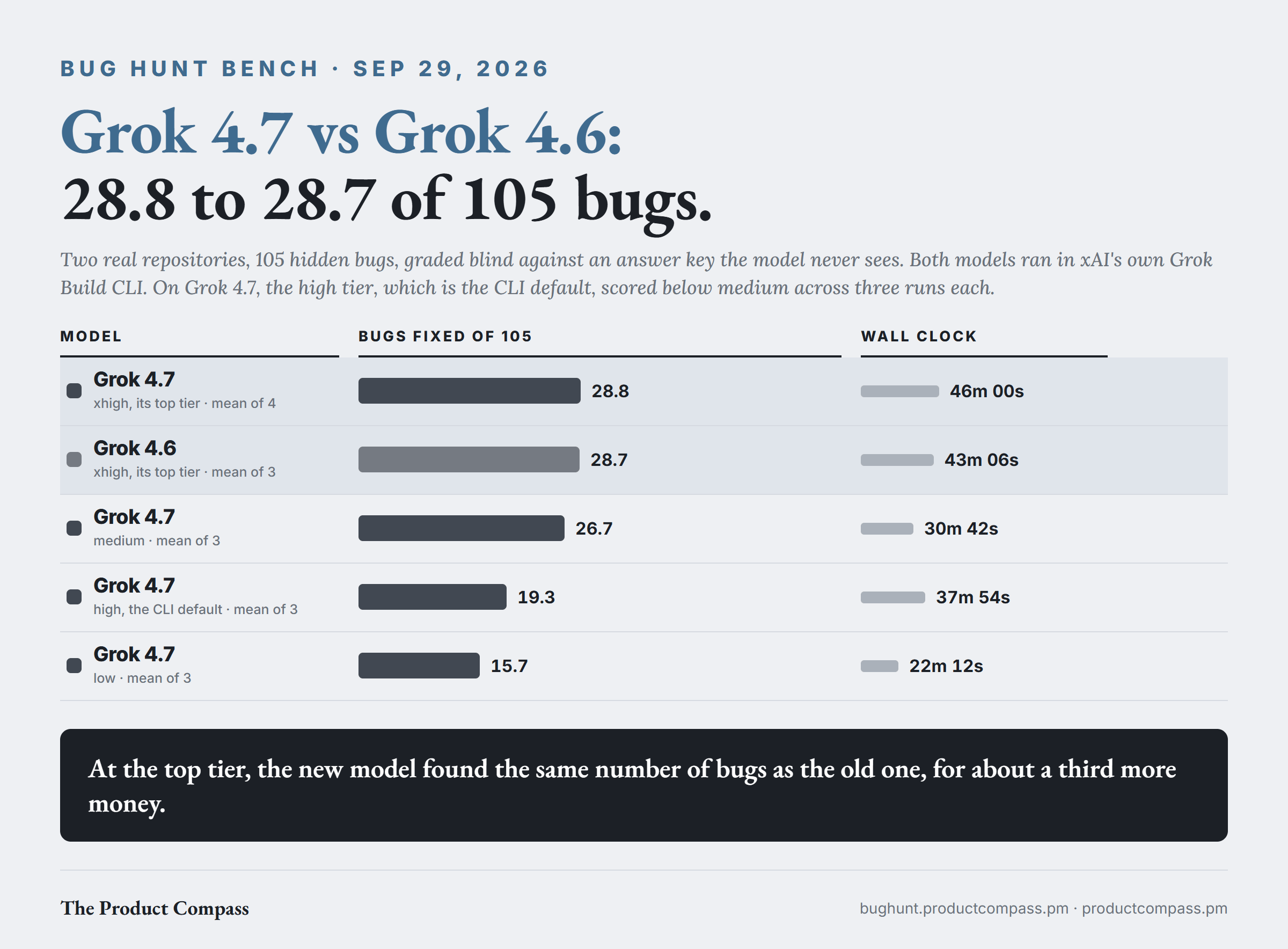
I keep a bench of two real repositories seeded with 105 hidden bugs, 45 in one and 60 in the other, most of them reverted out of real fix history rather than invented. Each model hunts them in its own native CLI, one round per repo, and an independent judge scores the resulting diff blind against an answer key the model never sees.
Grok 4.7, at xhigh, its top tier:
28.8 of 105 on average. Four runs scored 25, 30, 31 and 29.
Grok 4.6 at the same tier stands at 28.7, a mean of three. I added the fourth run to check whether the tie was an accident of three draws. It was not: the average moved by a tenth of a bug.
Speed did not change either. The two runs that had the machine to themselves took 39.6 and 45.4 minutes, against 43.1 on average for 4.6.
Cost did. My reconstructed floor puts a 4.7 run at about $22.88 against $16.89 for 4.6 on the same arithmetic, roughly a third more for the same score.
One thing moved in its favor. It found more real bugs nobody planted: 26 to 35 per run outside the answer key, against 18 on average for 4.6. Those never count toward the score.
The finding I would act on sits further down the effort ladder. Across three runs each, Grok 4.7 at medium found 26.7 and at high, the CLI's default, found 19.3. The ranges do not even overlap: medium scored 23 to 30, high 17 to 22, and medium was faster, 31 minutes against 38. I would not have predicted that. On my data, if you do not run Grok 4.7 at xhigh, run it at medium.
Two caveats. My bench measures one thing, finding and fixing bugs in two repositories, and a tie there does not contradict SpaceXAI's numbers on other work. And every Grok cost here is reconstructed rather than billed, because the CLI reports context occupancy instead of cumulative usage.
Full method and per-run receipts: bughunt.productcompass.pm.
Turn It On in VS Code
Install the extension. Extensions panel (Ctrl/Cmd+Shift+X), search “GUI for Grok Build & Muse Code”, install. That has been its Marketplace name since September 2026; it used to be listed as Grok Build for VS Code (Community). VS Code 1.106+, Cursor 3.x, and Antigravity 2.1.1+.
Open the sidebar with Ctrl/Cmd+;. The setup wizard installs the grok CLI if it is missing and walks you through sign-in, one click per step.
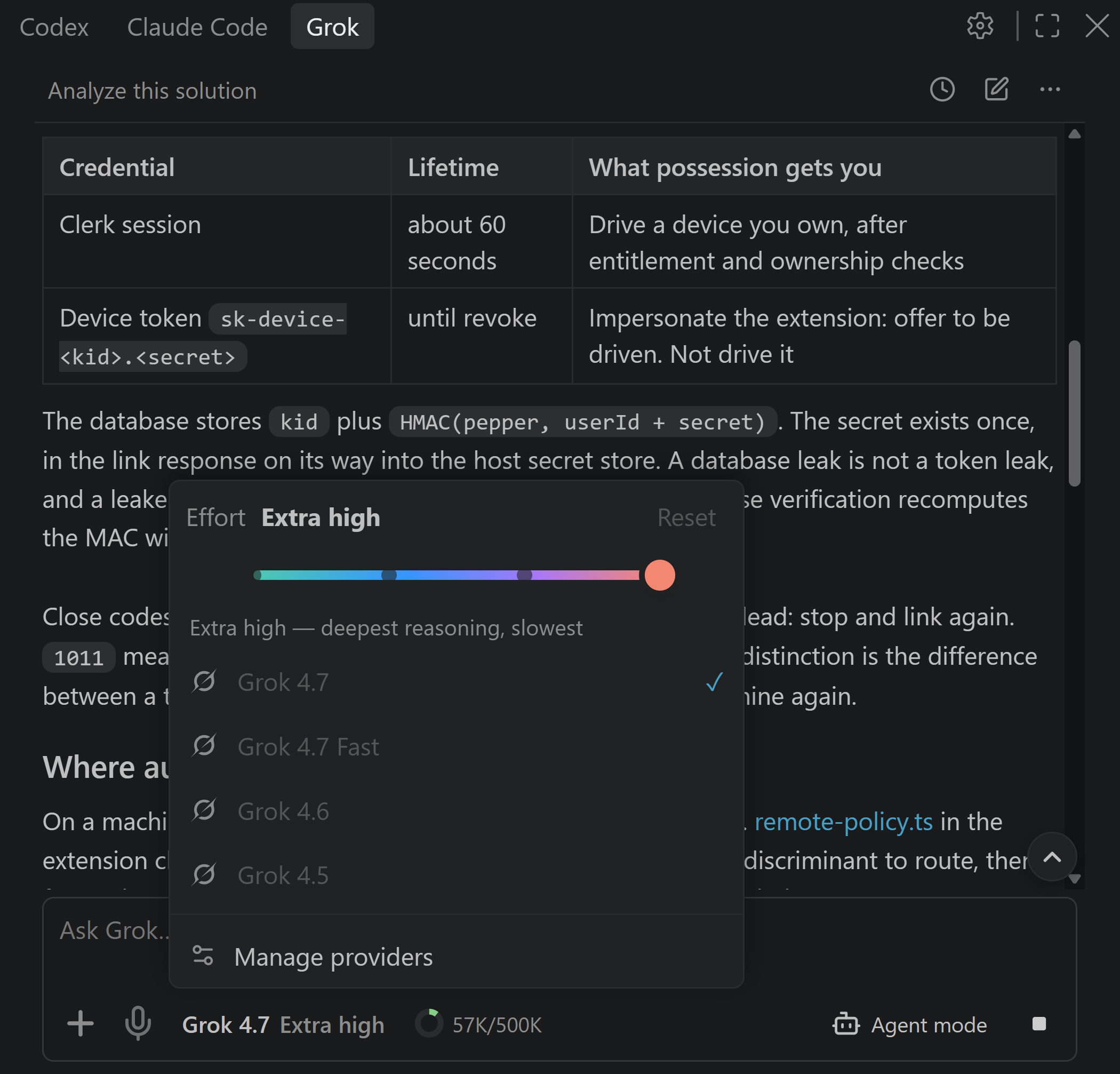
Check the model. Click the model chip in the composer. A current install starts on Grok 4.7, and you can switch models and effort live, mid-session.
Windows runs natively, no WSL required. The full feature list lives on the extension's own page: Grok Build for VS Code. Not in VS Code at all? The same agent runs as a standalone app: Grok Build Desktop (Community). Still choosing an interface: Does Grok Build have a GUI?
Reasoning Effort
Grok 4.7 has the same four tiers as 4.6: low, medium, high and xhigh, with high as the default. The string is xhigh, with no hyphen: the CLI silently runs a value it does not recognize at a lower tier, a trap I wrote up on the Grok 4.6 page. In the extension the effort strip sits in the model picker and changes live.
What It Costs
You can try Grok 4.7 for free. Grok Build is free to try with usage limits on any X or Grok account, and 4.7 is what a fresh session starts on. The exact allowance changes often enough that printing a number here would be printing something wrong. Sustained use needs SuperGrok, X Premium+, or an xAI API key.
On the API it is two dollars per million input tokens and six per million output, doubling to four and twelve for any request whose prompt reaches 200,000 tokens. Long agentic runs cross that line: both halves of my first xhigh run peaked near 300,000 tokens of context. Watch the context-token donut in the sidebar and compact a session before it gets there.
FAQ
Can I use Grok 4.7 in Visual Studio Code?
Yes. Install the GUI for Grok Build & Muse Code extension, sign in with any X or Grok account to try it, and a current install starts on Grok 4.7. Sustained use needs SuperGrok, X Premium+, or an xAI API key.
Is Grok 4.7 free?
You can try it free. Grok Build is free to try with usage limits on any X or Grok account, and Grok 4.7 is the model it starts on. The free allowance is sized for evaluating the model, not for working through it.
Is Grok 4.7 better than Grok 4.6 at coding?
On SpaceXAI's benchmarks, yes, by a wide margin on terminal work. On my bug bench, no: 28.8 of 105 against 28.7, in the same time, for about a third more per run. If you already like 4.6, there is no hurry.
How do I switch back to Grok 4.6?
Click the model chip and pick Grok 4.6. Switching is live and per-session, and Grok 4.6 and 4.5 are both still in the list.
What is Grok 4.7's context window?
500,000 tokens. API prices double for any request whose prompt reaches 200,000.
What is Grok 4.7 Fast?
The same model, served faster at twice the price. It is not a smaller model, and it is only offered on the Grok Build path, not on the public API.
Does this work in Cursor?
Yes, Cursor 3.x is supported. Cursor also offers Grok 4.7 natively. The extension gives you the Grok Build agent workflow, with its diffs, permissions, and sessions, rather than Cursor's own.
Is there a Grok 4.7 GUI?
Yes, this one. Since Grok 4.7 is what Grok Build starts on, a GUI for Grok Build is a Grok 4.7 GUI. Grok Build Desktop (Community) gives you the same thing without an editor, on Windows, macOS and Linux.
Still on Grok 4.6?
It has not gone anywhere and it is still in the model picker. The older guide stays up: How to Use Grok 4.6 in VS Code.
Setup is the easy part. What I write about here is what changes for PMs and builders once the agent is running and the building stops being the constraint.
GUI for Grok Build & Muse Code (formerly Grok Build for VS Code (Community)) is an unofficial community project by Pawel Huryn. Grok, Grok Build, and xAI are trademarks of xAI.