
Meta ships Muse Code terminal-first. There is no Muse Code extension for VS Code from Meta, no desktop app, and no GUI of its own; Meta's own page calls it multi-agent coding in your terminal. The free GUI for Grok Build & Muse Code runs the real Muse Code CLI in a VS Code or Cursor sidebar, in a standalone desktop app for Windows, macOS and Linux, and in any browser, including your phone. You get permission cards, diffs, resumable history, and Muse's own approval modes.
I build the extension, the desktop app, and AFK Pilot, the phone client. None of them is affiliated with or endorsed by Meta. Muse Code and Muse Spark are Meta's.
Last updated: September 29, 2026 (extension v4.14.1, Muse Code 1.4.1).
At a Glance
What it is. A graphical interface for Meta's Muse Code CLI, not a re-implementation of it. Muse speaks Meta's own protocol rather than the Agent Client Protocol the other agents use, so the extension ships a small adapter between the two.
Where it runs. VS Code 1.106+, Cursor 3.x and Antigravity 2.1.1+ as an extension; Grok Build Desktop (Community) as a standalone app on Windows, macOS and Linux; any browser through AFK Pilot.
Sign-in. Muse's own login, on the machine that runs it. The app shows Meta's link and a short code, and your usage counts against your own Meta account.
Approval modes. Muse's own, under Muse's names: Allow all, Prompt unmatched, and, at the desk, On request.
Other agents. Grok Build (the default), OpenAI Codex and Claude Code run in the same window. Each conversation keeps the agent it started with.
Price. The extension and the desktop app are free. The phone client has a free tier; Remote Max is $5 a month.
Not yet for Muse. Steering a running turn, compaction, deleting history, and the connectors the app manages for the other agents.
Why Muse Code Needs a GUI
Muse Code is built for long, multi-agent runs. On my bug benchmark a run at max effort takes about an hour and a half. In a terminal that is a scrolling log and a permission prompt you have to be sitting in front of. In a GUI it is a conversation you can leave and come back to, from the desk or from your phone.
What the interface adds, concretely:
Permission cards and diffs. In Prompt unmatched, every command Muse wants to run shows up with the exact command line, and a file edit shows as a diff before it lands.
A workflow card. Muse delegates through workflows, and the chat shows each one as a single card: the steps as rings on a track, the agents grouped under each step with their status and tokens, and what the run returned, with a copy button.
History you can resume. Conversations reopen with their tool calls and command output. Muse keeps its own history, and this app does not delete it.
A model and effort picker. Muse's models, with its contributor models marked by Meta's data-use notice, and the reasoning-effort strip.
Usage. The usage popover shows Muse's current window and its weekly window once Muse reports them, usually after your first reply.
Your phone. The same session in a browser, which matters more for an agent whose best setting is also its slowest.
Set It Up
Install a host. In VS Code or Cursor, open Extensions (Ctrl/Cmd+Shift+X), search “GUI for Grok Build & Muse Code”, and install. No editor? Download Grok Build Desktop (Community) from afkpilot.com/desktop.
Install Muse Code if you do not have it. When the CLI is missing, the Muse panel shows Meta's install command and an Install Muse Code button, which runs Meta's official installer in a visible terminal after you confirm. Then click Re-check.
Connect. Settings, Providers, Connect Muse Code. If Muse is already signed in on this machine, the app uses that sign-in. If not, Muse starts its own login and the app shows Meta's link and short code; the link opens when you click it.
Pick Muse and start. Choose a Muse model in the picker and send your first message. From then on the conversation stays with Muse.
Or install the CLI yourself with Meta's installer:
# Windows (PowerShell)
irm https://dev.meta.ai/install.ps1 | iex

# macOS and Linux
curl -fsSL https://dev.meta.ai/install.sh | bash
On Windows that puts muse.cmd under AppData\Local\Programs\muse in your user folder and adds it to your user PATH; on macOS and Linux it lands in ~/.local/bin/muse. Meta's own page: dev.meta.ai.
Muse Code on Windows
Muse Code runs natively on Windows. Early write-ups said it needed WSL; Meta now ships a PowerShell installer, and both the extension and the desktop app run Muse on Windows without WSL.
One problem worth knowing about. Muse Code 1.4.0 could fail right after you approved the sign-in code, with keychain write failed. I have seen it on Windows 11 and on headless Linux, from this app and from a plain terminal. The app works around it: on Windows and Linux it asks Muse to keep the sign-in in its own file, ~/.config/muse/auth.json, instead of the system keychain. In your own terminal the same fix is one variable:
# PowerShell
$env:TBH_CREDENTIAL_BACKEND='file'; muse login

# bash
TBH_CREDENTIAL_BACKEND=file muse login
I reported it to Meta as muse-code-sdk issue 38.
Muse's Own Approval Modes
A Muse conversation offers Muse's modes, under Muse's names, instead of the ones the other agents use:

Allow all. Muse's full access, the same as
muse --yolo. No prompts, the shell sandbox off, the workspace trusted.Prompt unmatched. Muse asks about anything no rule matches. The one I would start with on a real repository.
On request. Tools run in Muse's sandbox, and it asks only when a tool requests permission. At the desk only.
A fourth mode, Deny unmatched, is hidden for now: in that mode every turn stays open for about a minute before it ends, a Muse bug reported as muse-code-sdk issue 63. Conversations saved in it open in Prompt unmatched.
Approval changes apply from the next action. The sandbox settings work differently: Settings, Providers, Muse Code has Shell sandbox, Sandbox network, and Trust workspaces for new conversations, and they take effect when a conversation reopens or a new one starts. A trusted workspace also runs the repository's hooks, so trust only projects you would run yourself.
How Muse Code Did on 105 Real Bugs
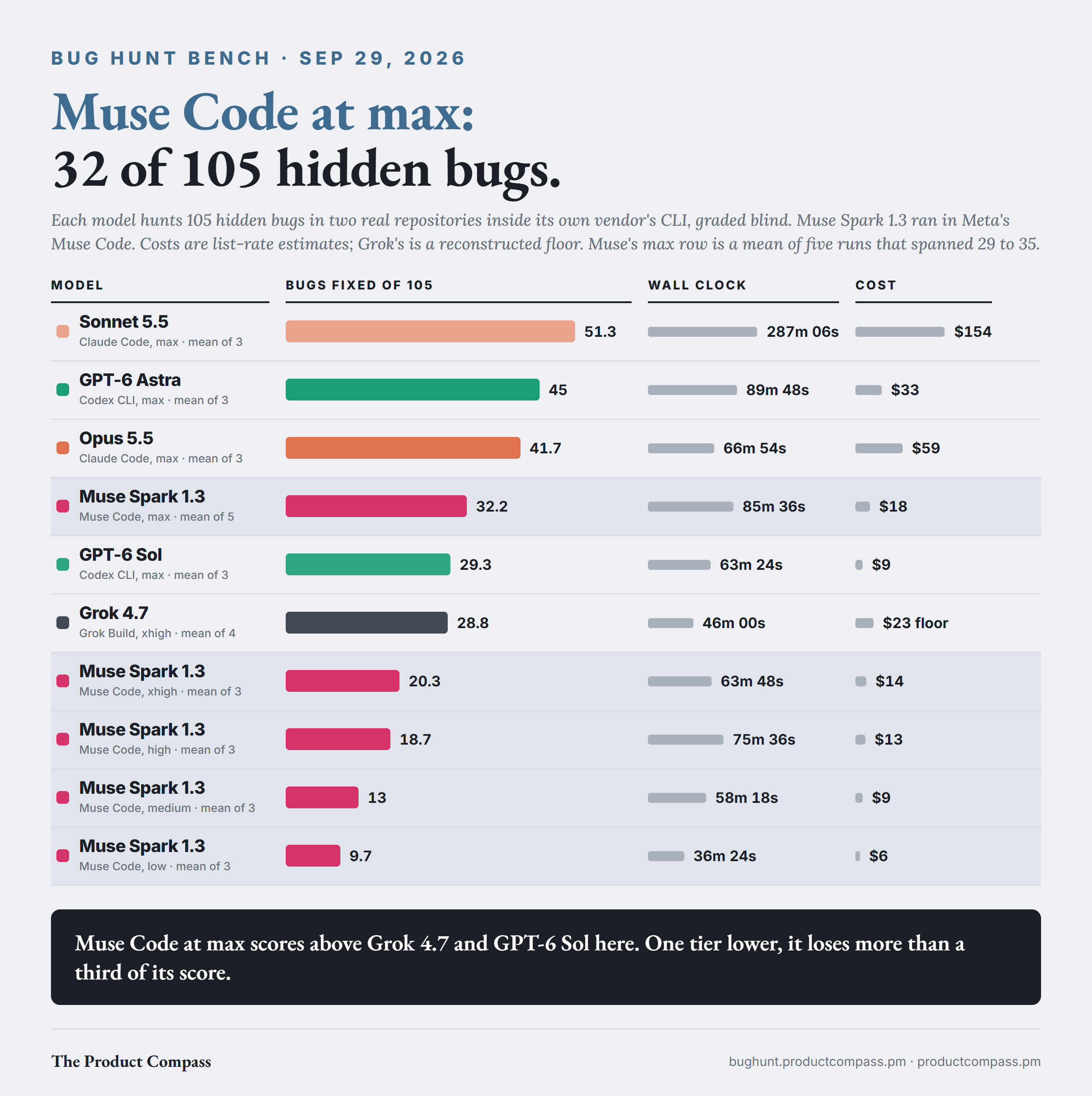
I keep a bench of two real repositories seeded with 105 hidden bugs, most of them reverted out of real fix history. Each model hunts them inside its own vendor's CLI, and an independent judge scores the result blind against an answer key the model never sees. Muse Spark 1.3 ran in Muse Code itself.
At max effort, 32.2 of 105. A mean of five runs that scored 33, 33, 35, 29 and 31, at about 86 minutes and $18 a run at list rates.
Where that sits. Above Grok 4.7 at its top tier (28.8) and GPT-6 Sol at max (29.3). Below Opus 5.5 at max (41.7), which cost $59 a run, and well below the top of the board, Sonnet 5.5 at max (51.3), at $154 a run and almost five hours.
One tier lower, a different model. At xhigh it found 20.3. High found 18.7, medium 13, low 9.7.
Honesty. It reported about one fix per run that it had not actually made.
What I take from it: if you run Muse Code on anything harder than a quick edit, max is the setting. Below max it drops into the range where other vendors' low settings sit.
Two caveats. The five max runs spanned 29 to 35, so read 32 as an estimate with a six-bug spread. And Muse Code updated itself during the experiment, from 1.1.1 to 1.3.0; the board explains why the version change is not what moved the score. Method and per-run receipts: bughunt.productcompass.pm.
Muse Code From Your Phone
Link the machine once with AFK Pilot and the same Muse conversation opens in any browser. From the phone you can send work, approve permission cards, follow a workflow card, switch Muse's approval mode, and connect Muse in the first place: the computer runs Muse's login and the phone shows Meta's link and code. Two things stay at the desk: installing Muse, which has to run on that machine, and Muse's sandbox and workspace-trust settings.
No computer to leave on? AFK Pilot Cloud machines come with Muse Code preinstalled next to Grok Build, Codex and Claude Code. The machine is already an isolated virtual machine, so Muse runs there without its own shell sandbox, its approval rules still apply, and On request is not offered. Setup, privacy and pricing, for all four agents: Grok Remote Control.
What It Does Not Do Yet
No steering mid-turn. Muse does not take a correction while it works, so a message you send queues and runs next. Grok Build and Codex do take one.
No Plan mode. This app cannot make Muse hold its edits until you approve a plan, so it does not pretend to.
No compaction or history deletion from here. Muse keeps its own history.
No app-managed connectors. The connectors you add under Settings, Connectors go to the other agents, not to Muse.
FAQ
Is there an official Muse Code GUI or VS Code extension?
No. As of September 2026 Meta ships Muse Code as a terminal agent, installed with a one-line script, plus an SDK for developers. There is no Meta extension for VS Code or Cursor and no Meta desktop app. This one is a community project.
Is it free?
The extension and the desktop app are free, and their source is public under FSL-1.1-MIT (Fair Source), which becomes plain MIT two years after each release. Muse Code itself runs on your own Meta account and plan.
Can I use Muse Code without the terminal?
Yes. Grok Build Desktop (Community) offers to install Muse with Meta's installer, after you confirm, and connects it from Settings. You never type a command.
Does Muse Code work in Cursor?
Yes. The extension runs in Cursor 3.x, VS Code 1.106+ and Antigravity 2.1.1+, and Muse connects the same way in all three.
Does Muse Code work on Windows?
Yes, natively. Meta's PowerShell installer puts it on your PATH, and the extension and the desktop app run it without WSL. If sign-in fails with keychain write failed, see Muse Code on Windows above.
Can I run Muse Code and Claude Code side by side?
Yes. Grok Build, Muse Code, Codex and Claude Code can all be connected at once. Models from every connected agent share one picker, and each conversation keeps the agent it started with, which makes it easy to put the same task to two agents.
Can I control Muse Code from my phone?
Yes, through AFK Pilot. Link the machine once, open afkpilot.com on the phone, and the same Muse conversation is there, approvals and workflow cards included. Or skip your own machine and use a Cloud machine, where Muse is preinstalled.
Which is better, Muse Code or Claude Code?
It depends on the setting and the budget. On my bench, Claude Code with Opus 5.5 at max found 41.7 of 105 bugs at about $59 a run, and Muse Code at max found 32.2 at about $18. Below max, Muse fell off far more steeply than Opus did. The per-run receipts are public: Bug Hunt Bench.
Is this the same app as the Grok Build GUI?
Yes, one app. It is built for Grok Build, which stays the default, and Muse Code is the other agent it names, because those are the two with no graphical interface of their own. The Grok side: Does Grok Build have a GUI?
I build these in the open and write up what building them teaches me about product work. That is the newsletter: not the tool tour, but what changes for PMs and builders once agents do the building.
GUI for Grok Build & Muse Code, Grok Build Desktop (Community) and AFK Pilot are unofficial community projects by Pawel Huryn. Muse Code and Muse Spark are trademarks of Meta; Grok and Grok Build of xAI. Not affiliated with or endorsed by Meta or SpaceXAI (formerly xAI).