

Hey, Paweł here. Welcome to the premium edition of The Product Compass Newsletter. Every week, I share actionable tips, templates, resources, and experiments for AI-native PMs.
Here’s what you might have missed:
Introduction to AI PM: Neural Networks, Transformers, and LLMs
From Weeks to Hours: How Claude Design Compresses Product Discovery
Claude Code’s Limits Are Generous. The Problem Is Your Setup.
Three CLAUDE.md Blocks That Make Claude Get Smarter Every Session
Consider subscribing or upgrading for the full experience.
Last week, inside Claude Code, I gave Claude a product-discovery job and added one short keyword: ultracode. I expected a better answer. Instead, it wrote a short program, spun up a fleet of agents, and ran the work through that program.
113 agents spent 1.95M tokens. The JavaScript that coordinated them spent zero model tokens. That distinction matters: the model did the judgment, the code did the coordination.
What surprised me wasn’t that Claude wrote code. It was that the most important coordination moved outside the model’s context window.
That changes how much one PM can run.
We’ll cover:
What a dynamic workflow is, and the token number that proves it
How it compares to n8n
Why it works: four reasons, and the three failure modes a harness fixes
The six patterns worth knowing
A worked product-discovery loop on 100 interviews, end to end
How to build, run, and contain one, and when not to
We won’t cover:
The Agent SDK internals
Fancy terms to memorize
This is the operating model, not the API docs.
1. What a Dynamic Workflow Is
1.1 The mechanism: the orchestrator is code, not a model turn
A dynamic workflow is a short JavaScript program Claude writes on the fly to coordinate subagents. You trigger it with the ultracode keyword, or by asking Claude to use a workflow. It reads the job, writes a script, spawns the agents, and merges what they return.
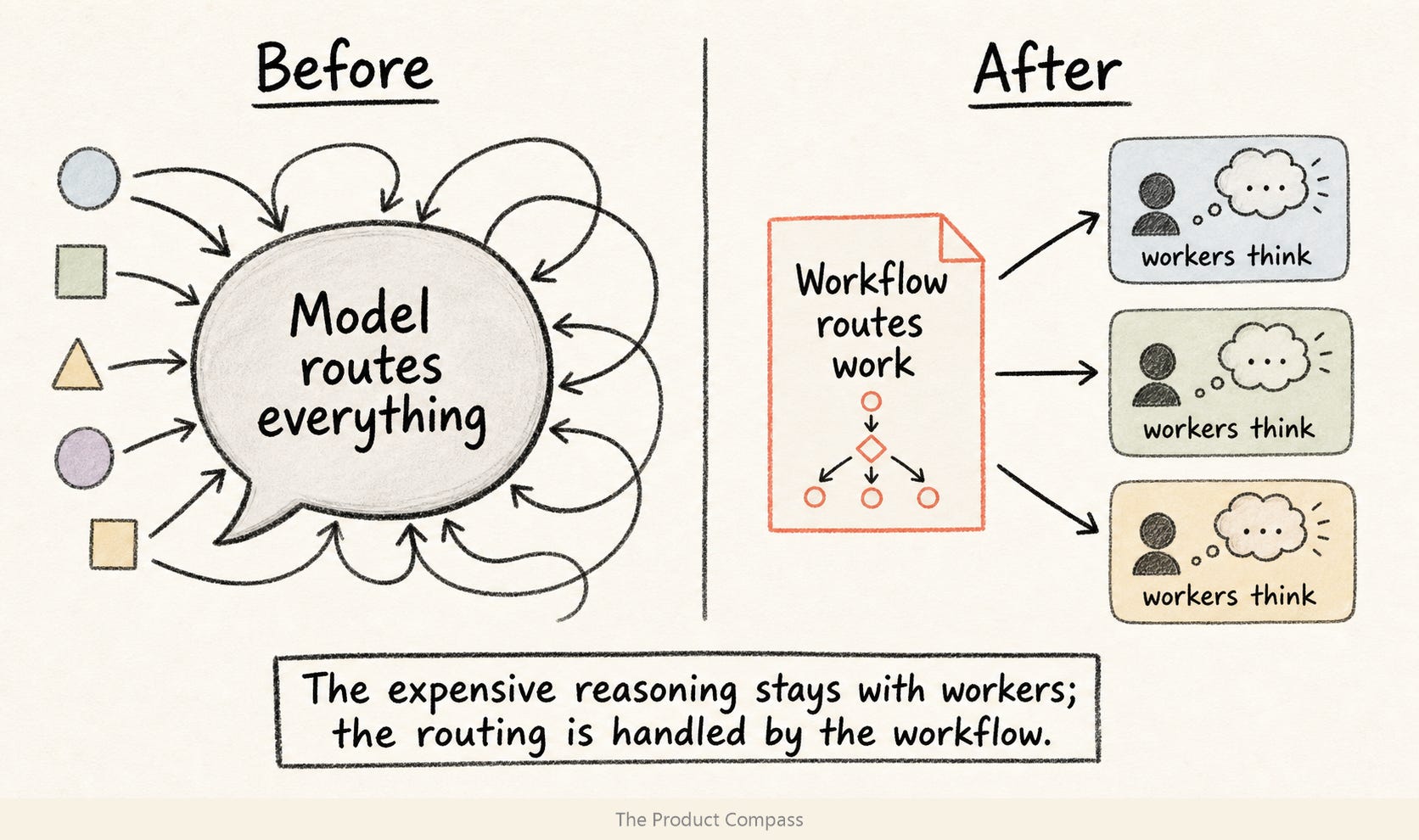
When you fan out 20 agents, something decides what each does, collects results, and drops duplicates. The old way, that something was the model, and every decision was a paid turn. Now it's ordinary code: loops, filters, sorting. None of it calls a model, so the routing is free. The agents still cost tokens; the glue between them doesn't.
1.2 How it compares to n8n
If you run n8n, you've made half this move. n8n took the glue between your tools and put it in a graph. A dynamic workflow takes the glue between agents and puts it in code. Same instinct, one level up.
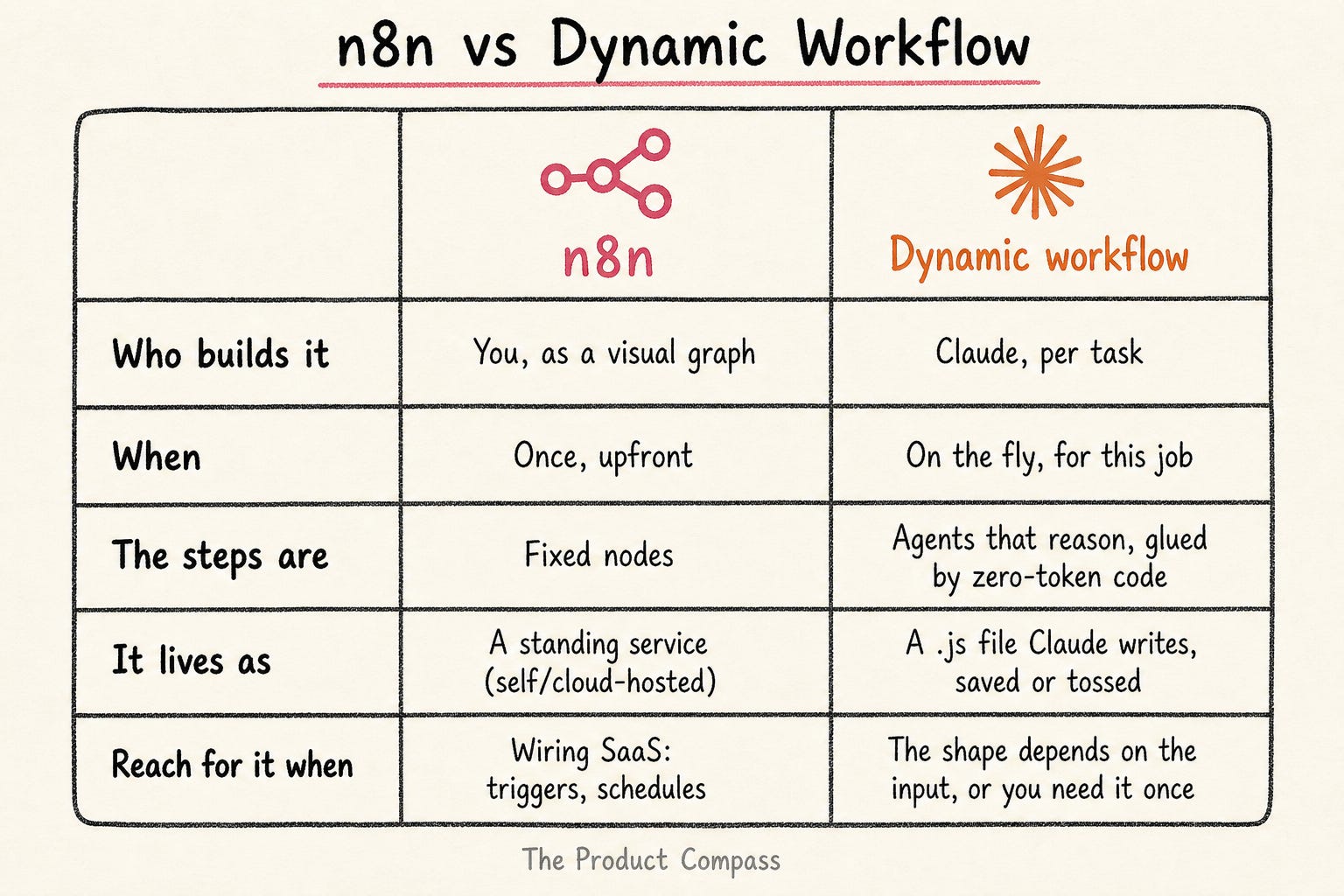
This isn't an n8n replacement. n8n asks: how do I connect tools I already know? A dynamic workflow asks: how do I let the agent build the procedure for this run?
You could already ask Claude to write code that coordinates agents with the Agent SDK, but those are embedded agents: the ones you build into your own app or product. A dynamic workflow coordinates workspace agents: the ones doing your actual work (coding, research, knowledge work) inside Claude Code. The SDK is for the agents you ship; dynamic workflows are for the agent you work with.
1.3 When a workflow beats a subagent
How do you know it’s time to stop prompting and start orchestrating?
Subagents already fan out and synthesize: Opus delegating to a fleet, one round, then a merge. So a single fan-out is not the reason to reach for a workflow. The reason is what happens after the fan-out, when the output of one stage decides the next.
A mental model:
Use subagents when the job is one round of parallel judgment.
Use a dynamic workflow when stage N’s output determines stage N+1: route, score, filter, loop, retry, generate, verify, build.
For PMs: subagents are the workers; the workflow is the operating procedure. The expensive resource (a model's reasoning) goes to each stage; the cheap resource (code) decides the order, which model tier runs each stage, and what carries forward.
2. Why Move the Orchestrator Off the Model
The reason to reach for a workflow isn't that it's more "advanced" than an agent. It's that it moves the fragile part out of the model's context. Order, routing, stopping, and model choice become code. The model still does the thinking; it no longer has to remember the plan, police its own laziness, grade its own work, or decide when the job is done.
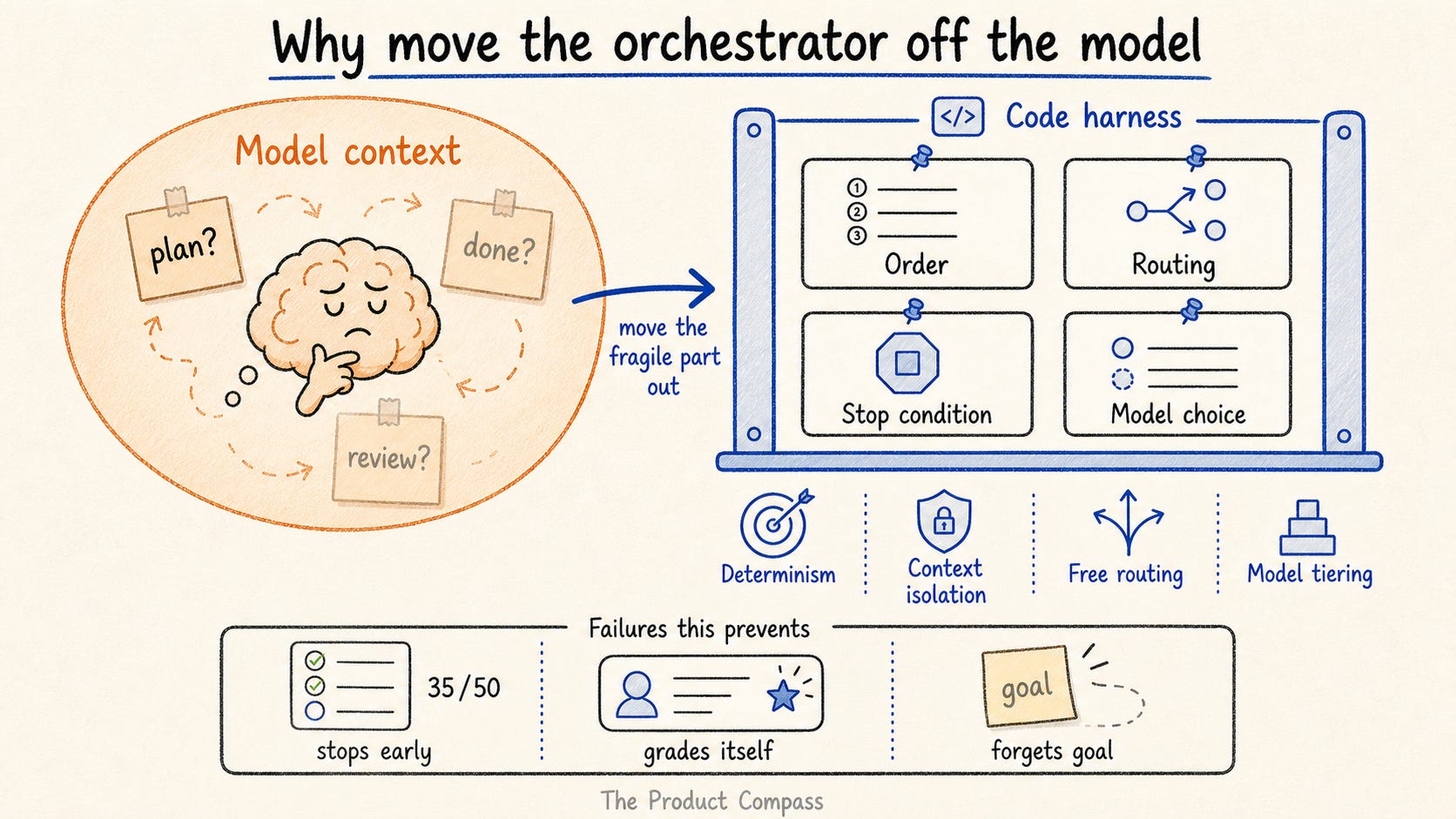
The structure that does this got a name that caught on in 2026: a harness. I'd been making the same case since 2025, under a different one: orchestration over autonomy. The model gets the judgment; the structure around it gets everything else.
Four things follow:
Determinism. Code owns the order, the routing, and the stop condition. They run the same way every time, instead of depending on whether the model feels done.
Context isolation. Each agent gets a fresh, bounded job. The goal lives in the script, not in a window that compacts and drifts.
No orchestration-token tax. The coordination layer isn’t another model conversation, so routing the fleet is free (§1.1).
Model tiering. Bounded, repetitive stages run on a cheaper model. (Subagents can do this too; it’s a pro tip, not the differentiator.)
The first two are the point; the last two are why it’s cheap. You feel their absence as three specific failures, and I’ve hit all three.
2.1 Agentic laziness
Ask Claude to review all 50 items; it reviews 35, writes a confident summary, and declares it done. A workflow holds the 50 in a for loop and runs until the array is empty. Humans get tired and models drift; a loop just checks the same condition again.
2.2 Self-preferential bias
Ask Claude to grade its own work and it grades generously, especially in judge-or-verify tasks. A workflow makes the judge a separate agent, with separate context, sometimes a different model. Spawn several skeptics, require a majority. The bias doesn’t survive being split.
2.3 Goal drift
Over a long session the objective loses resolution; every compaction is lossy, and the “don’t touch auth” constraint can evaporate by turn 80. A workflow holds the goal in the script, outside the model’s drifting memory. Agents come and go with fresh context; the goal doesn’t drift because it was never in a context that compacts.
For PMs: you've seen all three: 70% delivered as 100%, a self-review an outsider would shred, a Friday build that forgot Monday's requirement. Name the step your agent keeps redoing. That's your first workflow.
3. The Six Patterns Worth Knowing
Once the orchestrator is code, six shapes recur. Learn the names; they're how you recognize what a task wants.
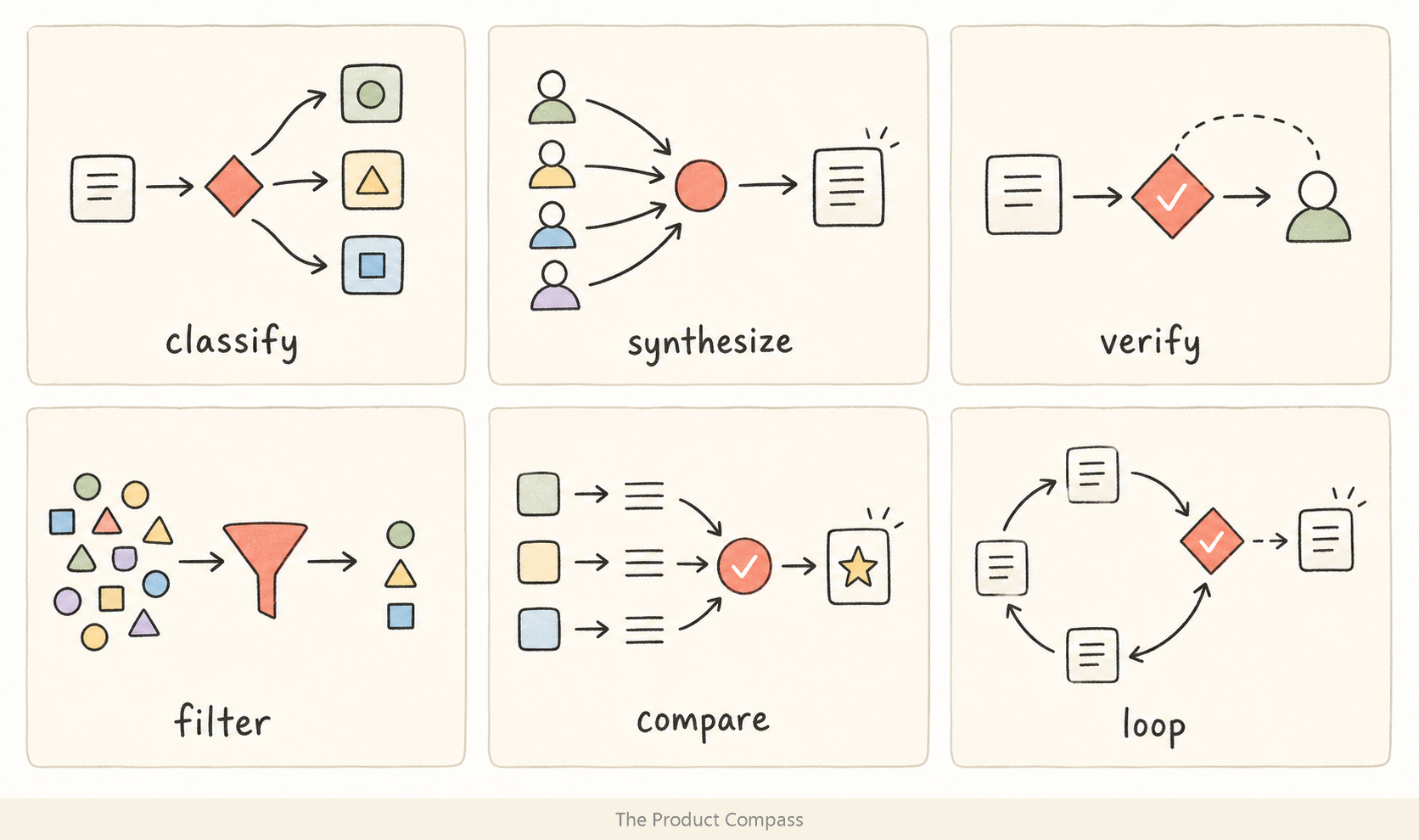
Classify-and-act: one agent decides the task type; the script routes accordingly. Reach for it when: triaging inbound (bug vs feature vs noise), routing support tickets.
Fan-out-and-synthesize: one agent per piece in parallel, then merge in code. Reach for it when: competitor teardown, customer-call synthesis, a market map.
Adversarial verification: separate agents check the output against a rubric. Reach for it when: fact-checking a PRD against its sources, a second reviewer on a risky call.
Generate-and-filter: many candidates, filtered and deduped, survivors kept. Reach for it when: naming, positioning lines, experiment ideas.
Tournament: N agents attempt the task different ways; judges compare until one wins. Reach for it when: a strategy memo or a hard design with no single right approach.
Loop-until-done: keep spawning until a stop condition (no findings, no errors, empty queue). Reach for it when: a backlog triage or an audit where you don’t know how much work there is.
For PMs, on your actual work:
Synthesize customer interviews → one agent per transcript, merged into a themes-and-JTBD table. Every interview read, not the first 20 (the worked example below runs this on 100).
Check 80 user stories against INVEST → a loop that runs until every story is checked, not until the model tires at 50.
Pressure-test a PRD before the review → a separate agent red-teams it against your goal and surfaces the assumption you’d otherwise defend at launch.
You're not learning to code. You're learning which weekly PM jobs can become standing workflows: set the goal once, save the procedure as a skill, and let it run end to end.
4. A Worked Example: A Product Discovery Loop on 100 Interviews
This is where a workflow earns its keep.
Here’s the pipeline I ran on 100 synthetic customer interviews (1-2 pages each).
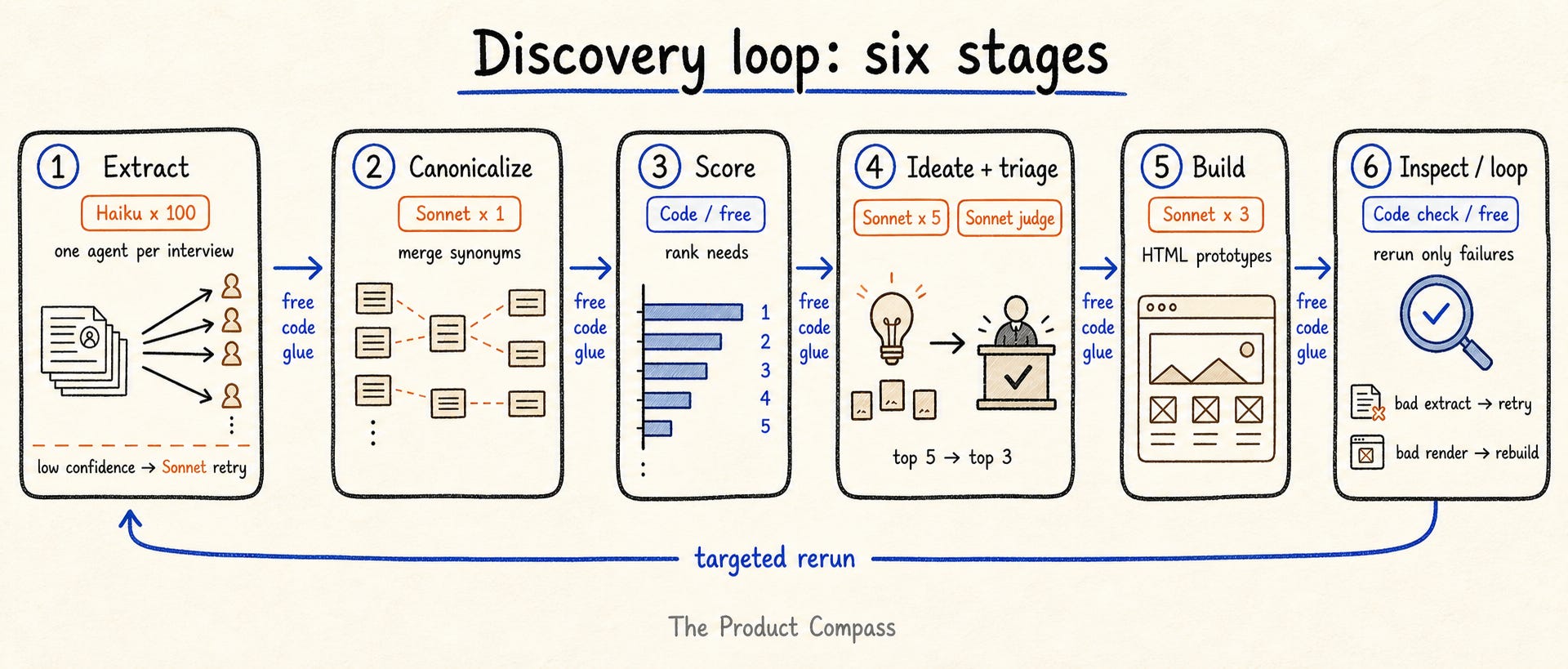
Six stages, each feeding the next:
Step 1: Extract → fan out one cheap-model agent per interview; each returns structured opportunities, personas, and verbatims. Bounded, repetitive work: Haiku or Sonnet, not Opus.
Step 2: Canonicalize → one agent clusters the raw opportunities into a canonical set. The extractors invent a fresh label per interview, so the same need arrives under a dozen names; merging synonyms is judgment, so it’s a model, not code.
Step 3: Opportunity score → code ranks each canonical opportunity by frequency × importance × (5 - satisfaction). No model runs the math.
Step 4: Generate and triage → for the top-scoring opportunities, an agent generates several solution ideas; a separate judge then ranks each by ROI (impact vs build effort) and keeps the top 3 to build. ROI re-orders the list, so a cheap, high-impact need can take a build slot from one that scored higher.
Step 5: Build → for the top 3 ideas by ROI, an agent uses the frontend-design skill to write a distinctive, clickable HTML prototype I can open.
Step 6: Inspect and rerun → a smoke check flags any prototype that fails to render, or any extraction that came back low-confidence, and the workflow reruns just that stage. This is the real loop: the output of one stage decides whether an earlier stage runs again.
That second stage wasn't in my first prompt. I'd written "merge and dedupe" and assumed code could do it; the counts came back fragmented. So I added one line to the prompt, cluster synonyms to a canonical set before counting, and Claude rewrote the harness with a clustering agent in front of the scorer. Even the fix lived off the model.
This is how it runs:
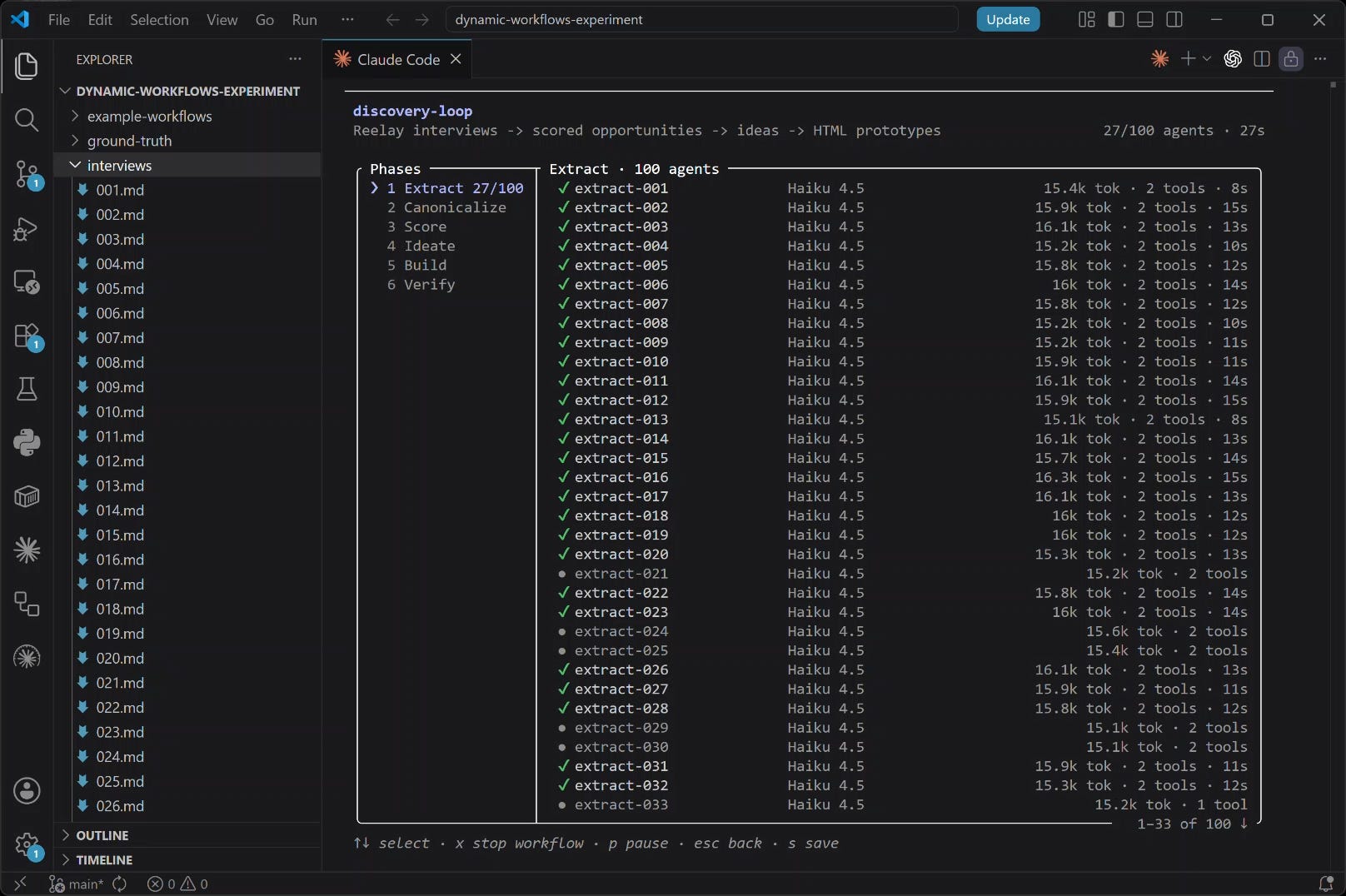
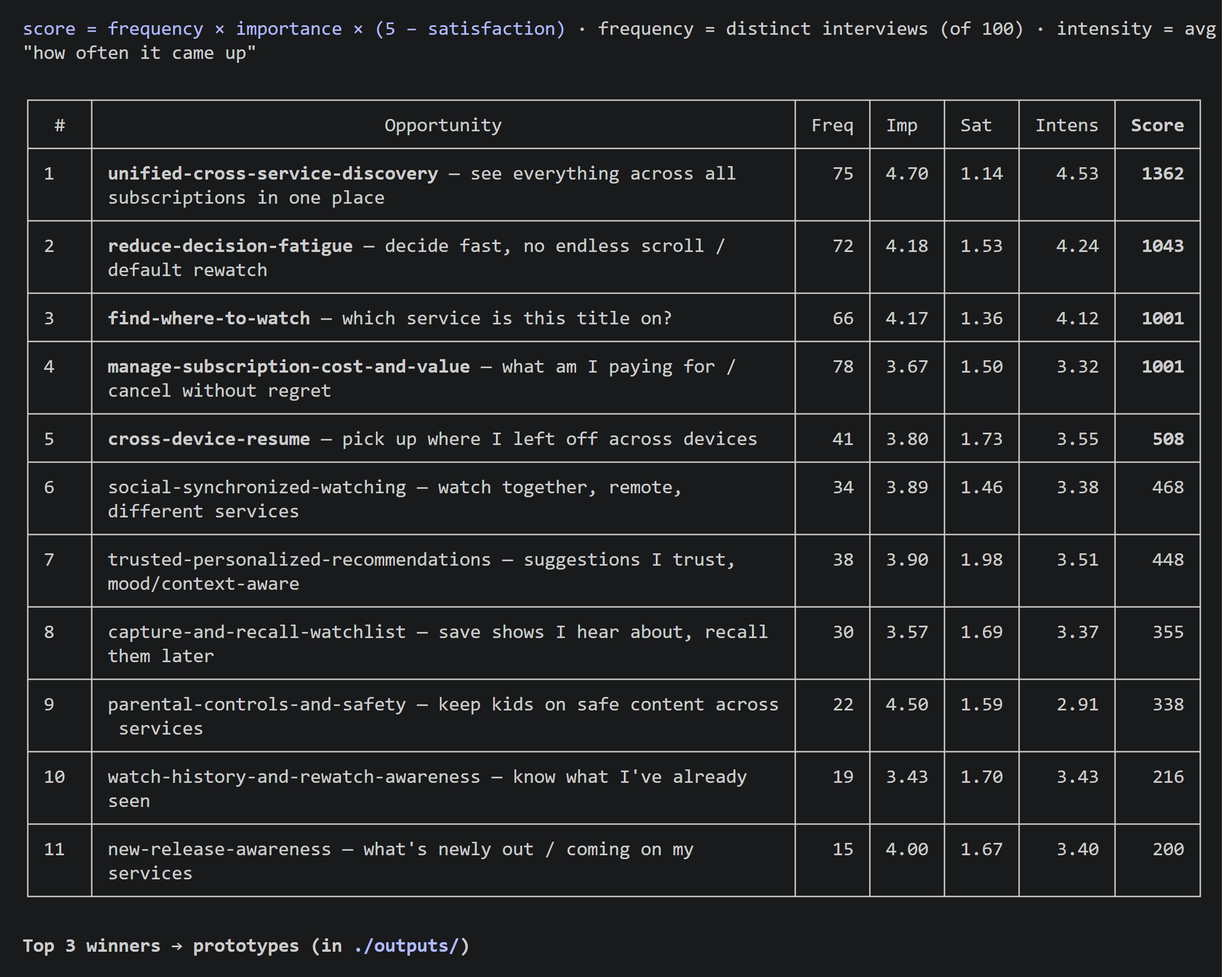

I measured the run: 113 agents spent 1.95M tokens in 12.5 min. 3/3 prototypes built and verified. The JavaScript that routed, scored, gated, and looped spent zero model tokens.
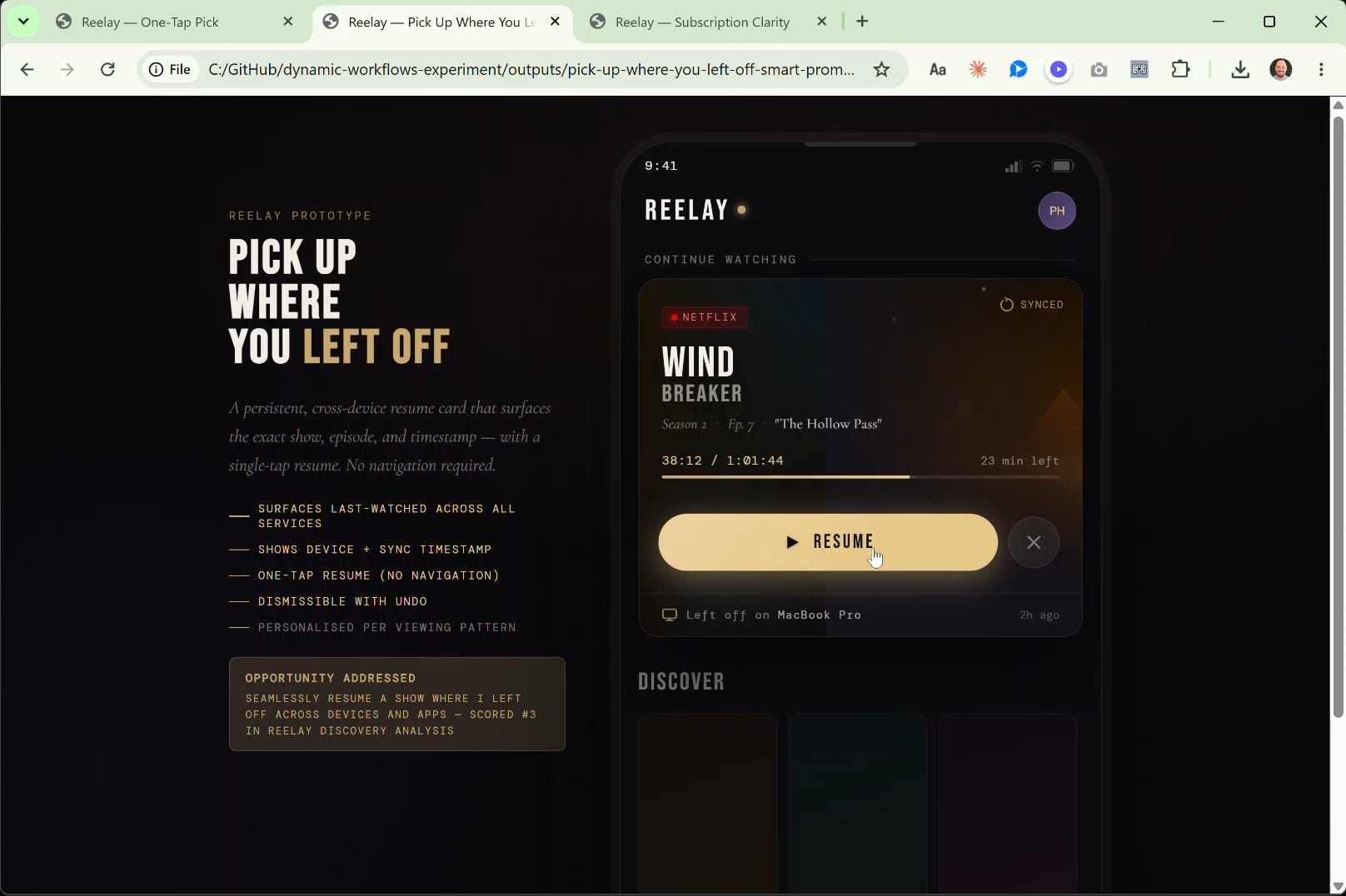
That's the payoff. The rest is how you build it 👇
The free preview ends here. Below:
5. How to Build and Run a Dynamic Workflow: the six-stage harness, the full run on video, shipping it as a skill, scheduling it with /goal + a budget, and containing it;
6. When a Dynamic Workflow Is Overkill (and when a subagent is enough);
The dynamic-workflows experiment repo (the synthetic interviews, the harness, and the prompts) if you want to run it yourself.