

Last week I ran a spike. Same CLAUDE.md, same skills, same MCPs, same hooks I write regularly in Claude Code. Shipped a working Knowledge Chatbot in an afternoon. No new framework. Zero files I hadn’t written a dozen times before.
Everyone's covering agents helping you build or do knowledge work. The pattern nobody's explaining: the same primitives are the production runtime.
What you’ll learn:
The Claude Code primitives that double as a production runtime
When to pick the Anthropic Agent SDK
The architecture — one function call replaces an n8n-style workflow
A full working demo: source code, build prompt, hosting notes
The gotchas that silently break things
How to host your Claude Code agents in production
1. The Missing Pattern — Agent as A Callable Component
Two narratives dominate right now:
Agents as products. Claude Code, Lovable, Cursor. You use them to code or to do your work.
Agents as infrastructure. Claude Managed Agents, CrewAI, LangGraph.
The pattern sitting between those two is agent as a callable component inside your app.
How does it work?
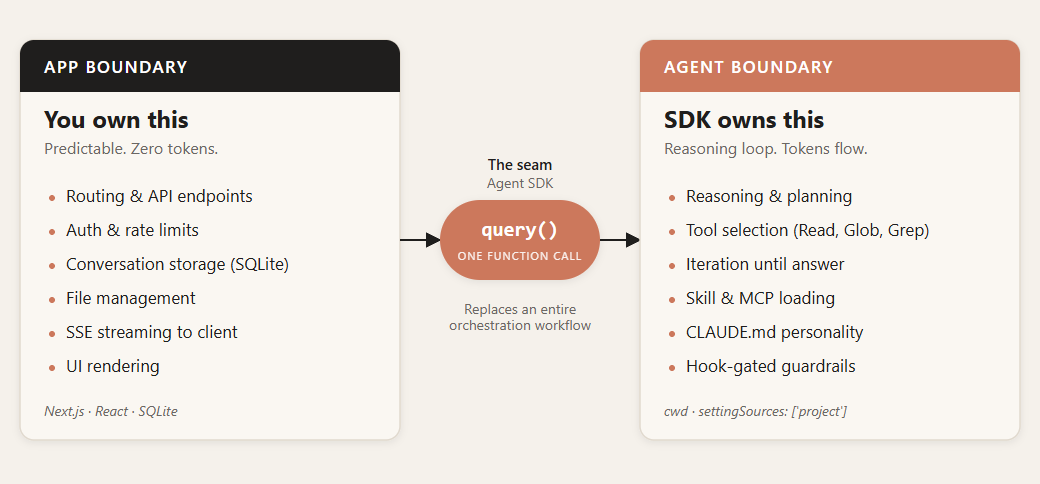
Your web app handles routing, auth, CRUD, form validation. When a request needs reasoning, you call the agent — which runs in a sandbox with its own CLAUDE.md, skills, and MCP servers.
The part that surprised me: the same .claude/ folder I've been editing every day for months is the deployable unit. There is no translation layer between dev and prod. The CLAUDE.md that guides Claude Code in your terminal is the exact same CLAUDE.md format that runs in production.
2. The Primitives You Already Use
Five key things. We've discussed most of them in the previous posts about Claude Code and Cowork:
CLAUDE.md — the agent’s identity in markdown. Tone, rules, constraints. In dev it shapes how Claude Code behaves in your terminal. In prod it loads as the system prompt of your production agent. Edit the file, ship the behavior.
Skills (
.claude/skills/) — reusable behaviors, also markdown. Same file format in dev and prod. Same loader.MCPs (
.claude/mcp.json) — servers that extend the agent’s tool surface. Your dev config probably talks to Chrome and your filesystem. Your production agent’s config talks to your search API and your database. Different servers, identical contract.Hooks — functions that fire on tool events.
PreToolUsecan block dangerous operations (reading.env, path traversal).PostToolUsecan log everything the agent read so you can show it in the UI.Sub-agents (
.claude/agents/<name>/) — each directory is a self-contained agent: its own CLAUDE.md, its own skills, its own MCP config, its own docs. Adding a second agent to your product is a new folder.
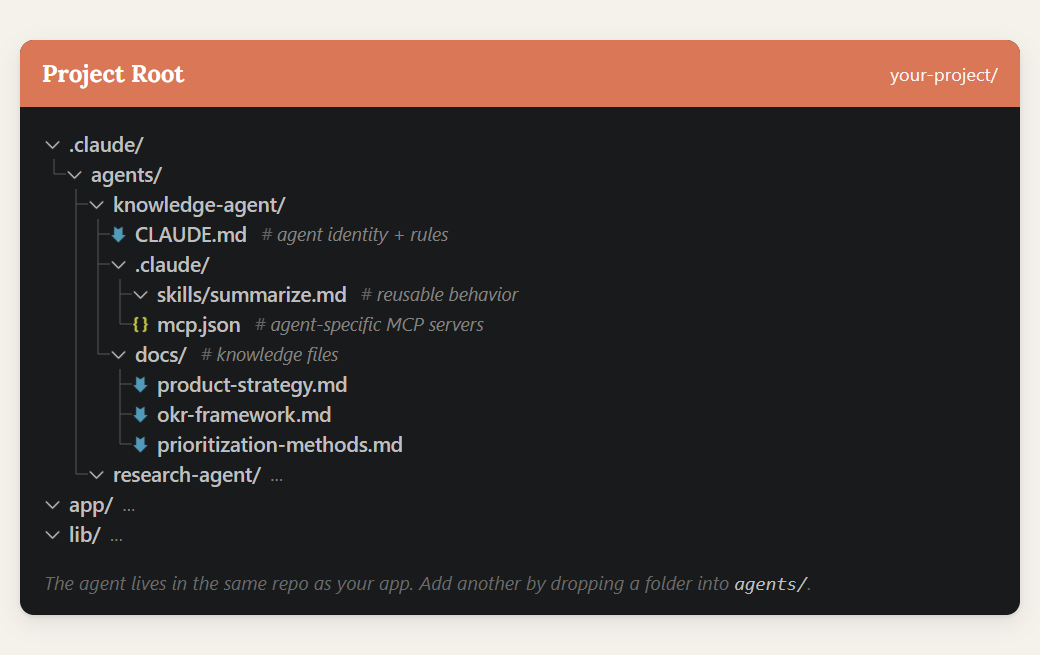
Everything is files. Everything is version-controlled. Everything diffs cleanly in a PR. If you've onboarded to Claude Code, you've already onboarded to the production stack.
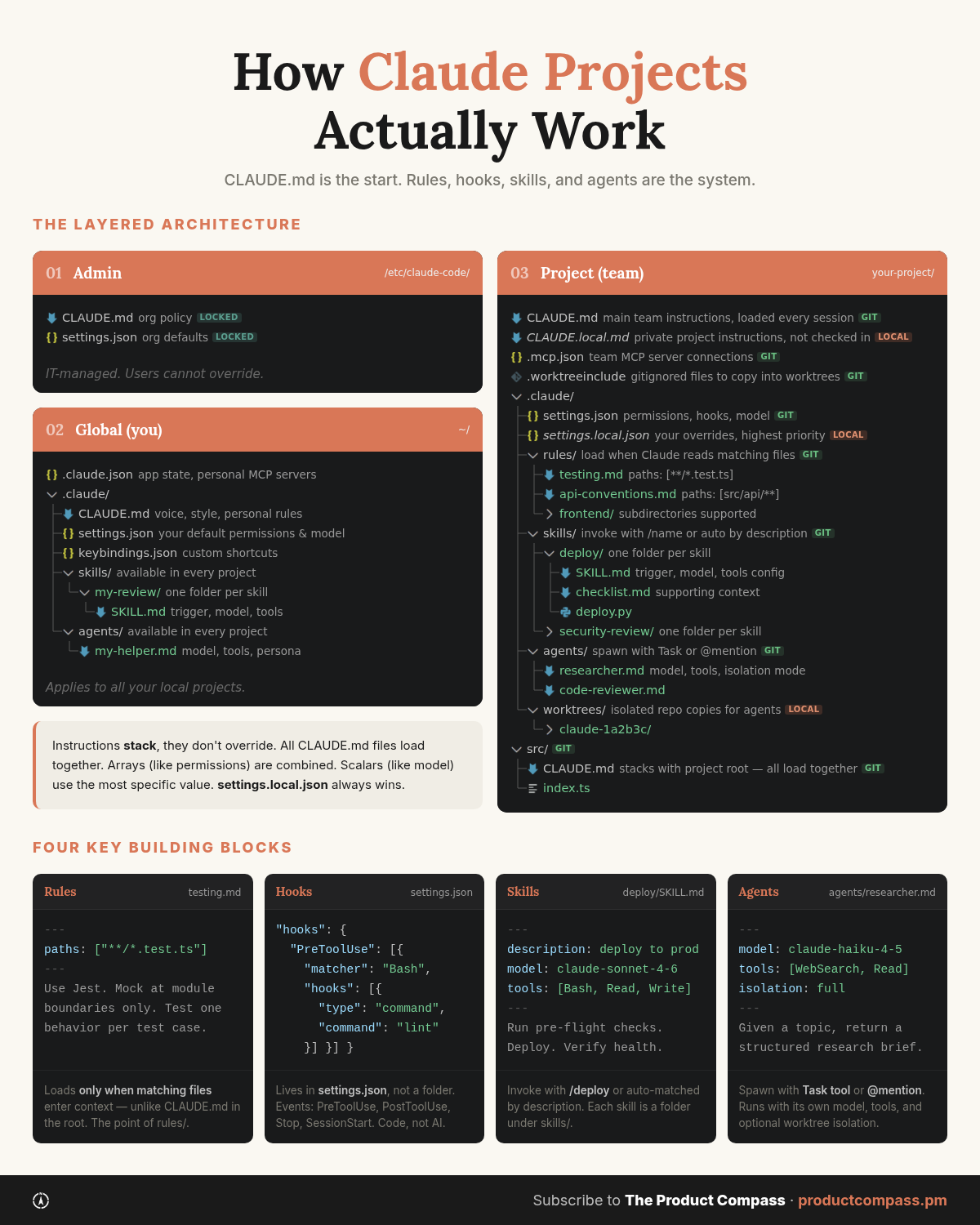
In case you wondered, here’s a bigger picture:
3. Why This Matters in Production
Here’s how it stacks up against the alternatives:
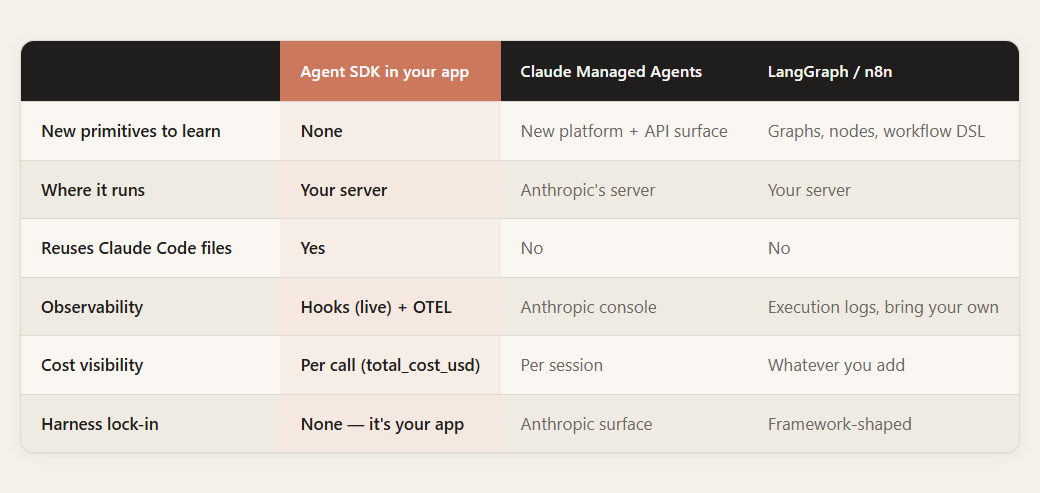
Four things fall out of this that I didn't expect going into the spike:
Nothing new to learn. The CLAUDE.md you wrote in dev is the CLAUDE.md that ships. Your muscle memory is already the production runtime.
You can skip Claude Managed Agents unless you actively need a hosted runtime. For request-response agents inside an app you already host, the SDK is a smaller dependency than a whole platform.
Full observability. Hooks give you live per-response metadata — cost, duration, files read — for your UI. OTEL exports full traces to Langfuse or any OTLP backend when you need it.
Same loop, dev → prod. The config you tested in Claude Code is the config running in production. If it worked in your terminal, it works in your app. No mental translation.
For PMs: this is what lets you prototype and ship agent features without becoming a bottleneck. Changing the agent's behavior is editing a markdown file — not a sprint, not a code review, not a redeploy cycle. You iterate on AI behavior at the speed you iterate on a Notion doc.
Now the part most people skip — how you actually wire it up.
4. The Architecture — One Function Call Replaces a Workflow
In n8n you wire it up node by node. A single agent has system prompt, LLM, model, tools, and memory.
A single Claude agent isn’t a workflow. Inside an app, you don’t need a node-by-node graph around it — simple orchestration and guardrails live in your hooks or your business logic.
In the SDK it's this:
for await (const msg of query({
  prompt: question,
  options: {
    cwd: './.claude/agents/knowledge-agent',
    settingSources: ['project'],
    allowedTools: ['Read', 'Glob', 'Grep'],
    maxTurns: 5,
    maxBudgetUsd: 0.15,
    model: 'claude-sonnet-4-6',
    hooks: { /* guardrails */ },
  },
})) {
  // stream text to the user, collect metadata
}
settingSources: ['project'] is the auto-loader. It reads the agent's CLAUDE.md, skills, and MCP config from agent’s working directory (cwd). Same behavior Claude Code has when it opens a session. You don't manually load anything.
The boundary is clean. Your app owns the request lifecycle, auth, storage. The agent owns reasoning, tool selection, iteration. One function sits on the seam. That's the entire orchestration layer.
5. The Demo — Knowledge Chatbot
I built the smallest thing that shows the pattern: a web app with markdown files and a chatbot that answers questions using those files, with memory across turns.
The agent lives in its own directory:
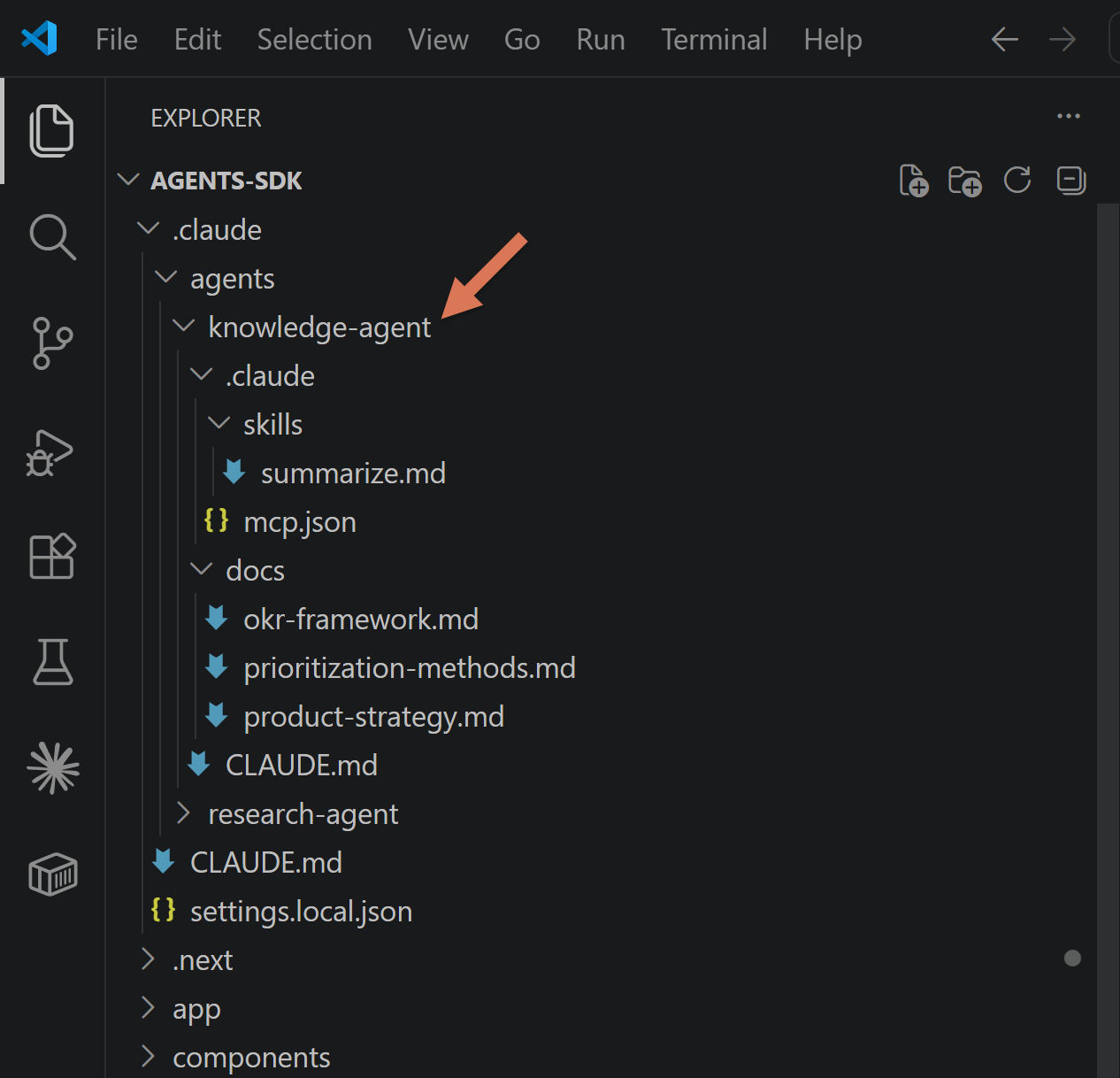
Stack:
Next.js 15 standalone (not serverless — the SDK spawns a full Claude Code runtime, not a lightweight API client).
SQLite for conversation memory because this is a prototype. Postgres, Redis, a JSON file on disk — all fine.
Adding a second agent? New folder in .claude/agents/. Give it a CLAUDE.md. Point cwd at the new directory. Same structure every time.
Keep reading for:
The prompt that scaffolds the app — paste into an empty repo, Claude Code builds the rest.
Full source code — Knowledge Chatbot, streaming responses, per-message cost metadata.
The lib/agent.ts wrapper with the TypeScript pitfalls the SDK docs skip
The postbuild trick that stops production from inheriting your repo’s CLAUDE.md.
The limitations I hit in the spike and the workarounds for each.
How to easily host this in production.