

Hey, Paweł here. Welcome to the free edition of The Product Compass Newsletter.
Every week, I share actionable tips, templates, resources, and insights for PMs.
This is the #1 AI PM newsletter for those who want to quickly learn by doing rather than listening or studying theory. No coding.
Here’s what you might have recently missed:
What Is Product Discovery? The Ultimate Guide for PMs (2026 Edition)
Three CLAUDE.md Blocks That Make Claude Get Smarter Every Session
Consider subscribing and upgrading your account for the full experience:
Note: I’m on vacation in Italy till 8/6, but in this post, I wanted to share the results of the experiments I keep running. This one can radically lower your AI bill.
In April, I demonstrated how I cut my Claude bill $1,389/mo → $200/mo by adjusting the context window, delegating work to subagents, reading PDFs as text, and so on.
Still, $200 is a lot of money, depending on your situation. And despite some social media claims, the $20 Claude subscription was never enough for any real work.
The situation got worse recently. For new 1M models, Anthropic no longer supports disabling the 1M context window or overriding auto compact thresholds. You will pay premium for Claude cache writes and reads in both Cowork and Claude Code, especially when running autonomous loops (there is no human to hit /compact).
What's just changed
On July 30, OpenAI reduced prices for GPT-5.6 Luna by 80%. The same week, they radically improved their models’ performance and token efficiency. The reports said that Luna with max effort scores similarly to Opus 5 at a fraction of the cost.
I decided to test it. The results are crazy, verified multiple times.
1. Bug Hunt Bench
Here’s a benchmark I’ve been improving for several weeks, never published in this newsletter. Look at the blue Luna rows and their last column, cost:
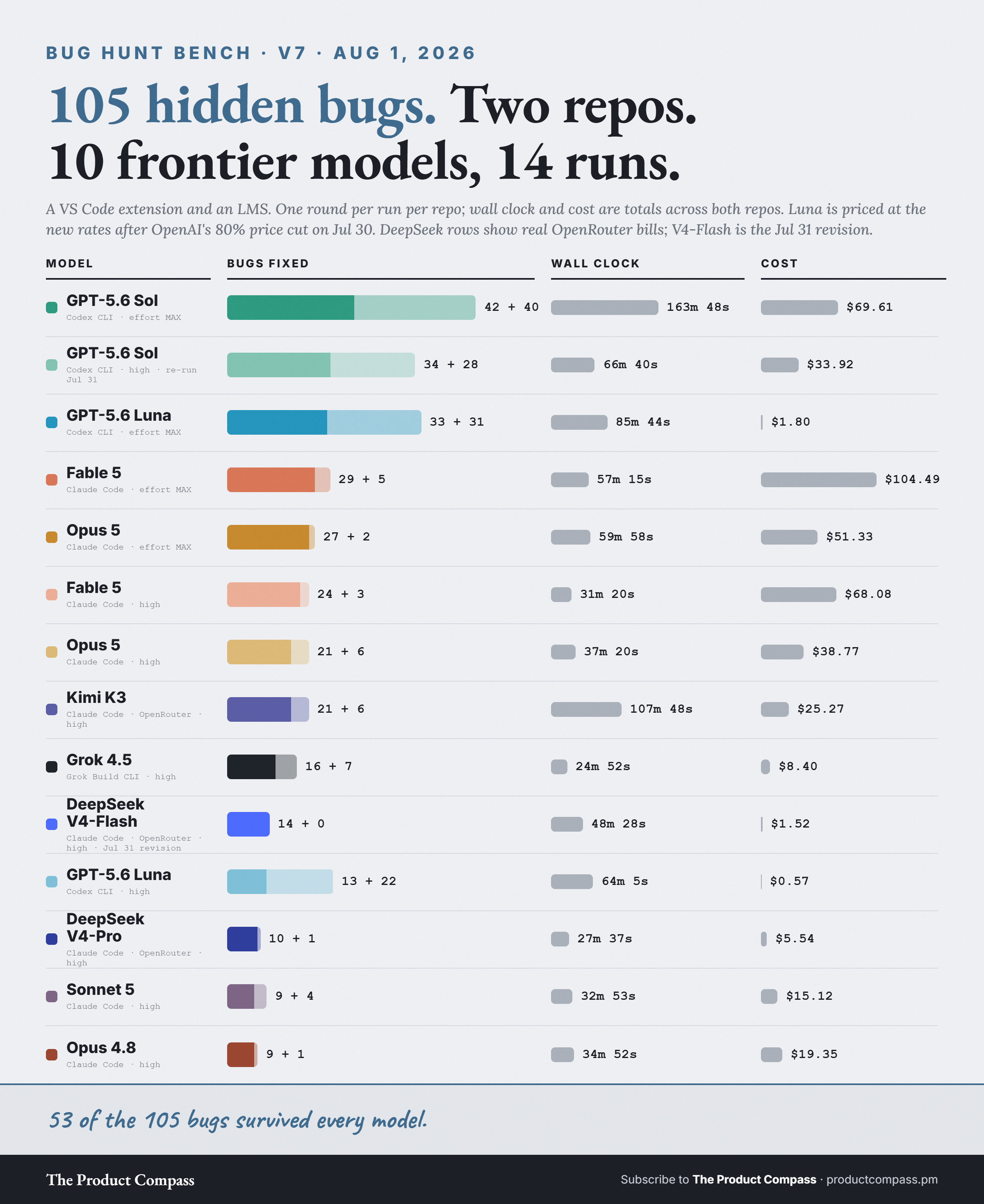
In version 7, I ran 105 hidden bugs through 10 frontier models:
GPT-5.6 Luna at max reasoning effort fixed 33 bugs.
Anthropic's Fable 5 fixed 29.
Luna's run cost $1.80 at API rates. Fable's cost $104.
The same Luna at high effort fixed 13. The effort is the whole difference.
What this means for you
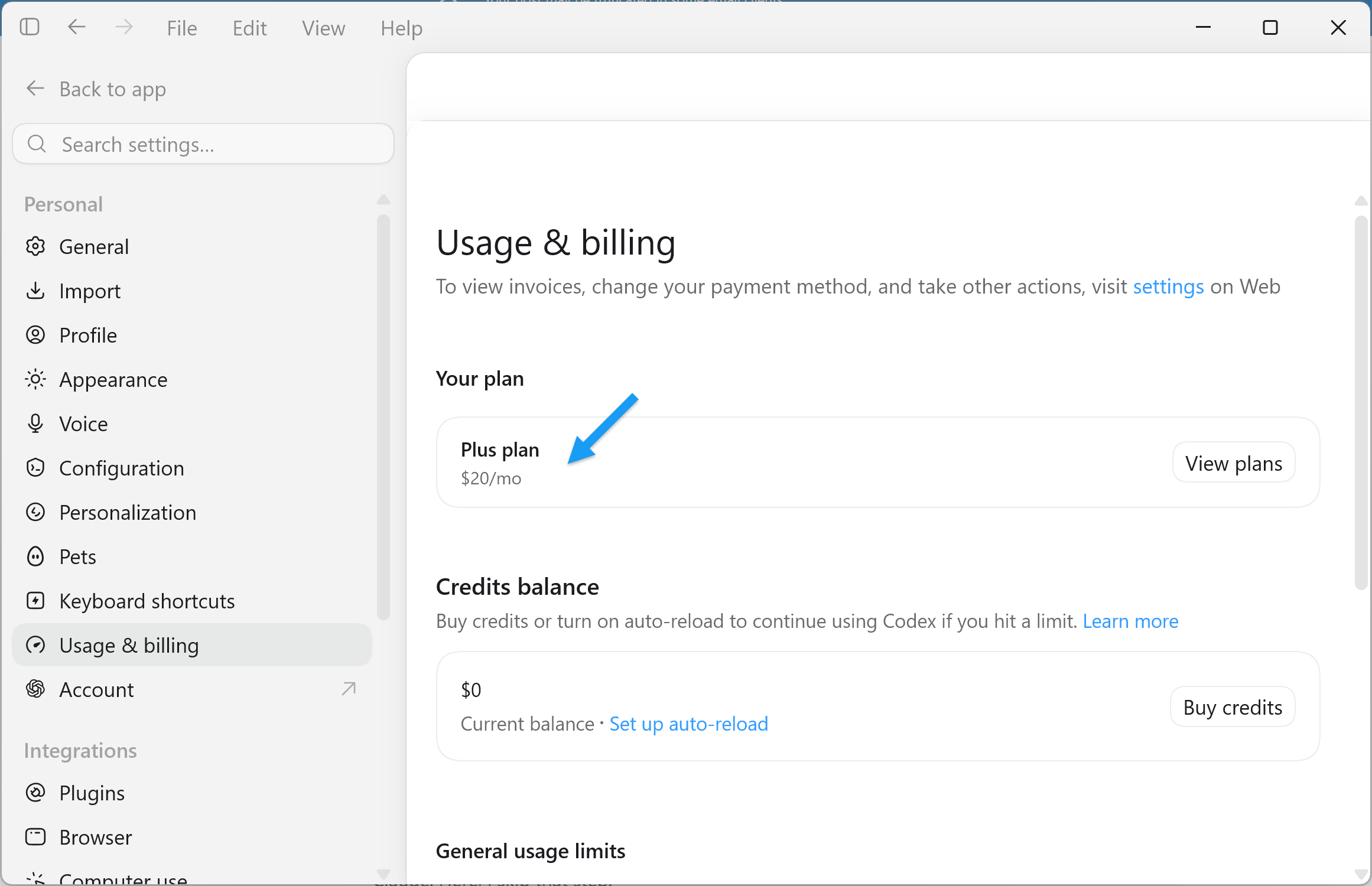
Luna is included in the $20 ChatGPT Plus plan. And subscriptions are heavily subsidized. In practice, you get at least $500 of API equivalent credits.
For the first time, $20 a month is enough not just for learning but also for serious agentic work.
How much cheaper is it, really?
Most of the gap comes straight from the rate card. Opus 5 and GPT-5.6 Luna are priced 20 to 25x apart on every token type:
Input: $5.00 vs $0.20 per million tokens
Cached input: $0.50 vs $0.02
Output: $25.00 vs $1.20
In my tests the actual spread ran from 20x to 90x, depending on the configuration and the session length (Anthropic’s 1M sessions make the situation worse). One thing I can say with confidence:
You will get more real work out of the $20 OpenAI plan & Luna max than out of the $200 Claude plan & Opus high.
What about speed?
As demonstrated by the benchmark, Luna at the max effort level is slower than Opus 5 at high. I suggest using:
Luna (max effort) for the most challenging tasks: planning, strategy, large implementations. Or for everything that can run async (nightly builds).
Luna (high effort) for small, daily tasks: batch operations, bug fixing, small features, summaries. It’s still clearly better than Sonnet 5 at high effort, a very strong model.
I measured this by asking the same easy questions about one of my solutions in two ways:
a cold one-shot call,
and follow-up turns inside a live session (more realistic).
Median time and median cost per question:
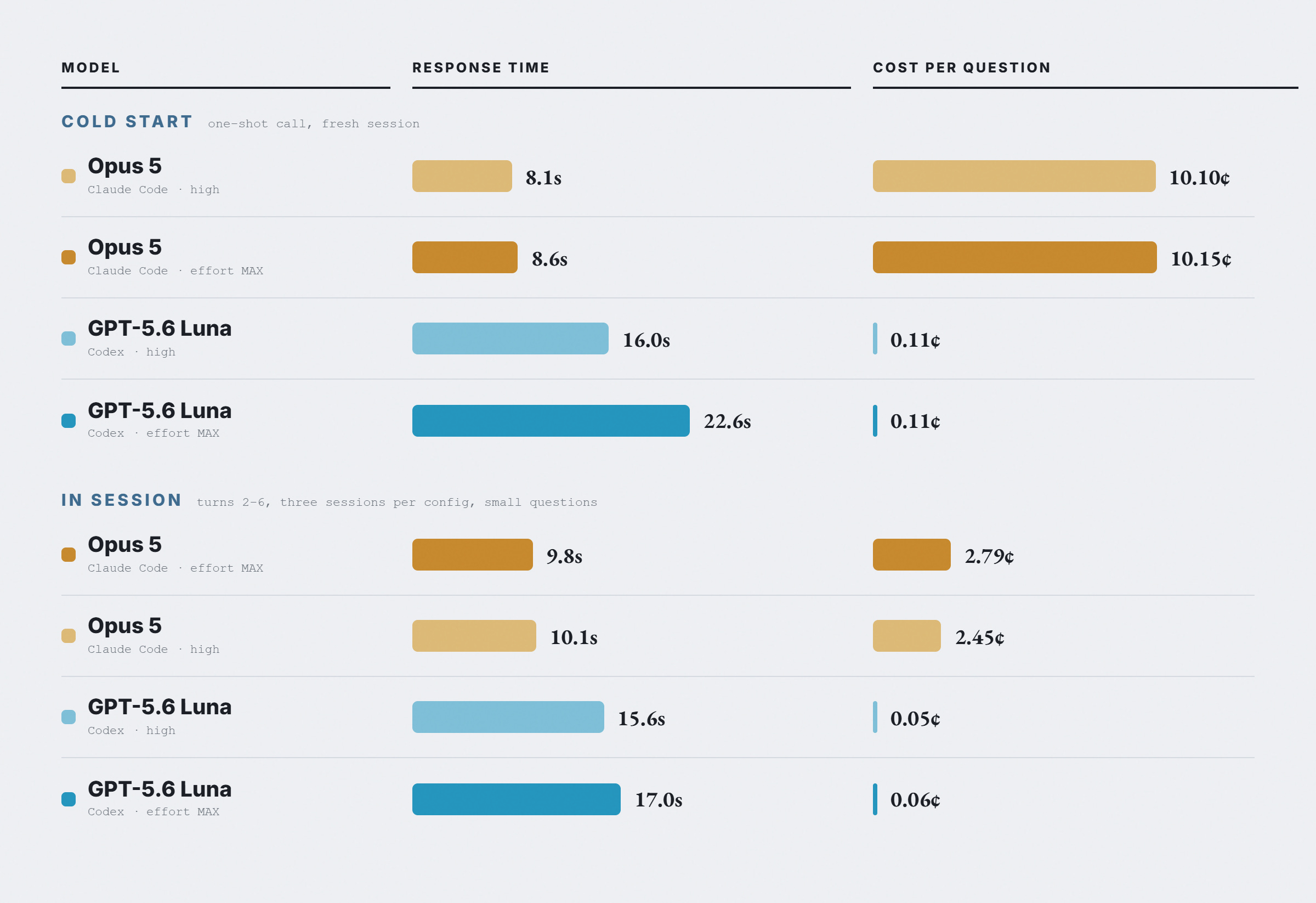
Both get cheaper once the session is warm. Opus 5 stops paying to re-upload your instructions and drops about 4x. Luna roughly halves, because more of its context is already cached. That closes the gap from about 90x to about 40x on these small questions.
One more setting: fast mode. It bills at 2x on the API, 2.5x in ChatGPT credits, and is supposed to run 1.5x faster. In every test I ran, it made no measurable difference to Luna.
Does it really work with a $20/mo plan?
Before publishing this, I created the second subscription and verified that everything I described is available on the Plus plan:
Every run, the method, and the raw logs are public: github.com/phuryn/experiments. The answer keys stay hidden so the benchmark keeps working.
2. How to Start With ChatGPT Desktop App
Unlike Cowork, the ChatGPT app is a real agentic environment. It supports autonomous loops and graphs (/goal), agentic coding, project-level skills and MCP, and manual compaction. All within a single interface, with no IDE or CLI.
Step 1: Install the ChatGPT desktop app
The Codex app is now called ChatGPT.
You can download it here: https://chatgpt.com/download/
When installing, you can import your existing settings (projects, skills, etc.) from Claude. Here, I skip that step.
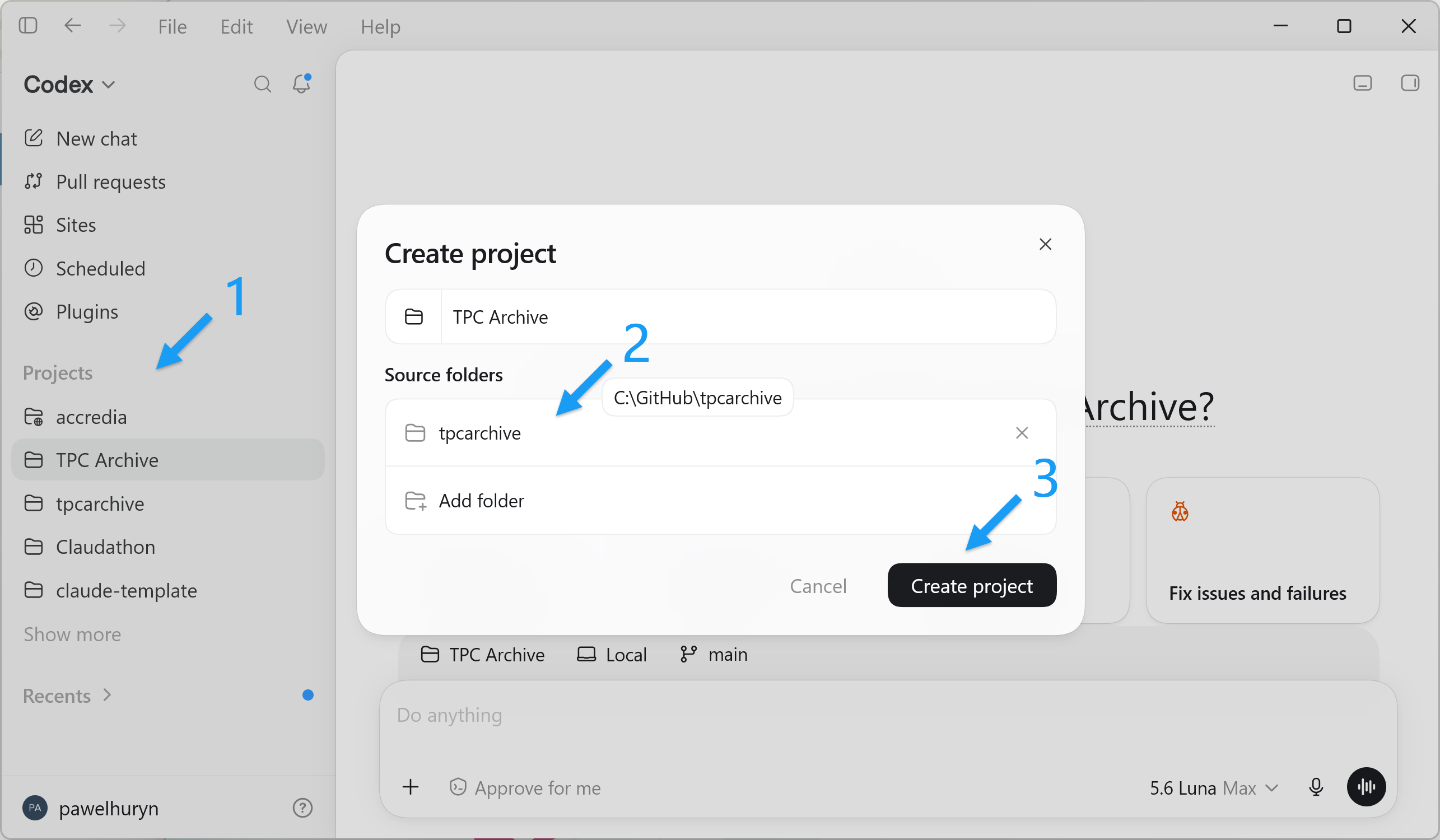
Step 2: Sign in and open your project folder
Before using the ChatGPT desktop app, sign in or create a new account. The “Plus” subscription costs $20/mo and is enough to start.
Click “Projects” and open an existing folder or create a new one:
In the top left corner, you will see two modes:
ChatGPT: documents, decks, research. Best for knowledge work.
Codex: the coding agent. A more advanced view, best if you’re prototyping.
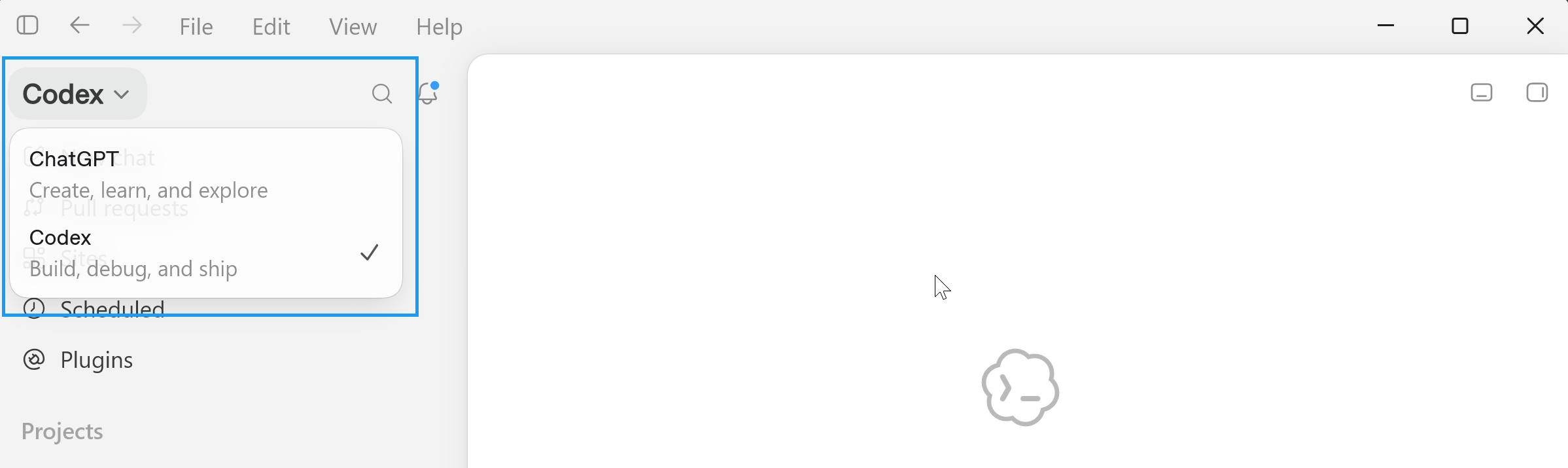
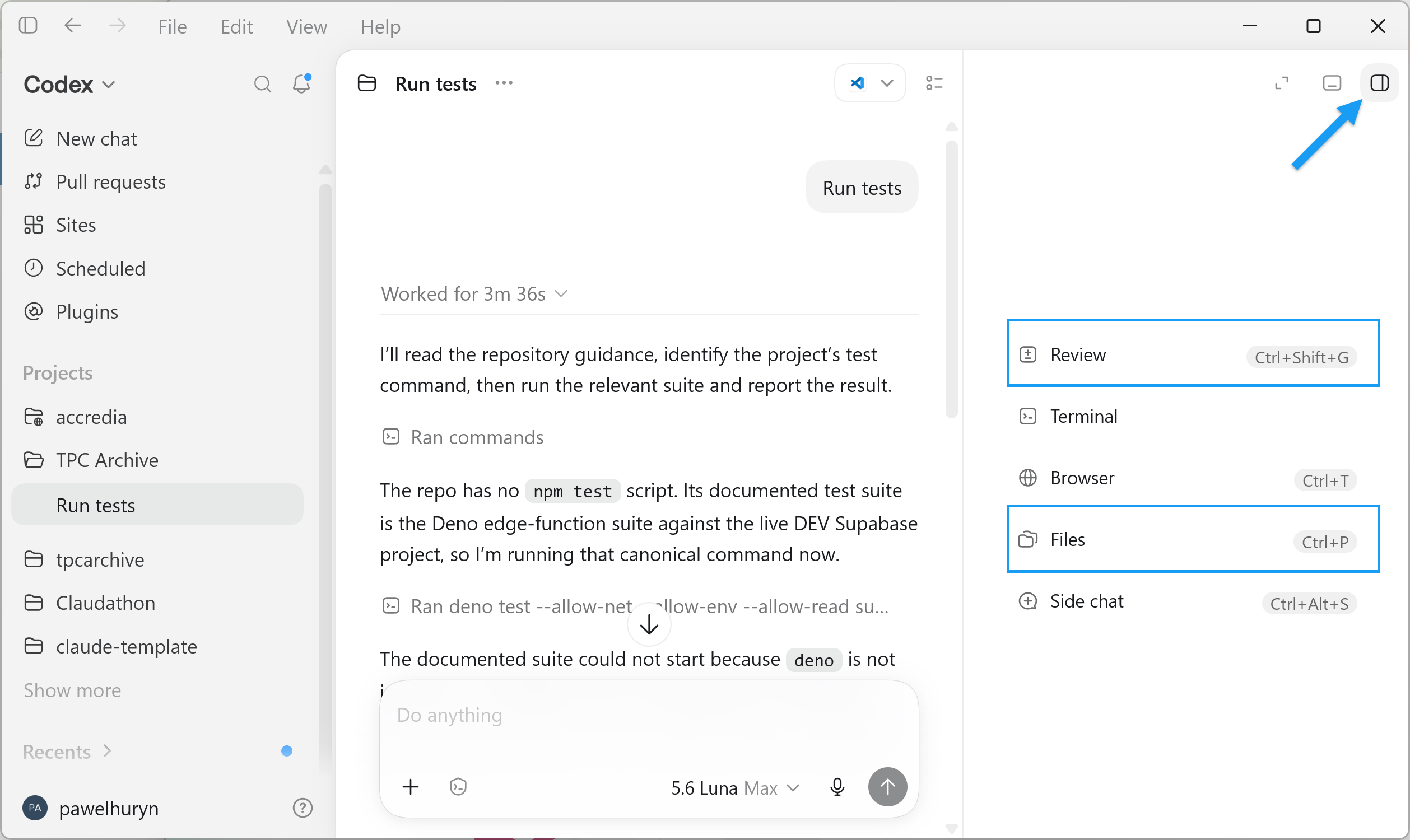
In the Codex mode, you will see:
File tree on the right (“Files”)
Visual diffs in the same panel (“Review”)
For example, here’s how you can browse files and documents without terminal or IDE:
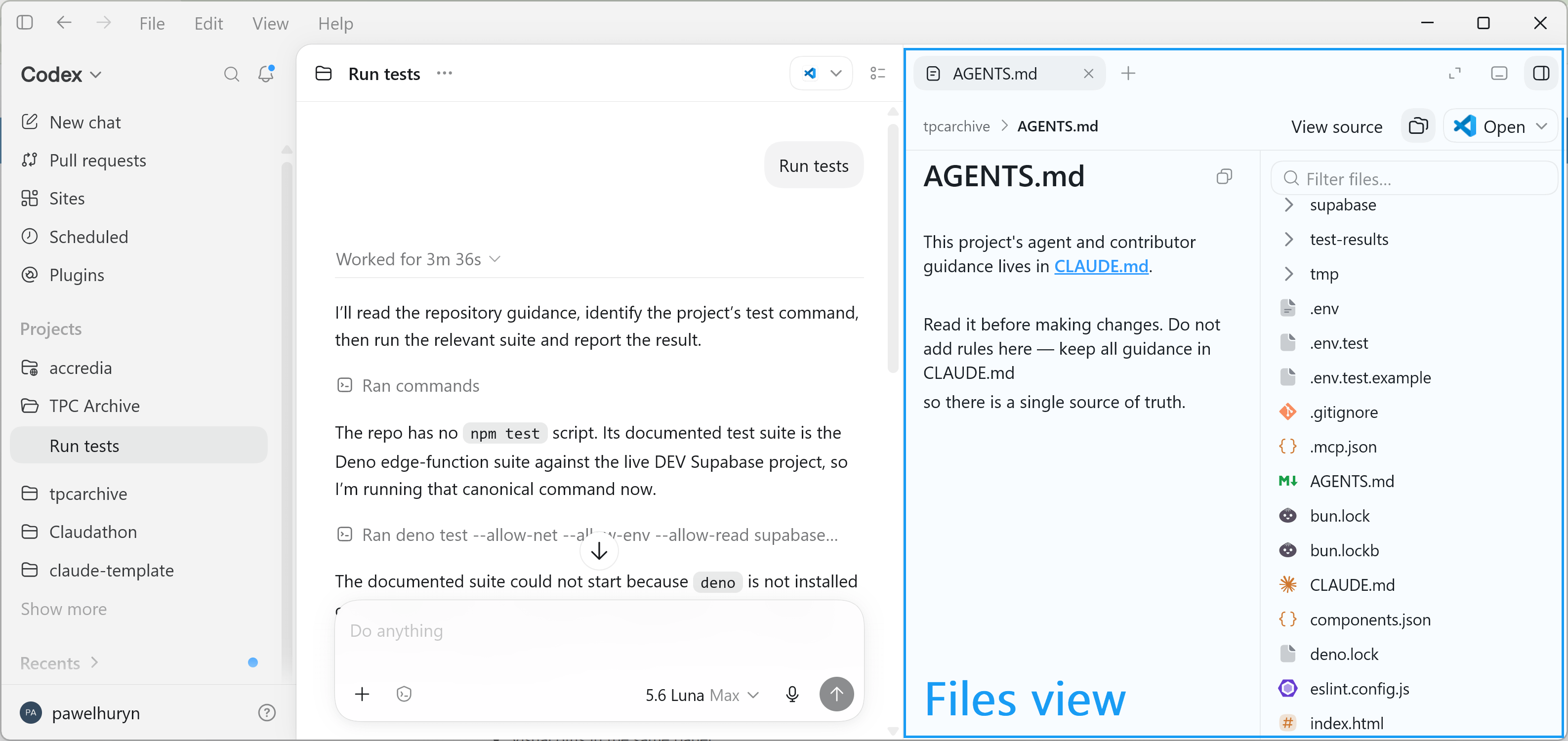
Step 3: If you also use Claude
Create AGENTS.md at the repo root
Copy and paste lines pointing to CLAUDE.md
This project's agent and contributor guidance lives in **[CLAUDE.md](CLAUDE.md)**.

Read it before making changes. Do not add rules here — keep all guidance in CLAUDE.md
so there is a single source of truth.
You can see an example in Step 2.
Both agents now use one source of truth. The longer version, including how I run the two side by side, is here: How to Set Up Codex as a PM and Run It Next to Claude.
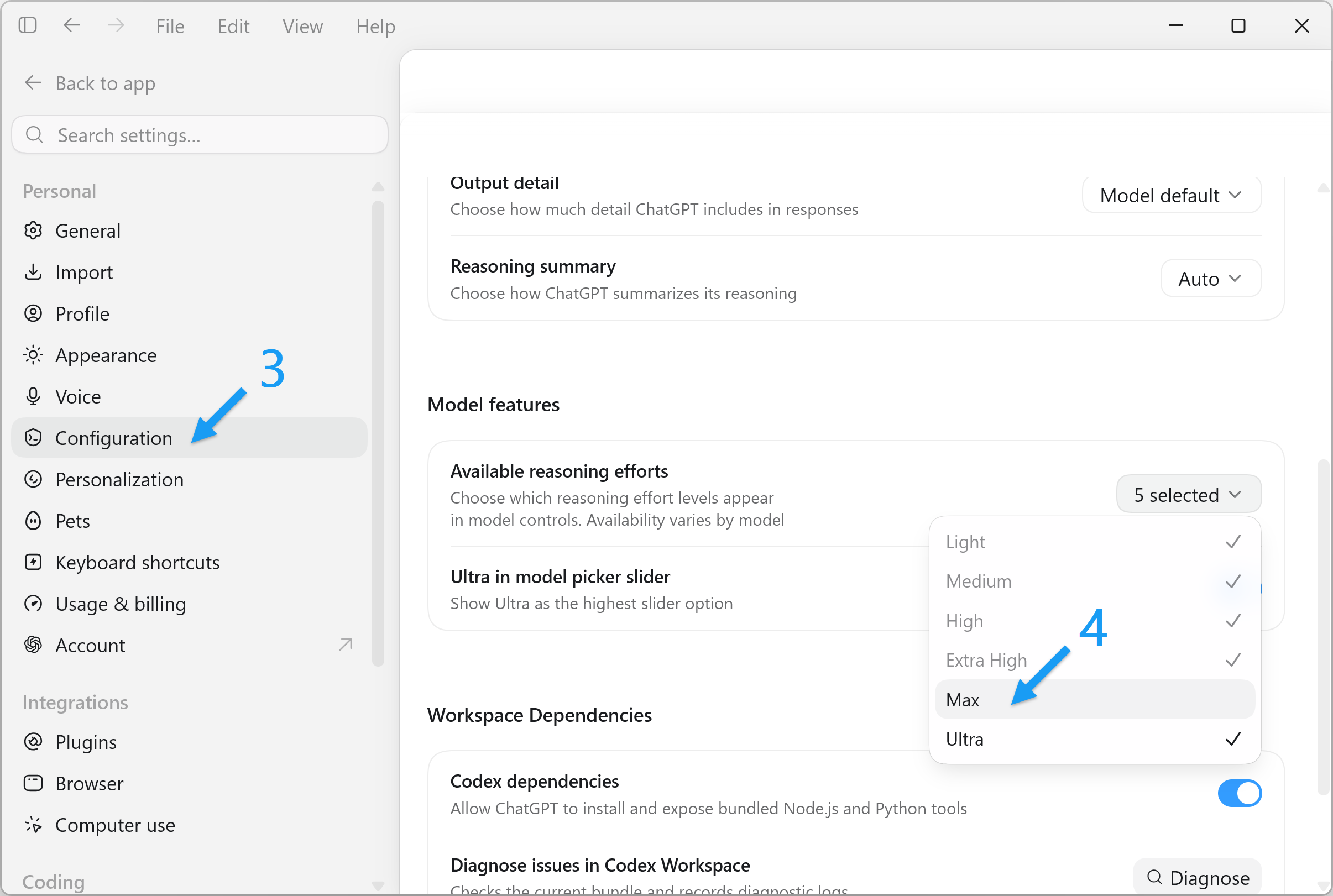
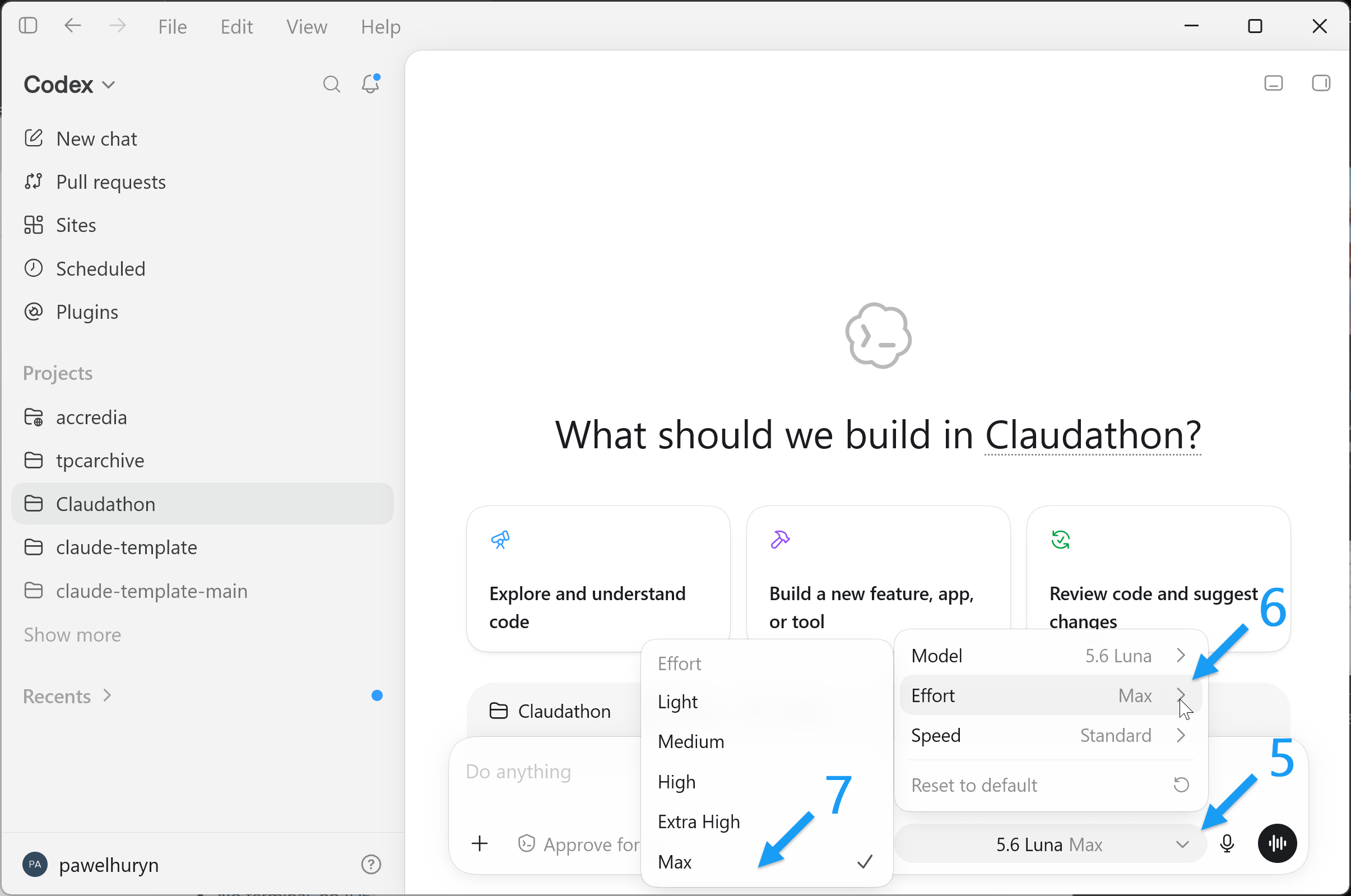
Step 4: Set reasoning effort to max
It's off by default. Luna at max is a different model than Luna at high. Here’s how:
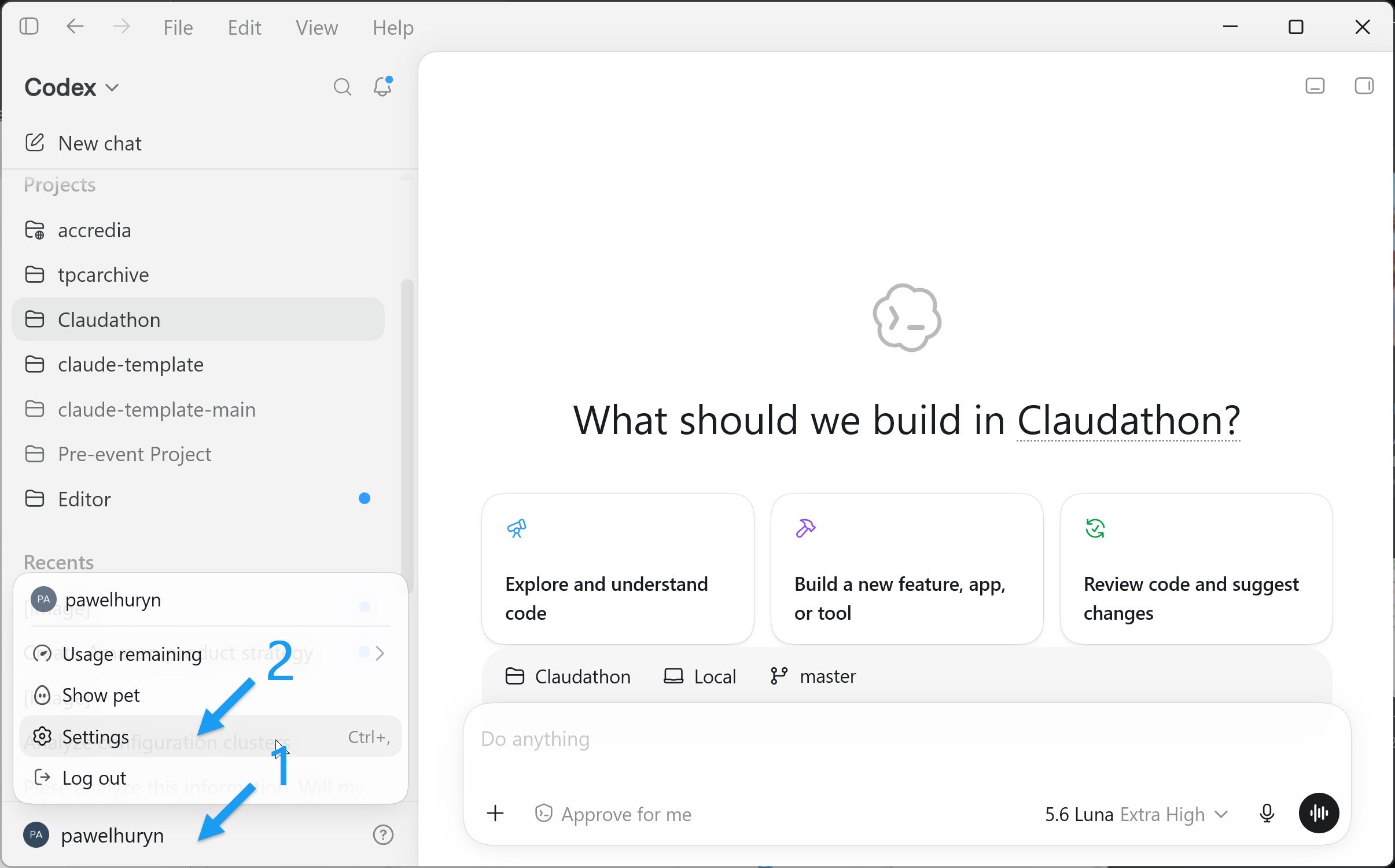
3. My Model Routing
Using Luna (max) for all the hardest tasks and Luna (high) for everything else maximizes value / cost. It’s a sweet “Pareto” spot.
At the same time, I keep multiple subscriptions, because I have to test things and want the best model for each job.
Here’s my routing table for daily work:
Judgment, strategy, complex cases: Fable 5
Frontend: Opus 5 (Kimi K3 is reportedly better, but it’s too slow for me)
Writing: Opus 5
Real-time information: Grok 4.5 (it has internal access to X API)
Research: I delegate to Grok 4.5 and Opus in parallel rather than using Perplexity
Coding, debugging: Sol at high, Luna at max effort, or Grok 4.5. Often working together as peers.
The most expensive model I use (Fable 5) never touches code.
You can learn more about how I run other models next to Claude from How to Set Up Codex as a PM and Run It Next to Claude.
4. Unsolved Bugs from Bug Hunt Bench
In my benchmark, 53 of the 105 bugs survived every model and every run. The natural question is: can we trust AI with quality?
Those were not random bugs, but real bugs frontier models missed between January and July 2026 and their synthetic analogs. Models failing at them was the default expectation.
This week, Google published its own numbers. In Chrome 149 and 150 (a month) they fixed 1,072 security bugs, more than in the previous 23 releases combined (2 years):
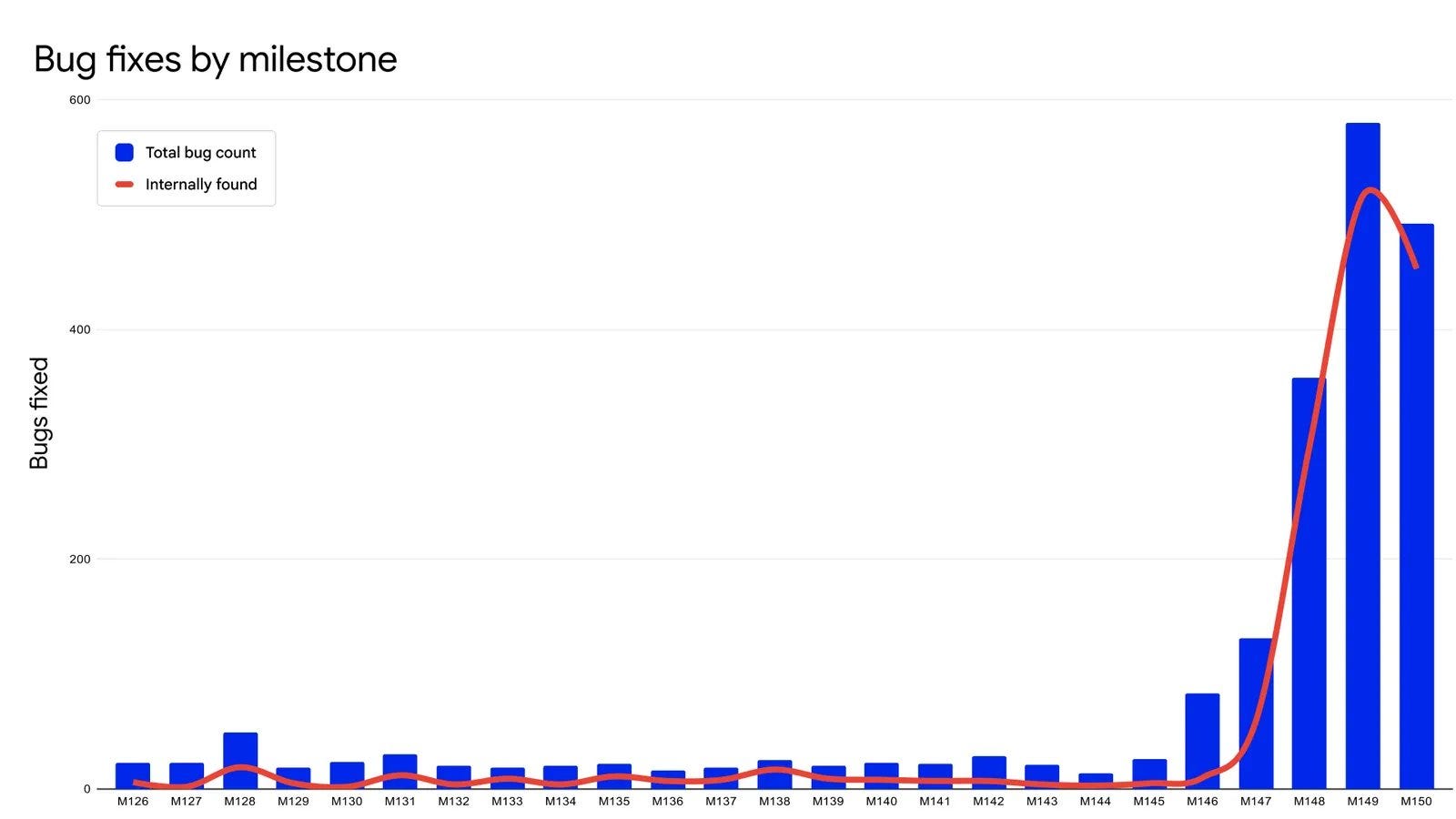
One of them was a sandbox escape that let a compromised renderer trick the browser into reading local files. It had been sitting in the codebase for more than 13 years, under one of the best-funded bug bounty programs in the industry. An agent found it in early 2026, on the first version of their harness.
No solution guarantees eliminating all bugs, but models are much more effective at finding them than people. In my opinion, human code review no longer makes sense.
What still does make sense is humans testing the solution. My Grok Build extension (link 1, link 2) has 1,600+ unit tests, all written by AI, with AI testing the app end-to-end using the browser. Still, many visual defects before each release are found by me testing with my eyes.
Not a single code review. See how clean the issue registry is despite a few thousands of agentic sessions a day.
You still review the solution. But what you review moves up, to the artifacts: what changed, why, and whether it should ship. I wrote about that a few weeks ago in I Don't Review the Code. I Review the Artifacts.
5. Weekly Virtual Events for Product Managers
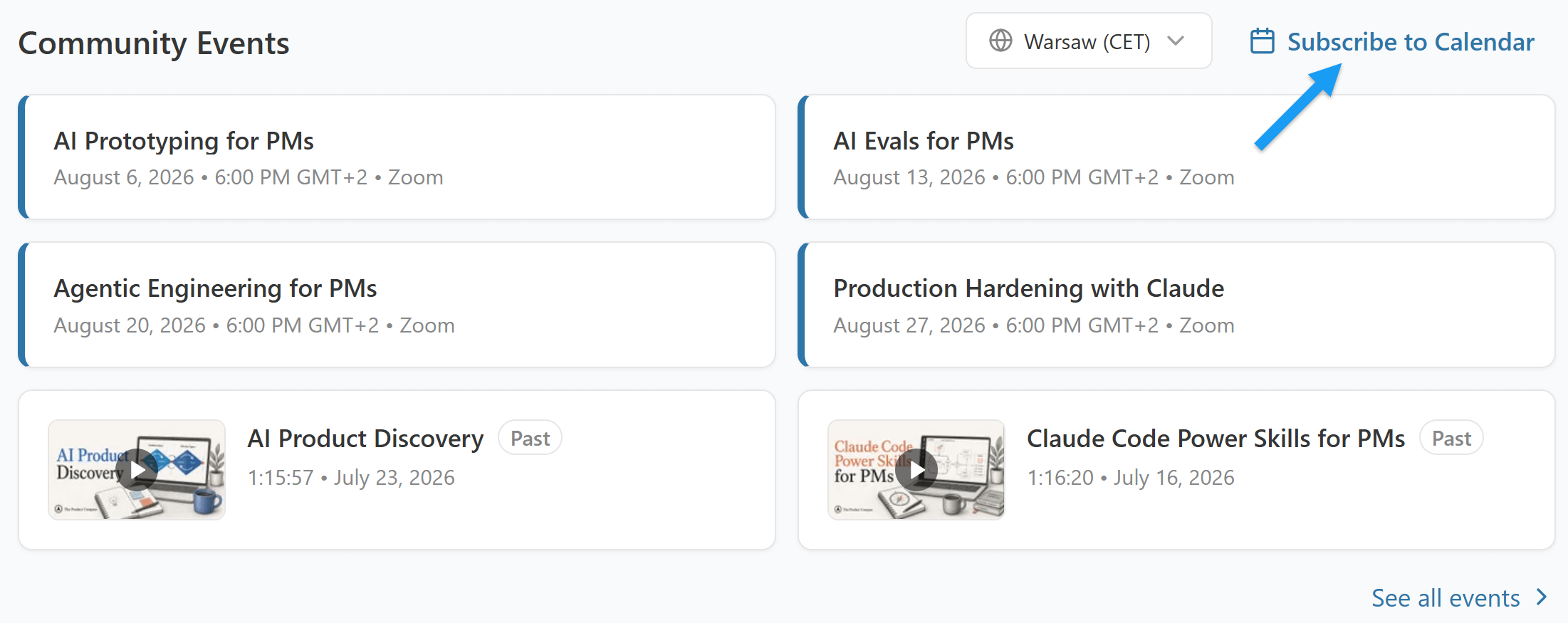
You can learn much more about Claude and Codex from our event series. We meet every week on Thursday (6 PM CET, 9 AM PT). Recent recordings with templates and additional resources are available in our events archive:
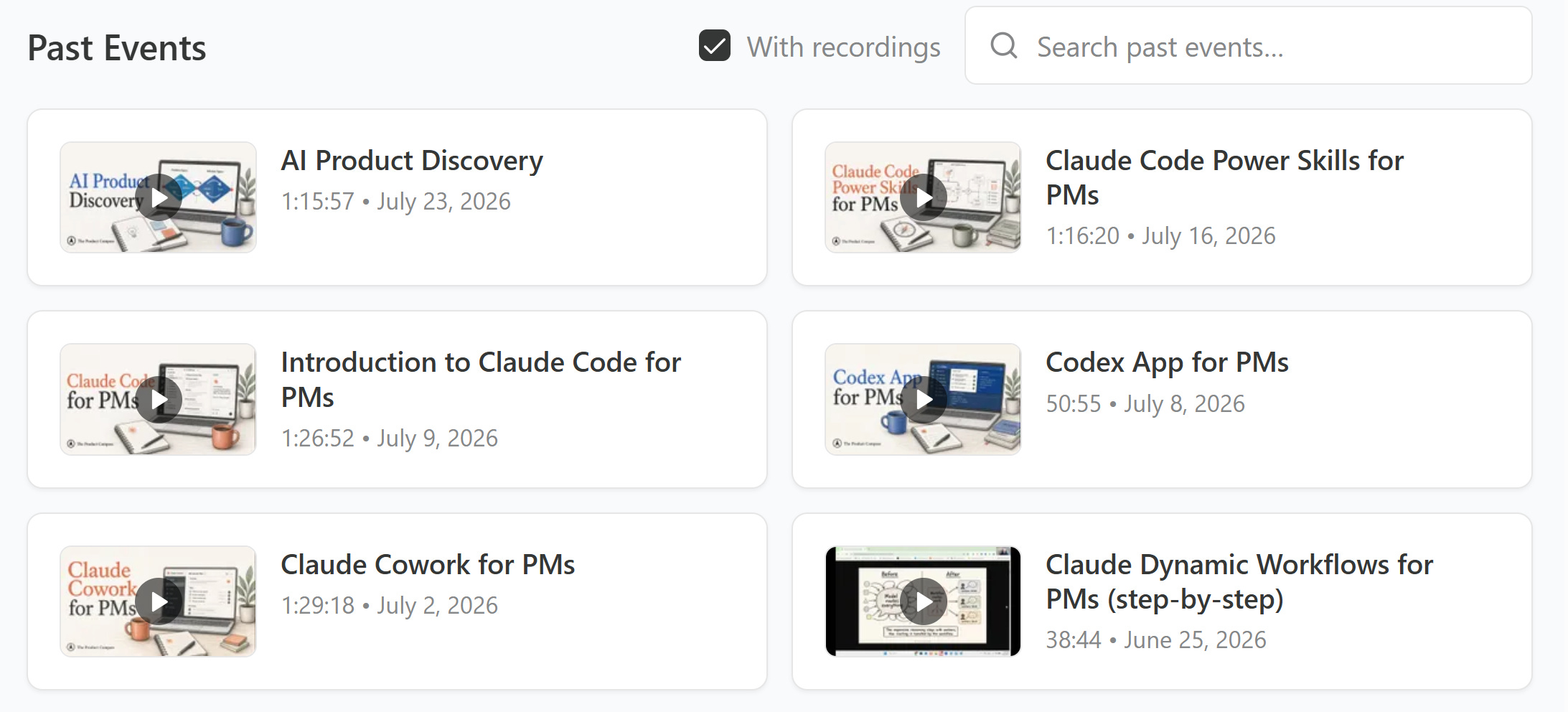
All sessions are available to paid subscribers.
Coming next:
AI Prototyping for PMs (August 6)
AI Evals for PMs (August 13)
Agentic Engineering for PMs (August 20)
Production Hardening with Claude (August 27)
Consider subscribing and upgrading your account to get full access:
As a paid subscriber, you can sync your calendar by visiting https://go.productcompass.pm/premium
Thanks for Reading The Product Compass
It's amazing to learn and grow together.
Have a great Sunday and an amazing week ahead,
Paweł
Resources
Bug Hunt Bench: every run, script, and raw log (answer keys withheld, so the benchmark stays reusable)