

Why This Guide Exists
This guide addresses the most common problems our subscribers face when building AI agents with Lovable and n8n:
Google OAuth confusion: Internal vs External apps, test users, redirect URIs
API key setup: Where to get free LLM API keys, credit card requirements
Security mistakes: Exposing secrets in frontend code, unsecured webhooks
Tool configuration: How to lock down agent capabilities to prevent misuse
Environment setup: Connecting all the pieces from scratch
To demonstrate solutions to these problems, I performed a live demo starting from completely fresh accounts: a new Google account and a new n8n account with no prior configuration. This ensures every step is documented, with no hidden assumptions.
What We’re Building
This is an example application designed to teach you the complete flow of building and publishing an AI-powered app.
The specific features don’t matter as much as understanding the patterns and layers, and how they interact with each other.
By the end of this you will understand the full stack.
This is Not a Course on Everything
We discussed specific no-code topics in more detail before. You can dive deeper:
How to Quickly Build SaaS Products With AI - how to work with Lovable
Create Your Own SaaS Without Coding in 2 Days - how I build Accredia
17 Penetration & Performance Testing Prompts - hardening before production
Vibe Engineering Resources - basic technical concepts
The Ultimate Guide to n8n for PMs - a detailed overview of n8n
3 Videos on Building AI Agents - specific n8n demos
I Copied the Multi-Agent Research System by Anthropic - multi-agent architecture
A Guide to Context Engineering - one of the most important resources
Intent Engineering Framework for AI Agents - how to enable reliable autonomy
The Example App: Personal Email Assistant Agent
We will build a chat application where you can ask your AI assistant to help with email tasks:
“What’s Pawel’s email address?” → Agent looks up contact in Google Sheets
“Draft a meeting invitation to Victor for Tuesday at 3pm” → Agent looks up contact in Google Sheets and creates Gmail draft
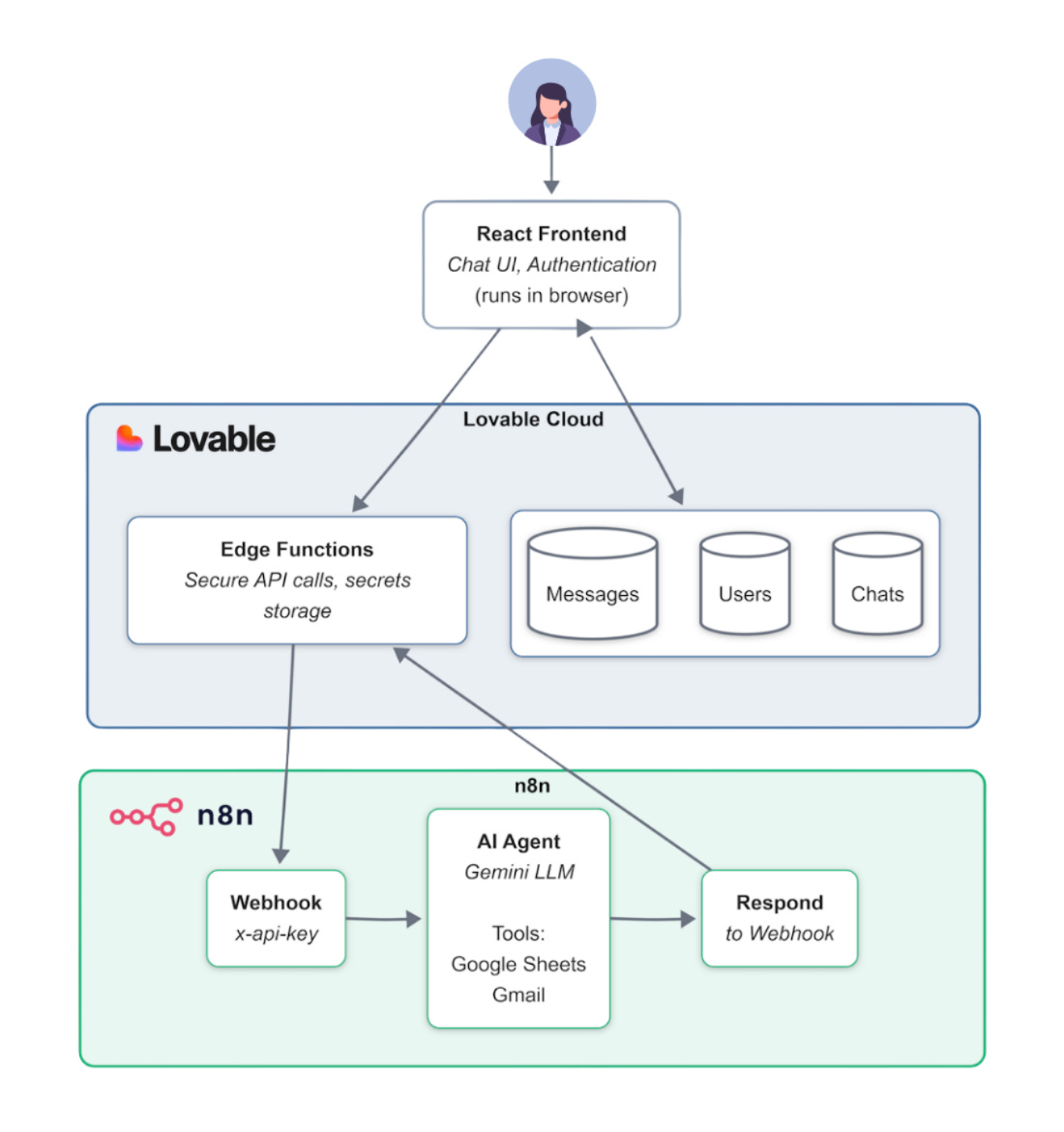
Key components:
React Frontend: Runs in browser - Chat UI, authentication
Lovable Cloud: Hosts database (users, chats, messages) and Edge Functions for secure server-side logic
n8n: Runs the AI agent workflow - receives requests, processes with Gemini, calls tools, returns responses
What You’ll Learn
How to get API keys and set up Google OAuth from scratch
How to build an AI agent with tools in n8n
How to create a frontend with email authentication using Lovable
How to secure the connection between Lovable and n8n
How to properly isolate user data with Row-Level Security
How to debug issues across the entire stack
How to separate Test and Production environments
How to publish your solution
The Article Includes
The full recording of our session (01:36:05)
Detailed step-by-step instructions for every action I made
Two n8n templates
My Lovable project to clone with the source code
An extensive Q&A collection - questions answered during and after the session
Let’s go 👇