
Supabase pauses a free project when it sees too little database activity over seven days. A paused project can be restored for up to a year, data included: open it in the Supabase dashboard and click Resume project. Projects on a paid plan are never paused.
To keep one awake, have something read its database. Supabase says a few database requests a day are typically enough. Point Staygreen's database read at a table or view, and it makes one every check: every 3 minutes on the free plan and every minute on Builder.
Watch your project free at staygreen.io: one Supabase project, no card.
Staygreen is made by The Product Compass. Supabase belongs to Supabase Inc., and the other monitoring tools named here belong to other companies. Everything said about them comes from their own docs, read on October 25, 2026.
Last updated: October 25, 2026. Supabase's rules are quoted from its own docs as they read that day.
Why Supabase Pauses Free Projects
In Supabase's words: “Supabase pauses Free Plan projects that show low activity over a 7-day period to save server resources.”
What counts is database activity from your users. “A Free plan project is considered inactive if it does not receive sufficient user database activity over the past week.”
Your own use may not be enough. “While you may be actively using the project, it's possible that usage is not enough to exclude it from automatic pausing.”
A little is enough. “Typically a few user requests to the database each day over the previous week is enough to keep the project from being paused.”
You get two emails: a warning roughly one week before the pause, and a confirmation once the project has been paused. After the warning, visiting the project from the dashboard or sending it requests is enough to stop it.
Paid projects are never paused. “Projects under a paid plan cannot be paused and are not subject to automatic pausing for inactivity.”
Quoted from Supabase's page on project pausing, read on October 25, 2026.
How to Restore a Paused Project
Open the Supabase Dashboard.
Select the organization, then the paused project.
Click Resume project and confirm.
“The project will return to its previous state, including data and configurations.” The window is a year: “You can restore a paused project for up to 1 year after it was paused.” After that the dashboard can't resume it. In Supabase's words, “The time limit exists because backups are only retained for a limited period.”
How to Keep a Free Project From Pausing
There are three ways:
Upgrade the project to a paid plan. Paid projects are never paused.
Run a scheduled job that queries the database. A GitHub Action, an n8n flow or a cron that reads from it a few times a day. It works while the job runs, and if the job quietly stops, you may only find out from a user.
Use a monitor that reads the database. Staygreen reads one row every 3 minutes on the free plan and every minute on Builder, and it alerts you when the project stops answering.
Staygreen reads with the project's publishable key, so it needs something the anon role can select. A one-row view made for it is enough, and Staygreen's add-monitor screen offers this SQL:
create view public.staygreen_health with (security_invoker = true) as select true as ok;
grant select on public.staygreen_health to anon;
What Staygreen's Supabase Check Does
staygreen.io checks your project from the outside, with the key a browser app already carries:
Auth health,
/auth/v1/health, which must answer with its version.Storage status,
/storage/v1/status.A database read you name: one row from a table, view or read-only function the
anonrole can read, on every check. It's the only check that touches the database, so it's the one that keeps a free project awake. Auth and Storage alone don't.Paused or deleted: when the project's address stops resolving, the alert says so and links the project's dashboard, where you can resume it.
It runs every 3 minutes from Toronto and San Francisco on Free, and every minute on Builder, which adds Frankfurt. A failed check is run again from a second location before anyone is alerted.
What it needs: the project's URL and its publishable key (the legacy anon key works too). The key is stored encrypted and never shown again. Only those are accepted: never a secret or service role key. Staygreen never asks for access to your Supabase account, so it can't resume a project for you or see which plan it's on.
If a read is refused: every read is tried when you save, so a wrong key, a missing grant or a project that's still paused is caught before the monitor exists. Resume a paused project first. If one is refused later, Staygreen confirms it from a second location, then each location tries it at most every 30 minutes while it stays refused, so your project's logs don't fill up.
The free plan includes one Supabase project. Builder takes as many as its 100-monitor limit allows. The same free plan also watches the app in front of the project: the website and its health routes, SSL and domain expiry, cron heartbeats and failed Stripe webhook deliveries. How that compares with UptimeRobot's free plan.
Setting Up Staygreen's Supabase Check
Add your app with its name and address. If the site talks to Supabase from the browser, the project's publishable key is in its code, so Staygreen offers the project as one monitor, already ticked.
Add the database read in the monitor's settings: a table or view the
anonrole can read, like the view above, or a read-only function.
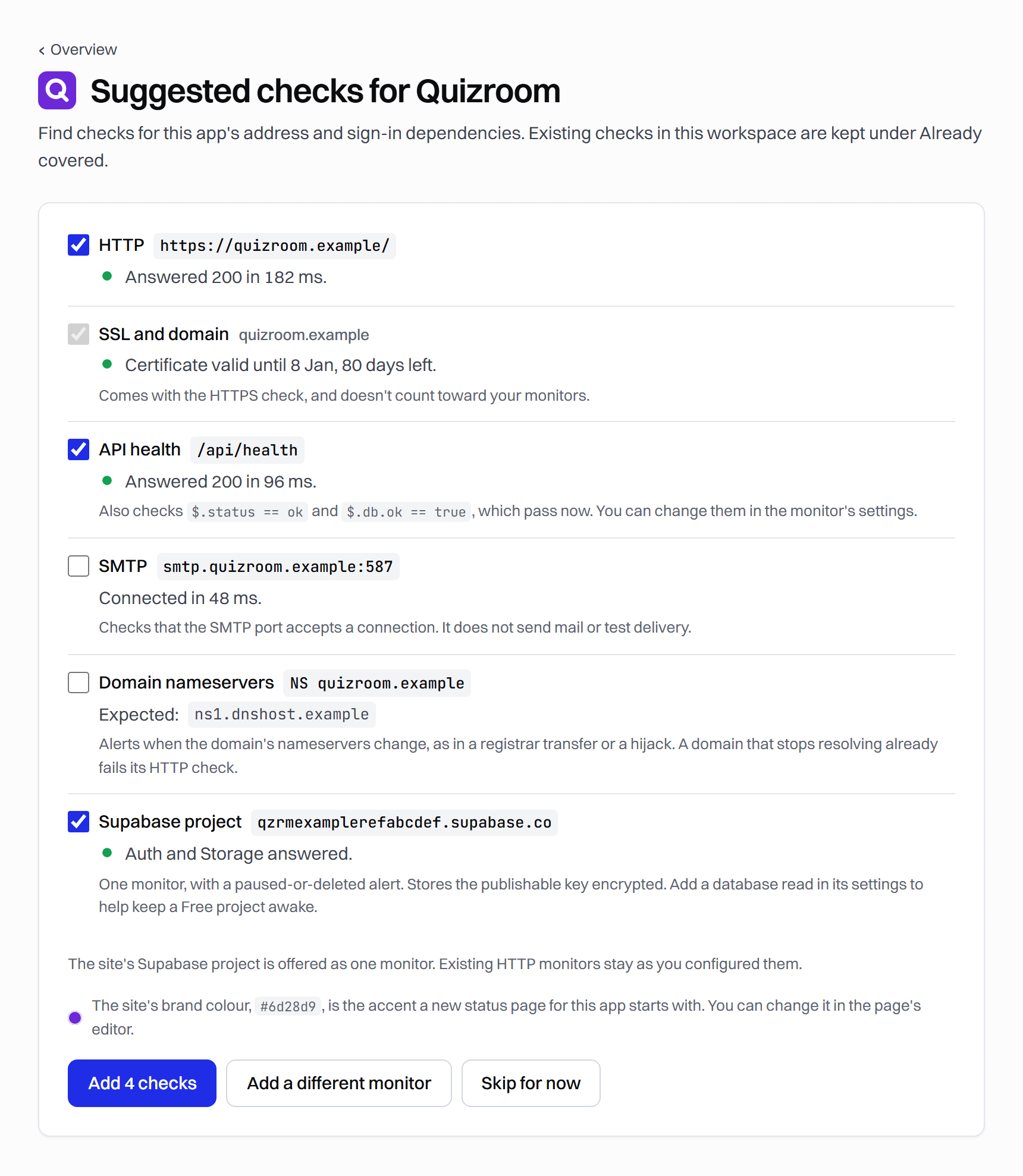
Or add the monitor yourself from the add-monitor screen.
Builder is $9 a month, or $7.50 a month billed yearly, for 10 apps, 100 monitors, checks every minute and 1 year of history.
What Staygreen doesn't do yet: alert delays and repeats while something is down, maintenance windows, CSV export, and email subscribers on status pages. What it isn't built for: SMS or phone-call alerts, a mobile app, ping and UDP checks, and checks more often than every minute. UptimeRobot covers the second list, and the UptimeRobot alternatives page compares it with the rest.
Questions People Ask
Will a monitor stop my Supabase project from pausing?
One that reads the database gives Supabase the activity it looks for, and a few requests a day are typically enough. Staygreen reads every 3 minutes on Free once you name a table or view for it.
Does a paused Supabase project lose its data?
Not within a year. Resuming it from the dashboard brings it back “including data and configurations.” After a year, the dashboard can no longer restore it.
Is a paused project the same as a deleted one?
No. A paused project can be resumed from the dashboard for up to a year. From the outside they look the same, though: the project's address stops resolving. So Staygreen's alert says paused or deleted and links the dashboard, where you can see which it is.
How long before Supabase pauses a free project?
Supabase looks at activity “over a 7-day period”, and sends a warning email roughly one week before the pause takes effect.
Does a keep-alive cron job or GitHub Action stop Supabase from pausing?
It can, if it makes real requests to the database often enough. The weak spot is that nothing tells you when the job stops. A monitor that makes the same read also alerts you when the project stops answering.
Don't other uptime monitors check Supabase?
Not among the four we checked. UptimeRobot, Better Stack, OpenStatus and Hyperping list no Supabase monitor among their monitor types (read on October 25, 2026). Hyperping's own “Is Supabase down?” page says “these checks cover the shared platform (API, dashboard and website), not your project's database.” A plain HTTP check on the project's address sees it go down. It doesn't say paused or point you to the button that brings it back.
Is Staygreen open source?
Not yet. Its code opens in November 2026 under the Apache 2.0 license, and from then on anyone can host it, commercial use included. Hosting it means running probes in several cities, the status page server and the alerts, and watching all of it, which the hosted version does for you, free for one app.
Watch your Supabase project free at staygreen.io: Auth, Storage and a database read every 3 minutes, and an alert if the project is paused or deleted.
Running a status page for the same app? A free status page on your own domain compares what each tool charges for one.
This page is part of The Product Compass, a newsletter for PMs and builders who ship products with AI. Subscribe for the guides and tool tests.