And it’s no longer optional. Your future employer will assume you know it.
Still, most PMs don’t know how to write good prompts.
So, in this post, I’ve collected the best, proven prompting techniques, courses, and resources. I will keep it updated as part of our C10. LLM Systems Practitioner PM.
We discuss (after consideration, no paywall):
14 Prompting Techniques
10 Free Proven Prompting Guides, Tools, and Courses
The Most Important Advice
1. 14 Prompting Techniques
Key techniques based on best practices from multiple sources (e.g., OpenAI, Anthropic, two AI cohorts I’ve attended), and validated by my experience.
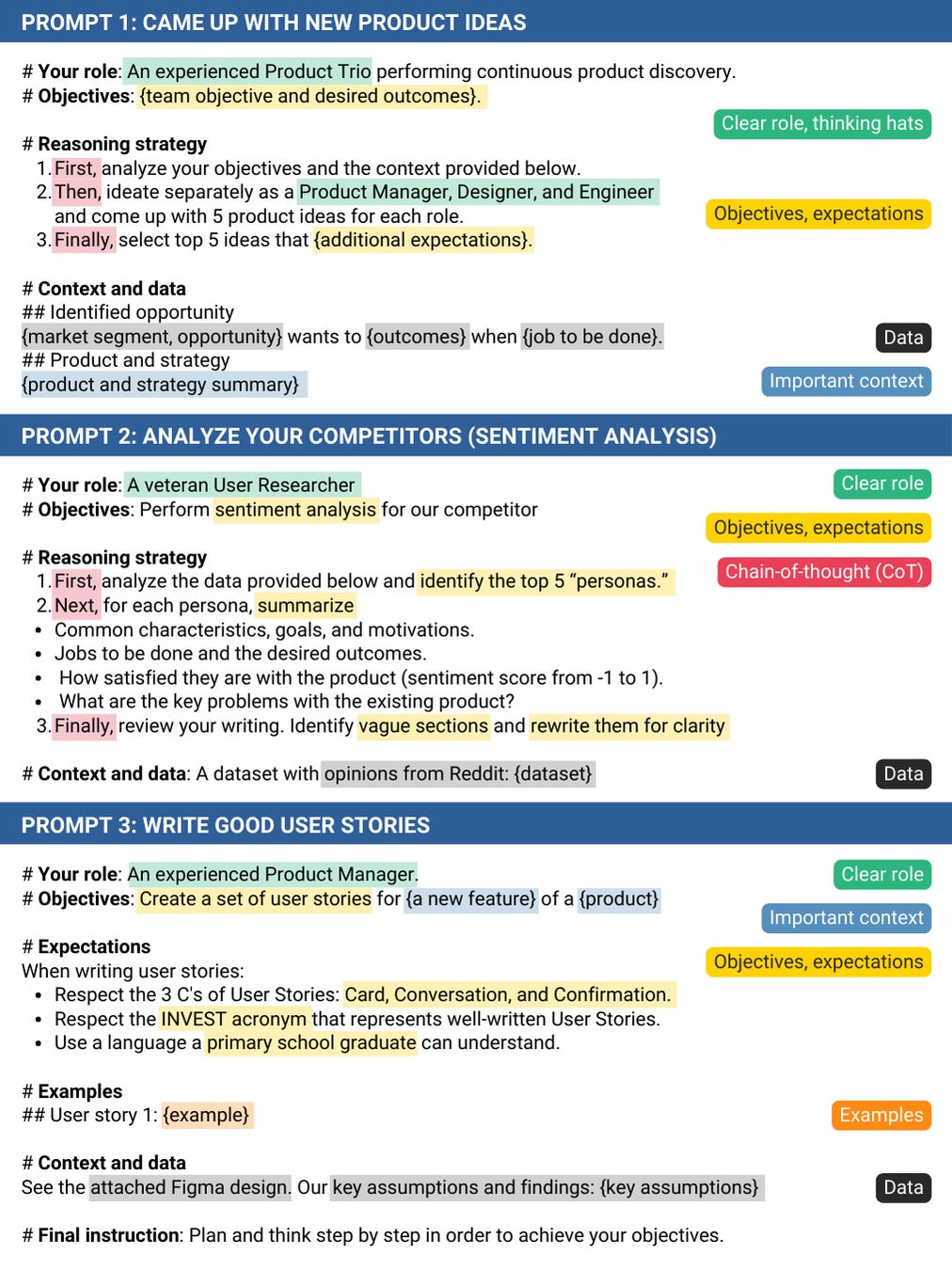
First, a few examples:
Prompting techniques - example prompts
Let’s dive in.
Technique 1: Ask to play a role
Assigning a role AI has to play can make the response more relevant and aligned with your use case:
Before:
Summarize this document: {content}
After:
You are a veteran product marketer with 20+ years of experience. Your unique insights leave the audience speechless (…) Summarize this document: {content}
Technique 2: Lead with context
When delegating a task, don't just define the objective. Explain why it matters, how the success will be measured, and provide a broader context(knowledge), so that AI can make better decisions:
Before (example 1):
Research this topic: {research_area}.
After (example 2):
You are one of many web research sub-agents working on the {strategic_initiative} for a {product_context}. Your objective is to research this topic: {research_area}.
Before (example 2):
Generate ten ideas on how to solve {problem}.
After (example 2):
We are performing continuous product discovery for a {product}. One of the identified opportunities is {problem} for {customer_segment}. Generate ten ideas that align with our {objective}.
Technique 3: Set a clear output format and constraints
Be explicit about what you need from the LLM:
Are there any constraints or limitations?
What is the expected output format?
Before:
Review the idea: {idea}. List the assumptions to test.
After:
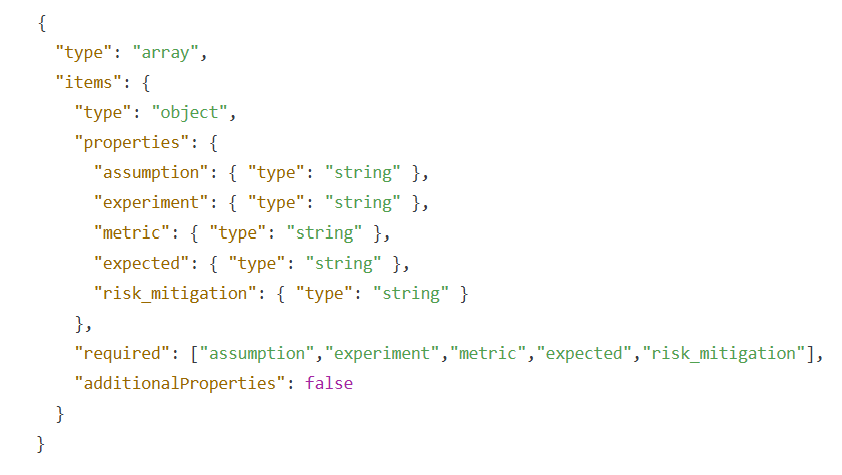
Review the idea: {idea}. List: An assumption to test -> Experiment -> Metric -> Expected value -> Risk mitigation

## Constraints:
- In experiments, measure the actual behavior, not opinions
- Include rollback criteria for production tests
- Use markdown formatting for experiment descriptions. All other properties are simple strings.

## Output format:
Respond only with valid JSON matching the schema below. Do not include anything else:
Technique 4: Provide examples or templates
Consider including positive and negative examples. In particular, negative examples might help you address issues identified during error analysis:
Response Examples:
Positive
Negative
Behavior Examples:
Positive
Negative
Before, example responses:
Create a set of user stories for {a new feature}
After, example responses:
Here are two examples of user stories I wrote in the past: {examples}. Create a set of similar user stories for {a new feature}.
Example behaviors:
Positive behaviors:
Propose an A/B prototype with a clear click-rate metric
Design a first-click test using Figma and track task completion
Suggest experiments for high-risk assumptions
Negative behaviors:
Suggest surveys without measuring real user interactions
Plan production experiments without rollback criteria
Suggest experiments for low-risk low-impact assumptions
Technique 5: Avoid leading questions
When ideating with AI, just like when interviewing customers, it’s essential not to suggest the expected answer. Doing so might bias the AI’s response.
Before:
Why is {product} better than its competitors based on {data}?
After:
What are the strengths and weaknesses of {product} compared to its competitors based on {data}? Be brutally honest.
Technique 6: Raise the stakes
Framing the task as high-stakes or important can encourage the AI to “try harder.” We can easily test that, e.g., in ChatGPT, which is much more likely to select a stronger model in this scenario.
Before:
Provide a detailed analysis of {user feedback}.
After:
Imagine you are preparing a report for the executive team. Your entire career depends on it. Provide a detailed analysis of {user feedback}.
Technique 7: Ask to plan, reflect, and persist
This technique works especially well with agents. Ask the agent to plan, reflect after each iteration, and adapt. Ask it to continue iterating until objectives are met to avoid finishing too early.
Remember, you are an agent - please keep going until the user's query is completely resolved, before ending your turn and yielding back to the user. Decompose the user's query into all required sub-requests, and confirm that each is completed. Do not stop after completing only part of the request. Only terminate your turn when you are sure that the problem is solved. You must be prepared to answer multiple queries and only finish the call once the user has confirmed they're done.
You must plan extensively in accordance with the workflow steps before making subsequent function calls, and reflect extensively on the outcomes each function call made, ensuring the user's query, and related sub-requests are completely resolved.
Technique 8: Encourage tool use
A technique dedicated to agents or LLMs with tools. Encouraging tool use reduces the hallucinations and guesses. Bonus from my tests: When possible, explain the order in which tools should be used.
Before:
Your objective is to decide whether to sunset {feature}.
After:
Your objective is to decide whether to sunset {feature}.
Always use the following tools:
CustomerSearch (to find high-ROI customers)
CustomerUsageReport (to get their usage stats)
Keep reading with a 7-day free trial
Subscribe to The Product Compass to keep reading this post and get 7 days of free access to the full post archives.