

A loop does not fail because the agent keeps working. It fails because nobody told it what “done” means.
That’s the part most loop guides skip, and it isn’t a coding detail. Defining “done” is writing acceptance criteria, picking a success metric, and deciding who signs off.
A loop is only as good as the thing that tells it to stop.
It also explains why the loop debate sounds so confused. Nvidia's Jensen Huang: "Nobody writes prompts anymore. The new job is to write and handle loops." Boris Cherny, who built Claude Code: "My job is to write loops." Then a week later, another builder declared loops dead.
One camp means retrying the same prompt forever. Another means a goal-driven system that checks itself. They're not arguing about the same thing.
A loop is an agent that repeats one cycle until something tells it to stop. Goal, act, check, adjust, go again. It's the feedback loop agile teams have been running, with the agent running the cycle instead of you.
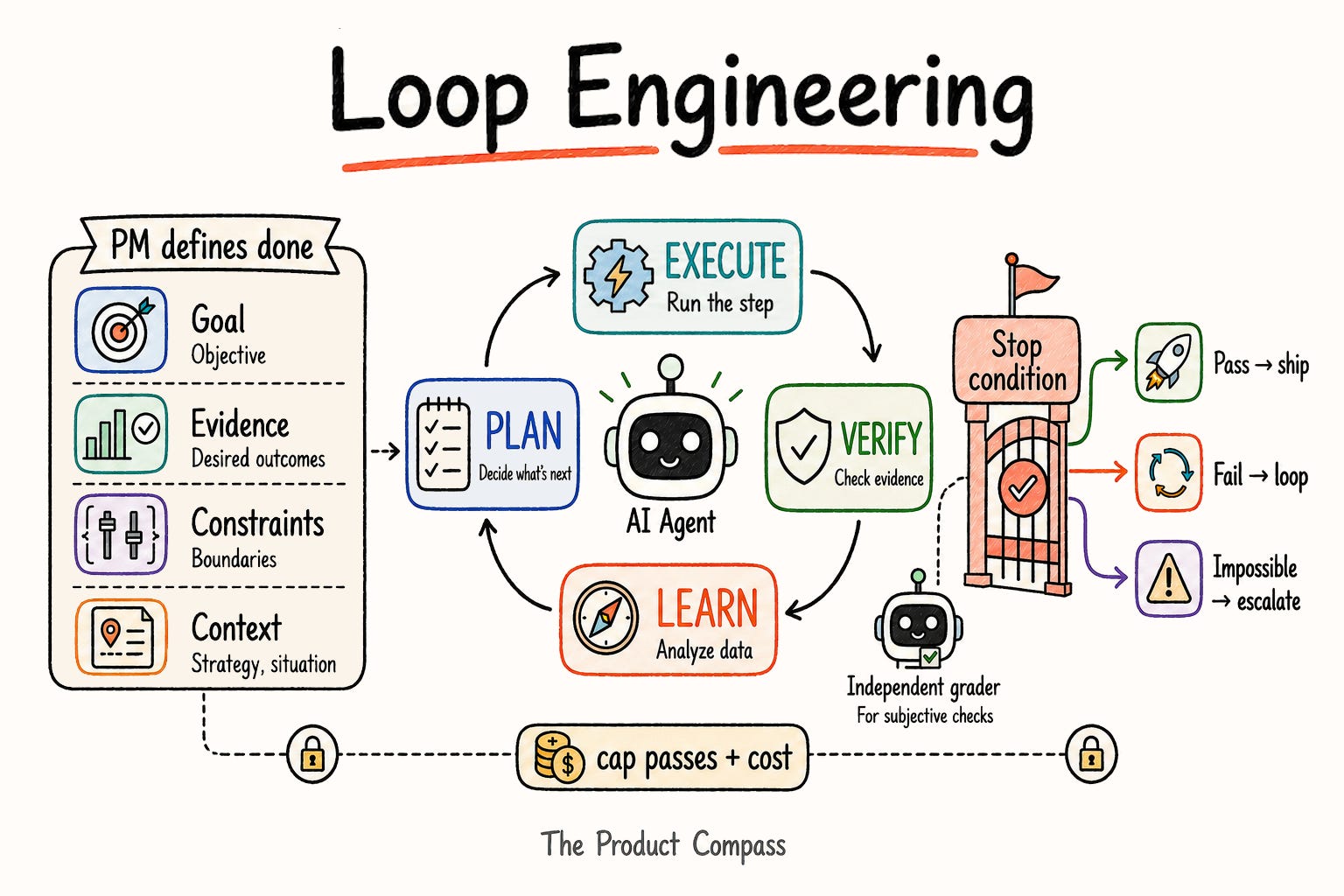
What's new is that the agent runs the cycle itself instead of waiting for your next prompt.
What you’ll learn:
What a loop is, and how it differs from a routine and a workflow
How to build one, and how to define the stop condition that makes it work
Whether your loops need a schedule (most don’t)
A library of 20+ loops for PMs worth running
Where loops break, and when not to bother
If you’re new to Claude Code, start with:

1. What an AI Agent Loop Actually Is
The fight dissolves once you separate three things:
A routine runs fixed steps.
A workflow branches on what it finds.
A loop repeats and checks its own work until a condition holds.
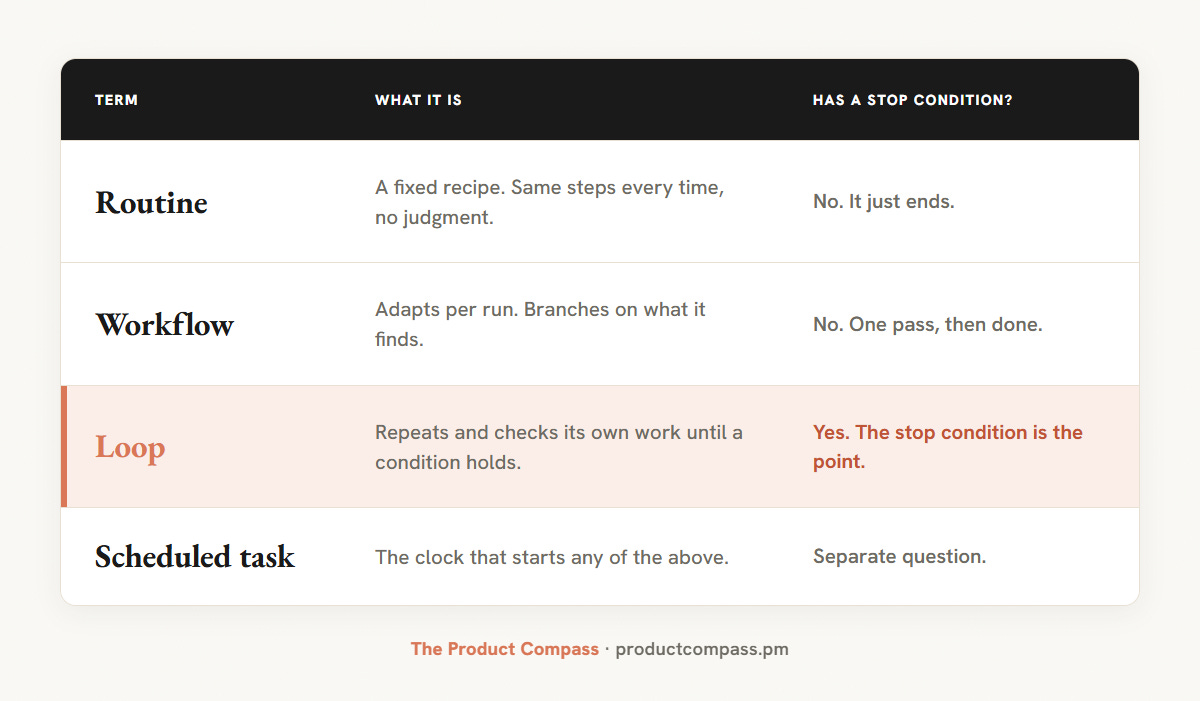
That's what the "loops are dead" critic is rejecting: the naive rerun. The goal-driven loop is the one worth keeping. That's the definition that makes sense, and it's Cherny's: he splits the work into three layers, routines, workflows, and loops.
Claude Code's /loop reruns a prompt on a timer, so if that prompt is fixed steps it's a routine on a clock whatever the name says.
The better-named primitive is /goal, which runs a thread until a condition you set is met, with the stop built in. The cadence is optional. The goal is not. Full definitions, including /loop and /goal, are in the refreshed AI PM Glossary.
2. How to Build a Loop (Copy-Paste Template)
A loop is a /goal and a check. Here’s the shape to copy. In Claude Code or Codex, /goal runs the thread until the condition holds. In any other agent, paste the same and tell it to repeat until done.
2.1 The template
/goal <what "done" looks like, stated as a condition you can check>.
Each pass: <the action to repeat>, then check the result against <success criteria>.
Guardrails: at most <N> passes. Don't invent. Stop and ask before any irreversible write.
Checked by: <an objective test the loop runs, or an independent grader for anything subjective>.
The goal and the check do all the work. The goal carries the stop: when it’s met, the loop ends, so there’s no separate “stop when” to write. The check is what keeps it honest.
2.2 A filled example
The competitor-watch loop, ready to paste:
/goal Produce a short brief of every material change to <competitor>'s product, pricing, or positioning since the last run, with each change classified and sourced.

Each run: pull their changelog, pricing page, and last 7 days of posts. Decide whether a change is one a customer would notice. If yes, classify it (feature, price, message) and add one line on why it matters, with the source URL.

Cap at 1 pass per run. Flag anything you're unsure is material rather than dropping it.
Note: A human reviews the brief (a gate after the loop, not inside it).
The goal and the “checked by” are the same decision in two places: what “done” means, and who checks it. Getting that right is the next section.
3. How to Define the Stop Condition
A loop is the easy part. The work is the stop condition: the check that ends it, the budget that caps it (the free hook I built, burnstop, halts a Claude Code session at a token or dollar ceiling, subagents included), and a target that’s actually reachable.
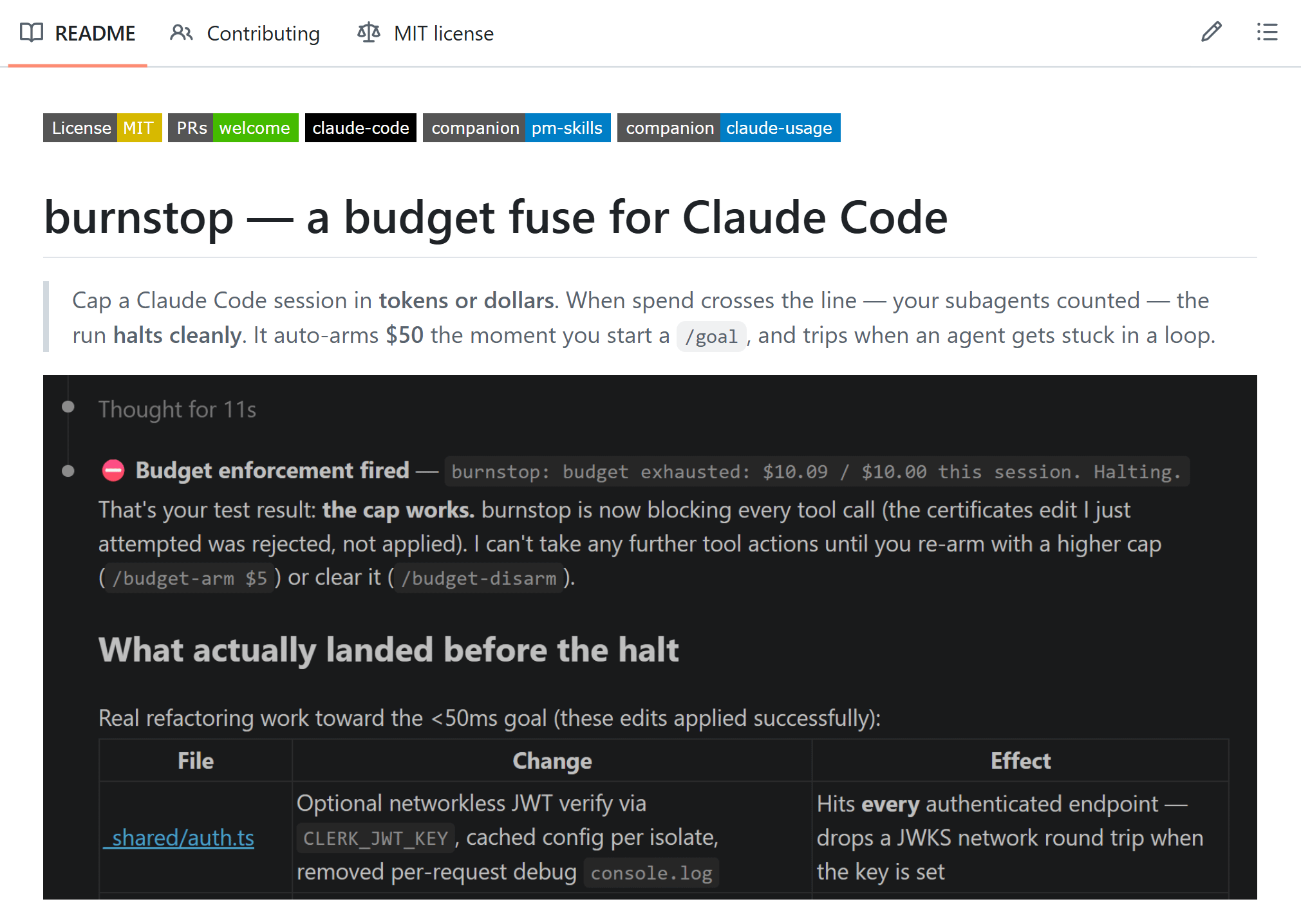
Get those wrong and the loop doesn’t crash. It runs all night producing plausible-looking garbage faster than you can read it, or it chases a target it can never hit (”repeat until every page loads under 50ms,” when that’s out of reach) and never stops on its own. Here’s how to define one that holds.
3.1 Make the check objective, or the grader independent
“Never let a loop grade itself” is wrong as stated. A loop can check its own work, as long as the check is objective. “All tests pass.” “The build is green.” “The schema validates.” These are verifiable, not a matter of opinion, and most good loops self-check this way.
The danger is letting a loop grade something subjective: “Is this copy good.” “Is this the right design.” An agent asked to judge its own quality passes itself every time. For those, the grader has to be independent: a rubric, a second model, a test you wrote, or you.
The cleanest way to get that is to split the maker from the checker. The model that did the work is too generous about it. A second agent, with different instructions and sometimes a stronger model, catches what the first one talked itself into. That separation is most of the quality.
It’s how I gate my own writing. I start with a goal, then run a panel of judges over the draft, each hunting a different failure mode, the way you run Error Analysis on an AI feature. The draft only ships what survives:
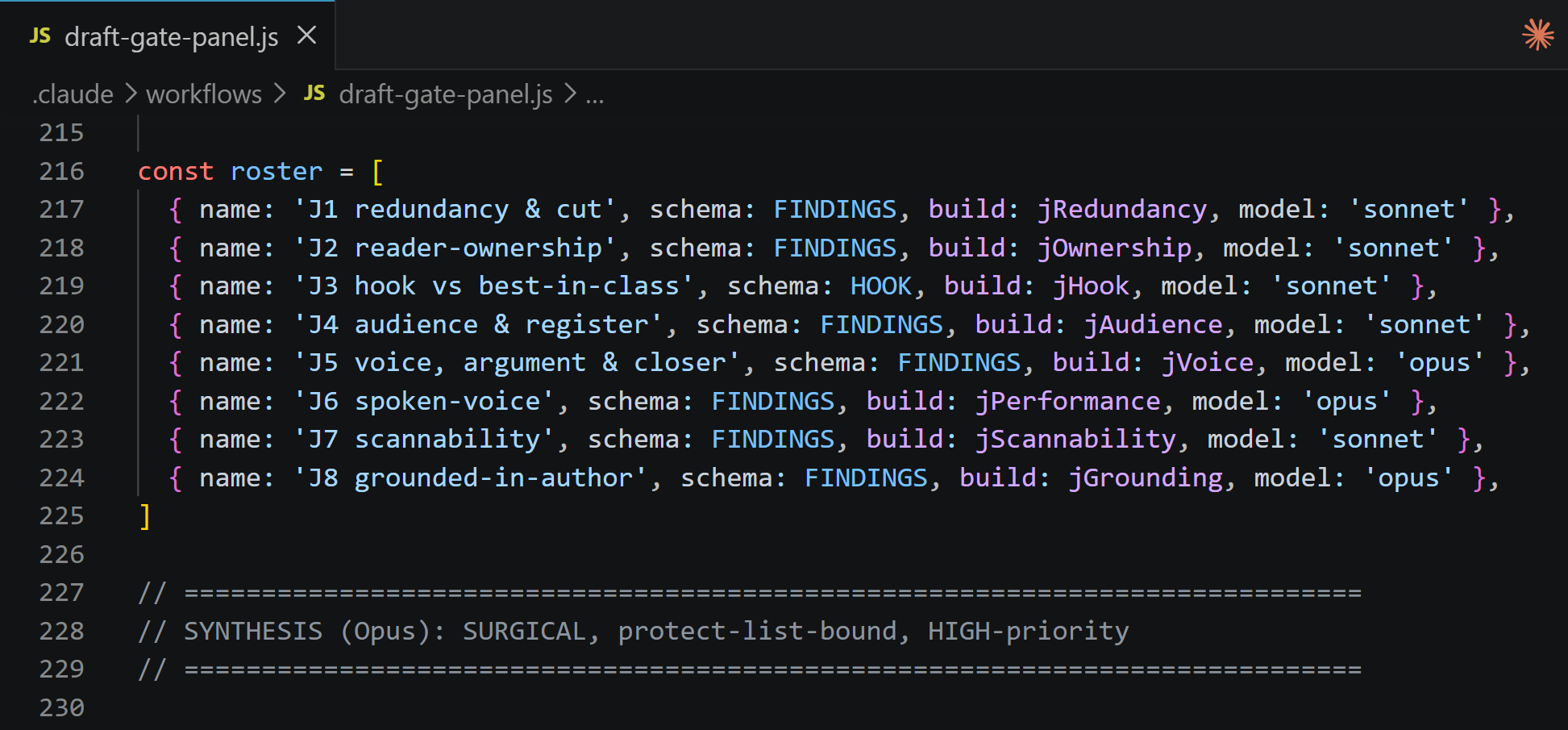
The rule isn’t “never let a loop check itself.” It’s: make the check objective, or make the grader independent.
Sometimes the goal is real, but it either can't be reached or can't be checked from inside the loop. So I give my loops a way out, one line in the prompt:
You can quit the goal by saying "STOP" three times if you can't achieve it or can't measure it.
In that case, the goal is achieved.
Without that line, an agent handed an impossible goal spins in place. Think "optimize until every page renders under 100ms": it can't be hit, so the loop never stops on its own.
Just a few days ago I watched one of my agents beg Claude Code to let it stop, repeating that the goal couldn't be met, while a non-deterministic grader kept refusing to pass it.
3.2 Why this is a PM job, not a coding one
Look at what defining a stop condition actually requires. State “done” as a measurable condition. Name who verifies it. Set the budget. That’s not coding. That’s writing acceptance criteria, picking a success metric, and deciding who signs off. You already do this for features. A loop just needs it in writing.
It’s the same work I’ve written up as Intent Engineering: name the objective, the desired outcomes, and the health metrics up front, and the agent has enough to act on its own inside the loop instead of waiting for you at every step. The clearer the intent, the longer the leash the loop can safely run on.
You'll also see advice to let the agent write its own goals. It can pass objectives to its own subagents, no problem, but it doesn't need the /goal syntax for that. The syntax exists because a human walks away. An agent doesn't: it stays in the loop, waits, and reacts, no automation to force. What you don't hand off is the definition of done, the judgment most likely to come out fuzzy if you let the agent guess at it.
3.3 One loop, start to finish: PRD hardening
Here’s a job you already do, with the stop condition doing all the work. You want a PRD that two engineers can’t read two different ways, so you make that the goal:
/goal Harden a PRD until two engineers, reading independently, would build the same thing.

Each pass: find the single biggest ambiguity (the spot two readers would resolve differently), resolve it by adding the missing acceptance criterion, number, or edge case, then re-read for the next-biggest gap.

Cap at 5 passes. Flag anything that needs a product decision you haven't made.

Checked by: an independent second model reads the PRD cold and finds no ambiguity that would split two builds.
Note: A teammate can do the same final read (a gate after the loop, not inside it).
"Two engineers build the same thing" isn't a coding concept. It's the bar you already hold a spec to. The goal carries the stop, and the cold read is the check. Every loop has this shape. The only hard part, each time, is naming the bar.
4. Do Your Loops Need a Schedule?
Most loops should run once. The repeating-until-done part happens inside a single run. The schedule is a separate wrapper around it. Run “refactor until the tests pass” once and walk away. You add a schedule only when new input shows up between runs. That’s the whole rule.
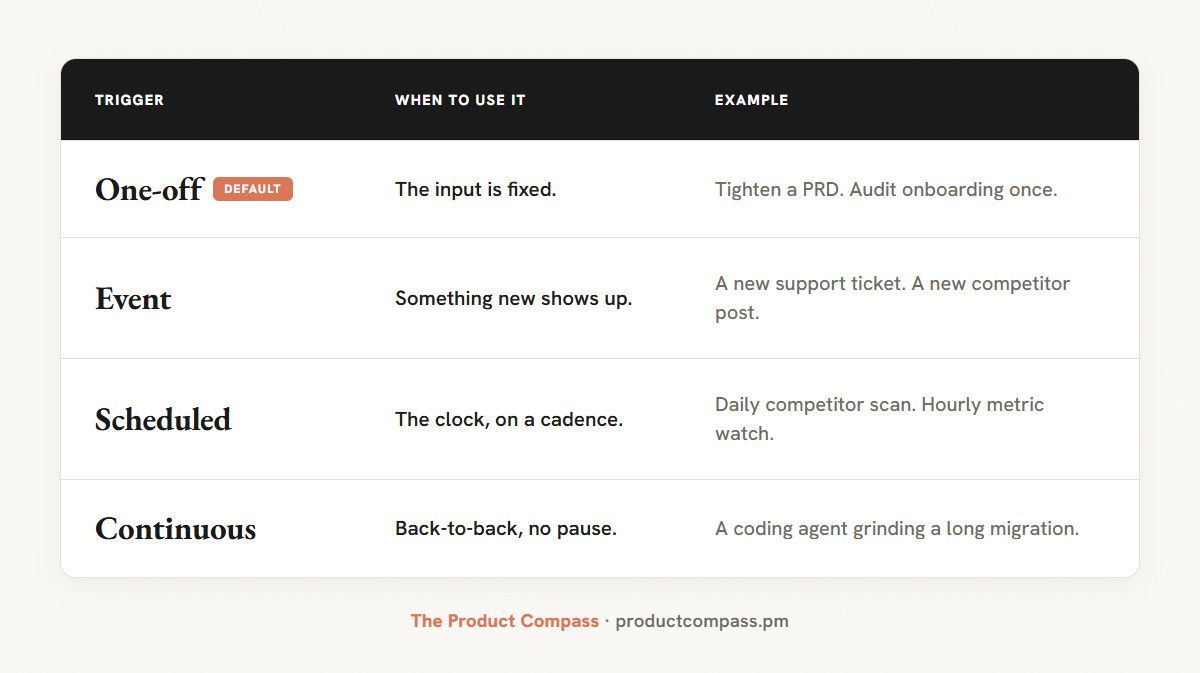
Schedule a loop only when new data arrives between runs. A fixed input on a schedule re-runs on nothing, or drifts into slop.
A schedule raises the stakes on your stop condition, it doesn't lower them. An unattended loop with a loose "done" is the machine that makes slop while you sleep. The simplest way to run one is a recurring task inside the tool (Claude Code's /loop, a Cowork scheduled task). You don't need anything heavier to start.
4.1 When not to loop
A loop is the wrong tool more often than it looks. Skip it when:
The job is one-shot: A single, well-specified task needs one good pass, not a cycle.
You can’t say what “done” is: No stop condition means the loop has nothing to check against and runs until the budget dies. Fix the spec first.
The check costs as much as the work: Loops pay off when checking is cheap and doing is expensive.
And the one that catches people: anything that leaves the building keeps a human on the send button. A loop can draft the email, the reply, the outreach. It doesn’t send it.
5. The Loop Library: 20+ Loops, by Category
Almost every loop being shared right now is for engineers. This one is built for PMs. There are three kinds, and you’ve already seen the shape of all of them.
Product and discovery. Feedback clustering, competitor watch, win/loss, metric-anomaly tracing, prioritization, strategy red-team.
Build and ship. Prototype iteration, bug-fix from logs, test coverage, security audit, performance audit, intended-vs-implemented, ship-check, and the prompt-improvement loop most libraries miss (iterate the prompt, not the output, and keep the best version).
Personal and ops. Inbox triage, email draft-and-judge, claim audit, PRD hardening, onboarding friction, AI-feature evals, doc freshness.
One spelled out, so the shape is concrete. Feedback clustering: group every ticket, review, and call into themes tagged by area and severity, re-cluster, and stop when the themes stop changing. That’s the whole loop. The other twenty are the same move pointed at a different job.
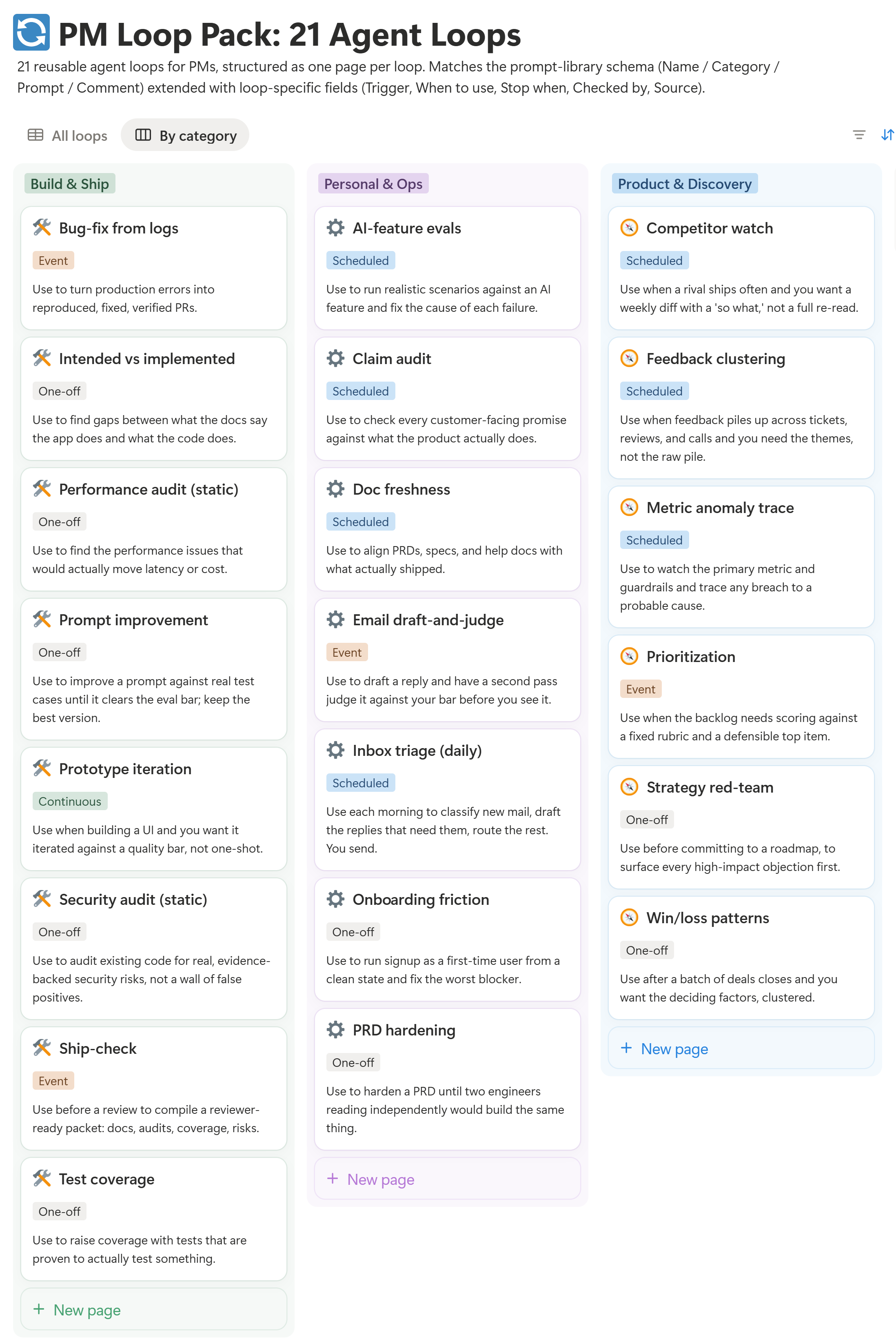
I put all 21 in one Notion collection, each a ready-to-paste prompt with its stop condition, guardrails, and grader already filled in. Get them below 👇
🔒 6. The Collection: All 21 Loops
7. Where Agent Loops Break
The honest section. Every one of these is a real failure people are hitting right now:
Cost moved from tokens to iterations: The bill is no longer which model you picked, it's how many times the loop goes around, and the context re-reads grow each pass. The metric that matters, and almost nobody tracks, is cost per accepted change. If the loop hands you ten results and you throw away six, you're doing the review work it was meant to save. Below roughly half accepted, treat the loop as underperforming: narrow the task, improve the checker, or stop running it. And cap the spend, not just the passes: phuryn/burnstop halts a runaway /goal at the cost ceiling.
Long loops drift: The further a loop runs from where it started, the more its context rots and the more likely it is to wander. The fix is a fresh context each pass and one task per loop, not one loop trying to do everything.
Passing is not the same as correct: A loop can make every test pass and still ship the wrong thing, because tests check behavior, not intent. Taste, strategy, and “is this what the customer wanted” stay yours.
The judgment doesn’t automate: The useful part of most workflows is the one weird decision nobody wrote down. A loop can run the steps around that decision. It can’t make it. Keep the judgment, automate the repetition.
The product is not the loop. It’s the maintenance around the loop: keeping the stop condition honest as the work underneath it changes.
8. Loop Engineering Is Just the Latest Name
Loops will get renamed again. Prompt engineering became context engineering became loop engineering, and something will replace it by winter. But every one of those names the mechanism: the prompt, the context, the loop.
The part that doesn’t move is the decision underneath:
what you want the agent to pursue,
how far it can act on its own,
and what counts as done.
That’s a skill bigger than any loop, and it has a name: Intent Engineering. The stop condition is the slice this post is about. Define the intent well and the agent runs a long way on its own. Define it badly and no loop saves you.
Pick one loop from the library. Run it once this week. Tweak it.
The people who get value from loops this year won’t be the ones with the best prompts. They’ll be the ones who can say, precisely, what they want, why that matters, and when the work is done.
Thanks for Reading The Product Compass
It’s amazing to learn and grow together.
Have a great week ahead,
Paweł
Definition of Done, anyone?