
Short answer: give each job a URL to call when it finishes, and have something alert you when the call doesn't come on time. That's a heartbeat, also called a dead man's switch, and it's how cron job monitoring works.
Staygreen gives you 5 heartbeats free, on the same schedule your crons already use. Each one can also fail a run when a number the job reports is wrong, like emails_sent > 0.
Staygreen is made by The Product Compass. Healthchecks.io, Cronitor, Better Stack, Sentry, UptimeRobot, Dead Man's Snitch and Hyperping belong to other companies, and Uptime Kuma is an open-source project. Every figure for them comes from the vendor's own pricing page, terms or docs, read on October 26, 2026.
Last updated: October 26, 2026. Free plans in this category change quietly, so check the vendor's page before you rely on a figure.
How Cron Job Monitoring Works
A scheduled job can go wrong in four ways, and a heartbeat catches each one differently:
It didn't run. The scheduler skipped it, a deploy dropped it, or the server was down. No call arrives by the expected time plus a grace window, so the run counts as missed.
It ran and failed. The job calls the URL with
/failon an error, or it calls the URL only after it succeeds, so a failure looks like a missed run.It started and never finished. The job calls
/startwhen it begins. If no finish arrives within the longest a run should take, the run counts as stuck.It ran and did nothing. The job sends a number with the call, like how many emails it sent, and the monitor fails the run when the number is wrong.
Logs and cron's own emails tell you about runs that happened. A heartbeat is the only one of the three that speaks up when nothing happens.
Staygreen: Heartbeats That Check What the Job Did
Staygreen gives each heartbeat its own ping URL on in.staygreen.io. On every plan:
The schedule is your cron line: five numeric fields like
0 6 * * *, in the time zone you pick. Shortcuts like @hourly and day or month names aren't accepted, so write0 * * * *instead.A grace window and a max run time: a run may arrive up to 5 minutes late, and after a
/startit has 60 minutes to finish, unless you change either.Numbers the job reports are checked: add them to the URL, like
?emails_sent=12, or POST them as JSON, and an assertion likerows_written >= 1fails the run when it's false.Missed, failed and stuck runs alert at once, by email, Telegram, Slack, Discord or signed webhook, and the next good ping closes the incident.
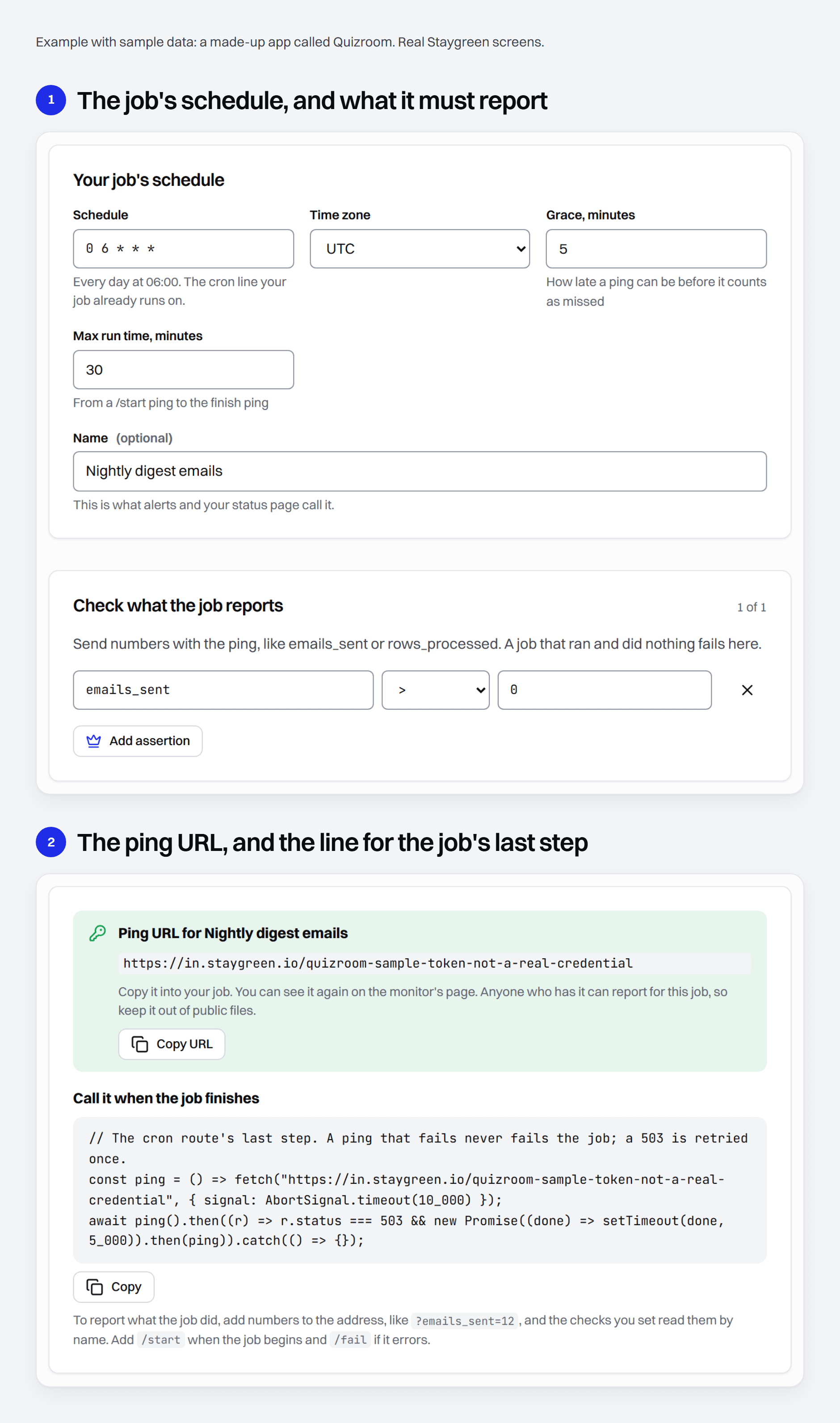
A new heartbeat starts watching at its first ping. Until then it says No ping yet and never alerts, so check that the first ping lands after you add the line. The ping URL is the heartbeat's only credential: keep it out of public files, and make a new one if it leaks, which retires the old. Secrets in what the job sends are masked before they're stored.
Free is 5 heartbeats, one assertion each, within one app's 50 monitors. Builder is $9 a month, or $7.50 a month billed yearly, for 50 heartbeats with up to 5 assertions each, across 10 apps.
Setting Up Cron Job Monitoring
Three ways to create the heartbeats, depending on where you start:
In the dashboard: paste your vercel.json and get one heartbeat per cron, with its schedule set.
From the command line:
npx staygreen provision https://yourapp.com --repo . --output staygreen.private.jsonreads the crons in vercel.json and netlify.toml, sets up the app's website check, its SSL check, a status page and one heartbeat per cron, and saves the ping URLs to that private file. It needs Node 22 or later and an API token with read and write access inSTAYGREEN_API_TOKEN, which you create under Agents and API in the dashboard. Later,npx staygreen scan https://yourapp.com --repo . --heartbeats staygreen.private.jsonmarks the repository's crons that have no heartbeat in that file.From your coding agent: over MCP, the agent reads the crons from vercel.json or netlify.toml and passes them to Staygreen's
provision_app, which does the same in one step.
Then the job calls its ping URL as its last step. Staygreen hands you the line for a shell or crontab, a Node or Vercel cron route, GitHub Actions, a Supabase cron and Python. The shell one:
# The job's last line. A ping that fails never fails the job.
curl -fsS -m 10 --retry 3 -o /dev/null "https://in.staygreen.io/your-ping-token" || true
That line pings no matter what ran before it, so let it run only after the job succeeded. In a script, start with set -e so a failed step stops the script before the ping. In a crontab line, put the ping after the job's command with &&.
In a Supabase cron, the ping goes after the job's statement, through pg_net. If that cron exists to keep a free Supabase project from pausing, the heartbeat is what tells you it stopped.
Cron Job Monitoring Tools Compared
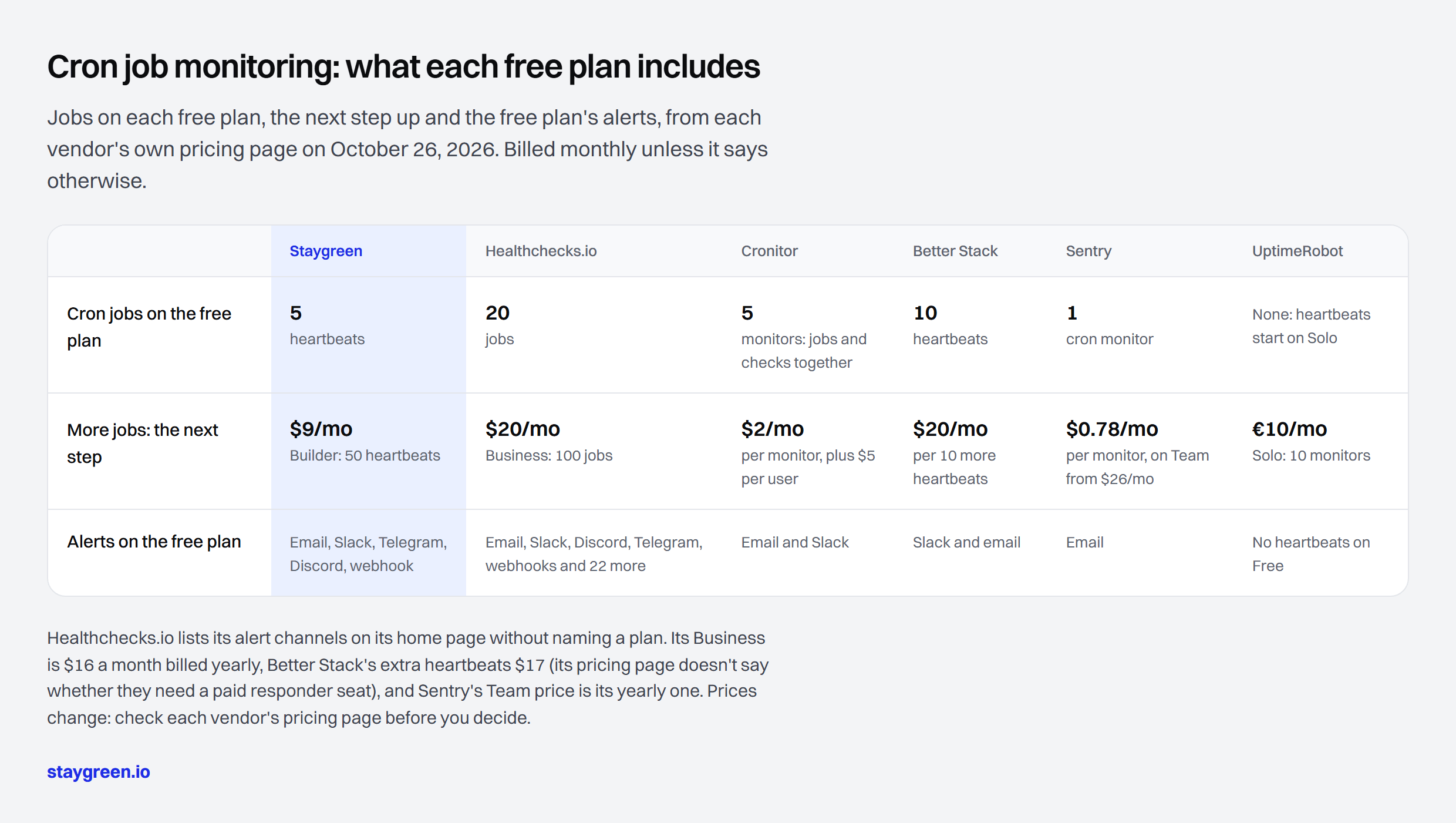
Cron jobs on the free plan: Staygreen 5. Healthchecks.io 20. Cronitor 5 monitors, jobs and checks together. Better Stack 10. Sentry 1. UptimeRobot none, since heartbeats start on Solo.
More jobs: the next step: Staygreen $9 a month on Builder, for 50. Healthchecks.io $20 a month on Business, for 100. Cronitor $2 a month per monitor, plus $5 per user. Better Stack $20 a month per 10 more. Sentry $0.78 a month per extra monitor, on Team from $26 a month. UptimeRobot €10 a month on Solo, for 10 monitors.
Alerts on the free plan: Staygreen email, Slack, Telegram, Discord and webhook. Healthchecks.io email, Slack, Discord, Telegram, webhooks and 22 more on its site, which doesn't name the plan. Cronitor email and Slack. Better Stack Slack and email. Sentry email. UptimeRobot: no heartbeats on Free.
Healthchecks.io: cron monitoring only, open source
The free Hobbyist plan keeps 100 log entries per job. Checks take a period or a cron expression and a grace time, and jobs can signal /start, /fail or their exit status. It can classify a ping as a failure by keywords in its body. Its home page lists alerts to email, Slack, Discord, Telegram, webhooks and 22 more services, while SMS, WhatsApp and phone-call credits start on Business. The code is open source under the BSD 3-clause license, so you can host it yourself. Sources: pricing, its home page, its ping API and the repository.
Cronitor: for crontabs on your own servers
The free Hacker plan's 5 monitors are shared between jobs and uptime checks. Its CLI reads your crontab and wraps each job. Cronitor keeps each run's output and duration, alerts when a run is slower than that job's history, and can fail a run on a metric the job reports, though its pages don't say on which plan. Sources: pricing, cron job monitoring and its monitor API.
Better Stack: heartbeats beside incident management
Its free plan is “Free for personal projects”, with Slack and email alerts. A heartbeat alerts when no ping arrives within its frequency and grace period, and a job can append /fail with its exit code. Its pricing page doesn't say whether extra heartbeats need a paid responder seat. Sources: pricing and heartbeat docs.
Sentry Crons: if Sentry already has your errors
Sentry includes 1 cron monitor on every plan, the free Developer plan for one user too. It records missed, failed and timed-out check-ins, next to the errors your job threw when it uses Sentry's SDK. Extra monitors are bought from a pay-as-you-go budget. Sources: pricing, pricing docs and Crons docs.
UptimeRobot: heartbeats from Solo
The free plan has no heartbeat monitoring. Solo adds it, and each heartbeat counts as one of the plan's monitors. The UptimeRobot alternatives page compares the rest of its free plan. Source: pricing.
Dead Man's Snitch, Hyperping and Uptime Kuma
Dead Man's Snitch gives 1 free job with hourly, daily, weekly or monthly intervals, 3 for $5 a month and 100 with integrations for $19. Hyperping's free plan has 20 monitors, and cron healthchecks count toward them, with the job's own cron expression and time zone. Uptime Kuma, self-hosted under the MIT license, has push monitors that wait for your job to call. Sources: Dead Man's Snitch plans and FAQ, Hyperping, Uptime Kuma.
When Another Tool Is the Better Choice
More than 5 jobs, free: Healthchecks.io watches 20, and all of Hyperping's 20 free monitors can be healthchecks. Better Stack gives 10 for personal projects.
Classic crontabs on servers you run: Cronitor's CLI finds and wraps them, and keeps each run's output.
Your errors already live in Sentry: its cron monitors put missed runs beside them.
You want to host it: Healthchecks.io is open source under the BSD 3-clause license, and Uptime Kuma's push monitors do the job on your own machine.
You need SMS or phone calls: Healthchecks.io's Business plan includes SMS and call credits, and a Better Stack responder seat includes unlimited phone and SMS alerts. Staygreen has neither.
What Staygreen doesn't do yet: alert delays and repeats while something is down, and maintenance windows. What its heartbeats don't do: capture a job's output or logs, or alert on a run that's slower than usual. A run fails for time only after the max run time you set.
Questions People Ask
What is a dead man's switch in monitoring?
A monitor that alerts when something stops checking in. Each run of the job sends a ping, and silence past the expected time plus a grace window raises the alarm. Cron job monitoring is the usual use for it.
How do I monitor a cron job for free?
Give the job a heartbeat and make the ping its last step. Staygreen is free for 5 jobs and checks numbers they report. Healthchecks.io is free for 20, Hyperping for 20 shared with uptime checks, Better Stack for 10 on personal projects, Cronitor for 5 monitors, and Sentry and Dead Man's Snitch for one each.
How do I monitor Vercel cron jobs?
Paste vercel.json into Staygreen to get one heartbeat per cron with its schedule set, then add the Node line it gives you as the last step of each cron route. On Vercel's Hobby plan, set the grace to 60 minutes before you import, because Vercel runs a Hobby cron anywhere within the hour it's due.
What if the ping itself fails?
The job carries on. The lines Staygreen hands out swallow their own errors, so the job never fails because of monitoring. Staygreen answers 200 as soon as a ping is recorded, and if it can't record one it answers 503, which the shell, Node, Python and Actions lines try again. A ping that never arrives is a missed run, which is the alert you want when a job or its network breaks.
Does it work with GitHub Actions scheduled workflows?
Yes. Keep the ping URL in a repository secret and add a final step that runs on success and calls it. A workflow that didn't run, or failed before that step, shows up as a missed run. GitHub can delay scheduled runs when it's busy, at the start of the hour most of all, so give the heartbeat more grace or schedule the job off the hour. In a public repository, GitHub also turns schedules off after 60 days with no activity, and the heartbeat is how you hear about it.
How is cron monitoring different from uptime monitoring?
An uptime check reaches out to your site on a timer. A heartbeat waits for your job to call in. Most apps need both, and Staygreen's free plan has both. The free uptime monitoring comparison covers the uptime side.
Is Staygreen open source?
Not yet. Its code opens in November 2026 under the Apache 2.0 license, and from then on anyone can host it, commercial use included. Hosting it means running probes in several cities, the status page server and the alerts, and watching all of it, which the hosted version does for you, free for one app.
Watch your cron jobs free at staygreen.io.
This page is part of The Product Compass, a newsletter for PMs and builders who ship products with AI. Subscribe for the guides and tool tests.