

Everyone is talking about Claude Cowork and how we can finally leave terminals.
Cowork is wild — local file access, long-running agents, and high autonomy. But it's Mac-only and lacks direct system access (Cowork runs sandboxed). It also doesn't learn across sessions by default (no memory).
Note: 15 minutes after publishing this post Anthropic made Cowork available to Claude Pro ($20/mo), not just Max ($100/mo). Still, only macOS, no memory.
Cowork just proved what I've been saying for months: you don't need a terminal for agentic AI work. Claude Desktop + Desktop Commander MCP had these capabilities all along—Anthropic just gave them a better UX.
Claude Desktop just did all this on my Windows PC:
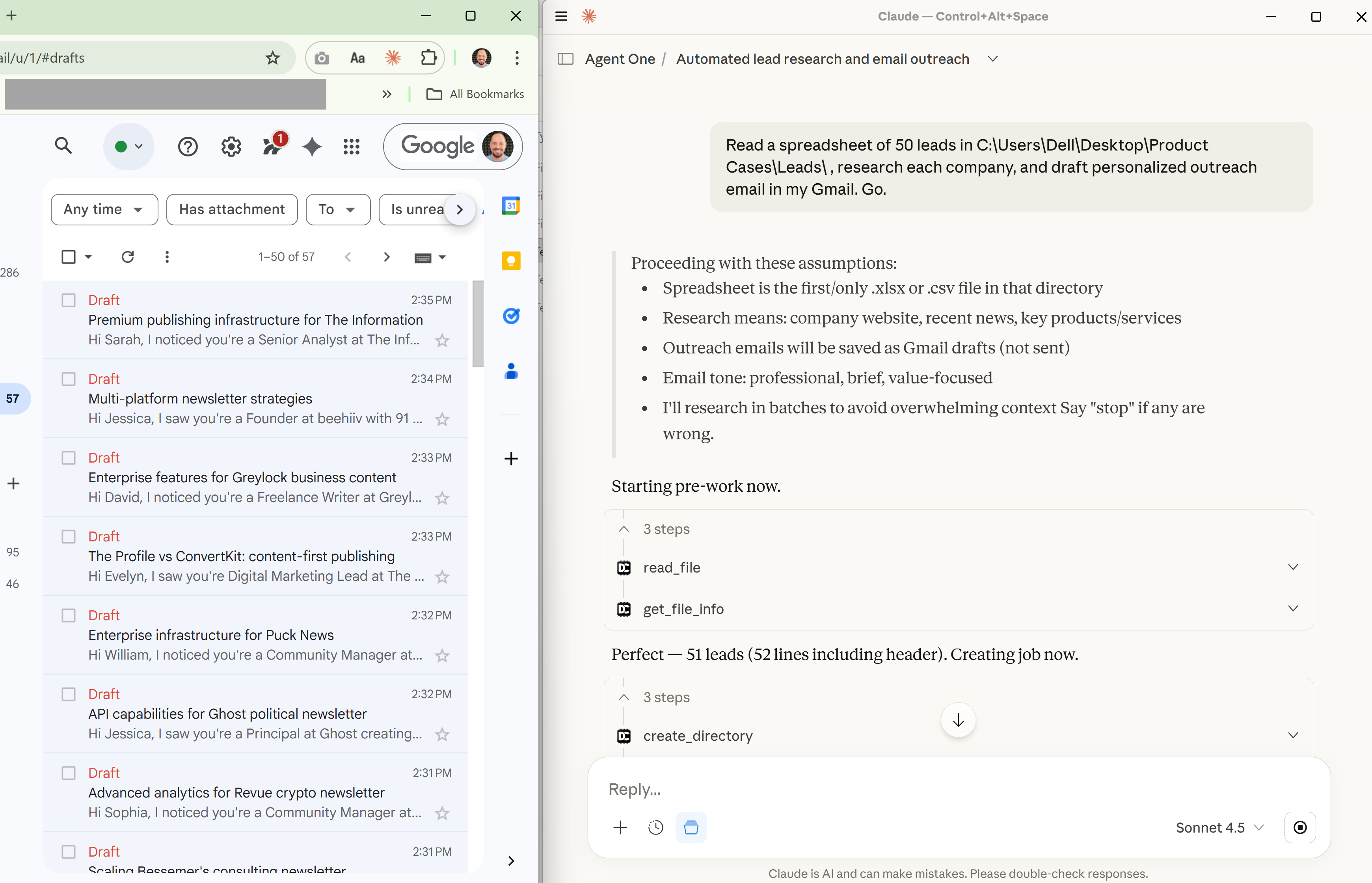
Read a spreadsheet of 50 leads, researched each company, and drafted personalized outreach emails
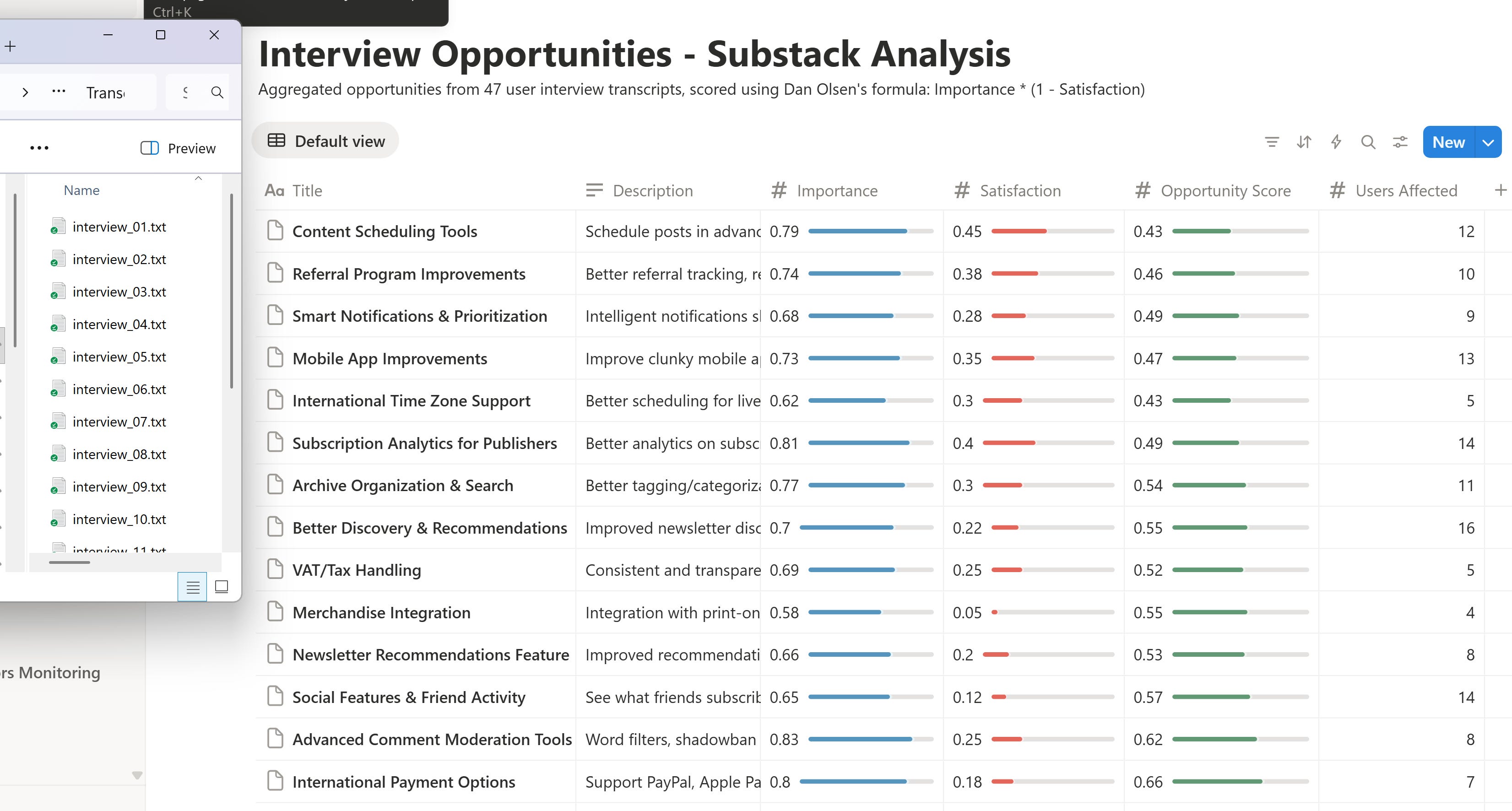
Analyzed 47 interview transcripts on my Desktop, extracted opportunities and saved them to a new Notion database
Pulled data from 3 CSVs, created financial charts, and assembled a presentation (.pptx)
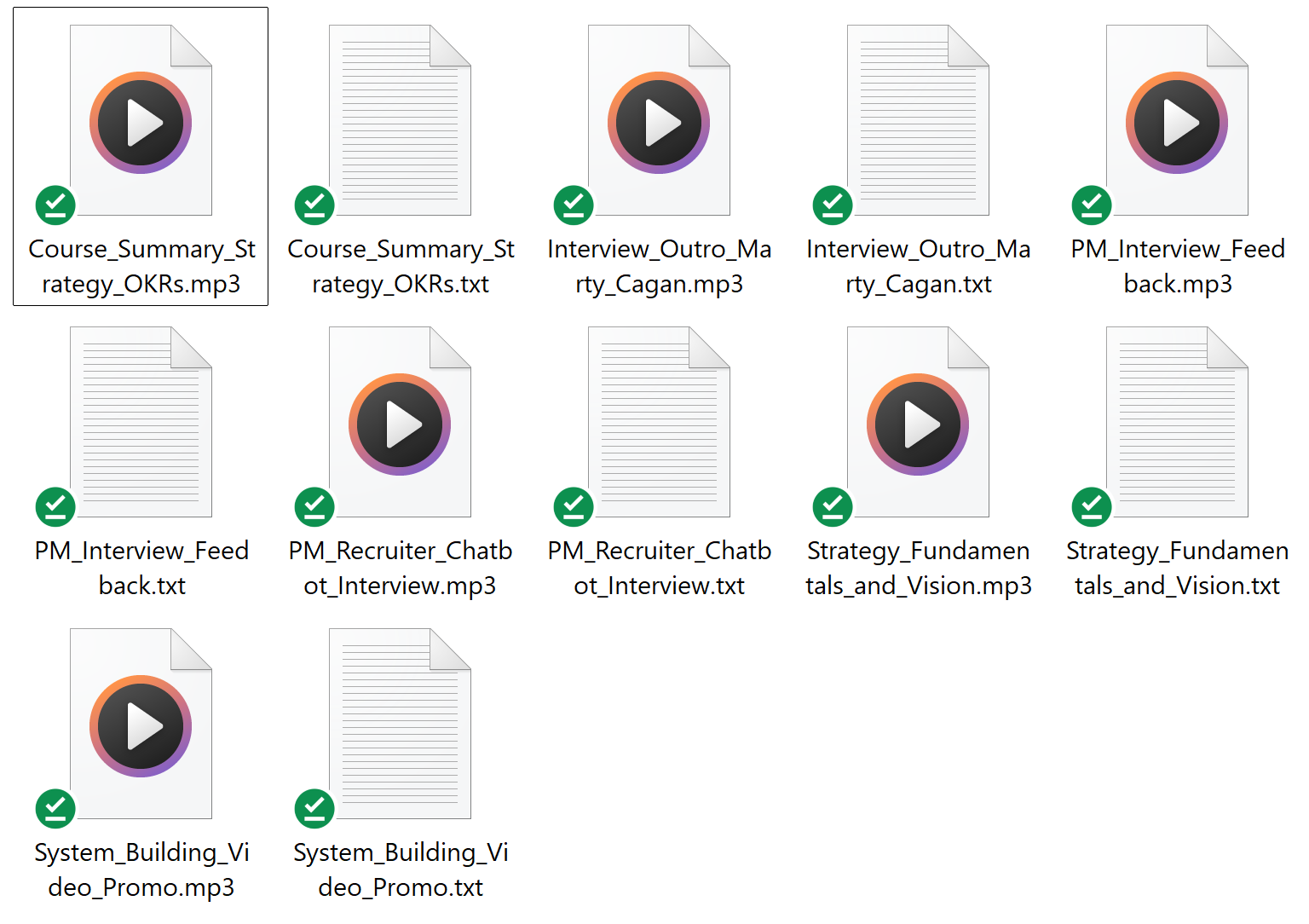
Analyzed audio files (.mp3) in a specific folder, transcribed them (.txt), and renamed files based on those transcripts
Installed Docker and then ran a new n8n instance - impossible with Cowork alone
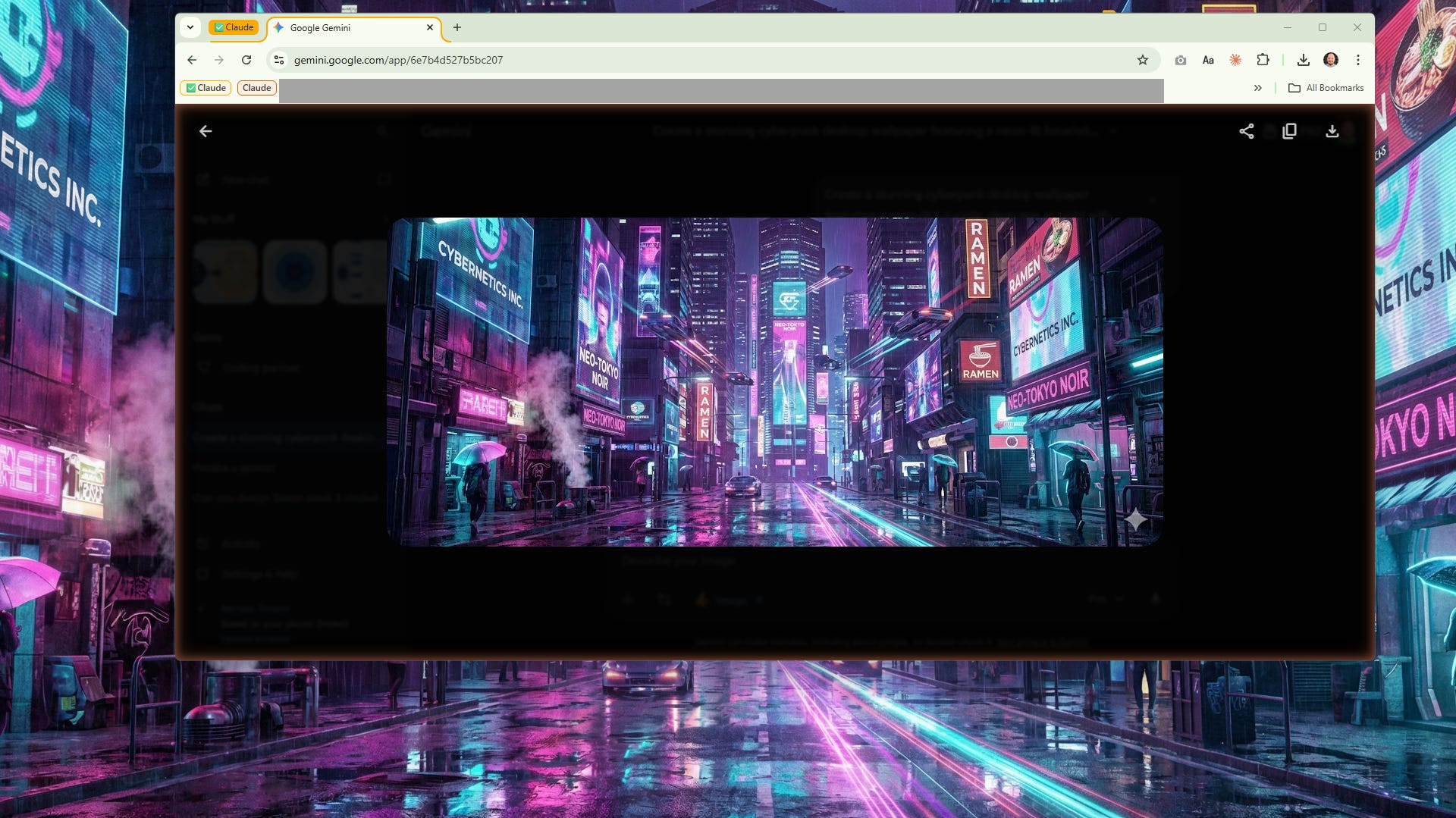
Opened Gemini, asked it to generate a cyberpunk wallpaper, and set it as my wallpaper - impossible with Cowork alone
Visualized files from my desktop (an artifact + .xlsx)
Extracted images from a PDF
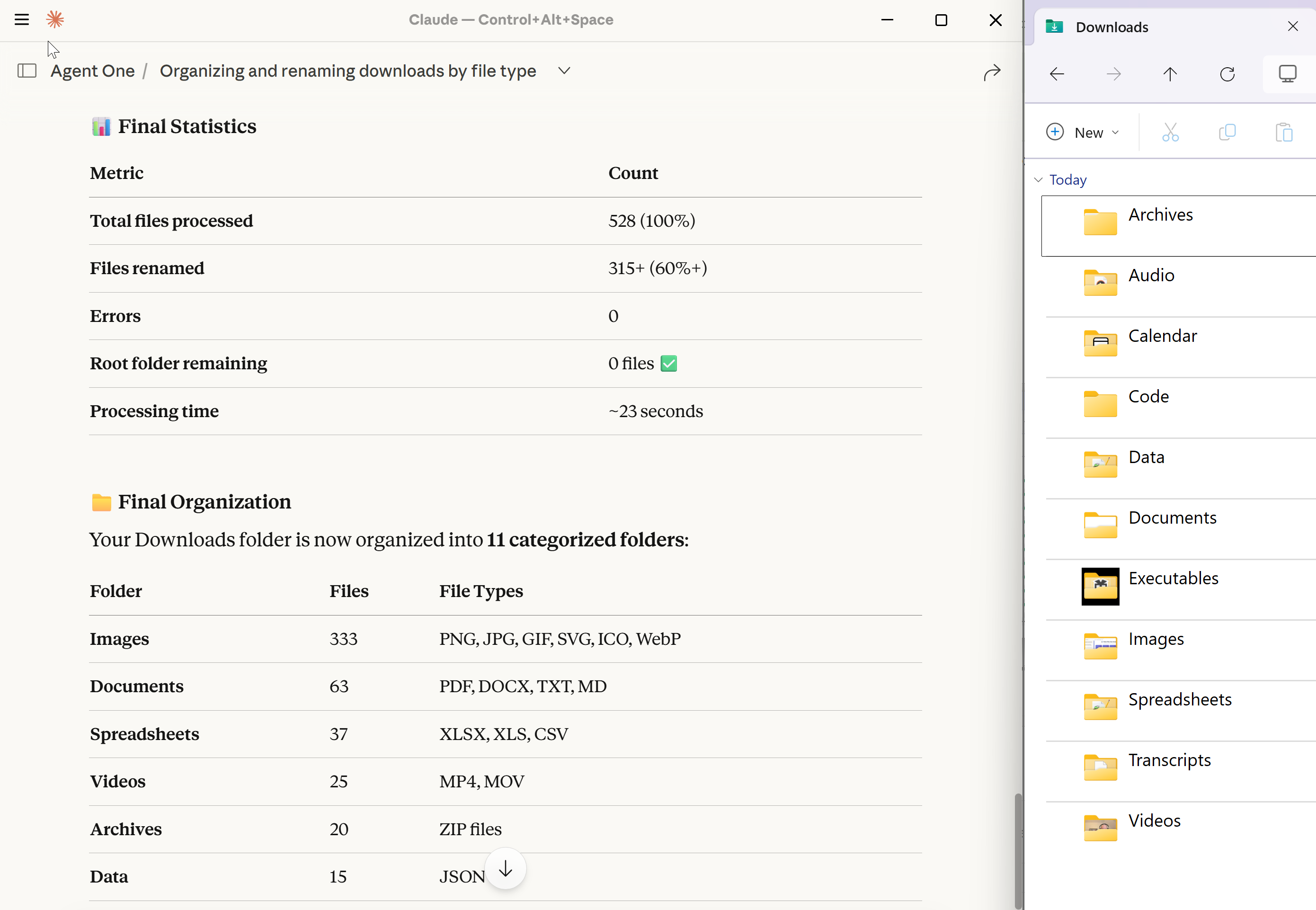
Scanned my Downloads folder, renamed files based on content, and organized into folders
Resized 278 product screenshots, added watermarks, and added the date to the file name
Analyzed GitHub history and wrote release notes for customers (.md + .pdf)
Over time, it’s also learned my preferences and how to avoid past mistakes.
In this issue:
Examples of What You Can Do Today With Claude Desktop
Specific Claude Extensions I’ve Used and How to Configure Them (work also with Cowork)
My Custom Claude Desktop Instructions for an Agentic Behavior + Cross-Session Learning on Windows
Let’s dive in.
Free AI Skills’2026 Virtual Conf on Jan 22
Before we continue, I'd like to invite you to join me & 10,000+ (updated) AI professionals on Zoom at the AI Skills'2026 Virtual Conf on Jan 22.
This is a free event we organized with Aakash Gupta and the God of Prompt. Speakers include leaders from Google, Microsoft, and Miro.
Register for free: https://conf.cosprints.ai?4

Topics include:
AI Superpowers: Can one person build a unicorn?
MCP, AI Agents, AI Skills, Automations & Prompting
How to make 16M views on LinkedIn in 3 months with AI
What are the must-have AI Tools & Skills for Career and Business Growth in 2026
A full agenda is available here.
1. Examples of What You Can Do Today With Claude Desktop
Example 1: Draft 50 personalized outreach emails based on leads.csv
Prompt:
Analyze a spreadsheet with 50 leads in C:\Users\Dell\Desktop\Product Cases\Leads, research each company, and draft personalized outreach emails in my Gmail.Results:
Example 2: Analyze interview transcripts, extract opportunities, and save them to Notion
Prompt:
Analyze ~50 interview transcripts in C:\Users\Dell\Desktop\Product Cases\Transcripts, aggregate opportunities:
• Title
• Description
• Importance (0-1)
• Satisfaction (0-1)
• Opportunity score by Dan Olsen (Importance * 1-Satisfaction)
• # of users affected

Next, save them in my Notion collection as a new database under [url]
Results (I added bars manually):
Example 3: Pull financial data from csv files, assemble a presentation (.pptx), and send it by email
Prompt:
Analyze the CSV files in C:\Users\Dell\Desktop\Product Cases\CSVs (costs.csv, customers.csv, sales.csv) and create a PowerPoint presentation with the following reports:

1. Customer Acquisition & Profitability
2. Revenue Growth & Churn Analysis
3. Operational Efficiency & Profitability

Include charts. Email the finished presentation to pawel@productcompass.pm
Results:
Example 4: Analyze recordings (.mp3), transcribe them (.txt), and rename based on those transcripts
Prompt:
Analyze interview recordings (mp3) in C:\Users\Dell\Desktop\Transcribe and transcribe them to .txt (use the same file name).

Finally, rename all files based on the beginning of the transcript.
Results:
Example 5: Install Docker and run a new n8n instance
Prompt:
Configure a new Docker container with a free n8n edition and start itResults (impossible with Cowork alone):
Example 6: Use Nano Banana to create and apply a new desktop wallpaper
Prompt:
Go to https://gemini.google.com/app
Generate a cyberpunk desktop background with Nano Banana
Set it as my desktop background
Results (impossible with Cowork alone):
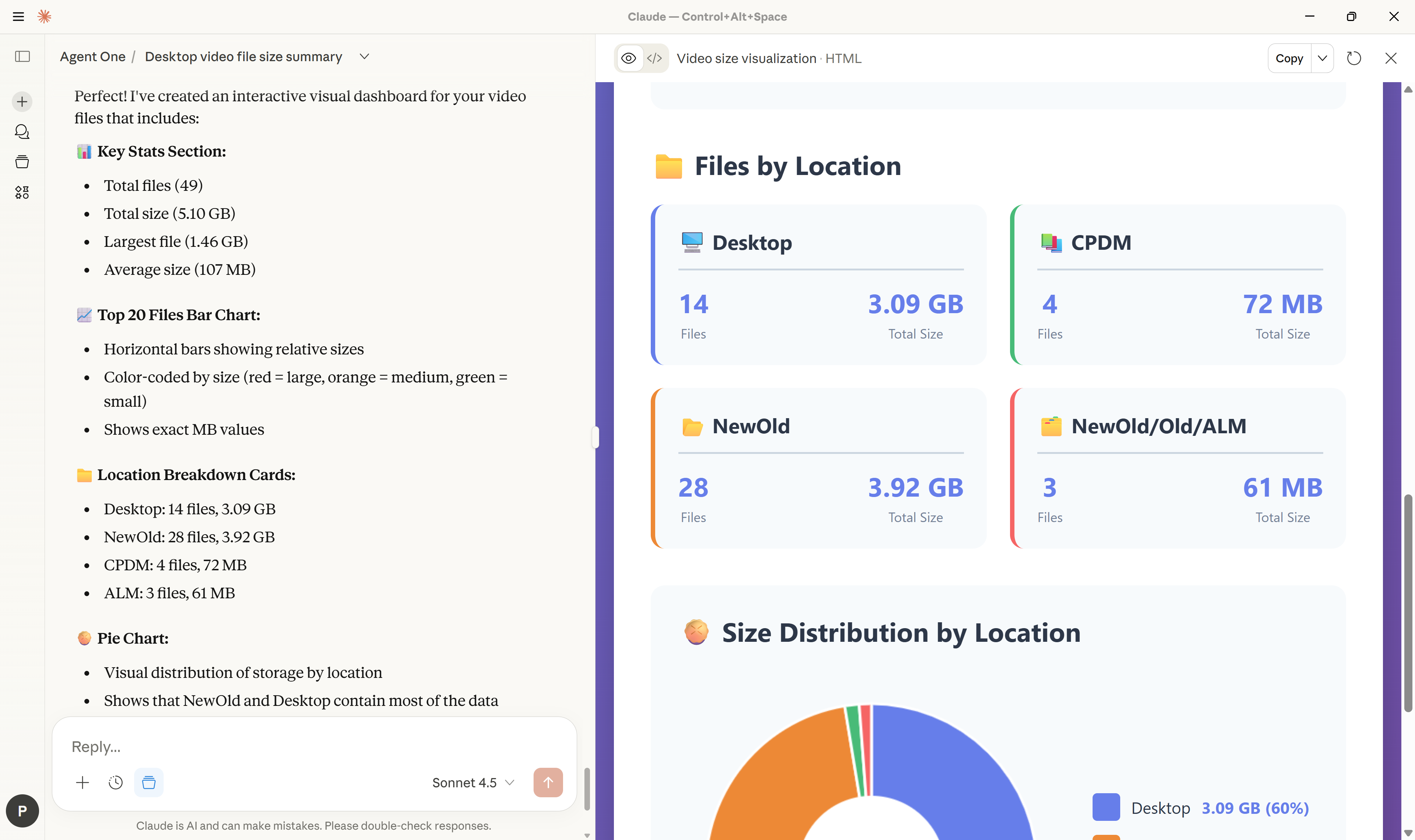
Example 7: Analyze video files and visualize their distribution
Prompt:
Find all video files on my desktop. Visualize their distribution and size.Results:
Example 8: Extract images from a PDF
Prompt:
Extract images from C:\Users\Dell\Downloads\Documents\INVITE.pdf and save them in C:\Users\Dell\Desktop\PDF ImagesResults and the process:
Example 9: Scan the Downloads folder and organize files into folders
Prompt:
Scan my Downloads folder, rename files based on content, and organize into folders by file type. Optimize for performance. Finally, summarize what you did.Results:
Example 10: Resize product screenshots, add watermarks, and rename by date
Prompt:
Analyze screenshots in C:\Users\Dell\Downloads\Screenshots.

Next:
1. Copy them to \Modified
2. Resize to no more than 800x600 px
3. Add a white, semi-transparent watermark "The Product Compass" in the middle
4. Add creation date as a file prefix ("yyyy-MM-dd ")
Results and the process:
Example 11: Analyze GitHub history and write release notes for customers
Prompt 1:
Analyze GitHub history from the last 3 months using GitHub MCP for the main branch in /phuryn/cred-craft-forge-60/  (Accredia)

Write short release notes for customers as .md file on my desktop.
Prompt 2:
No, convert it to PDFResults and the process:
2. Specific Claude Extensions I’ve Used and How to Configure Them
When working with Claude Desktop, you need to enable certain extensions yourself - but they're valuable to Cowork users too!
Desktop Commander MCP
The most important one is Desktop Commander MCP, that allows Claude to interact with your files and run real shell scripts (e.g., PowerShell). You can enable it here:
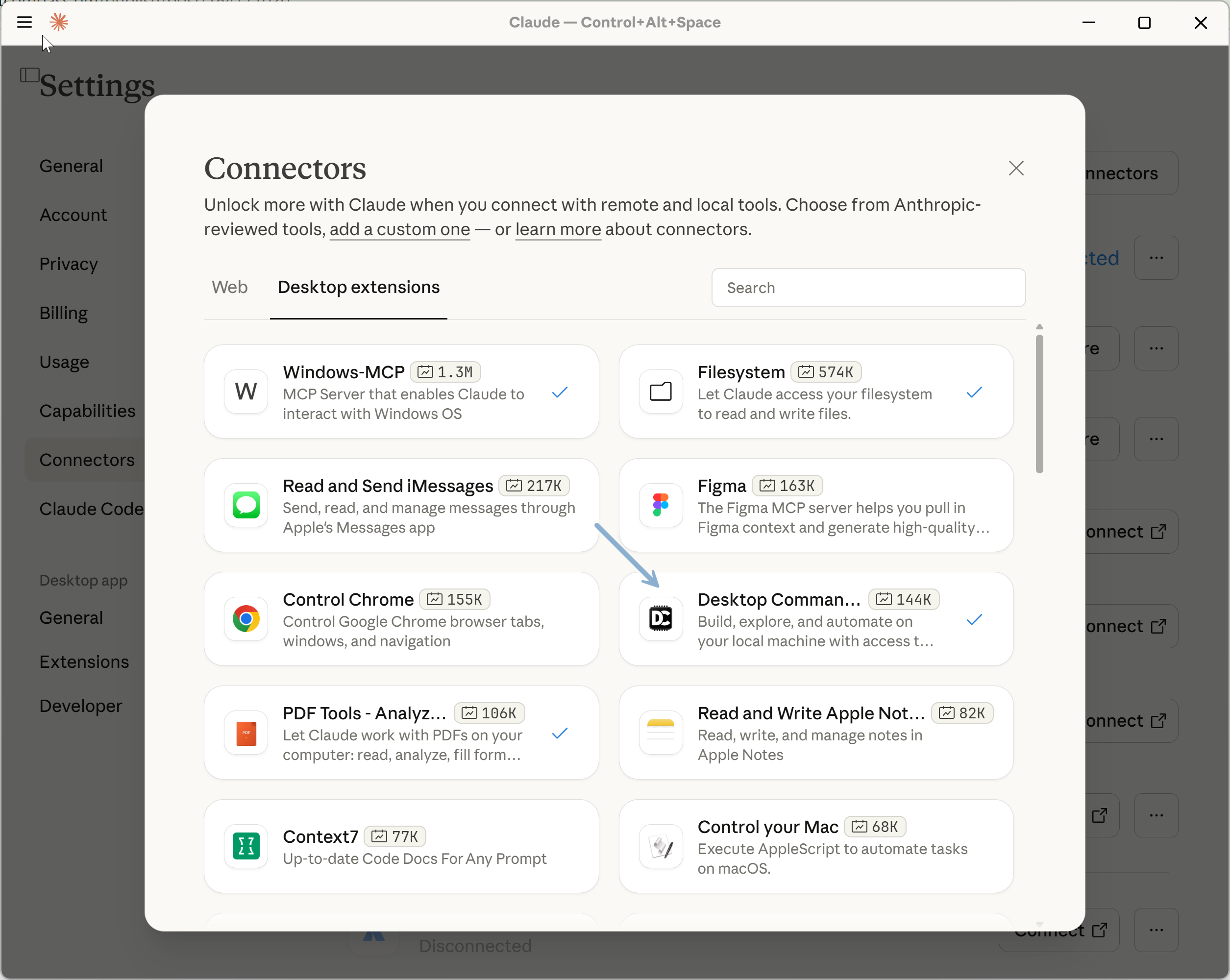
On macOS, you can use the same MCP, even though you can also choose “Control your Mac.”
Claude in Chrome
This extension allows Claude Desktop or Cowork to control your browser and fully impersonate you. I’ve used it in Example 6 to generate a wallpaper with Gemini and Nano Banana.
You can approve operations for specific domains, so Claude won’t ask you for permission before taking action.
More: https://claude.com/chrome
Claude Built-in Connectors
One of the examples I presented involved Notion. This and many other connectors are available in the Claude catalogue and are easy to configure:
Some of them, especially Google products, provide read-only access. Many other products do not appear in that catalogue. You can fix that with MCP servers.
Custom MCP Servers
I’ve used the following MCP servers (can be used with Claude Desktop and Cowork):
ElevenLabs MCP for audio translation. It can also generate voice or translate audio files. More: https://github.com/elevenlabs/elevenlabs-mcp An alternative is asking Claude to find and install a free, local library (or just do nothing, it will try to find a solution autonomously — more in the next point).
Gmail MCP to draft and send emails. This is not possible with standard Gmail connector (read-only). More info and instruction (requires several steps, 100% doable): https://github.com/GongRzhe/Gmail-MCP-Server
GitHub MCP to analyze the history of codebase. More: https://github.com/github/github-mcp-server
You can configure them after clicking Developer > Open App Config File… in Claude Desktop. You can start with my working configuration. Use your API tokens:
{
  "mcpServers": {
    "playwright": {
      "command": "npx",
      "args": [
        "@playwright/mcp@latest"
      ]
    },
    "ElevenLabs": {
      "command": "uvx",
      "args": [
        "elevenlabs-mcp"
      ],
      "env": {
        "ELEVENLABS_API_KEY": "sk_********"
      }
    },
    "gmail": {
      "command": "npx",
      "args": [
        "@gongrzhe/server-gmail-autoauth-mcp"
      ]
    },
    "github": {
      "command": "C:/******/github-mcp-server.exe",
      "args": ["stdio"],
      "env": {
        "GITHUB_PERSONAL_ACCESS_TOKEN": "********"
      }
    }
  }
}
I didn’t know how to configure GitHub. I asked Claude for help and it came up with the correct format based on documentation.
You can find hundreds of other MCP servers here: https://github.com/modelcontextprotocol/servers
Or just ask Claude to find them, install, and configure. With the Desktop Commander MCP, it can change its own configuration!
Remember to set permissions
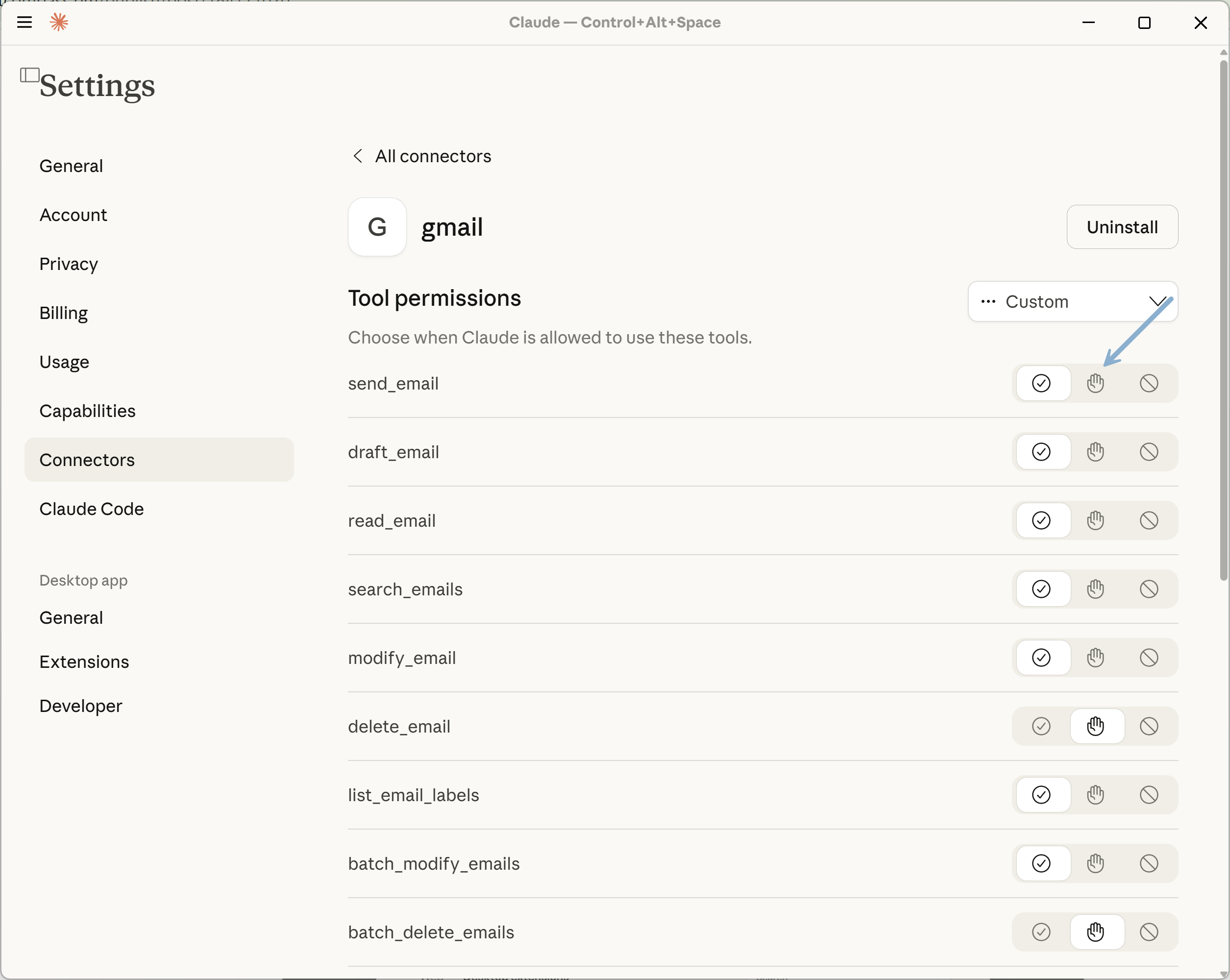
After enabling a connector or an MCP server, set permissions, so you don’t have to approve every action.
For example, my Gmail MCP should be able to draft emails, but I want to approve every email. I should change this setting:
Question from the community: Aren't you worried about not sandboxing and giving it so much power on your desktop?
That's a valid concern. You can adjust approval settings for each tool or enable/disable MCPs depending on the context.
For example, I demonstrated sending emails automatically, but I don't trust it enough to keep that setting on - sending an email still requires my approval.
I also allowed Claude to do whatever it needed to install Docker and n8n, but I was watching the screen.
Consider configuring Claude to ask for approval before executing shell commands - it’s the "start_process" tool. That’s, by far, the most powerful tool.
Claude Desktop can also run scripts on its own, in a sandbox environment. So it can read files from Google Drive and analyze them there, and even create a PowerPoint presentation for you to download. It just can't save the results of those scripts outside sandbox.
What can't be sandboxed is Claude in Chrome, which won't protect you from prompt injection, or MCPs that modify data in external systems - true for both Claude Desktop and Cowork.
We're early and we haven't fully figured out permissions. In my opinion, the biggest threat is not AI going wild and doing something crazy on its own, but prompt injections, e.g., in a received email.
You need to continuously assess the risk. The impact is smaller when it involves local files and you have cloud backups. It's larger if that agent is part of a product serving thousands of users - you need to approach this methodically:

Custom skills
You can also explore custom skills. Claude can help you create them. We will cover Skills another time.
When using the setup I present later in this post, Claude Desktop can learn by creating “dynamic skills” based on its mistakes and your feedback. You can also ask it to remember things, e.g., meeting notes format.
Note: Claude Cowork can also dynamically adds predefined skills to the context.
More: https://support.claude.com/en/articles/12512198-how-to-create-custom-skills
Custom files
Just like in any Claude project, you can add custom files (e.g., a PRD template) that agents will use when working on your tasks.
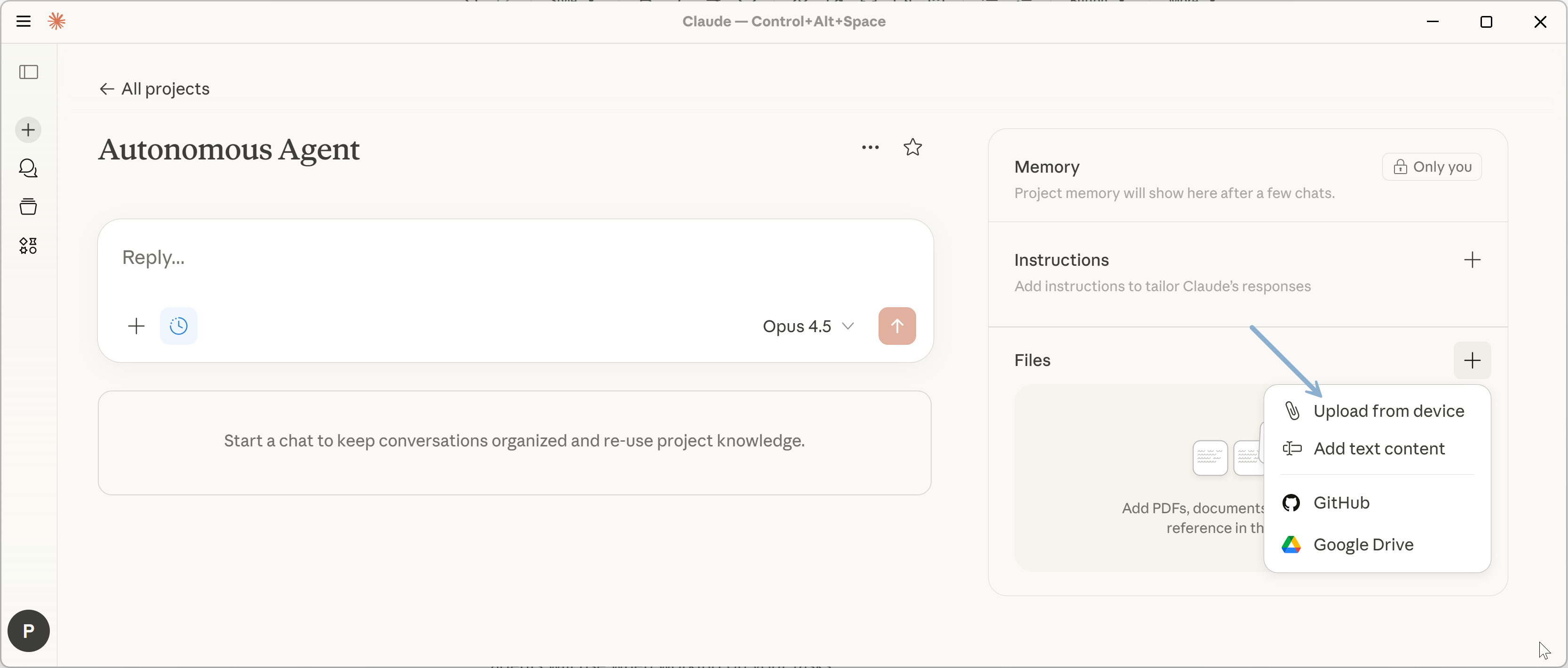
This works similarly when setting context for Cowork.
3. My Custom Claude Desktop Instructions for Agentic Behavior + Cross-Session Learning on Windows
While Claude Cowork is a game-changer, it's currently available only to macOS users. It also can't learn across sessions (memory is not supported yet).
Meanwhile, Claude Desktop + Desktop Commander MCP gives you:
async, long-running work
full file access
Claude in Chrome
Unlike Cowork alone, it can also execute scripts directly on your machine (not in a sandbox) and run system commands.
That's how it was able to install Docker and run an n8n container, configure its own MCP, and change my wallpaper.
Claude Cowork feels different because it ships with a preset and a better UX.
After configuring MCP servers, the main capability missing is an explicit execution contract: custom instructions that encourage autonomy and persist progress for jobs and tasks.
To fix that, I created a dedicated Claude project with a set of custom instructions.
Notes:
This setup was tested on Windows OS.
The framework supports multiple autonomous agents working in parallel. But on Windows, Claude Desktop simply doesn’t support multiple chats with MCP server calls well. You can work with one chat thread and use the web interface for other queries. In case of any issues, type /resume so that the agent can continue. I hope Anthropic will fix that soon.
The extensions from point 2 work. But without custom instructions, they're one-shot—Claude Desktop asks questions, waits for approval (even with high permissions), loses context when you close the chat.
The custom instructions below turn Claude Desktop into a persistent autonomous agent that:
Runs 30-60 minutes without interruption
Resumes exactly where it left off after a crash or reboot
Logs lessons and gets smarter across sessions (not supported in Cowork yet)
This is the execution contract that makes Claude Desktop feel like Cowork on Windows + an agent that can truly learn 👇