

How to use this post: Drop this structure into your Claude Code or Cowork and ask it to build the same system for your domain — customer interviews, competitive research, market intelligence, whatever you do repeatedly. It works.
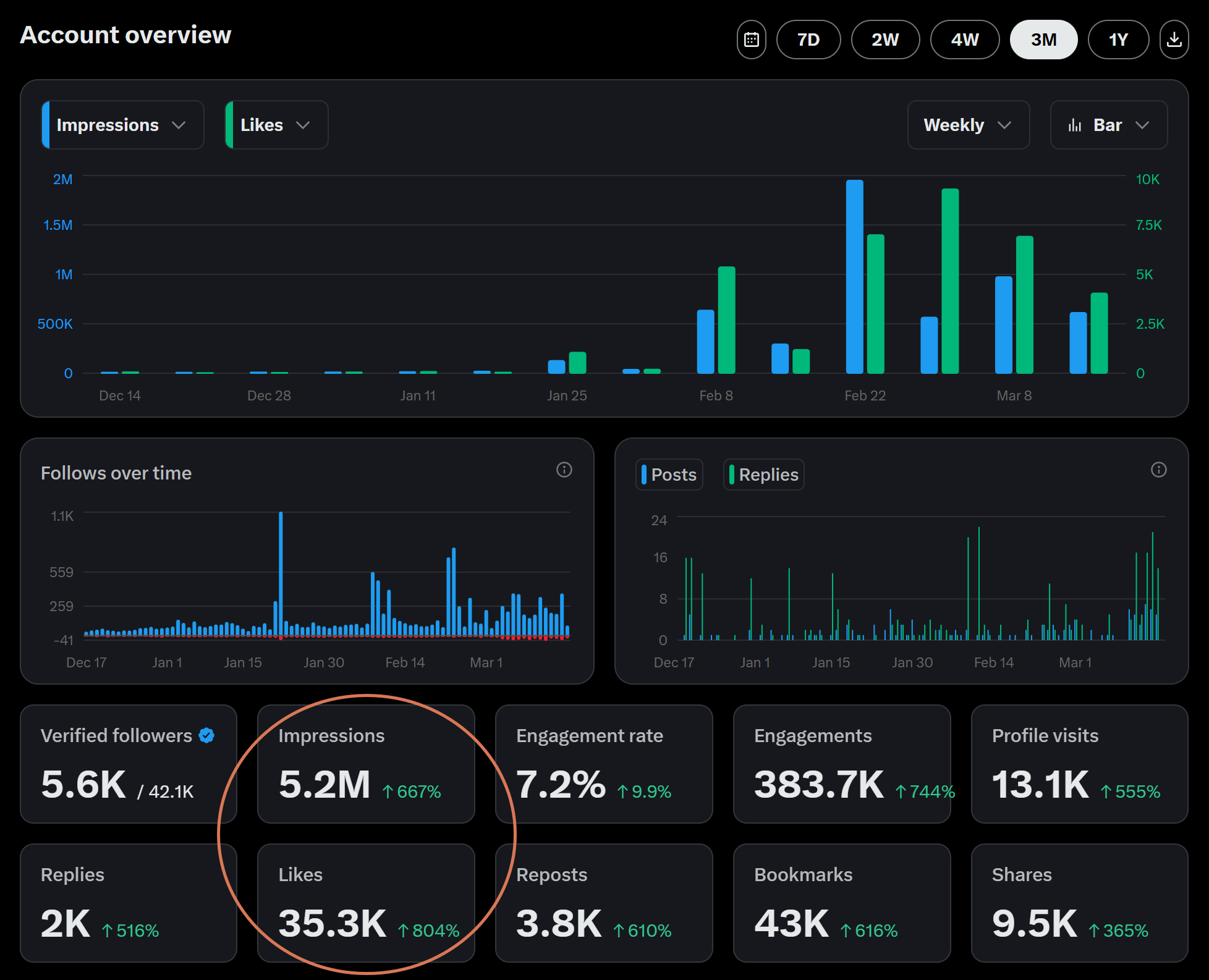
5.2 million impressions on X. 35,000 likes. 43,000 bookmarks. 7.2% engagement rate. In three months. Most of that growth happened within the last 6 weeks.
Not from writing more. Not from better prompts. From building a system that compounds.
[Edited] After publishing this article:


I'm going to show you what that system looks like, how it evolved, and why the architecture matters more than the content it produces. You can drop the whole structure into Claude and use it directly, or treat it as inspiration to build your own.
I'll use content creation as the case study — but the pattern works for customer research, competitive intelligence, market analysis — any domain where knowledge compounds.
This is Part 3 of my Claude for PMs series. New to the tools? Start with Part 1: Cowork and Part 2: Claude Code.
In this post, we discuss:
How Agentic Systems Learn from Real-World Data
How a Claude Knowledge System Compounds Over Time
Architecture: File-Based Knowledge Graph
2x Usage: The Best Time to Start with Claude
What We’ll Learn Next
How This AI System Evolved in 3 Phases
Building Custom AI Tools with Claude Code
Cross-Surface Workflow: Claude Code, Cowork, and Web
Hypothesis Tracking: How the System Stays Honest
How to Build Your Own Claude Knowledge System
Why Self-Improving AI Systems Win
1. How Agentic Systems Learn from Real-World Data
The workflow is simple:
Pull data → organize knowledge → let the system learn → compound over time.
X (Twitter) content is where I tested it. But the same architecture works for:
Customer interviews — After 50 interviews, the system knows your product’s pain points better than your Confluence page.
Competitive monitoring — Competitor moves instead of tweets. Pricing changes instead of LinkedIn posts. Patterns across weeks you’d miss manually.
Market intelligence — Pull from APIs, browser scraping, manual input. Let the system self-correct as the market shifts.
AI handles the repetitive work — the research, the drafting, the data pulling.
What it can't do is decide what matters. That's your job. This system doesn't replace your judgment. It gives your judgment better inputs, faster, and those inputs compound over time.
2. How a Claude Knowledge System Compounds Over Time
The more you use Claude, the more it improves. Structure emerges. Knowledge files build up. It starts feeling less like using a tool and more like building a system that gets better every time you touch it.
I didn’t start with a master plan. I started by pasting screenshots into Cowork, asking “what makes this post work?” Raw, unstructured. Just curiosity.
But Claude started noticing patterns I missed. It flagged that negation hooks outperform positive hooks on LinkedIn. It noticed that data experiments get 3x more bookmarks than opinion posts. It spotted that my builder-teacher posts consistently outperform my analyst takes.
Over weeks, the system grew. Claude suggested reorganizing the files into a knowledge hierarchy. Then it suggested building a Python script to fetch tweet data cheaper. Then it started proposing edits to its own knowledge base.
Now the system has 26 content templates, 13 active hypotheses being tested with real data, 50+ catalogued false beliefs (things conventional wisdom says hurt but data shows don’t), and 7 topic lanes with energy tracking — all maintained by Claude, all improving with each use.
But "maintained by Claude" doesn't mean I stepped back. Here's what the collaboration actually looks like — I asked Claude to summarize who contributed what during a real session:

I decide every editorial call — what to post, what to kill, what angle to take, which facts need checking twice. Claude handles research, verification, structural options, and pattern-matching against the knowledge base.
AI compresses execution. The writing, the code, the analysis. What it can’t compress: knowing what to build. Knowing what to cut. Taste. Judgment.
The dev who writes code all day gets compressed. The dev who decides what code should exist becomes more valuable than ever. Same split applies to PMs. Same split applies to content. This is 10+ iterations per post. Not “write me a post about X.”
3. Architecture: File-Based Knowledge Graph
What we built with Claude is a file-based knowledge graph with progressive disclosure. This is where I ended up after months — not where I started. You can drop this structure into Claude and use it as-is, or treat it as inspiration. Paste it in and Claude understands immediately what goes where.
Here’s what my repo looks like today:
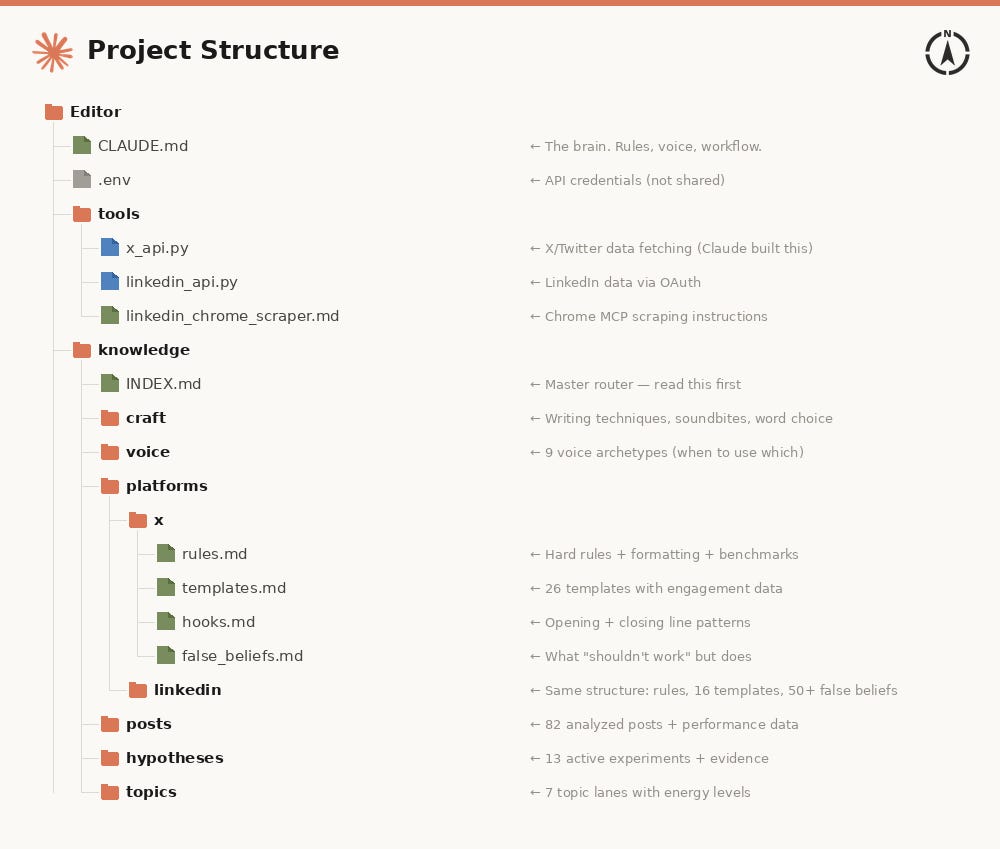
Project Structure:
CLAUDE.md is the brain. It defines the rules, the voice, the workflow. Everything Claude needs to know about how to operate.
knowledge/INDEX.md is the router. It reads this first, then drills into only the folder that’s relevant to the current task.
Each subfolder is a knowledge domain:
craft/ holds writing techniques.
voice/ holds 9 archetypes for matching tone to content.
platforms/ holds platform-specific rules, templates, and hooks.
posts/ holds performance data from analyzed content.
hypotheses/ holds what I’m testing next.
And here's how it flows:
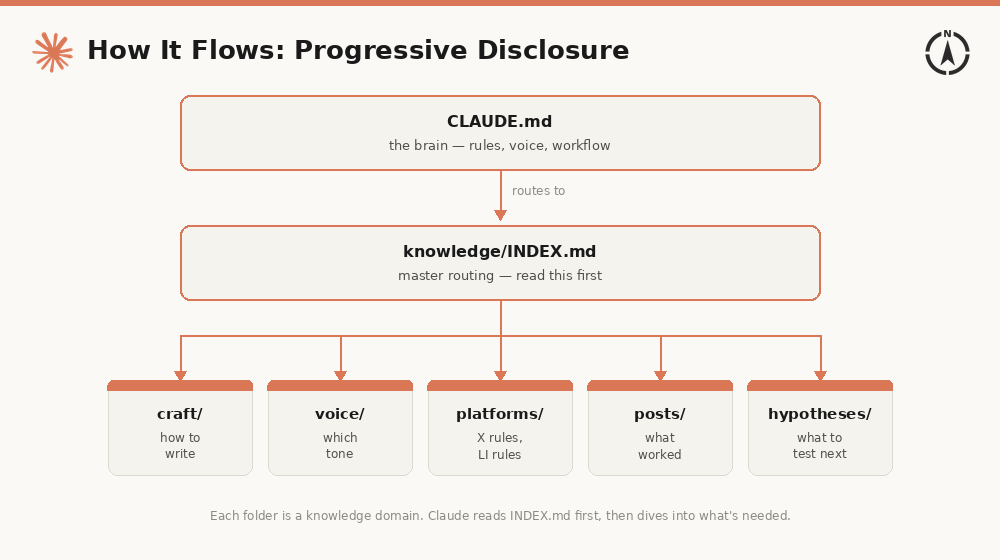
Progressive disclosure means Claude doesn’t load everything. Context windows are finite — even at 1 million tokens, loading everything wastes attention. The system only loads what’s relevant to this specific task.
How to adjust this as a PM: Replace craft/ with discovery/. Replace voice/ with stakeholders/. Replace platforms/ with channels/. Same architecture, different labels.
4. 2x Usage: The Best Time to Start with Claude
Claude is offering double usage limits through March 27. Weekdays outside peak hours, all day on weekends. Automatic across Web, Code, Cowork, and mobile.
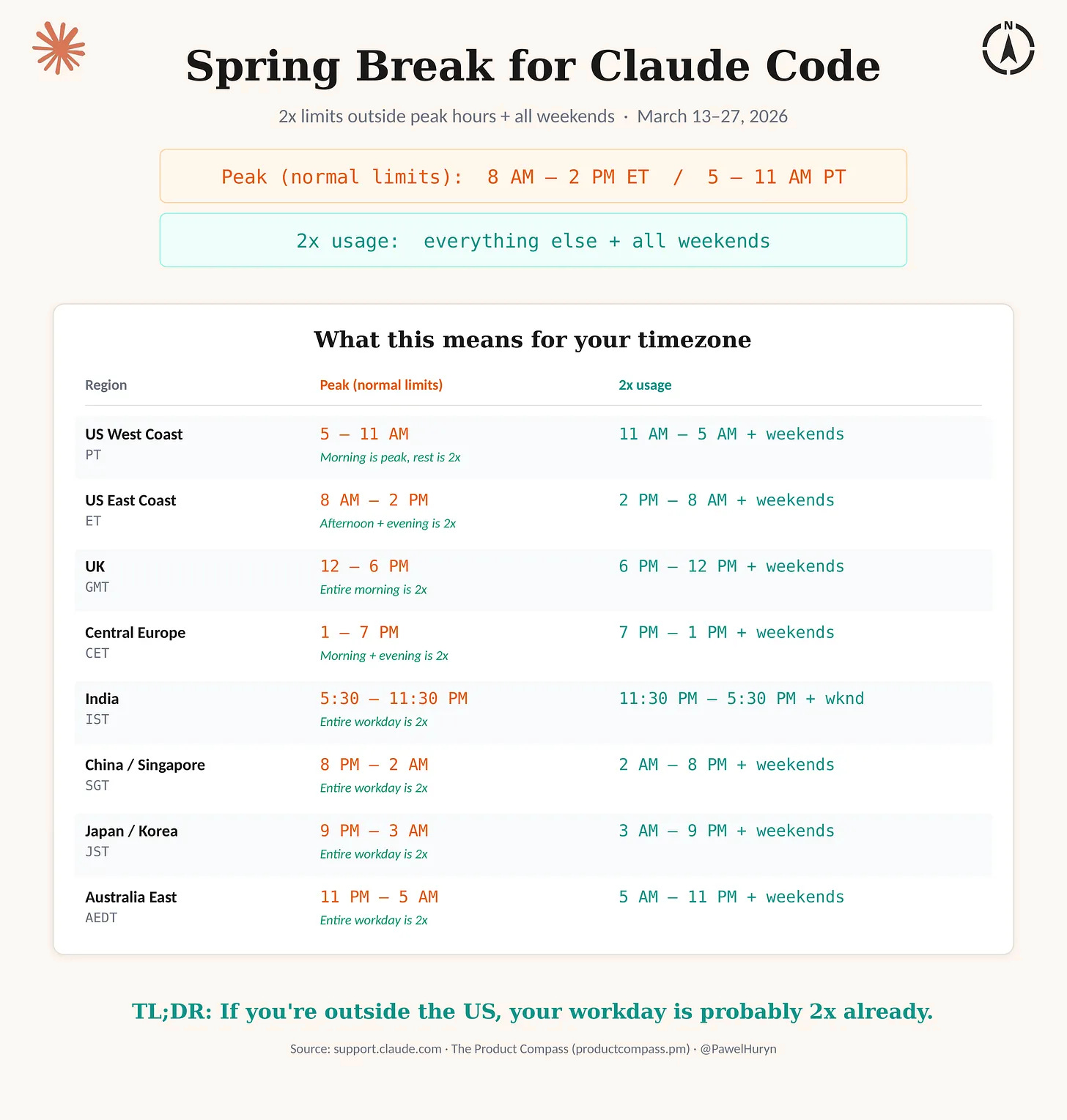
It's the best time to start building with Claude.
5. What We’ll Learn Next
Here’s what’s behind the paywall — and why each piece matters:
How Claude builds tools for you — Claude Code can call any API and wrap it into a reusable script. No MCP needed. I’ll show you how it works and when to say yes. (If you’ve ever wanted to pull data from an API but didn’t want to write code — this is how.)
Automating Chrome without the 30-second waits — Claude Code controls your real browser through MCP. Direct DOM access, not screenshots. Setup takes 2 minutes. (If you’ve tried AI browser tools and hated the speed — this is different.)
From generic prompts to a PM knowledge system — How to structure CLAUDE.md so it actually compounds: learning mode, hypothesis tracking, false beliefs. The principles and key snippets — not my full file, but everything you need to build your own. (If your Claude sessions start from scratch every time — this fixes it.)
How the system stays honest — Hypothesis tracking that kills bad ideas with data. False beliefs that fight conventional wisdom. And one CLAUDE.md instruction that makes Claude propose improvements on its own. (If you want a system that challenges its own assumptions — this is how.)
The three phases — How this evolved from pasting screenshots into Cowork to a system that learns. Where to start, what to expect at each stage. (If you’re starting from zero — this is your roadmap.)
The cross-surface workflow — Same system from Claude Code, Cowork, and web. The tool doesn't matter — the shared context does. (If you've tried Claude in one surface and wondered how to connect them — this is it.)