

Hey, Paweł here. Welcome to the freemium archived edition of The Product Compass.
Every Saturday, I share actionable tips and resources for PMs.
Here are some posts you might have recently missed:
[Free] What is Product Management?
[Premium] User Interviews: The Ultimate Guide to Research Interviews
[Premium] Product Vision vs Strategy vs Goals vs Roadmap: The Advanced Edition
Subscribe now, if you haven’t already, for the full experience:
How to Write User Stories: The Ultimate Guide + 10 Examples
I haven't covered Agile and Scrum topics in this newsletter so far.
But it’s hard to ignore that:
Most of us work in one of the Agile frameworks.
Many Product Managers use tools like Jira daily.
Mistakes can result in waste, delays, and team members disengaged at work.
These are the basics you must get right as a PM.
So, in today’s newsletter, as one of the ~400 PSPO III, I'd like to explain everything you need to know about User Stories:
What Are User Stories?
How to Write Good User Stories?
🔒 How to Split User Stories: An Introduction
🔒 9 Proven Tactics to Split User Stories
🔒 User Stories vs Job Stories
🔒 8 Common Mistakes to Avoid
1. What Are User Stories?
A User Story is one of the formats you can use to create a Product Backlog item.
While not the official part of the Scrum framework, they are the most common approach to describe the work that needs to be done in your product.
A User Story is written from the perspective of a user who wants to derive value from the product. It should focus on the user's desired outcomes and be embedded in the context where the user seeks value from the product.
User Story format and examples
The basic format of a User Story is simple:
WHO: As a [user type]
WHAT: I want [action to perform]
WHY: So that [the desired outcome]
See the User Stories examples on the cards below:
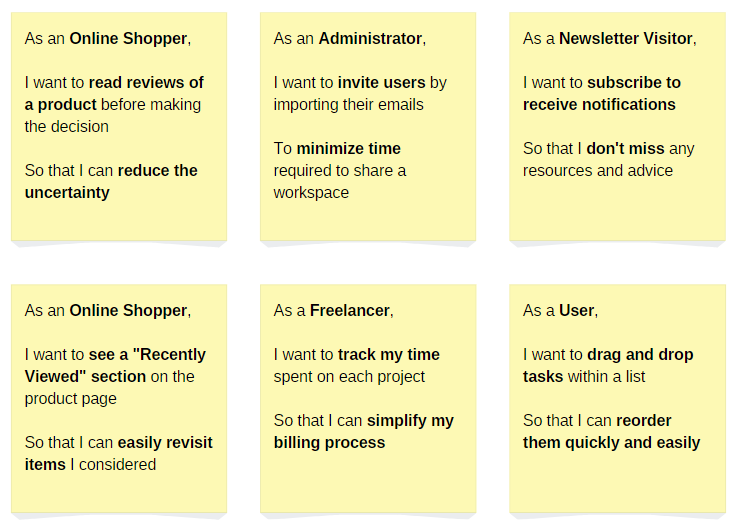
10 User Story Examples (Different Industries)
The six cards above in text, plus four more industries — all in the same As a / I want / So that format:
E-commerce: As an Online Shopper, I want to read reviews of a product before making the decision, so that I can reduce the uncertainty.
E-commerce: As an Online Shopper, I want to see a “Recently Viewed” section on the product page, so that I can easily revisit items I considered.
B2B SaaS: As an Administrator, I want to invite users by importing their emails, to minimize the time required to share a workspace.
Media: As a Newsletter Visitor, I want to subscribe to receive notifications, so that I don't miss any resources and advice.
SaaS: As a Freelancer, I want to track my time spent on each project, so that I can simplify my billing process.
Productivity: As a User, I want to drag and drop tasks within a list, so that I can reorder them quickly and easily.
Fintech: As a Checking Account Holder, I want to freeze my card instantly from the app, so that I can protect my money when the card goes missing.
Marketplace: As a Marketplace Seller, I want to duplicate an existing listing, so that I can publish similar items faster.
B2B analytics: As a Team Lead, I want to see who viewed the weekly report, so that I can follow up only with the people who missed it.
Healthcare: As a Patient, I want to receive a reminder 24 hours before my appointment, so that I don't miss it.
A prerequisite to working with User Stories is understanding the users, ideally segmented by their needs and desired outcomes. For more information, see:
How to Achieve Product-Market Fit? Part I: Market and Value Proposition, point 3
Jobs-to-be-Done Masterclass with Tony Ulwick and Sabeen Sattar
2. How to Write Good User Stories?
2.1 Start with validated product ideas
Where do User Stories come from?
It’s not about the Product Manager who comes up with brilliant ideas or stakeholders submitting their feature requests.
Creating User Stories must result from Product Discovery, which allows the product team to discover opportunities, brainstorm ideas, and address the critical risks before the implementation.
For more information, see the newly refreshed, comprehensive summary of what Product Discovery is (no paywall):

2.2 The 3C’s of User Stories
The 3 C's of User Stories are Card, Conversation, and Confirmation.
They are essential for writing a good User Story:
Card
Those are the cards I previously presented, explaining WHO, WHAT, and WHY. Although they once were physical cards, you're more likely to create User Stories in tools like Jira today.
Conversation
Rather than creating a detailed specification, discuss the reasoning behind the User Story with the whole product team and stakeholders.
It’s also essential for everyone to understand not just how the User Story will benefit the users but also how it will contribute to the Product Outcome (or Product Goal in Scrum) and how it aligns with your product strategy.
This empowers others to make informed, autonomous decisions without micro-management.
Confirmation
Confirmation refers to the Acceptance Criteria that should be fulfilled to ensure the requirements have been met and delivered correctly. It's typically a concise checklist, not a list of detailed test cases.
2.3 The INVEST User Stories
INVEST is an acronym representing the essential qualities of well-written User Stories:
Independent: Each User Story should be self-contained and not depend on other stories.
Negotiable: The details of the User Story can be discussed and negotiated with the team and the stakeholders.
Valuable: The User Story delivers value to the user.
Estimable: It should be possible to estimate the effort required to complete the User Story.
Small: User Stories should be small enough to be completed within a single iteration. If you do not work in iterations, you might assume 2-4 weeks as the rule of thumb.
Testable: There are clear criteria to determine if the story has been successfully implemented.
While those qualities are highly desirable, do not obsess over this acronym. In practice, it’s virtually impossible to keep every User Story independent and valuable for the user.
2.4 The example User Story
In the example User Story below:
I suggested a title, “Recently viewed section.” You wouldn't want to copy the Card directly into the title, as it would be unreadable.
I linked to a previously created and validated design.
I suggested you the possibility of adding selected details like:
Interactions if the design is not self-explanatory.
Business rules that might be summarized, e.g., as a table.
I defined the acceptance criteria as a brief checklist, not a list of test cases.

The acceptance criteria from the example above, in text:
The “Recently viewed” section is displayed at the bottom of the product page for every user who has previously viewed at least 1 product.
It is not displayed for users visiting the first product page of their session.
The current product itself is excluded from the displayed items.
The section showcases product cards or thumbnails with images, titles, and prices.
Each product card indicates when it was viewed (e.g., “Viewed 5 minutes ago”).
Clicking on a product card leads the user to the corresponding product page.
2.5 Who writes User Stories, and how much time does it take?
Don’t even get me started on Product Owners “accountable for effective Product Backlog management” ;)
First, there is no such job title as a Product Owner. The Product Manager best fulfills this accountability.
Second, managing a Product Backlog should be a collective effort because you can succeed only as a team.
Everyone on the team should feel a sense of ownership of the product. So, encourage your team to participate actively in creating User Stories and refining their details.
As a rule of thumb, managing the Product Backlog shouldn't take you more than 4-8 hours a week. Your key focus should be on discovering what to build together with the The Product Trio, communicating the strategic context, and aligning with the stakeholders.
Not creating documentation.
3. How to Split User Stories: An Introduction
Some User Stories are too big to be selected for the implementation. In that case, you must break them into smaller, more manageable pieces to deliver value faster and, ideally, start learning from customers using your product for real.
In the picture below, you can see the most common categorization:
Epic: A larger element, typically combining 5-15 smaller User Stories (please do not attach to those numbers; that’s highly context-specific).
User Stories: Small, manageable items.
Tasks: Used to plan and monitor the exact work performed by Engineers. Product Managers have nothing to say here.
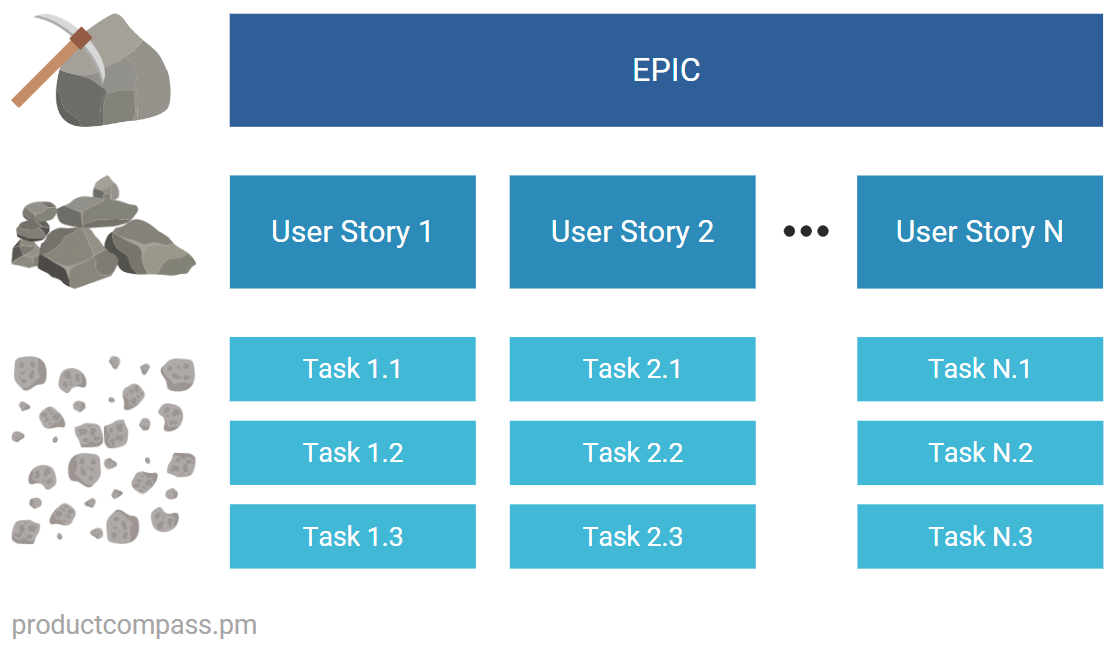
Some add more layers like Initiatives, Features, etc., but in my experience, they overcomplicate things and do not bring much value. Keep it simple.
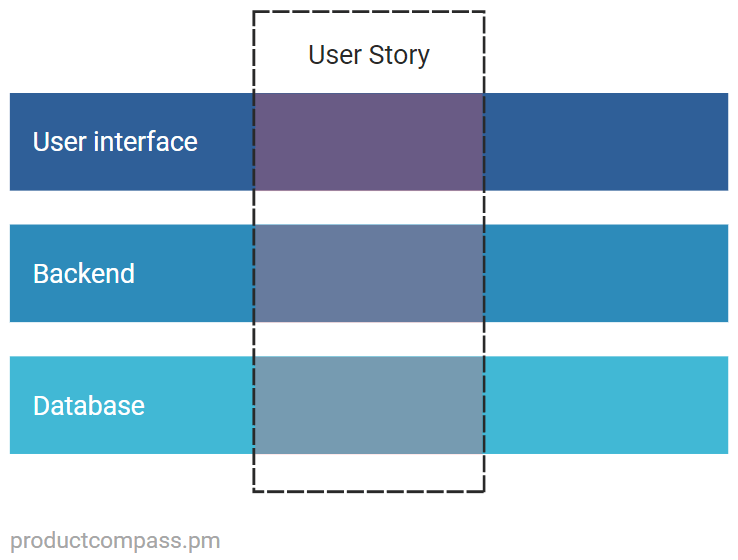
One thing worth noticing is that for the User Story to be valuable for the users (the INVEST acronym), it usually needs to go through all the software layers:
🔒 🎁 Bonus resources
🔒Two bonus resources: the User Stories Cheat Sheet (points 1–3 as a one-page PDF) and the video version of this guide. This is free for all subscribers. Sign up and get full access (don’t pay anything).
4. 9 Proven Tactics to Split User Stories
Here are the 9 proven strategies to break large User Stories into manageable pieces:
Tactic 1: Split by happy path vs. alternative paths
Focus on delivering the core functionality or the “happy path” first without exceptions or alternative paths.
For example, in an e-commerce product, you could initially implement the process for purchasing a product, assuming it is in stock, without handling different currencies or advanced delivery options. This allows for a quicker release and early user feedback.
Tactic 2: Split by the workflow step
Break down the User Story according to different stages in a workflow.
For instance, in a loan application process, you might focus on the initial application submission before implementing the approval stages.
Tactic 3: Split by the business rule
Some business rules can be separated into other User Stories.
An example would be creating separate User Stories to check a product's availability before allowing a customer to add it to the cart.
Tactic 4: Split by interface elements
For example, on a product detail page, you could implement the "recently viewed" or "specification" sections in separate User Stories.
Tactic 5: Split by data types
Consider a social media platform that allows users to post text updates, share images, and upload videos.
In this scenario, you could initially focus on implementing the functionality for posting text only.
Tactic 6: Split by platform or device
Start by focusing on one platform, like web or mobile, or even further, by device type, such as iOS or Android.
Tactic 7: Split by non-functional requirements
Non-functional requirements, such as performance or security, can often be addressed in pieces.
For example, you could initially focus on optimizing the load time of a critical feature, like the product list search.
Tactic 8: Split by enabling features
Enabling features are necessary components or infrastructure that must be in place for subsequent features to be implemented.
For example, consider building a basic API before tackling the features that depend on it.
While it's technically not a User Story, as there is no such thing as "Technical User Stories," there are situations in which that's the right approach. At the same time, avoid staying in "laying the groundwork" mode for months.
I describe it in more detail in point 6.
Tactic 9: Split by user type (persona)
A User Story, by definition, focuses on a specific user. I'm including it on the list to clarify.
This strategy for breaking down Product Backlog items is implemented by default when using the User Story format.
5. User Stories vs Job Stories
What I like about Job Stories is the focus on the context in which the action is performed. The format of a Job Story:
SITUATION: When [the context]
WHAT: I want [action to perform]
WHY: So that [the desired outcome]
But as you might notice, it misses the information about the user.
So, if you want to write Job Stories, I encourage you to include the information about the user:
WHO AND SITUATION: When [the context] as a [user type]
WHAT: I want [action to perform]
WHY: So that [the desired outcome]
Let’s analyze the Job Story examples below:
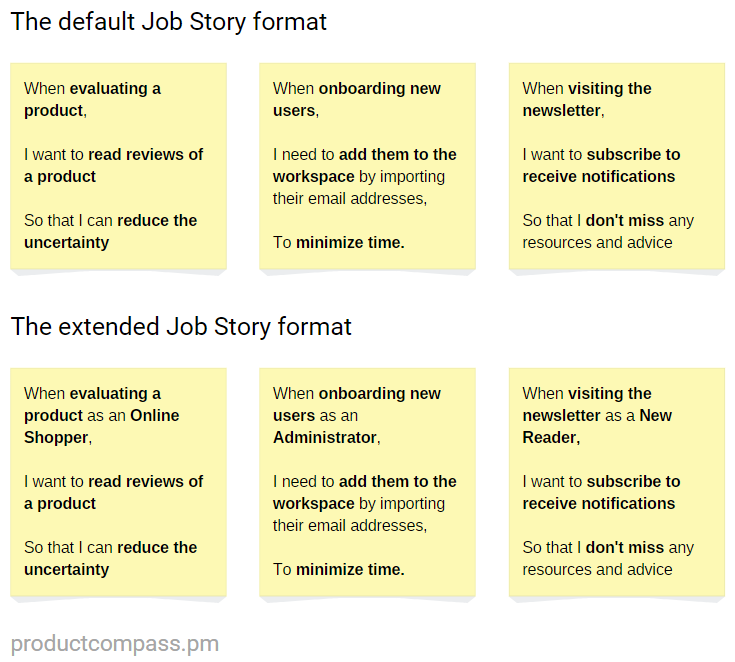
All the other advice from this post can be applied to both User Stores and Job Stories. So don’t overthink it. Even when writing User Stories, you need to make sure everyone understand the context.
🔒 6. 8 Common Mistakes to Avoid When Writing User Stories
User Stories FAQ
What is a good user story example?
“As an Online Shopper, I want to read reviews of a product before making the decision, so that I can reduce the uncertainty.” It names a specific user, one action, and the outcome the user cares about — and it leaves the implementation to the conversation.
What is the difference between a user story and a job story?
A user story starts from a persona (As a [user type]…). A job story starts from a situation (When [context], I want to…, so I can…). Job stories work better when the context matters more than who the user is. Section 5 covers both formats.
How long should a user story be?
A sentence — short enough to fit on a card. Per the 3C's, the card is a promise for a conversation: details live in the acceptance criteria, and those stay concise. They are not detailed test cases.
Summary
User Stories are more than tasks or feature requirements. They are narratives that foster collaboration, guide development, and drive meaningful outcomes.
Ask yourself:
Is the approach I described different from how you manage User Stories?
Considering the 3C's (Card, Conversation, Confirmation), do you see opportunities to make your User Stories more concise and effective?
When reflecting on the INVEST criteria (Independent, Negotiable, Valuable, Estimable, Small, Testable), which aspect do you find most challenging to implement consistently? Why?
What is one improvement you can implement starting Monday?
If you have any questions or doubts, contact me on Slack.
I’m happy to help.
Thanks for reading The Product Compass!
It’s fantastic to learn and grow together.
Have a wonderful weekend and a productive week ahead!
Take care, Paweł